Hidizs DH80 Portable Balanced DAC & AMP User Manual
Бренд: Hidizs | Модел: DH80
Introduction
The Hidizs DH80 Portable Balanced DAC & AMP is a high-fidelity audio decoding amplifier designed to enhance your listening experience across various devices. It supports advanced audio technologies like MQA and native DSD, delivering powerful and clear sound. This manual provides detailed instructions for setting up, operating, and maintaining your DH80 unit.
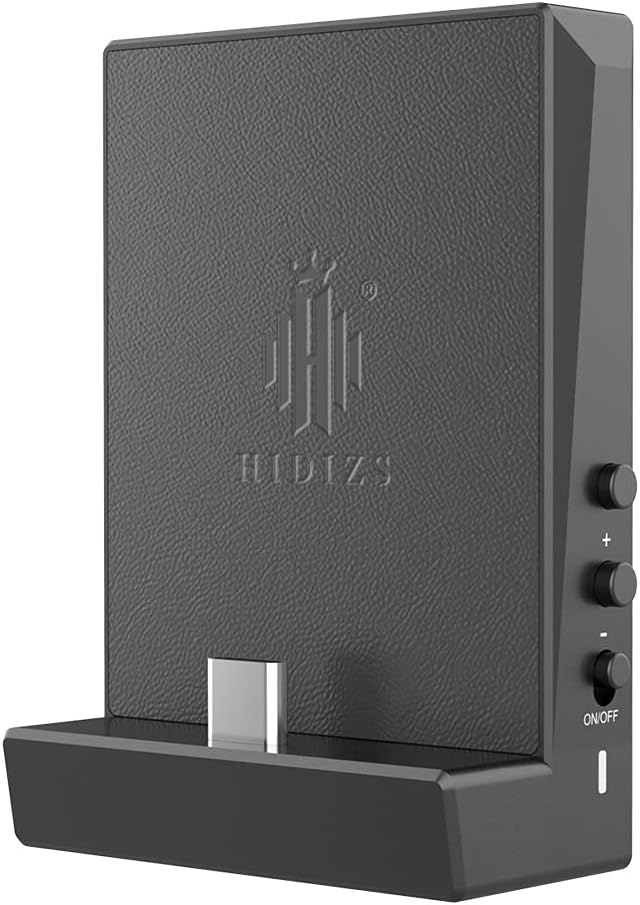
Сүрөт 1: Алдыңкы view of the Hidizs DH80 Portable Balanced DAC & AMP, highlighting its compact design and USB-C input.
Негизги өзгөчөлүктөрү
- MQA Audio Technology & Native DSD64/128 Support: Fully unfolds MQA files and supports native DSD for outstanding sound quality.
- ESS9281C PRO DAC Chip + Dual Op Amps RT6863C: Advanced chip for dynamic range, low power consumption, ultra-low distortion, and near-zero noise.
- 3-level Gain Selection & High Output Power: Three gain settings (High, Medium, Low) for compatibility with various HiFi headphones, offering up to 210mW+210mW @32Ω output for balanced 4.4mm.
- Өркүндөтүлгөн Конфигурация: Features 4 capacitors, dual crystal oscillators, and dual op amps RT6863C for improved dynamics and separation.
- Sampling Rate Indicator Light: LED indicator lights up in different colors (Red: 44.1k-48k / Blue: 88.2k-384k / Pink: MQA) synchronized with the playing track's sampылдамдыгы.
- Магниттик адсорбциялык дизайн: Allows seamless and secure connection with Hidizs AP80/AP80 Pro players.
- Robust & Stylish Design: Exquisite CNC aluminum alloy craftsmanship available in black, red, gray, blue, and champагне.
- Wide USB DAC Compatibility: Compatible with Windows 10, Mac OS, iPad OS, Android, and iOS systems.
Продукт бүттүview
The Hidizs DH80 is crafted from durable metal and plastic, featuring a sleek and minimalistic design. Its compact size makes it highly portable, while the magnetic adsorption feature ensures a secure connection with compatible devices like the Hidizs AP80/AP80 Pro. The unit includes essential ports and controls for easy operation.

Figure 2: The Hidizs DH80/DH80S is available in multiple colors, demonstrating its robust and stylish CNC aluminum alloy craftsmanship.

Figure 3: The magnetic adsorption design ensures a seamless and secure connection between the DH80/DH80S and compatible devices, protecting connection ports.
Орнотуу жана Байланыштар
The Hidizs DH80 is designed for easy integration with a wide range of audio devices. Follow these steps for initial setup:
- Заряддоо: Before first use, ensure the DH80 is fully charged using a standard USB-C cable. The LED indicator will show charging status.
- Connecting to Source Device: Use the appropriate USB cable to connect the DH80 to your Windows 10 PC, Mac OS, iPad OS, Android device, or iOS device. For iOS users, a Lightning OTG cable must be purchased separately.
- Наушниктерди туташтыруу: Plug your headphones into either the 4.4mm balanced port or the 3.5mm single-ended port on the DH80.
- Күйгүзүү: Locate the ON/OFF switch and slide it to the 'ON' position to power on the device.

Figure 4: The DH80/DH80S offers broad USB DAC compatibility with major operating systems, making it versatile for various setups.
Video 1: Official Video Introduction to Hidizs DH80 & DH80S. This video provides a visual overview of the product's features and how it integrates with various audio devices.
Иштөө нускамалары
MQA Audio Technology & Native DSD Decoding
The DH80/DH80S supports MQA audio technology, allowing it to fully 'unfold' MQA files for superior sound quality. To utilize MQA, ensure that music services supporting MQA (e.g., HiBy Music, TIDAL) are installed on your playback device. The device also supports native DSD64/128 decoding, providing high-resolution audio playback.

Figure 5: The DH80/DH80S is equipped with MQA support, enabling high-fidelity audio playback from compatible streaming services and files.
ESS9281C PRO DAC Chip & Dual Op Amps RT6863C
At the core of the DH80/DH80S is the advanced ESS9281C PRO DAC chip, which contributes to its wide dynamic range, low power consumption, and ultra-low distortion. Coupled with dual independent RT6863C op-amps, the device delivers powerful output: up to 4Vrms for balanced 4.4mm output and up to 2Vrms for single-ended 3.5mm output.

Figure 6: An internal schematic view of the DH80/DH80S highlighting the ESS9281C PRO DAC chip and the dual RT6863C op-amps, which are crucial for its high-performance audio processing.
3-level Gain Selection
The DH80/DH80S features a convenient 3-level gain selection switch (High, Medium, Low) to ensure optimal compatibility with various types of headphones, from sensitive in-ear monitors to demanding over-ear headphones. Adjust the gain setting based on your headphone's impedance and sensitivity for the best audio performance and volume control.

Figure 7: The 3-level gain switch (H, M, L) on the side of the DH80/DH80S allows users to optimize output power for different headphones, ensuring high compatibility and sound quality.
Sampling Rate Indicator Light
The DH80/DH80S includes an LED indicator that visually confirms the sampling rate of the currently playing audio track. This feature helps users verify that their audio is being decoded at the intended quality.
- Кызыл: 44.1 кГц - 48 кГц
- Көк: 88.2 кГц - 384 кГц
- Кызгылт: MQA

Figure 8: The sampling-rate indicator light on the DH80/DH80S changes color to reflect the current audio resolution, providing instant visual feedback to the user.
Техникалык тейлөө
To ensure the longevity and optimal performance of your Hidizs DH80, follow these maintenance guidelines:
- Тазалоо: Use a soft, dry cloth to wipe the exterior of the device. Avoid using harsh chemicals or abrasive materials.
- Сактагыч: Аппаратты түз күн нурунан жана экстремалдык температурадан алыс салкын, кургак жерде сактаңыз.
- Колдонуу: Ички компоненттерге зыян келтириши мүмкүн болгон кулап түшүүлөрдү же кагылышууларды болтурбоо үчүн шайманды этияттык менен кармаңыз.
- Порт коргоо: When not in use, ensure connection ports are protected from dust and debris.
Проблемаларды чечүү
If you encounter any issues with your Hidizs DH80, refer to the following common problems and their solutions:
| Көйгөй | Мүмкүн себеп | Чечим |
|---|---|---|
| Үн чыгышы жок | Incorrect connection, low battery, wrong gain setting, incompatible audio format. | Check all cable connections. Charge the device. Adjust gain setting. Ensure audio format is supported. |
| Бузулган аудио | Gain setting too high, faulty cable, damaged headphones. | Lower the gain setting. Try a different cable. Test with another pair of headphones. |
| Device not recognized by computer/phone | Driver issue, faulty USB port/cable, operating system incompatibility. | Try a different USB port or cable. Restart your device. Check Hidizs website for drivers if needed. Ensure OS compatibility (iOS requires separate OTG cable). |
| LED көрсөткүч иштебейт | Device off, low battery, internal fault. | Ensure device is powered on. Charge the device. If problem persists, contact support. |
Техникалык шарттар
| Атрибут | Деталь |
|---|---|
| Продукциянын өлчөмдөрү | 2.76 x 1.97 x 0.47 дюйм |
| Элемент Салмагы | 2.9 унция |
| Модель номери | DH80 |
| Батареялар | 1 Литий Полимердик батарейка (кошулган) |
| Материал | Металл, пластик |
| DAC чип | ESS9281C PRO |
| Op Amps | Dual RT6863C |
| Balanced Output (4.4mm) | Up to 4Vrms, 210mW+210mW @32Ω |
| Бир учтуу чыгаруу (3.5 мм) | Up to 2Vrms |
| Колдоого алынган аудио форматтары | MQA, Native DSD64/128 |
| Шайкештик | Windows 10, Mac OS, iPad OS, Android, iOS |
Кепилдик жана колдоо
For warranty information and technical support, please refer to the official Hidizs webсайтка же түздөн-түз кардарларды тейлөөгө кайрылыңыз. Сатып алуу квитанциясын кепилдик дооматтары үчүн сатып алуунун далили катары сактаңыз.