
Introduction
Thank you for choosing the Hbada Ergonomic Gaming Chair. This manual provides essential information for the safe and efficient assembly, operation, and maintenance of your new chair. Please read these instructions carefully before use and retain them for future reference.

Image: The Hbada Ergonomic Gaming Chair in a modern gaming environment, showcasing its design and presence.
Коопсуздук маалыматы
- Монтаждоодон мурун бардык компоненттер бар экенин жана бузулбаганын текшериңиз. Эгерде кандайдыр бир бөлүктөрү жок же сынган болсо, колдонбоңуз.
- Чогултуу боюнча көрсөтмөлөрдү так аткарыңыз. Туура эмес чогултуу туруксуздукка жана жаракатка алып келиши мүмкүн.
- Отургучта турбаңыз. Аны отуруу үчүн гана колдонуңуз.
- Максималдуу салмак көтөрүү мүмкүнчүлүгүнөн ашпаңыз (техникалык мүнөздөмөлөрдү караңыз).
- Чогултуу учурунда балдарды жана үй жаныбарларын отургучка жакын алып барбаңыз.
- Материалдын бузулушуна жол бербөө үчүн отургучту күндүн түз нуруна же өтө жогорку температурага дуушар кылбаңыз.
Продукциянын өлчөмдөрү
Understanding the dimensions of your chair is important for proper placement and comfortable use. Below are the key measurements:
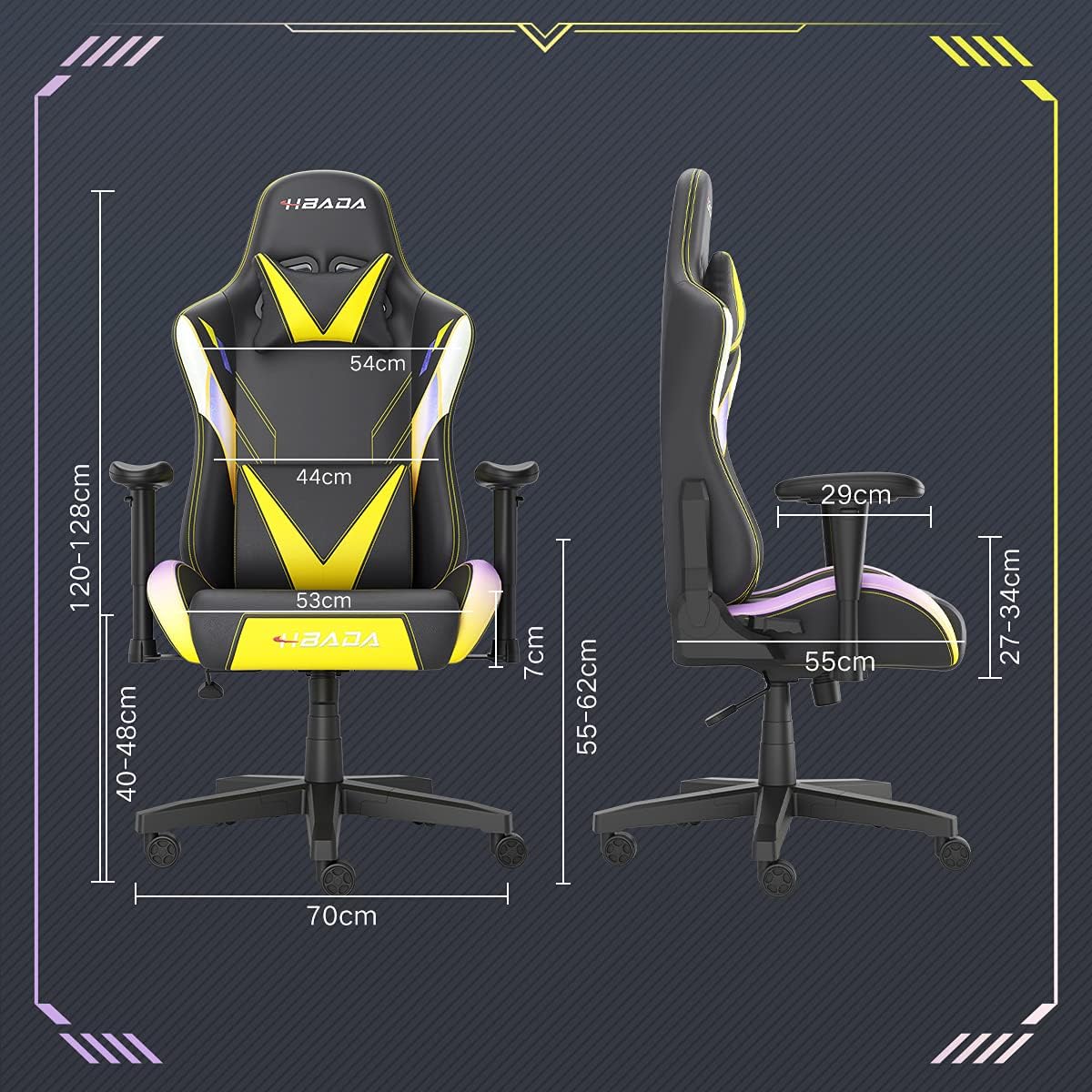
Image: A detailed diagram illustrating the various dimensions of the Hbada Gaming Chair, including height, width, and depth measurements.
- Жалпы бийиктиги: 120-128 см (жөнгө салынуучу)
- Орундуктун бийиктиги: 40-48 см (жөнгө салынуучу)
- Орундун туурасы: 53 см
- Отуруунун тереңдиги: 55 см
- Артканын туурасы: 54 cm (shoulder area), 44 cm (lumbar area)
- Колтуктун бийиктиги (орундан): 7 см (жөндөлүүчү)
- Негизги диаметри: 70 см
Орнотуу жана чогултуу
Please follow these steps carefully to assemble your Hbada Gaming Chair. It is recommended to have a clear, spacious area for assembly.
Чогултуу кадамдары:
- Step 1: Assemble the Base and Wheels
Insert the five casters into the holes on the star base. Then, place the gas lift cylinder into the center hole of the base.

Image: Illustration of attaching the five casters to the chair's star-shaped base and inserting the gas lift cylinder.
- Step 2: Attach the Seat and Backrest
Connect the backrest to the seat using the provided screws and mounting plates. Ensure all screws are tightened securely.

Image: Diagram showing the process of securing the backrest to the seat cushion using screws and brackets.
- 3-кадам: Колдуктарды орнотуу
Attach the armrests to the sides of the seat using the designated screws. Make sure they are firmly attached.

Image: Visual guide for attaching the armrests to the chair's seat base.
- Step 4: Connect Seat to Base
Carefully place the assembled seat onto the gas lift cylinder, ensuring it is properly seated and stable.

Image: Depiction of lowering the assembled seat onto the gas lift cylinder, connecting the upper and lower parts of the chair.
- Step 5: Attach Headrest and Lumbar Pillow
Secure the detachable headrest and lumbar support pillow to the chair as desired for optimal comfort.

Image: Instructions for attaching the headrest and lumbar support pillows to the gaming chair.
Иштөө нускамалары
Your Hbada Gaming Chair is designed with several adjustable features to provide personalized comfort and support.
Key Adjustable Functions:
- Adjustable Sitting Height: Use the lever located under the seat on the right side to raise or lower the chair. Pull the lever up to adjust the height, then release it at your desired position. The seat has an 8 cm elevation range.
- Reclining Backrest (90° to 155°): The backrest can be reclined from 90 degrees (upright) to 155 degrees (nearly flat). Use the recline lever on the side of the chair to adjust the angle. Lean back to your preferred position and lock the lever.
- Жөнгө салынуучу кол таянгычтар: The armrests can be adjusted in height by 7 cm. Locate the button or lever on the side of each armrest to unlock, adjust, and then lock them into your desired height.
- 360° Free Swivel: The chair features a full 360-degree swivel function, allowing for easy movement and access to your surroundings without needing to move the entire chair.
- Detachable Headrest and Lumbar Support: The chair includes a removable headrest pillow and lumbar support cushion for enhanced ergonomic comfort. Adjust their positions or remove them based on your preference.

Сүрөт: An overview of the chair's ergonomic systems, highlighting adjustable sitting height, armrests, 155° reclining, 360° swivel, cool racing casters, and durable base.

Image: The Hbada Gaming Chair demonstrated in its 155-degree reclined position, illustrating the recline controller.
Техникалык тейлөө
Regular maintenance will help prolong the life and appearance of your Hbada Gaming Chair.
- ПУ терисин тазалоо: PU булгаары беттерин жумшак, d менен сүртүңүзamp кездеме. Өжөр тактар үчүн жумшак самын эритмесин колдонуп, андан кийин таза,amp кездеме. Катуу химиялык заттардан же абразивдүү тазалоочу каражаттардан алыс болуңуз, анткени алар материалга зыян келтириши мүмкүн.
- Кастерге кам көрүү: Periodically check the casters for accumulated dust or hair. Clean them with a brush or vacuum cleaner to ensure smooth movement and prevent damage to your flooring.
- Frame and Components: Regularly inspect all screws and bolts to ensure they are tight. Re-tighten if necessary to maintain stability.
- Түздөн-түз күндүн нурунан качуу: Prolonged exposure to direct sunlight can cause the PU leather to fade and crack. Position your chair away from direct sunlight when possible.
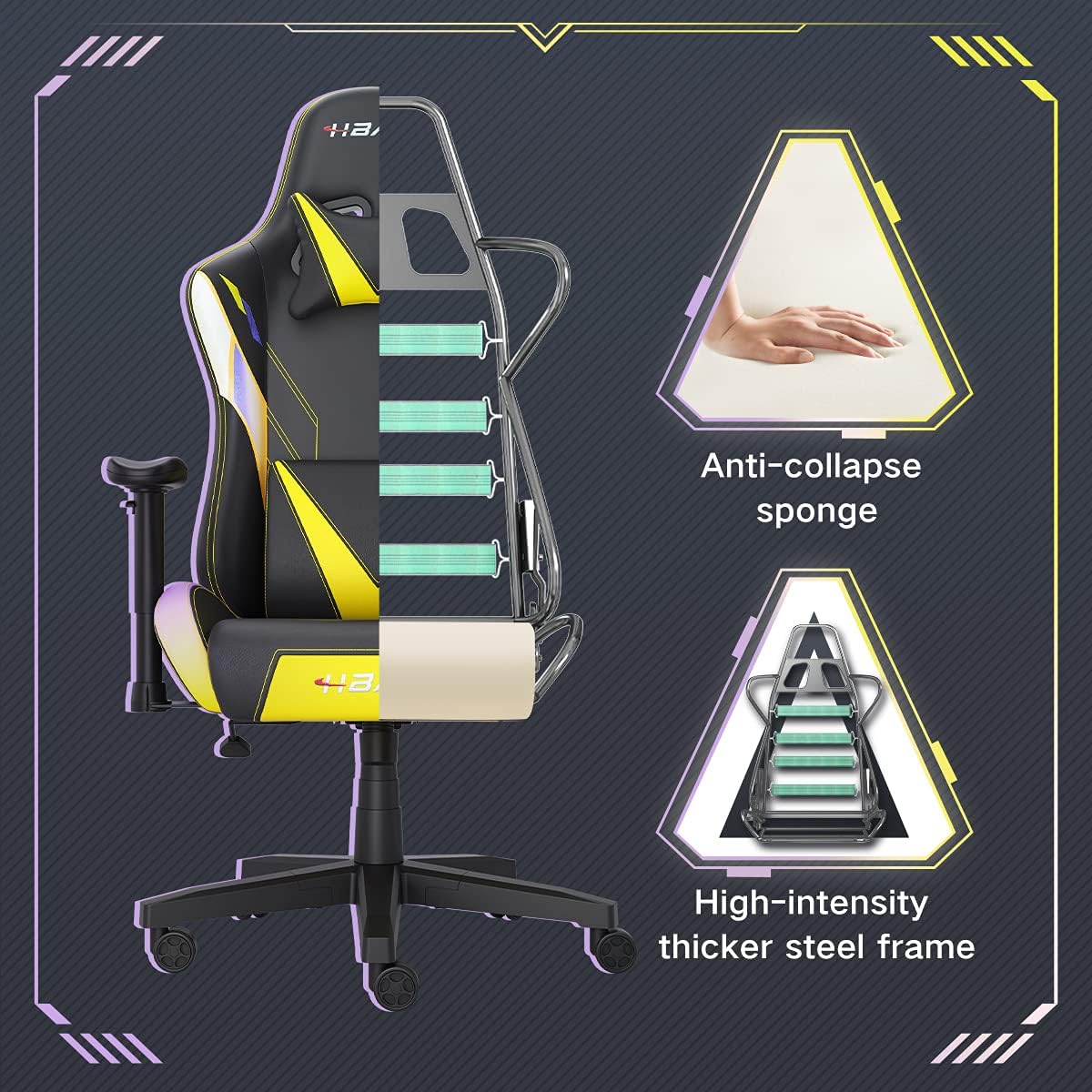
Сүрөт: кесилген view of the chair's internal structure, highlighting the anti-collapse sponge padding and the high-intensity thicker steel frame, indicating durable construction.
Проблемаларды чечүү
If you encounter any issues with your Hbada Gaming Chair, refer to the following common problems and solutions:
| Көйгөй | Мүмкүн себеп | Чечим |
|---|---|---|
| Кресло бийиктигин тууралабайт | Газ лифтинин иштебей калышы же рычаг иштебей калышы. | Бийиктикти жөндөө рычагы толугу менен орнотулганын текшериңиз. Эгерде көйгөй чечилбесе, газ лифтин алмаштыруу керек болушу мүмкүн. Кардарларды колдоо кызматына кайрылыңыз. |
| Chair is wobbly or unstable | Бурамалар бошоп калган же туура эмес чогултулган. | Check all assembly screws and bolts, and tighten them securely. Refer to the assembly instructions. |
| Дөңгөлөктөр тегиз жылбайт | Дөңгөлөктөргө тыгылып калган таштандылар (чач, чаң). | Отургучту оодарып, дөңгөлөктөрдөгү бардык таштандыларды алып салыңыз. |
| Арткы таянгыч жөлөнбөйт же бекитилбейт | Recline mechanism jammed or lever not engaged. | Ensure the recline lever is fully engaged. Check for any obstructions around the mechanism. |
Техникалык шарттар
| Өзгөчөлүк | Деталь |
|---|---|
| Бренд | Хбада |
| Модель номери | W203YMA/EU |
| ASIN | B095PSFLKX |
| Түс | Сары |
| Материал | PU Leather, Metal Frame |
| Продукциянын өлчөмдөрү | 70 x 70 x 128 см (Узундугу x Туурасы x Бийиктиги) |
| Продукт Салмагы | 22 килограмм |
| Өзгөчөлүктөр | Ergonomic, Swivel, Casters, Headrest Support, Adjustable Recline (90°-155°), Adjustable Seat Height (8cm range), Adjustable Armrests (7cm range) |
| Бирдиктердин саны | 1.0 Сан |
Кепилдик жана колдоо
Your Hbada Gaming Chair comes with a бир жылдык кепилдик сатып алынган күндөн тартып. Бул кепилдик өндүрүштүк кемчиликтерди жана кадимки колдонуудагы материалдык кемчиликтерди камтыйт.
If you experience any issues during use, including problems with installation, damage, or missing parts, please do not hesitate to contact Hbada customer service. We are committed to providing reliable service and can offer free exchanges for covered issues.
For support, please visit the official Hbada webсайтка же сатуучуга кайрылыңыз.