
1. Бүттүview
The DORHEA 1S Battery Level Indicator Capacity Module is designed to display the remaining charge of various battery types, including lithium, lead-acid, and Ni-MH batteries. It features a clear blue LED display with four segments to indicate battery capacity.

Image: A set of four DORHEA 1S battery level indicator modules, each displaying a full charge with four blue LED segments within a red battery outline.
2. Пакеттин мазмуну
- 4 x 1S Battery Capacity Module
3. Орнотуу жана туташуу
To use the module, connect its positive and negative terminals to the positive and negative terminals of the battery you wish to test. The module will then display the real-time battery power.
3.1. Multi-Series Lithium Battery Configuration
For measuring multi-series lithium batteries (e.g., 2S, 3S, 4S, 6S), it is necessary to short-circuit the corresponding pads on the module. For example, if measuring a 2S battery (two batteries connected in series), a short circuit on the pad corresponding to 'S2' on the board is required. Refer to the module's PCB for 'S' markings.

Image: A diagram illustrating the connection of the battery level indicator module to a single battery. The positive terminal of the battery connects to the '+' terminal on the module, and the negative terminal connects to the '-' terminal.
4. Иштөө нускамалары
The module displays battery capacity using four blue LED segments. The red outline of the battery icon is always lit. The number of illuminated blue segments indicates the approximate charge level.
4.1. General Battery Level Indication
- Качан батареянын көлөмүtage is less than N*3.3V: All 4 blocks are off, indicating the battery is low and requires charging.
- Качан батареянын көлөмүtage is over N*3.3V: 1 block illuminates.
- Качан батареянын көлөмүtage is over N*3.5V: 2 blocks illuminate.
- Качан батареянын көлөмүtage is over N*3.7V: 3 blocks illuminate.
- Качан батареянын көлөмүtage is over N*3.9V: 4 blocks illuminate.
Note: 'N' represents the number of battery cells in series (e.g., N=1 for a 1S battery, N=2 for a 2S battery).

Image: Four DORHEA 1S battery level indicator modules, each displaying a full charge with four blue LED segments, providing a visual representation of the module's operational display.
5. Battery Type Configuration and Voltage Босоголор
The module can be configured for different battery types and series. Ensure the correct 'S' pad is shorted for multi-series lithium batteries. The following are specific voltage thresholds for common battery types:
5.1. 1S Lithium Battery (Li-po/Li-ion)
- Тtage > 3.3V: 1 grid bright
- Тtage > 3.5V: 2 grids bright
- Тtage > 3.7V: 3 grids bright
- Тtage > 3.9V: 4 grids bright
5.2. Lead-Acid Battery Voltage Диапазондор
4V Lead-Acid (can use 1S lithium iron phosphate battery settings)
- Тtage > 3.3V: 1 grid bright
- Тtage > 3.5V: 2 grids bright
- Тtage > 3.7V: 3 grids bright
- Тtage > 3.9V: 4 grids bright
6V Lead-Acid (can use 2 series of lithium iron phosphate battery settings)
- Тtage > 5.6V: 1 grid bright
- Тtage > 5.9V: 2 grids bright
- Тtage > 6.2V: 3 grids bright
- Тtage > 6.6V: 4 grids bright
12V Lead-Acid (can use 4 series of lithium iron phosphate batteries settings)
- Тtage > 11.0V: 1 grid bright
- Тtage > 11.8V: 2 grids bright
- Тtage > 12.3V: 3 grids bright
- Тtage > 13.1V: 4 grids bright
24V Lead-Acid (can use 8 series of lithium iron phosphate battery settings)
- Тtage > 22.3V: 1 grid bright
- Тtage > 23.5V: 2 grids bright
- Тtage > 24.7V: 3 grids bright
- Тtage > 26.3V: 4 grids bright
6. Техникалык шарттар
- Бренд: DORHEA
- Модел: 1S
- Дисплей түрү: Blue LED segments with red outline
- Мин. Operating Voltage: 3.3 вольт
- Түсү: Көк, Кызыл
- Пакеттин өлчөмдөрү: 3.31 x 2.05 x 0.47 дюйм
- Элемент Салмагы: 0.63 ounces (per 4 modules)
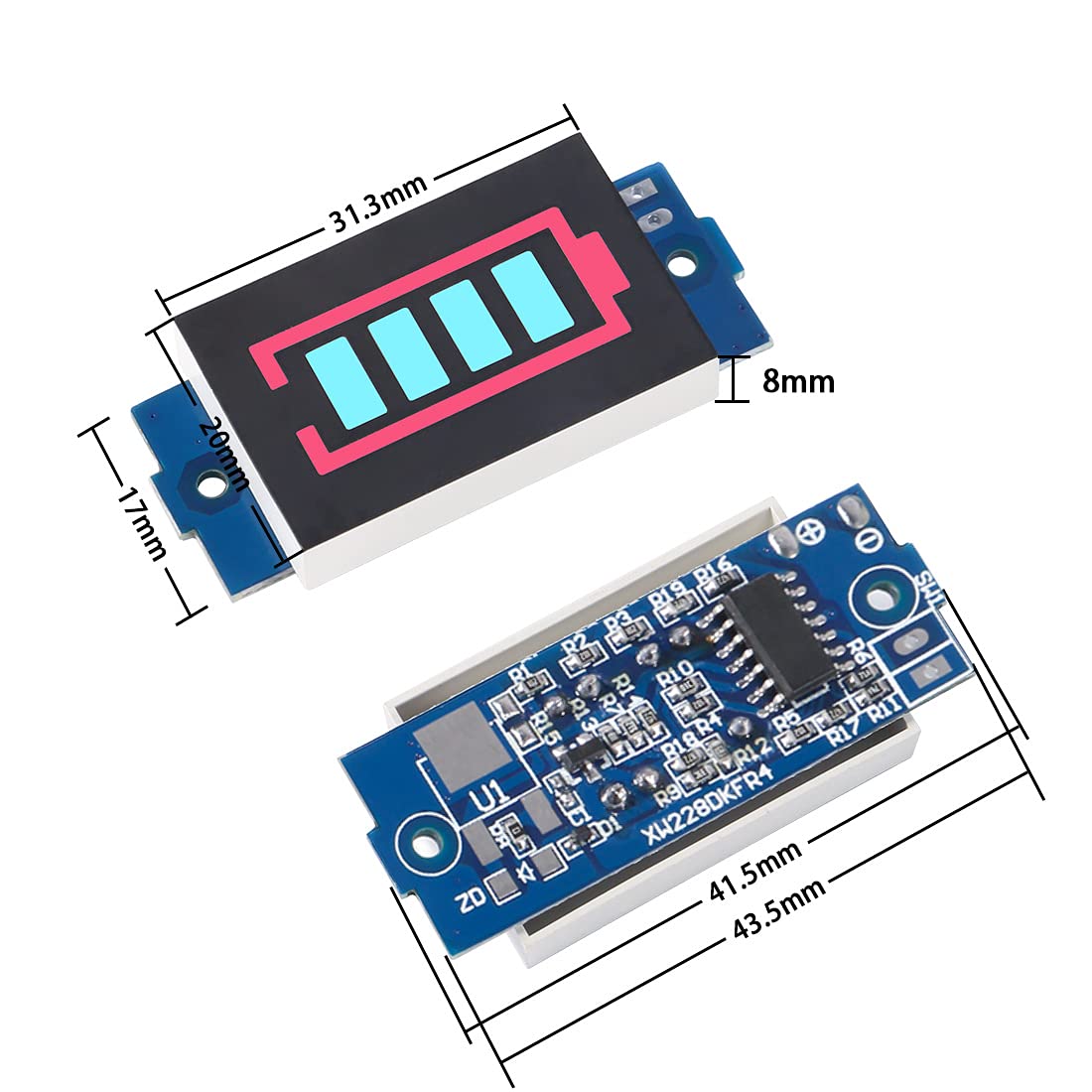
Сүрөт: деталдуу view of the DORHEA battery level indicator module with key dimensions labeled in millimeters, showing its compact size suitable for various applications.
7. Кыйынчылыктарды
- Display not lighting up: Ensure positive and negative connections are correct and secure. Verify the battery voltage is within the module's operating range (above N*3.3V).
- Туура эмес окуулар: Ensure the correct 'S' pad is shorted for multi-series lithium batteries. The electricity quantity parameter is a reference value and may have a small error range (approximately 2%).
- High current draw: The module has a current draw of approximately 35mA. If left continuously connected, it can drain the battery over time. For applications where continuous display is not required, consider using a momentary push-button switch to activate the display only when needed.
- Only red outline visible, no blue bars: Бул батареянын көлөмүн көрсөтөтtage is below the minimum threshold (N*3.3V) for the first blue segment to illuminate. The battery requires charging.
8. Техникалык тейлөө
- This module is not waterproof. Ensure it is used in a dry environment to prevent damage to electronic components.
- Always ensure the number of corresponding battery strings matches the module's configuration (e.g., 'S' pad shorting) and use it within the specified voltage диапазону.
- Do not exceed a voltage of 4.3 * N at most. For example, if the 'S3' pad is selected, the maximum voltage detected by the module should not exceed 4.3 * 3 = 12.9V.
9. Кепилдик жана колдоо
For any questions, technical assistance, or support regarding your DORHEA 1S Battery Level Indicator Capacity Module, please contact the seller or manufacturer through the platform where the product was purchased. Please refer to your purchase documentation for specific warranty details.