
Introduction
The Cellularline Clip Pro is a mono Bluetooth® earbud designed for convenience and portability. It features a unique charging base with an integrated clip, allowing you to easily attach it to clothing. The earbud itself is wireless and its capsule can be rotated for comfortable use in either the right or left ear. This manual provides detailed instructions for setting up, operating, and maintaining your Clip Pro earbud.

Image: The Cellularline Clip Pro earbud detached from its charging base, showcasing its compact design and the charging contacts.
Пакеттин мазмуну
Сураныч, пакетте төмөнкү нерселерди текшериңиз:
- Cellularline Clip Pro Mono Headset
- Заряддоо кабели
- Алмаштыруучу кулакчтар
- Көрсөтмө (бул документ)
Продукт бүттүview
Familiarize yourself with the components of your Cellularline Clip Pro:

Сүрөт: Жогорку view of the Clip Pro charging base with the earbud securely docked. A blue indicator light is visible on the earbud.
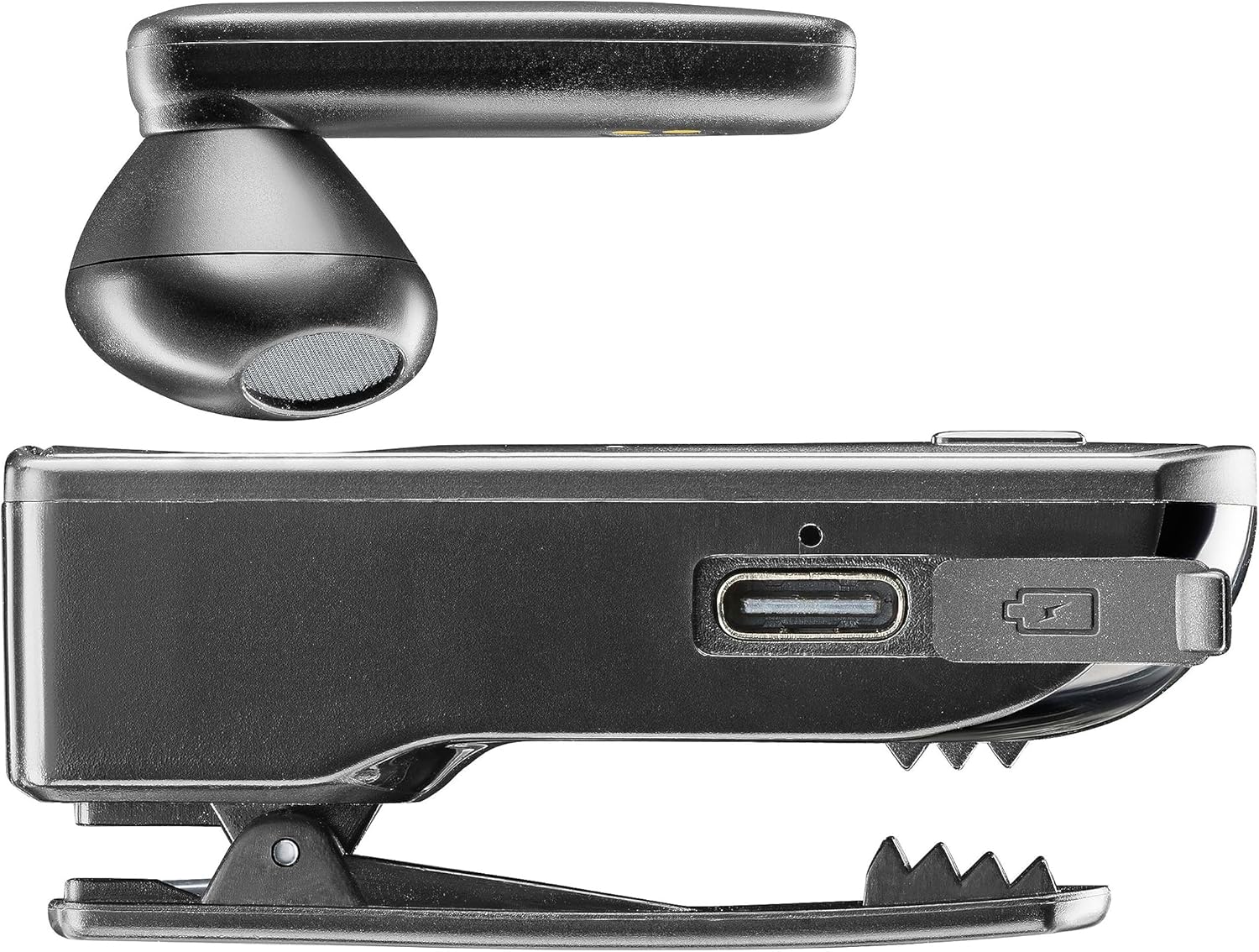
Сүрөт: каптал view of the Clip Pro charging base, highlighting the USB-C charging port and the integrated clip mechanism.

Сүрөт: деталдуу view of the earbud's inner surface, showing the two gold charging contacts and the speaker mesh.
Жайгашуу
1. Аппаратты заряддоо
Before first use, fully charge your Cellularline Clip Pro. The charging base provides additional power for the earbud.
- Connect the provided charging cable to the USB-C port on the charging base.
- Кабелдин экинчи учун туура келген USB кубат булагына туташтырыңыз (мисалы, дубал адаптери, компьютердин USB порту).
- Place the earbud into the charging base. Ensure the charging contacts align.
- The charging indicator light on the earbud will show charging status. A full charge takes approximately 1.5 hours.
2. Bluetooth түзмөгү менен жупташуу
To use the earbud, you must first pair it with your smartphone or other Bluetooth-enabled device.
- Ensure the earbud is charged and powered off.
- Remove the earbud from the charging base. It will automatically enter pairing mode (indicator light will flash).
- On your device (e.g., smartphone), go to the Bluetooth settings and enable Bluetooth.
- Издөө available devices. Select "Cellularline Clip Pro" from the list.
- Once connected, the earbud's indicator light will stop flashing and remain solid or turn off, depending on the model.
- The earbud is now ready for use. It will automatically reconnect to the last paired device when powered on and within range.
Иштөө нускамалары
Күйгүзүү/өчүрүү
- Күйгүзүү: Remove the earbud from the charging base. It will automatically power on. Alternatively, press and hold the multifunction button on the earbud for a few seconds.
- Өчүрүү: Place the earbud back into the charging base. It will automatically power off. Alternatively, press and hold the multifunction button on the earbud for a few seconds until the indicator light turns off.
Чалууларды башкаруу
- Чалууга жооп берүү/аяктоо: Көп функциялуу баскычты бир жолу басыңыз.
- Чакырууну четке кагуу: Көп функциялуу баскычты болжол менен 2 секунд басып туруңуз.
- Акыркы номерди кайра терүү: Көп функциялуу баскычты эки жолу басыңыз.
- Vibrator Feature: The charging base will vibrate when you receive an incoming call, even if the earbud is docked.
Үндү көзөмөлдөө
The charging base features dedicated volume adjustment buttons.
- Көлөмүн жогорулатуу: Press the '+' button on the charging base.
- Көлөмдү азайтуу: Press the '-' button on the charging base.
Wearing the Earbud
The earbud capsule is rotatable, allowing for comfortable use in either the right or left ear.
- Gently rotate the earbud capsule to align with your preferred ear.
- Insert the earbud into your ear canal. Adjust for a secure and comfortable fit.

Image: A man wearing the Cellularline Clip Pro earbud, with the charging base clipped to his shirt collar, demonstrating its hands-free use.
Техникалык тейлөө
To ensure the longevity and optimal performance of your Cellularline Clip Pro, follow these maintenance guidelines:
- Тазалоо: Use a soft, dry cloth to clean the earbud and charging base. Do not use abrasive cleaners or solvents.
- Наушниктер: Regularly check and clean the eartips. Replace them if they become worn or damaged.
- Сактагыч: When not in use, store the earbud in its charging base to protect it and keep it charged. Store in a cool, dry place away from direct sunlight and extreme temperatures.
- Суу каршылык: This device is not waterproof. Avoid exposure to water, moisture, or excessive humidity.
Проблемаларды чечүү
If you encounter issues with your Cellularline Clip Pro, try the following solutions:
| Көйгөй | Мүмкүн чечим |
|---|---|
| Earbud does not power on. | Ensure the earbud is charged. Place it in the charging base for at least 15 minutes. |
| Түзмөк менен жупташтыруу мүмкүн эмес. | Make sure Bluetooth is enabled on your device. Ensure the earbud is in pairing mode (flashing indicator light). Try forgetting the device in your phone's Bluetooth settings and re-pairing. |
| Үн жок же үнү төмөн. | Check the volume levels on both the earbud (using the charging base buttons) and your connected device. Ensure the earbud is properly seated in your ear. |
| Charging base not vibrating for calls. | Ensure the earbud is correctly docked in the charging base and the base itself has sufficient power. |
| Earbud disconnects frequently. | Ensure your device is within the Bluetooth range (typically 10 meters/33 feet) and there are no significant obstructions. Fully charge both the earbud and the charging base. |
Техникалык шарттар
- Модель аты: BTCLIPPROK
- Бренд: Cellularline
- Байланыш технологиясы: Зымсыз Bluetooth
- Форма фактору: Earbud (Capsule)
- Кулак жайгаштыруу: Кулак ичинде
- Түсү: Кара
- Материал: PC + ABS пластик
- Элемент Салмагы: 94 грамм
- Заряддоо убактысы: 1.5 саат
- Батареянын курамы: Литий-ион (1 камтылган)
- Кайра заряддалуучу батарея: Ооба
- Өзгөчөлүктөр: Multifunction answer button, Volume adjustment buttons, Vibrating charging base
- Шайкеш түзмөктөр: iPhone, Samsung, Huawei, Xiaomi, and all Bluetooth-enabled devices
- Башкаруу түрү: Media control, Volume control, Touch
Коопсуздук маалыматы
Түзмөккө зыян келтирбөө же өзүңүзгө жаракат келтирбөө үчүн төмөнкү коопсуздук чараларын окуп чыгып, аткарыңыз:
- Аппаратты экстремалдык температурага, түз күндүн нуруна же жогорку нымдуулукка дуушар кылбаңыз.
- Аппаратты түшүрүүдөн же катуу таасирлерден сактаныңыз.
- Do not attempt to disassemble, repair, or modify the device yourself. Contact authorized service personnel for assistance.
- Аппаратты балдардан жана үй жаныбарларынан алыс кармаңыз.
- Аппаратты жана анын батареясын жергиликтүү эрежелерге ылайык таштаңыз.
- Do not use the earbud at excessively high volumes for prolonged periods, as this may cause hearing damage.
Кепилдик жана колдоо
For warranty information and customer support, please refer to the official Cellularline webсайтка же сатуучуга кайрылыңыз. Кепилдик дооматтар үчүн сатып алганыңыздын далилин сактаңыз.