
cellularline BTHUSHTWSK
Cellularline HUSH Bluetooth In-Ear Earbuds User Manual
Model: BTHUSHTWSK
1. Киришүү
This manual provides detailed instructions for the Cellularline HUSH Bluetooth In-Ear Earbuds. These earbuds feature an interactive touch display, Active Noise Cancelling (ANC), Noise-Free Calls technology, and customizable sound with 5 EQ modes. Please read this manual carefully to ensure proper use and optimal performance of your device.
2. Кутуда эмне бар
- Cellularline HUSH Earbuds
- Заряддоо кутусу
- User Manual
3. Продукт бүтүп калдыview
The Cellularline HUSH earbuds are designed for an advanced and personalized audio experience. The compact charging case features an interactive touch display for easy control.

Image 1: Cellularline HUSH Earbuds in their charging case, showcasing the sleek design and in-ear fit.
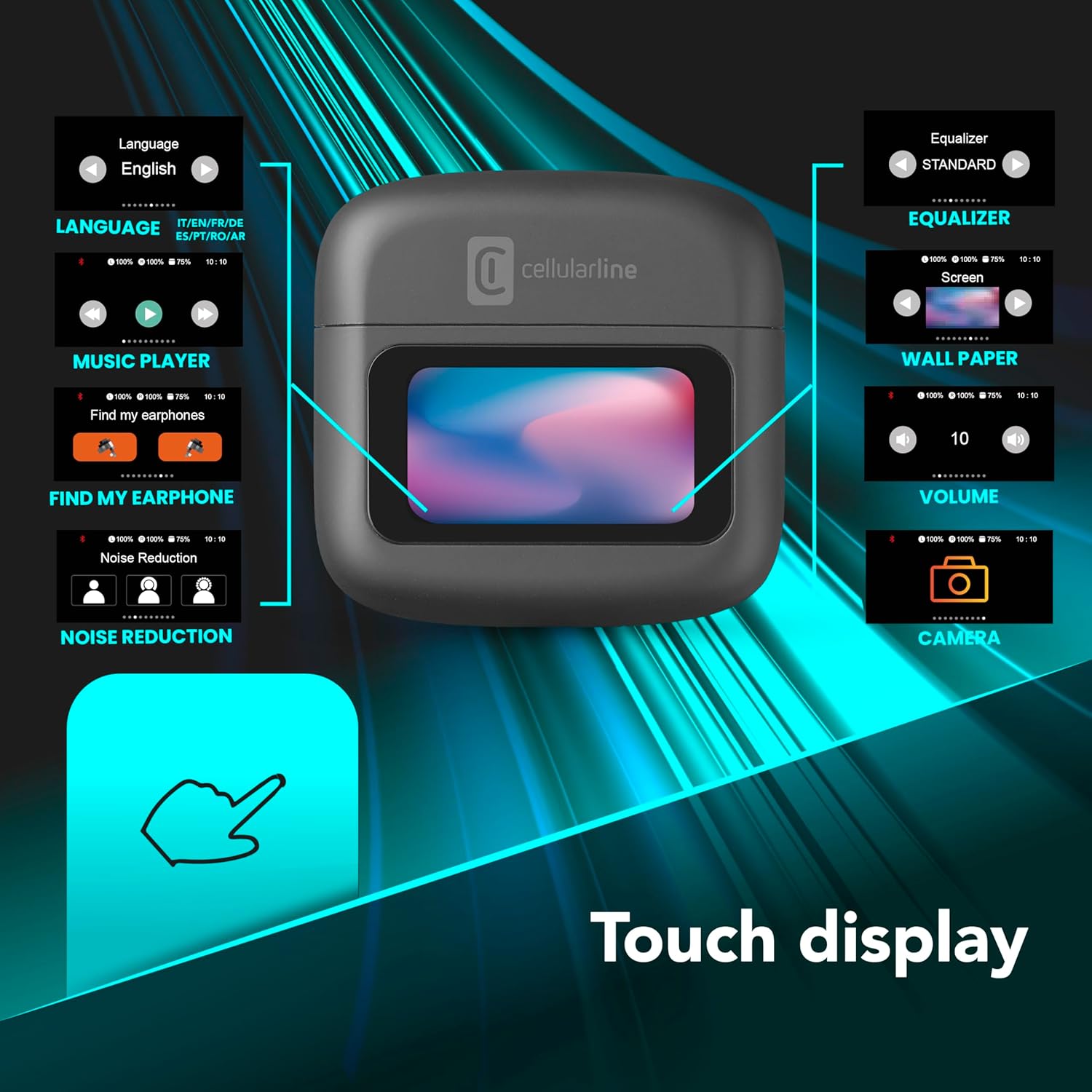
Image 2: An illustration highlighting the various functions accessible via the touch display on the charging case, including language, music player, 'Find My Earphone', noise reduction, equalizer, wallpaper, volume, and camera control.
4. Орнотуу
4.1 Заряддоо
Before first use, fully charge the earbuds and the charging case. Place the earbuds into the charging case. The magnetic closure ensures proper placement for charging. The case and earbuds offer up to 42 hours of total play time.

Image 3: Graphic indicating 42 hours of total play time and 6 hours of charger time for the Cellularline HUSH earbuds.
4.2 Жупташуу
The earbuds feature an Autopairing function. When removed from the charging case, they will automatically enter pairing mode or reconnect to the last paired device. To pair with a new device, ensure Bluetooth is enabled on your device and select 'Cellularline HUSH' from the list of available devices.
5. Иштөө нускамалары
5.1 Touch Display Controls
The interactive touch display on the charging case allows for easy management of various functions. You can control music playback, manage calls, adjust noise reduction modes, and select EQ settings directly from the display.
5.2 Активдүү ызы-чууну жокко чыгаруу (ANC)
Activate Active Noise Cancelling to reduce ambient low-frequency noise, providing an immersive listening experience. This feature can be controlled via the touch display.
5.3 Noise-Free Calls
The integrated microphones utilize Noise-Free Calls technology to eliminate background noise, ensuring clear and crisp voice transmission during calls.

Image 4: The charging case display showing an incoming call with options to answer or decline, next to a smartphone displaying a similar call interface.
5.4 Эквалайзер (EQ) режимдери
Customize your audio experience by selecting one of the 5 available EQ modes through the touch display. This allows you to tailor the sound profile сиздин артыкчылыктарыңызга.
5.5 Ызы-чууну азайтуу режимдери
Switch between different noise reduction modes, including Active Noise Cancelling, Normal Mode, and Transparency Mode, to suit your environment. These modes are accessible via the touch display.

Image 5: The charging case display showing options for Noise Reduction, including Active Noise Cancelling, Normal Mode, and Transparency Mode.
6. Техникалык тейлөө
To ensure the longevity and optimal performance of your Cellularline HUSH earbuds:
- Кулакчындарды жана кубаттоочу кутучаны таза жана кургак кармаңыз.
- Аппаратты экстремалдык температуранын же нымдуулуктун таасиринен сактаңыз.
- Clean the ear tips regularly with a soft, dry cloth.
- Store the earbuds in their charging case when not in use.
7. Кыйынчылыктарды
If you encounter issues with your Cellularline HUSH earbuds, refer to the following common solutions:
- Үн жок:
- Кулакчындардын кубатталганын текшериңиз.
- Түзмөгүңүзгө Bluetooth байланышын текшериңиз.
- Үндү кулакчындарда жана туташкан түзмөктө тууралаңыз.
- Жупташуу мүмкүн эмес:
- Ensure earbuds are in pairing mode (usually indicated by a flashing light).
- Түзмөгүңүздөгү Bluetooth'ду өчүрүп, күйгүзүңүз.
- Телефонуңуздун Bluetooth жөндөөлөрүнөн түзмөктү унутуп, кайра жупташтырып көрүңүз.
- ANC иштебейт:
- Ensure ANC is activated via the touch display.
- Check for proper fit of the earbuds in your ears.
- кубаттоо маселелери:
- Заряддоо кабели бекем туташтырылганын текшериңиз.
- Заряддоочу кутучада кубат бар экенин текшериңиз.
- Кулакчындардагы жана корпустагы заряддоо контакттарын тазалаңыз.
8. Техникалык шарттар
| Өзгөчөлүк | Деталь |
|---|---|
| Бренд | уюлдук линия |
| Модел | BTHUSHTWSK |
| Шайкеш түзмөктөр | Bluetooth түзмөктөрү |
| Башкаруу ыкмасы | тийүү |
| Кошумча функциялар | Active Noise Cancellation and Noise-Free Calls |
| Батареянын орточо иштөө мөөнөтү | 42 саат |
| Элемент Салмагы | 126 г |
| Түс | Нерон |
| Кулак жайгаштыруу | Кулак ичинде |
| Форма фактору | Кулак ичинде |
| Noise Control | Активдүү ызы-чууну жокко чыгаруу |
| Наушник уясы | Jack-less |
| Байланыш технологиясы | Зымсыз |
| Зымсыз байланыш технологиясы | Bluetooth |
9. Кепилдик жана колдоо
For warranty information and customer support, please refer to the documentation included with your product or visit the official Cellularline webсайт. Кепилдик дооматтар үчүн сатып алганыңыздын далилин сактаңыз.
Ask a question about this manual
Ask about setup, troubleshooting, compatibility, parts, safety, or missing instructions. Manuals+ will review the question and use this page’s manual context to help answer it.