
1. Киришүү
Thank you for choosing the T-DAGGER Verde T-TGK317 RGB Wireless Bluetooth 5.0 60% Gaming Mechanical Keyboard. This manual provides detailed instructions for setting up, operating, maintaining, and troubleshooting your new keyboard. Please read this manual thoroughly before use to ensure optimal performance and longevity of your device.
2. Пакеттин мазмуну
Пакетте бардык буюмдар бар экенин текшериңиз:
- T-DAGGER Verde T-TGK317 RGB Mechanical Keyboard
- USB-C - USB-A кабели
- User Manual
3. Негизги өзгөчөлүктөрү
- 60% компакттуу жайгашуусу: Space-saving design without a numeric keypad.
- RGB жарыктандыруу: Customizable per-key RGB lighting with multiple effects.
- Көк механикалык өчүргүчтөр: Tactile and clicky feedback for typing and gaming.
- Double Shot Inject Keycaps: Durable keycaps with legends that will not fade.
- Зымсыз Bluetooth 5.0 байланышы: Бир эле учурда үч түзмөккө чейин туташат.
- Зымдуу USB-C туташуусу: Detachable USB-C cable for reliable wired connection and charging.
4. Орнотуу
4.1 Зымдуу туташуу
- Баскычтоптун сол жагындагы USB-C портун табыңыз.
- Берилген USB-C кабелин клавиатурага туташтырыңыз.
- Кабелдин USB-A учунун компьютериңиздеги жеткиликтүү USB портуна туташтырыңыз.
- Баскычтоп автоматтык түрдө таанылып, колдонууга даяр болот.

Image: Connecting the USB-C cable for wired mode.
4.2 Bluetooth зымсыз байланышы
- Locate the power/mode switch on the left side of the keyboard. Slide it to the 'BT' position for Bluetooth mode.
- Түзмөк менен жупташтыруу үчүн, басып кармап туруңуз FN + BT1 (or BT2, BT3) for 3-5 seconds until the corresponding key (1, 2, or 3) flashes rapidly. This indicates the keyboard is in pairing mode.
- Түзмөгүңүздө (компьютер, планшет, смартфон) Bluetooth жөндөөлөрүн ачып, жаңы түзмөктөрдү издеңиз.
- Select "T-DAGGER T-TGK317" from the list of available devices.
- Эгер суралса, экранда көрсөтүлгөн жупташтыруу кодун клавиатура аркылуу киргизип, Enter баскычын басыңыз.
- Once paired, the corresponding BT key (1, 2, or 3) will stop flashing and remain steadily lit.
- Жупташтырылган Bluetooth түзмөктөрүнүн ортосунда которулуу үчүн басыңыз FN + BT1/BT2/BT3 кыскача.

Сүрөт: каптал view showing the power/mode switch for wired/Bluetooth selection.
5. Операция
5.1 Function Key Combinations (FN)
The T-TGK317 keyboard utilizes the FN key to access secondary functions printed on the keycaps. Press and hold the FN баскычын басып, андан кийин каалаган функция баскычын басыңыз.
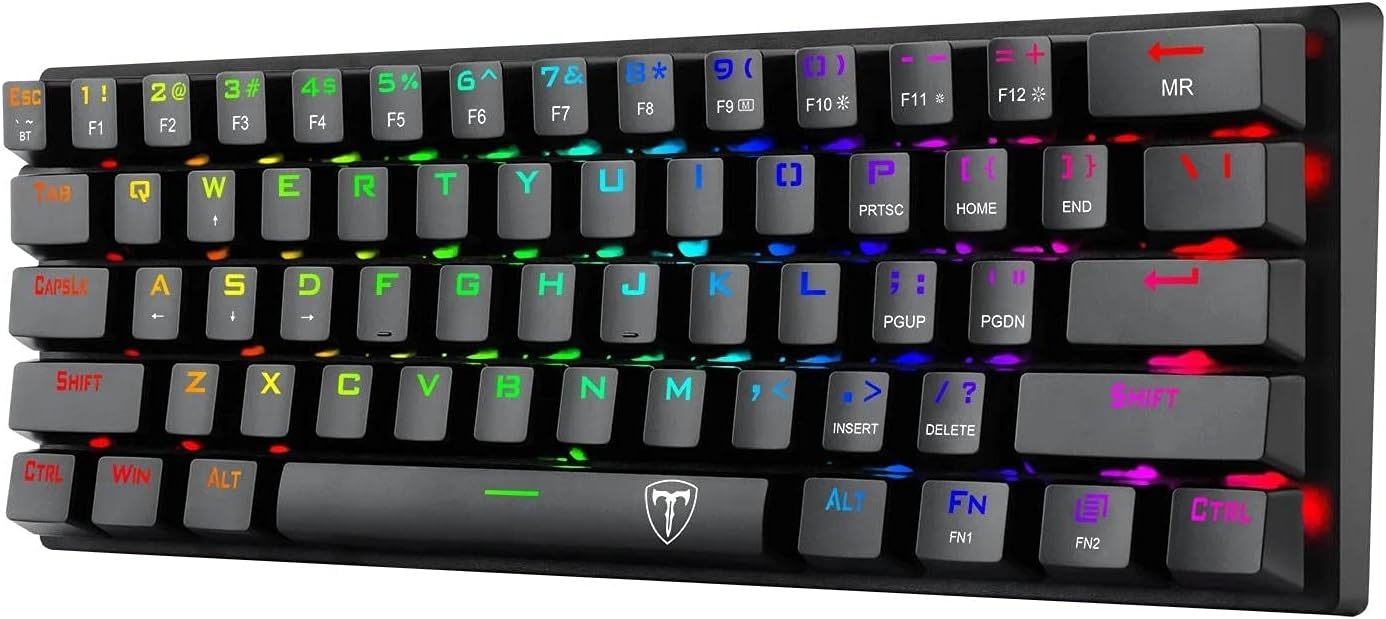
Сүрөт: Жогорку view of the keyboard showing FN key and secondary functions.
| Комбинация | Функция |
|---|---|
| FN + 1/2/3 | Switch between Bluetooth devices (short press) / Enter pairing mode (long press) |
| FN + F1-F12 | Мультимедиа башкаруу элементтери (мисалы, ойнотуу/тындыруу, үндү катуулатуу/басаңдатуу, үнсүз режим) |
| FN + Оңго Shift | Toggle arrow key functionality (if applicable) |
| FN + \| | Change RGB lighting mode |
| FN + [{ | Арткы жарыктын жарыктыгын азайтыңыз |
| FN + ]} | Арткы жарыктын жарыгын жогорулатуу |
| FN + ;: | Жарыктын ылдамдыгын азайтыңыз |
| FN + '" | Арткы жарык ылдамдыгын жогорулатуу |
| FN + Боштук | Change backlight color (in certain modes) |
5.2 RGB жарыкты башкаруу
The T-TGK317 offers extensive RGB lighting customization:
- Жарыктандыруу режимин өзгөртүү: Басыңыз FN + \| to cycle through various pre-programmed lighting effects.
- Жарыктыкты жөндөө: Колдонуу FN + [{ жарыктыгын азайтуу жана FN + ]} жарыктыгын жогорулатуу үчүн.
- Ылдамдыкты жөндөө: Колдонуу FN + ;: to decrease animation speed and FN + '" to increase animation speed.
- Түсү өзгөртүү: In certain static or reactive modes, press FN + Боштук ар кандай түстөр аркылуу айлануу.
6. Техникалык тейлөө
Туура тейлөө сиздин клавиатураңыздын узак иштөөсүн жана иштешин камсыз кылат:
- Тазалоо: Use a soft, dry cloth to wipe the keyboard surface. For deeper cleaning, you may use a can of compressed air to remove dust and debris from between the keycaps. Avoid using harsh chemicals or abrasive materials.
- Клавиатураны алып салуу: If necessary, keycaps can be carefully removed using a keycap puller (not included) for thorough cleaning. Be gentle to avoid damaging the switches.
- Battery Care (Wireless Mode): To preserve battery life, turn off the keyboard using the power switch when not in use for extended periods. Recharge the keyboard when the battery indicator (if available) shows low power or when performance degrades.
- Сактагыч: Клавиатураны күн нурунан жана экстремалдык температурадан алыс, салкын, кургак жерде сактаңыз.
7. Кыйынчылыктарды
If you encounter issues with your T-DAGGER T-TGK317 keyboard, refer to the following solutions:
| Көйгөй | Чечим |
|---|---|
| Keyboard not responding in wired mode. | Ensure the USB-C cable is securely connected to both the keyboard and the computer. Try a different USB port or cable. Ensure the keyboard is switched to wired mode (if applicable, check the side switch). |
| Баскычтоп Bluetooth аркылуу туташпай жатат. | Ensure the keyboard is in Bluetooth mode ('BT' on the side switch). Make sure the keyboard is charged. Put the keyboard into pairing mode (long press FN + BT1/BT2/BT3). Delete previous pairings on your device and try pairing again. Ensure your device's Bluetooth is enabled. |
| Баскычтар катталбай жатат же эки жолу терилбей жатат. | Clean under the keycaps with compressed air. Ensure the keyboard firmware is up to date (check T-DAGGER website for updates). If the issue persists, contact support. |
| RGB жарыктандыруу иштебей жатат же тыгылып калган. | Try cycling through lighting modes (FN + \|). Adjust brightness (FN + [{ / ]}). Ensure the keyboard is not in a low-power state if using Bluetooth. |
| Bluetooth байланышы туруксуз. | Ensure the keyboard is within range of your device. Minimize interference from other wireless devices. Ensure the keyboard battery is sufficiently charged. |
8. Техникалык шарттар
| Өзгөчөлүк | Деталь |
|---|---|
| Бренд | T-DAGGER |
| Модел | T-TGK317 |
| Байланыш | Wireless (Bluetooth 5.0), Wired (USB-C) |
| Которуу түрү | Көк механикалык өчүргүчтөр |
| Баскыч капкактары | Double Shot Inject Keycaps |
| Арткы жарыктандыруу | RGB |
| Макет | 60% (61 ачкыч) |
| Операция системасы | Windows 10 (Compatible with PC & Laptop) |
| Элемент Салмагы | 630 г |
| Түс | Кара |
9. Кепилдик жана колдоо
T-DAGGER products are designed for reliability and performance. For information regarding warranty coverage, technical support, or service inquiries, please refer to the warranty card included with your product or visit the official T-DAGGER webсайт. Сатып алуу квитанциясын кепилдик дооматтары үчүн сатып алуунун далили катары сактаңыз.