
1. Киришүү
The Ezonetronics CarPlay Android Auto Retrofit Kit is designed to integrate advanced smartphone connectivity into your Volkswagen vehicle's existing MIB1/MIB2 infotainment system. This decoder box enables features such as Apple CarPlay, Android Auto, Mirror Link, and voice control, utilizing your car's original display and controls. The system provides an OEM-like experience by retaining the factory display and control mechanisms, including the rotary controller and steering wheel commands.
2. Продукт бүтүп калдыview
This retrofit kit enhances your driving experience with the following key features:
- Үзгүлтүксүз интеграция: Specifically designed for VW Golf 7, Tiguan, Lamando, Magotan, Phideon, and Teramont models with MIB1/MIB2 platforms.
- Зымсыз туташуу: Built-in 2.4G and 5.8G WiFi for stable connection and Bluetooth 5.0 technology.
- Бир нече функциялар: Supports Apple CarPlay, Android Auto, Mirror Link, CarLife, and USB media playback.
- Интуитивдик башкаруу: Operates via original steering wheel controls, touch control (vehicle dependent), and voice commands (e.g., "Hey Siri...").
- Navigation Support: Compatible with GPS navigation apps like Google Maps, Waze, and Apple Maps, providing real-time traffic information.
- Жакшыртылган аудио: Integrated DSP with a fully adjustable audio equalizer for improved sound quality.
- Камера киргизүүлөрү: Two RCA inputs for adding PAL, NTSC, CVBS, and AHD rear and front cameras.
- Паркинг жардам: Supports 360 HD panoramic cameras, dynamic guidelines, and parking distance control with OEM parking style.
- Оңой орнотуу: Plug and Play design ensures non-destructive installation without cutting wires.
- Ийкемдүү иштөө: Ability to switch the CarPlay display on and off at any time using factory controls.
3. Пакеттин мазмуну
Пакетте бардык буюмдар бар экенин текшериңиз:
- 1 x Ezonetronics VW Decoder Box
- 1 x Power Wiring Harness
- 1 x LVDS Cable
- 1 x USB/MIC Cable
- 1 x WiFi антеннасы
- 1 x 5G антенна
4. Шайкештик
This kit is compatible with the following Volkswagen models equipped with the MIB1/MIB2 platform:
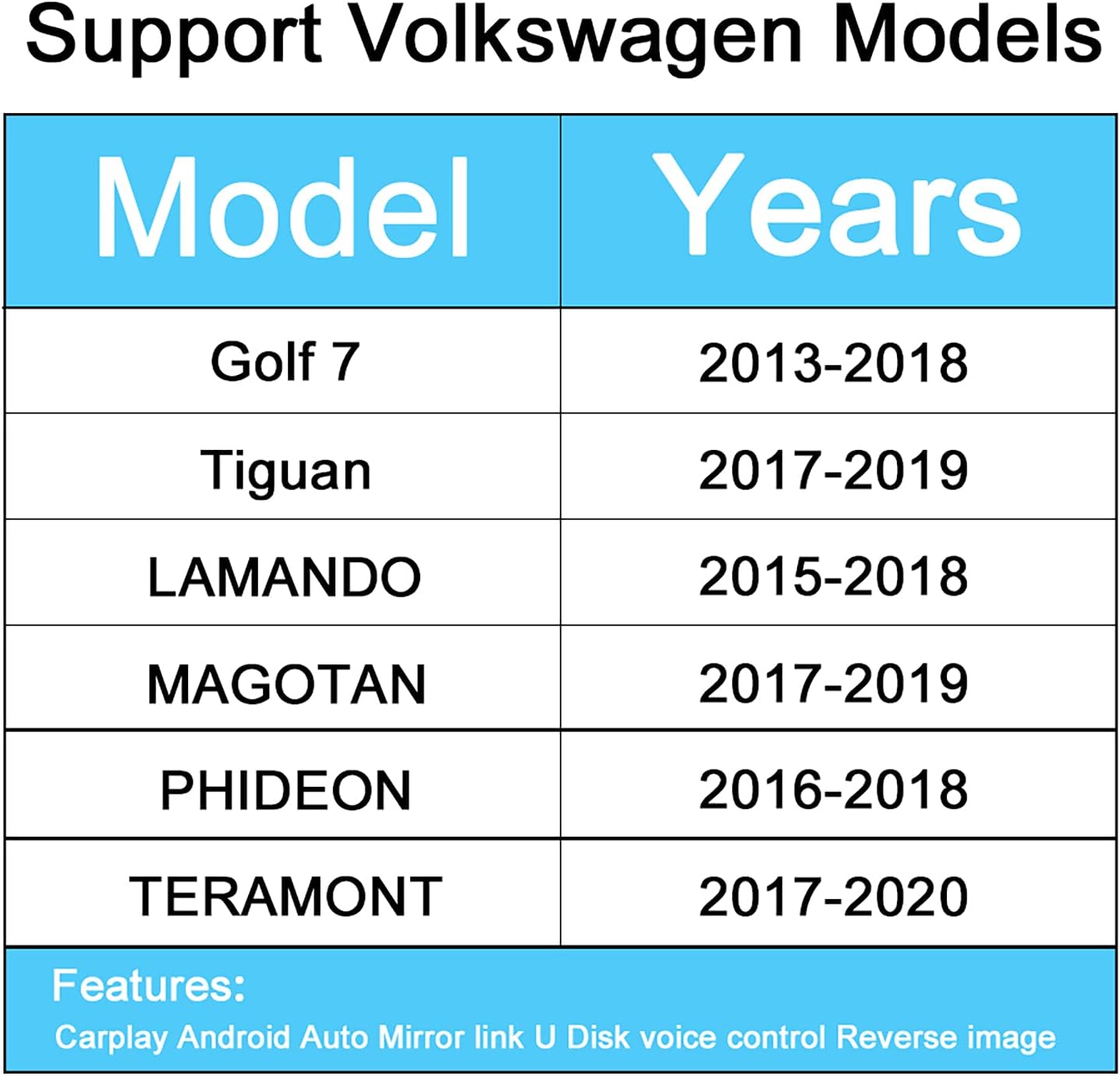
Сүрөт 4.1: Compatible Volkswagen Models and Years. This image displays a table listing the Volkswagen models and their corresponding compatible years for the retrofit kit.
| Модел | Жылдар |
|---|---|
| Гольф 7 | 2013-2018 |
| Tiguan | 2017-2019 |
| Lamando | 2015-2018 |
| Маготан | 2017-2019 |
| Фидеон | 2016-2018 |
| Teramont | 2017-2020 |
To confirm compatibility, especially if you are unsure, please contact customer support with photos of your car's central console.
5. Орнотуу жана орнотуу
The Ezonetronics Retrofit Kit is designed for a Plug and Play installation, meaning it is non-destructive and does not require cutting or breaking original wires. However, professional installation is recommended to ensure correct wiring and functionality.
5.1. Жалпы орнотуу кадамдары (Толук нускамаларды алуу үчүн адиске кайрылыңыз)
- Даярдоо: Орнотууну баштоодон мурун унаанын от алдыруу өчүрүлгөнүн жана батареянын ажыратылганын текшериңиз.
- Access the Head Unit: Carefully remove the trim panels and screws to access the factory head unit or display.
- Connect the Decoder Box: Integrate the Ezonetronics decoder box into the existing wiring harness using the provided power wiring and LVDS cables. These connections are typically inline with the factory wiring.
- Антенналарды орнотуу: Connect the WiFi and 5G antennas and route them to an optimal location for signal reception, away from metal obstructions.
- USB/MIC Connection: Connect the USB/MIC cable. The USB port can be used for media playback or wired CarPlay/Android Auto connections. The microphone is essential for voice control.
- Камера туташуулары (милдеттүү эмес): If installing front or rear cameras, connect them to the RCA inputs on the decoder box.
- Сыноо функциясы: Before reassembling the dashboard, reconnect the battery and test all functions: CarPlay, Android Auto, Mirror Link, audio, voice control, and camera inputs.
- Кайра чогултуу: Бардык функциялар текшерилгенден кийин, башкаруу панелинин компоненттерин кылдаттык менен кайра чогултуңуз.
For specific vehicle disassembly and wiring diagrams, refer to your vehicle's service manual or consult a qualified automotive technician.
6. Иштөө нускамалары
The Ezonetronics Retrofit Kit allows you to seamlessly switch between your car's original system and the CarPlay/Android Auto interface using factory controls.
6.1. Системалардын ортосунда которулуу
Typically, you can switch to the CarPlay/Android Auto interface by pressing and holding a specific button on your car's original head unit (e.g., 'MEDIA' or 'NAV') or via a menu option. Refer to your vehicle's specific controls for exact activation.
6.2. Apple CarPlay
Connect your iPhone via USB or wirelessly (if supported by your phone and the kit). CarPlay will display a simplified iOS interface on your car's screen, allowing access to:
- Телефон чалуулар: Чалууларды жасоо жана кабыл алуу.
- Карталар: Use Apple Maps, Google Maps, or Waze for navigation.
- Музыка: Play music from Apple Music, Spotify, or other audio apps.
- Кабарлар: Send and receive messages via Siri.

Сүрөт 6.1: CarPlay Phone Interface. This image shows the CarPlay interface displaying an incoming phone call on the vehicle's screen.

Сүрөт 6.2: CarPlay Maps Interface. This image illustrates the CarPlay navigation screen with various map applications available.

Сүрөт 6.3: CarPlay Music Interface. This image displays the CarPlay music player with a list of playlists.
6.3. Android Auto
Connect your Android phone via USB. Android Auto provides a driver-friendly interface for:
- Навигация: Google Maps and Waze.
- Байланыш: Calls and messages.
- Медиа: Music and podcast apps.

Сүрөт 6.4: Android Auto Wired Connection. This image shows an Android phone connected via USB, displaying the Android Auto interface on the car's screen.
6.4. Mirror Link
Mirror Link allows you to display your smartphone's screen directly onto the car's display. This function supports both Airplay for iPhones and Auto Link for Android devices. It is typically used for viewing videos, photos, or other content not natively supported by CarPlay/Android Auto.

Сүрөт 6.5: Mirror Link Wired Connection. This image demonstrates a smartphone's screen being mirrored onto the car's display via a wired connection.
6.5. Үн менен башкаруу
Activate voice control by saying "Hey Siri" (for CarPlay) or using the voice command button on your steering wheel. This allows hands-free operation for navigation, calls, messages, and music playback.
6.6. Reverse Camera and Parking Assistance
The kit supports the display of original and aftermarket reverse cameras, including dynamic guidelines and parking sensor integration. When the vehicle is put into reverse, the camera feed will automatically appear on the screen.

Сүрөт 6.6: кайтарым Камера View. This image shows the rear view camera display on the car's screen, including parking guidelines.
6.7. USB медиа ойнотуу
Connect a USB flash drive to the provided USB port to play audio and video files directly through the system.
7. Техникалык тейлөө
To ensure the longevity and optimal performance of your Ezonetronics Retrofit Kit, follow these general maintenance guidelines:
- Тазалоо: Keep the unit and surrounding areas clean and free of dust. Use a soft, dry cloth for cleaning. Avoid abrasive cleaners or solvents.
- Суюктуктардан алыс болуңуз: Do not expose the unit to liquids or excessive moisture.
- Температура: Operate the unit within the recommended temperature range for automotive electronics. Extreme temperatures can affect performance.
- Кабелдин бүтүндүгү: Periodically check all connected cables for any signs of wear or damage. Ensure connections are secure.
- Программалык камсыздоо жаңыртуулары: Check the Ezonetronics website or contact support for any available software or firmware updates to ensure optimal performance and compatibility.
8. Кыйынчылыктарды
If you encounter issues with your Ezonetronics Retrofit Kit, try the following troubleshooting steps:
- Кубат жок/дисплей жок:
- Бардык электр туташууларынын бекем орнотулганын текшерүү үчүн текшериңиз.
- Унаанын аккумулятору туура туташтырылганын жана заряддалганын текшериңиз.
- Ensure the kit is correctly switched to the CarPlay/Android Auto interface.
- Аудио жок:
- Check the volume levels on both the car's system and your smartphone.
- Ensure the audio output settings on your smartphone are correct.
- Verify all audio cables (if applicable) are connected properly.
- CarPlay/Android Auto туташпай жатат:
- Смартфонуңуздун операциялык системасы жаңыртылганын текшериңиз.
- Try restarting your smartphone and the car's infotainment system.
- For wired connections, try a different USB cable. For wireless, ensure WiFi and Bluetooth are enabled on your phone and the kit.
- Check if your phone is listed as a compatible device for CarPlay/Android Auto.
- Poor Signal/Intermittent Connection:
- Ensure the WiFi and 5G antennas are properly installed and not obstructed.
- Башка электрондук түзүлүштөрдүн кийлигишүүсүн азайтыңыз.
- Үн менен башкаруу жооп бербей жатат:
- Микрофон туура туташтырылганын жана жайгашканын текшериңиз.
- Check microphone permissions on your smartphone.
If these steps do not resolve the issue, please contact Ezonetronics customer support for further assistance.
9. Техникалык шарттар
| Өзгөчөлүк | Деталь |
|---|---|
| Бренд | Ezonetronics |
| Модель номери | 9b723a35-12a5-4b68-974b-97c44dee9d8b |
| Байланыш технологиясы | USB, Wi-Fi (2.4G & 5.8G), Bluetooth 5.0 |
| Controller Type | Android, Button, iOS (via vehicle controls) |
| Өзгөчө өзгөчөлүк | Үн менен башкаруу |
| Шайкеш түзмөктөр | Smartphone, Tablet, USB Stick |
| Аудио чыгаруу режими | RCA, Speakers |
| Айланадагы үн конфигурациясы | 5.1 |
| Видеону коддоо | H.264, H.265/HEVC, VP9, AV1, MPEG-4 |
| Түс | Кара |
| Элемент Салмагы | 900 грамм |
| Чыгуу күчү | 50 Ватт |
| Каналдардын саны | 2 (Audio), 5.1 (Surround) |
| Internet Applications | YouTube |
| Башкаруу ыкмасы | Колдонмо, тийүү, үн |
| Аудио формат | WAV |
10. Кепилдик жана колдоо
Ezonetronics stands behind its products and services. For warranty information, technical support, or any inquiries regarding your retrofit kit, please refer to the official Ezonetronics webсайтка же кардарларды тейлөө бөлүмүнө кайрылыңыз.
Сиз да зыярат кылсаңыз болот Ezonetronics Store on Amazon көбүрөөк маалымат жана байланыш параметрлери үчүн.