
1. Киришүү
Thank you for choosing the AIYIMA A05 TPA3221 Power Amplifier. This compact 2.0 channel stereo amplifier is designed to deliver high-fidelity audio to passive speakers, featuring both Bluetooth and RCA input options. This manual provides detailed instructions for setup, operation, and maintenance to ensure optimal performance and longevity of your device.
2. Коопсуздук нускамалары
- Электр камсыздоо: Use only the specified power adapter (DC 12-32V) to prevent damage. Ensure the power outlet voltage шайкеш келет.
- Вентиляция: кой amplifier in a well-ventilated area. Do not block ventilation openings. Avoid placing it on soft surfaces that may obstruct airflow.
- Нымдуулук: Keep the device away from water, humidity, and liquids. Do not operate with wet hands.
- Жылуулук: Avoid direct sunlight, heat sources, or extreme temperatures.
- Тазалоо: Тазалоодон мурун электр кубатынан ажыратыңыз. Жумшак, кургак чүпүрөктү колдонуңуз. Суюк же аэрозольдук тазалагычтарды колдонбоңуз.
- Тейлөө: Do not attempt to repair or disassemble the unit yourself. Refer all servicing to qualified personnel.
- Балдар: Балдар жетпеген жерде сактаңыз.
3. Пакеттин мазмуну
Сураныч, пакетте төмөнкү нерселерди текшериңиз:
- AIYIMA A05 Bluetooth 5.0 Ampкөтөргүч x 1
- Bluetooth антеннасы x 1
- Колдонуучунун колдонмосу x 1
- Кепилдик картасы x 1
- DC 32V кубат адаптери x 1

Сүрөт 3.1: Contents of the AIYIMA A05 ampкөтөргүч топтому, анын ичинде amplifier unit, Bluetooth antenna, user manual, warranty card, and power adapter.
4. Продукт бүтүп калдыview
4.1 Алдыңкы панелдин башкаруу элементтери
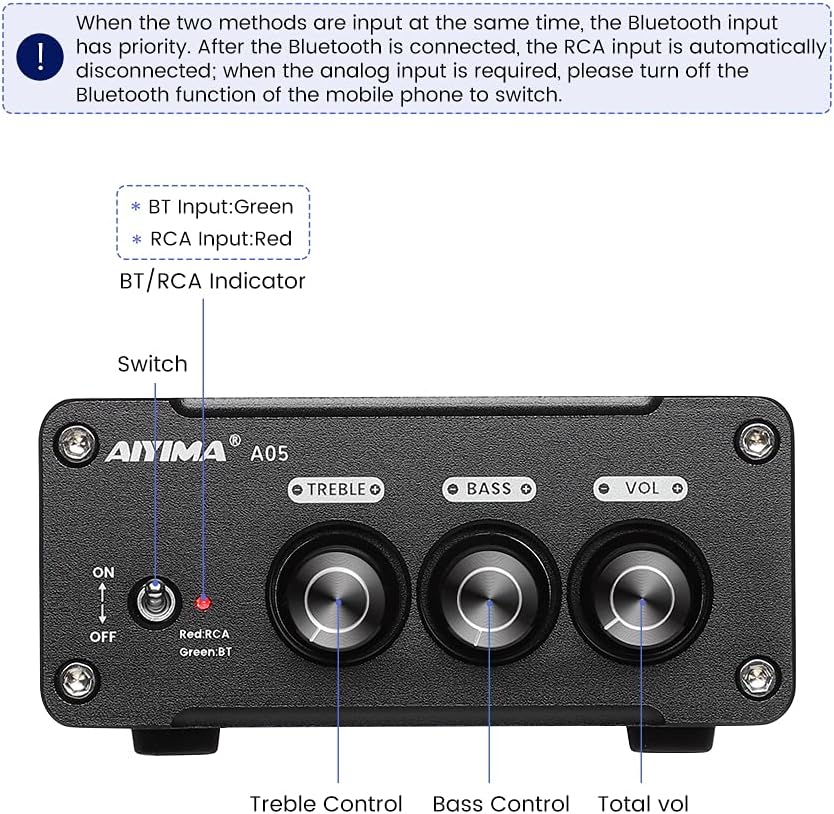
Сүрөт 4.1: Front panel of the AIYIMA A05 amplifier, showing the power switch, input indicator, treble, bass, and volume controls.
- Кубат өчүргүч (КҮЙГҮЗҮҮ/ӨЧҮРҮҮ): Күйгүзөт ampкөтөргүч күч.
- BT/RCA Indicator: Displays the active input source. Green indicates Bluetooth (BT) input, Red indicates RCA input.
- Үч ыргак башкаруу: Жогорку жыштыктагы аудио чыгарууну тууралайт.
- Басс башкаруу: Төмөн жыштыктагы аудио чыгарууну тууралайт.
- Үндү көзөмөлдөө: Жалпы аудио чыгаруу деңгээлин тууралайт.

Сүрөт 4.2: Жакын план view of the power switch and the BT/RCA input indicator on the front panel.

Сүрөт 4.3: Жакын план view of the Treble, Bass, and Volume control knobs.
4.2 Арткы панелдин туташуулары

Сүрөт 4.4: Rear panel of the AIYIMA A05 amplifier, showing the Bluetooth antenna port, RCA audio input, speaker outputs, and DC power input.
- ANT (Bluetooth Antenna Port): Connect the included Bluetooth antenna here for wireless audio reception.
- AUDIO IN (RCA Input): Connect audio sources (e.g., CD player, TV, DAC) using RCA cables.
- SPEAKER (Audio Output): Connect passive speakers using speaker wires. Ensure correct polarity (+ to + and - to -).
- DC 24-32V (Power Input): Connect the provided DC power adapter.
5. Орнотуу нускамалары
Follow these steps to set up your AIYIMA A05 ampөмүр берүүчү:
- Connect Bluetooth Antenna: Screw the included Bluetooth antenna into the ANT port on the rear panel.
- Динамиктерди туташтыруу: Connect your passive speakers to the SPEAKER output terminals on the rear panel. Ensure the positive (+) terminal of the amplifier connects to the positive (+) terminal of the speaker, and the negative (-) terminal connects to the negative (-).
- Connect Audio Source (RCA): If using a wired audio source, connect it to the AUDIO IN (RCA) ports on the rear panel using appropriate RCA cables.
- Туташуу кубаты: Connect the DC power adapter to the DC 24-32V input port on the rear panel, then plug the adapter into a wall outlet.
- Күйгүзүү: Flip the power switch on the front panel to the "ON" position. The input indicator will light up.

Сүрөт 5.1: Арткы панели amplifier with Bluetooth antenna, RCA cables, speaker wires, and power adapter connected.
6. Иштөө нускамалары
6.1 Күйгүзүү/өчүрүү
Күйгүзүү үчүн amplifier, flip the front panel switch to the "ON" position. To power off, flip the switch to the "OFF" position.
6.2 Bluetooth байланышы
- камсыз кылуу amplifier is powered on and the BT/RCA indicator is green, indicating Bluetooth mode. If it's red, ensure no RCA cable is connected or disconnect it.
- Мобилдик түзмөгүңүздө (телефон, планшет ж.б.) Bluetooth'ду күйгүзүп, жеткиликтүү түзмөктөрдү издеңиз.
- Select "AIYIMA A05" from the list of devices to pair.
- Once paired, the indicator light will remain green, and you can play audio from your device through the ampөмүрлүү.
6.3 RCA Input Usage
- Connect your audio source to the RCA input ports on the rear panel.
- камсыз кылуу amplifier is powered on. The BT/RCA indicator should be red, indicating RCA input mode.
- If the indicator is green (Bluetooth mode), ensure Bluetooth is disconnected on any paired device, or turn off Bluetooth on your mobile device to switch to RCA input.
6.4 Adjusting Audio
- Көлөмү: Rotate the "VOL" knob clockwise to increase volume and counter-clockwise to decrease.
- Үч кабат: Rotate the "TREBLE" knob to adjust high-frequency sounds to your preference.
- Бас: Rotate the "BASS" knob to adjust low-frequency sounds to your preference.
7. Техникалык тейлөө
- Тазалоо: Disconnect the power adapter before cleaning. Use a soft, dry, lint-free cloth to wipe the surface of the amplifier. Do not use harsh chemicals or abrasive materials.
- Сактагыч: If not in use for an extended period, store the ampliifier салкын, кургак жерде, тике күндүн нурунан жана экстремалдык температурадан алыс.
- Байланыштары: Кабелдин бардык туташууларынын бекемдигин жана коррозияга учурабагандыгын текшерүү үчүн мезгил-мезгили менен текшерип туруңуз.
8. Кыйынчылыктарды
If you encounter issues with your AIYIMA A05 amplifier үчүн, төмөнкү жалпы көйгөйлөрдү жана чечимдерди караңыз:
| Көйгөй | Мүмкүн себеп | Чечим |
|---|---|---|
| Үн чыгышы жок |
|
|
| Distorted or buzzing sound |
|
|
| Bluetooth туташпай жатат |
|
|
| Loud noise/ticking on startup |
|
|
If the problem persists after trying these solutions, please contact AIYIMA customer support for further assistance.
9. Техникалык шарттар

Сүрөт 9.1: Dimensions of the AIYIMA A05 amplifier: 107mm (4.2in) width, 87mm (3.4in) depth, 36mm (1.4in) height.
| Өзгөчөлүк | Спецификация |
|---|---|
| Модел | A05 |
| Чыгуу күчү | 105 Watts (at 4 Ω) |
| Каналдардын саны | 2.0 (Стерео) |
| Bluetooth версиясы | QCC3034 APTX Bluetooth 5.0 |
| Чипсет | TPA3221 |
| Minimum Supply Voltage | 12 вольт (ток) |
| Maximum Supply Voltage | 32 вольт (ток) |
| Элемент Салмагы | 500 грамм |
| Өлчөмдөрү (болжол менен) | 107mm (W) X 87mm (D) х 36 мм (H) |
10. Кепилдик жана колдоо
AIYIMA A05 amplifier comes with a warranty. Please refer to the included Warranty Card for specific terms and conditions. For technical support, troubleshooting assistance, or warranty claims, please contact AIYIMA customer service through the retailer where the product was purchased or visit the official AIYIMA webсайт.
Онлайн ресурстар: For additional information and support, you may visit the AIYIMA store page: AIYIMA Official Store