
Introduction
This manual provides essential instructions for the proper use and maintenance of your Easytry123 replacement remote control. This remote is designed to be compatible with various Hisense Smart 4K UHD LED TV models. Please read this manual thoroughly before operating the remote control.
Продукт бүттүview
The Easytry123 replacement remote control is an ergonomic, button-controlled device utilizing infrared technology for seamless interaction with compatible Hisense televisions. It features dedicated buttons for power, volume, channel control, navigation, and quick access to popular streaming services.



Жайгашуу
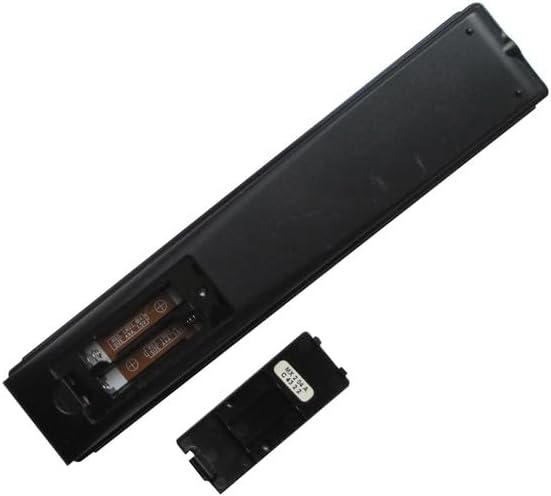
Батарея орнотуу
- Пульттун артындагы батарея отсегин табыңыз.
- Slide the battery cover downwards or press the latch and lift to open. (Refer to Figure 3 and Figure 4)
- Оң (+) жана терс (-) терминалдары бөлүмдүн ичиндеги белгилер менен туура дал келишин камсыз кылып, эки (2) AAA батарейканы салыңыз.
- Replace the battery cover by sliding it back into position until it clicks securely. (Refer to Figure 5)
No additional setup or coding is required for this replacement remote control. It is designed to work directly with compatible Hisense TV models once batteries are installed.
Иштөө нускамалары
This remote control operates using infrared (IR) signals. Ensure there is a clear line of sight between the remote's IR emitter (located at the top front) and your television's IR receiver.
- Кубат баскычы: басыңыз Күч button (usually red, top right) to turn the TV on or off.
- Үндү көзөмөлдөө: колдонуу VOL+ жана VOL - аудио үнүн жөндөө үчүн баскычтар.
- Каналды башкаруу: колдонуу CH ^ жана CH v buttons to change TV channels.
- Навигация аянтчасы: The central circular pad with directional arrows (Өйдө, ылдый, сол, оң) and a central OK/Enter button is used to navigate menus and select options.
- Артка баскычы: басыңыз Артка button (left arrow) to return to the previous screen or menu.
- Үй баскычы: басыңыз Үй button (house icon or circle) to access the TV's main smart interface.
- Колдонмонун кыска баскычтары: Dedicated buttons for services like Sling, Google Play, Fandango Now, жана Tikilive provide quick access to these applications.
- Google Жардамчы баскычы: The button with the Google Assistant logo (colored dots) activates voice commands if your TV supports this feature.
- Input/123 Button: This button (often labeled '123' or with an input icon) allows you to switch between different input sources (HDMI, AV, etc.).
- Үнсүз баскычы: The button with a crossed-out speaker icon mutes or unmutes the TV audio.
- Ойнотуу башкаруулары: сыяктуу баскычтар Ойнотуу/Тыныгуу, Артка түрүү, жана Fast Forward are used for media playback.
- CC (Жабык субтитрлер): Жабык коштомо жазууларды күйгүзөт же өчүрөт.
- NRT (No Remote Timer): Functionality may vary by TV model.
- MTS (Multi-channel Television Sound): Allows selection of audio tracks (e.g., stereo, SAP).
Техникалык тейлөө
- Тазалоо: Пультту жумшак, кургак чүпүрөк менен сүртүңүз. Суюк тазалагычтарды же абразивдүү материалдарды колдонбоңуз.
- Батареяга кам көрүү: Пульттун реакциясы жайлап же иштебей калганда батареяларды алмаштырыңыз. Эгерде пульт көпкө чейин колдонулбаса, агып кетүүнүн алдын алуу үчүн батареяларды алып салыңыз.
- Сактагыч: Пультту күн нурунан жана экстремалдык температурадан алыс, салкын, кургак жерде сактаңыз.
Проблемаларды чечүү
- Пульт жооп бербей жатат:
- Жаңы AAA батарейкаларынын туура полярдуулукта орнотулганын жана туура полярдуулукта экенин текшериңиз.
- Пульт менен телевизордун инфракызыл кабыл алгычынын ортосундагы тоскоолдуктарды текшериңиз.
- Пультту түз сыналгыга багыттаңыз.
- Try replacing the batteries with a fresh set.
- Кээ бир функциялар иштебейт:
- This is a replacement remote and may not support all advanced functions of your original TV remote.
- Verify that your TV model is listed as compatible with this remote.
- Интерференция: Strong light sources or other infrared devices can sometimes interfere with the remote's signal.
Техникалык шарттар
| Бренд | Easytry123 |
| Шайкеш түзмөктөр | Television (Various Hisense Smart 4K UHD LED TV Models) |
| Байланыш технологиясы | Инфракызыл |
| Controller Type | Control Button |
| Өзгөчө өзгөчөлүк | Эргономикалык |
| Батареялар талап кылынат | 2 AAA батарейка |
Маанилүү эскертүүлөр
- This is a replacement remote control and is not a universal remote control.
- The replacement item may not work with all functions as the original remote. Some advanced or specific features of your original remote might not be supported.
- Бул колдонууга жеңил and does not require a manual or batteries to be included in the package.
- бар no need for setup or code programming; it works directly with compatible models.
- Ар дайым ensure our remote matches the model number of your unit оптималдуу шайкештик үчүн.
Кепилдик жана колдоо
Specific warranty information for this product is not provided in this manual. For any issues or support inquiries, please refer to the seller or retailer from whom the product was purchased. Ensure you retain your proof of purchase for any potential warranty claims.