
Introduction
This manual provides detailed instructions for the installation, operation, and maintenance of your Xigmatek Aquarius Plus Black ATX PC Case. Please read this manual thoroughly before beginning installation to ensure proper setup and safe use of your new PC case.
The Xigmatek Aquarius Plus Black is a mid-tower gaming PC case designed to accommodate ATX, Micro-ATX, and Mini-ITX motherboards. It features excellent cooling potential with support for up to 10 x 120mm fans, including 7 pre-installed ARGB 120mm AY120 fans. The case also offers ample space for a 360mm graphics card, a 158mm CPU cooler, and includes 4 drive bays (2 x 3.5" and 2 x 2.5"/3.5"). Its aesthetic design includes two seamless tempered glass panels and three dust filters for protection.
Коопсуздук маалыматы
- Компоненттерди орнотуудан же алып салуудан мурун ар дайым кубат менен жабдууну розеткадан ажыратыңыз.
- Электростатикалык разряддан (ЭСР) келип чыккан зыянды алдын алуу үчүн бардык компоненттерди этияттык менен кармаңыз. Антистатикалык билек боону колдонууну карап көрүңүз.
- Avoid placing the PC case in direct sunlight, near heat sources, or in areas with high humidity.
- Ашыкча ысып кетүүнүн алдын алуу үчүн корпустун айланасында туура желдетүүнү камсыз кылыңыз.
- Майда тетиктерди жана таңгактоочу материалдарды балдардан алыс кармаңыз.
- Do not attempt to modify the case structure. Unauthorized modifications may void your warranty and pose safety risks.
Пакеттин мазмуну
Пакетте бардык буюмдар бар экенин текшериңиз:
- Xigmatek Aquarius Plus Black ATX PC Case
- 7 x 120mm ARGB AY120 Fans (pre-installed)
- Кошумча жабдуулар топтому (бурамалар, бекиткичтер, кабелдик байлагычтар)
- Колдонуучунун Колдонмосу (бул документ)
Өзгөчөлүктөрү
- Mid-Tower Design: ATX, Micro-ATX жана Mini-ITX энелик платаларын колдойт.
- Өркүндөтүлгөн муздатуу: Pre-installed with 7 x 120mm ARGB AY120 fans; supports up to 10 x 120mm fans.
- Температуралуу айнек панелдери: Two seamless tempered glass panels for a clear view ички компоненттеринин.
- AmpСактагыч: 4 drive bays (2 x 3.5" HDD, 2 x 2.5"/3.5" SSD/HDD).
- Component Clearance: Supports graphics cards up to 360mm and CPU coolers up to 158mm.
- Dust Filtration: Three dust filters included to protect internal components.
- Алдыңкы I/O: 1 x USB 2.0, 3 x USB 3.0 ports.
Орнотуу жана орнотуу
Follow these steps to install your PC components into the Xigmatek Aquarius Plus case.
1. Ишти даярдаңыз
Carefully remove the tempered glass side panels by unscrewing the thumb screws at the rear of the case. Place the panels on a soft, flat surface to prevent scratches.

Image: The bare chassis of the Xigmatek Aquarius Plus, showing its internal structure before component installation.
2. Install the Motherboard
- Identify the correct standoff positions for your ATX, Micro-ATX, or Mini-ITX motherboard. The case may have pre-installed standoffs or require you to install them using the provided accessory kit.
- Place the motherboard I/O shield into the rear opening of the case.
- Энелик платаңызды тирөөчтөр жана киргизүү/чыгаруу калканы менен кылдаттык менен тегиздеңиз, андан кийин аны акырындык менен ордуна түшүрүңүз.
- Secure the motherboard with the appropriate screws from the accessory kit. Do not overtighten.

Сүрөт: ички view of the Xigmatek Aquarius Plus case, illustrating the motherboard tray and fan placement.
3. Install Storage Drives
The case supports 2 x 3.5" HDDs and 2 x 2.5"/3.5" SSDs/HDDs.
- Locate the drive bays. Typically, 3.5" bays are found in a cage near the power supply shroud, and 2.5" mounts are on the back of the motherboard tray.
- For 3.5" drives, slide the drive into the bay and secure it with screws.
- For 2.5" drives, mount them to the designated trays or screw points on the motherboard tray.
4. Install the Power Supply Unit (PSU)
The Xigmatek Aquarius Plus supports bottom-mounted PSUs.
- Кубат блогун корпустун арткы астыңкы жагындагы атайын бөлүмгө жылдырыңыз.
- Secure the PSU to the case with screws from the rear.
- Route the necessary power cables through the cable management cutouts to the motherboard and other components.
5. Install Expansion Cards (e.g., Graphics Card)
The case has 4 expansion slots.
- Корпустун артындагы керектүү кеңейтүү уячасынын капкактарын алып салыңыз.
- Insert your graphics card or other expansion card into the appropriate PCIe slot on your motherboard.
- Картаны корпуска бурама менен бекитиңиз.
6. Connect Front I/O Cables
Connect the front panel cables (USB 2.0, USB 3.0, HD Audio, Power Switch, Reset Switch, Power LED, HDD LED) to their corresponding headers on your motherboard. Refer to your motherboard manual for exact header locations.
7. Кабелдик башкаруу
Кабелдерди өткөрүү жана бекитүү үчүн энелик плата лотогунун артындагы кабелдерди башкаруу кесиктерин жана бекитүүчү чекиттерди колдонуңуз. Бул аба агымын жана эстетиканы жакшыртат.
8. Reattach Panels
Once all components are installed and cables are managed, carefully reattach the tempered glass side panels and secure them with the thumb screws.
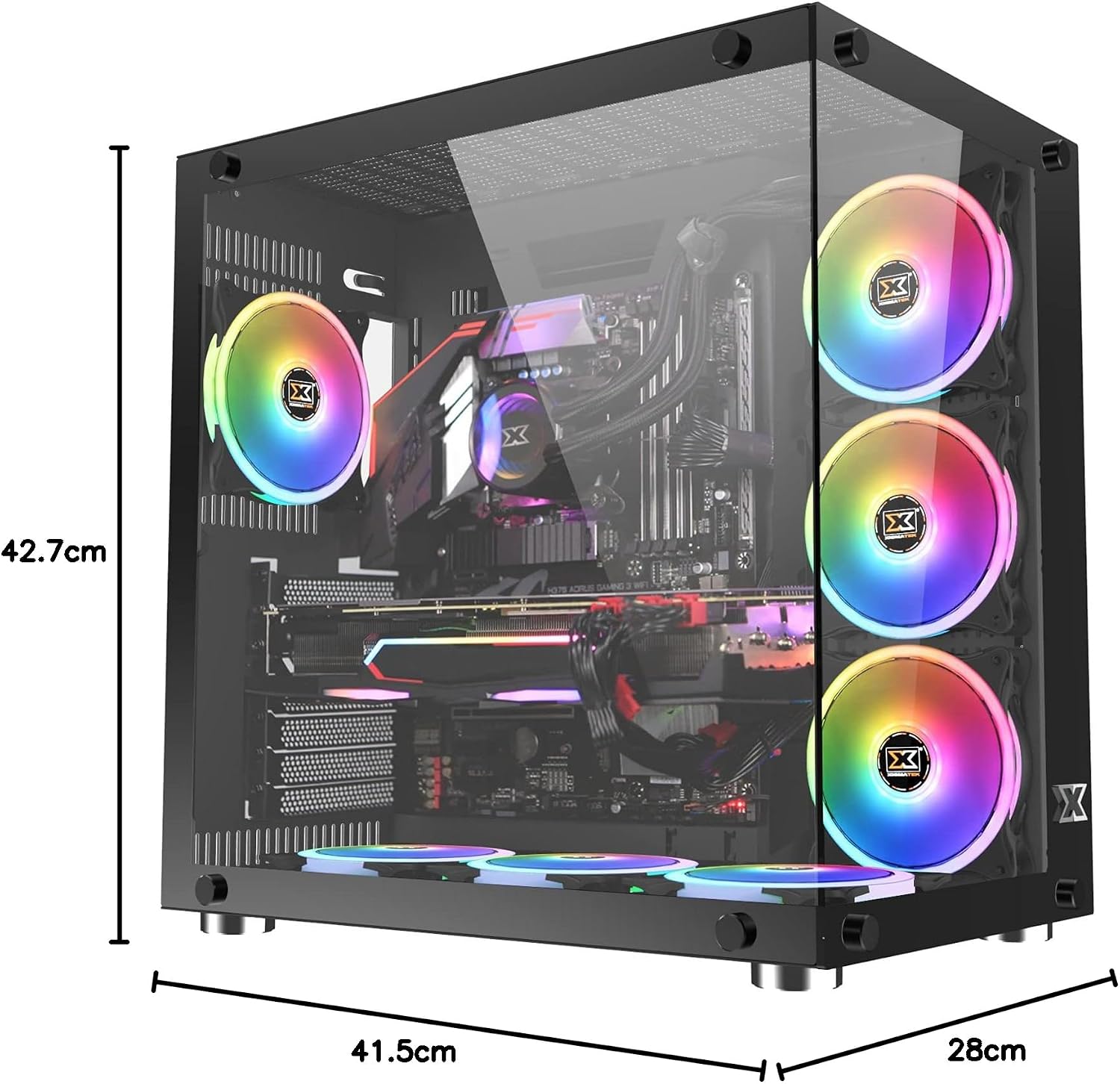
Image: The Xigmatek Aquarius Plus case fully assembled with internal components, showcasing its dimensions (41.5cm D x 28cm W x 42.7cm H).
Иштөө нускамалары
After successful installation, connect your peripherals (monitor, keyboard, mouse) and power cable to the PSU. Press the power button on the front panel to start your system.
ARGB Fan Control
The pre-installed ARGB fans are typically connected to a fan controller or directly to an ARGB header on your motherboard. Refer to your motherboard's manual or the fan controller's instructions for details on how to customize the lighting effects and fan speeds.
Техникалык тейлөө
Үзгүлтүксүз тейлөө сиздин PC компоненттеринин оптималдуу иштешин жана узак иштөөсүн камсыз кылууга жардам берет.
- Чаң чыпкалары: The Xigmatek Aquarius Plus includes three dust filters. Regularly remove and clean these filters to prevent dust buildup inside the case. Use compressed air or a soft brush.
- Ички тазалоо: Periodically open the case and use compressed air to remove dust from fans, heatsinks, and other components. Ensure the system is powered off and unplugged before cleaning.
- Температуралуу айнек панелдери: Clean the tempered glass panels with a soft, lint-free cloth and a glass cleaner designed for electronics. Avoid abrasive materials.
Проблемаларды чечүү
Көйгөйгө туш болсоңуз, көйгөйлөрдү чечүүнүн төмөнкү жалпы кадамдарын карап көрүңүз:
- Система күйбөй жатат:
- Check if the power cable is securely connected to the PSU and the wall outlet.
- PSU которгучу 'ON' абалында экенин текшериңиз.
- Алдыңкы панелдин кубат которгучу кабели эне платасынын башына туура туташтырылганын текшериңиз.
- Confirm all internal power cables (24-pin ATX, CPU, GPU) are properly seated.
- Вентиляторлор айланбай жатат/ARGB күйбөй жатат:
- Желдеткичтин кубаттуулук туташууларын энелик платага же желдеткич контроллерине текшериңиз.
- Verify ARGB connections to the motherboard or controller.
- Ensure fan controller is powered (if applicable).
- USB порттору иштебейт:
- Confirm the front panel USB cables are correctly connected to the motherboard's USB headers.
For more complex issues, consult the manuals for your individual PC components (motherboard, GPU, PSU) or contact Xigmatek customer support.
Техникалык шарттар
| Модель аты | Aquarius Plus Black |
| Модель номери | EN46423 |
| Иштин түрү | Орто мунара |
| Motherboard шайкештиги | ATX, Micro ATX, Mini ITX |
| Өлчөмдөр (D x W x H) | 41.5 см х 28 см х 42.7 см |
| Салмагы | 7 кг |
| Материал | Чыңалган айнек, болот |
| Кеңейтүү уячалары | 4 |
| Drive Bays | 2 x 3.5" HDD, 2 x 2.5"/3.5" SSD/HDD |
| Алдын ала орнотулган күйөрмандар | 7 x 120mm ARGB AY120 Fans |
| Max Fan Support | 10 x 120 мм желдеткичтерге чейин |
| Максималдуу GPU узундугу | 360 мм |
| CPU муздаткычтын максималдуу бийиктиги | 158 мм |
| PSU монтаждоо | Төмөнкү |
| Алдыңкы I / O порттору | 1 х USB 2.0, 3 х USB 3.0 |
| Муздатуу ыкмасы | Аба |
| Жарыктандыруу | RGB (on fans) |
Кепилдик жана колдоо
For warranty information and technical support, please refer to the official Xigmatek webсайтына кириңиз же жергиликтүү сатуучуңузга кайрылыңыз. Кепилдик талаптары үчүн сатып алганыңызды тастыктаган документти сактап коюңуз.