
1. Киришүү
Thank you for choosing the CHONCHOW US801 Gaming Keyboard and Mouse Combo. This manual provides detailed instructions for setting up, operating, and maintaining your new peripheral set. Please read this manual carefully before use to ensure optimal performance and longevity of your product.

Image: The CHONCHOW US801 Gaming Keyboard and Mouse Combo, showcasing its full-size layout and ergonomic design.
2. Пакеттин мазмуну
The CHONCHOW US801 Gaming Keyboard and Mouse Combo package includes:
- 1 x CHONCHOW US801 Wired Gaming Keyboard
- 1 x CHONCHOW US801 Wired Gaming Mouse
- 1 х Колдонуучунун колдонмосу (бул документ)
3. Орнотуу нускамалары
The CHONCHOW US801 Gaming Keyboard and Mouse Combo is a plug-and-play device. No additional drivers or software are typically required for basic functionality.
- Баскычтопту туташтыруу: Locate an available USB 2.0 port on your computer, laptop, or gaming console. Insert the USB connector of the keyboard into the port.
- Чычканды туташтыруу: Locate another available USB 2.0 port. Insert the USB connector of the mouse into the port.
- Системаны таануу: Your operating system (Windows, Mac OS, Xbox, PS4) should automatically detect and install the necessary drivers. This process may take a few moments. A notification typically appears once the device is ready for use.
- Initial Functionality Test: After installation, test the keyboard by typing and the mouse by moving the cursor and clicking buttons to ensure they are working correctly.
Note on Initial Connection:
In rare cases, after connecting the USB cable, the keyboard backlight may not illuminate fully or correctly. This can occur due to static electricity or repeated disconnections/reconnections causing signal issues with the operating system. If this happens, please wait patiently for approximately 20 seconds for the keyboard's light control chip to restart. If the issue persists, ensure your computer is connected to the internet, then reconnect the keyboard and wait for the "driver installation is complete" notification. If problems continue, refer to the Troubleshooting section or contact customer support.
4. Keyboard Features and Operation
4.1. Арткы жарыкты башкаруу
The keyboard features adjustable RGB backlighting with multiple modes and brightness levels.
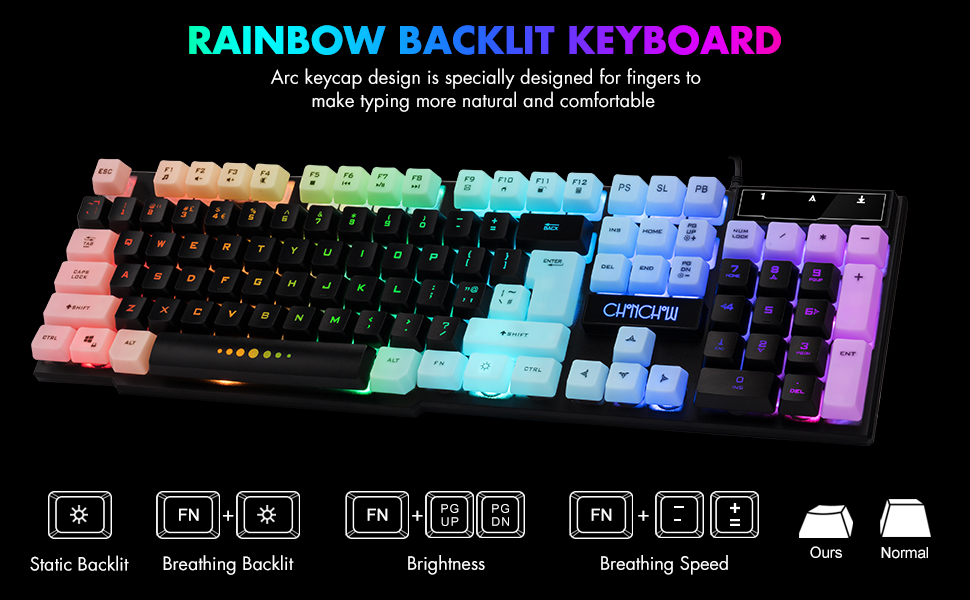
Image: Visual guide for controlling keyboard backlighting, showing key combinations for various effects.
- Арткы жарыкты күйгүзүү/өчүрүү: басыңыз Электр лампасы key (usually located near the right Ctrl key).
- Switch Backlight Mode (Breathing/Static): Басыңыз FN + Электр лампасы ачкыч.
- Жарыктыкты жөндөө: Басыңыз FN + PG UP жарыктыгын жогорулатуу үчүн, же FN + PG DN жарыктыгын азайтуу үчүн.
- Adjust Breathing Speed: Басыңыз FN + + дем алуу ылдамдыгын жогорулатуу үчүн, же FN + - дем алуу ылдамдыгын азайтуу үчүн.
4.2. Мультимедиа ачкычтары
The keyboard includes 12 multimedia function shortcut keys for quick access to common functions.

Image: Layout of the keyboard highlighting the 12 multimedia function keys and their corresponding FN key combinations.
| Ачкыч айкалышы | Функция |
|---|---|
| FN + F1 | Музыка ойноткуч |
| FN + F2 | Үндү төмөндөтүү |
| FN + F3 | Үндү көтөрүү |
| FN + F4 | Үнсүз |
| FN + F5 | Ойнотуу/Токтоо |
| FN + F6 | Мурунку трек |
| FN + F7 | Ойнотуу/Тыныгуу |
| FN + F8 | Кийинки трек |
| FN + F9 | |
| FN + F10 | Web Үй |
| FN + F11 | Кулпуланган экран |
| FN + F12 | Калькулятор |
4.3. Anti-Ghosting Keys
The keyboard features 19 anti-ghosting keys, ensuring that multiple key presses are registered simultaneously, which is crucial for gaming.

Image: The keyboard layout with 19 anti-ghosting keys visually indicated.
4.4. WIN Key Lock
The Windows key can be disabled to prevent accidental presses during gaming sessions.

Image: Close-up of the Windows key with an overlay indicating its lock function.
- Disable/Enable WIN Key: Басыңыз FN + WIN ачкыч.
5. Mouse Features and Operation
The gaming mouse features 7-color breathing LED lighting and adjustable DPI settings.

Image: The CHONCHOW gaming mouse displaying its 7-color LED breathing light effect.
5.1. DPI тууралоо
The mouse offers four levels of DPI sensitivity to suit different tasks and preferences.
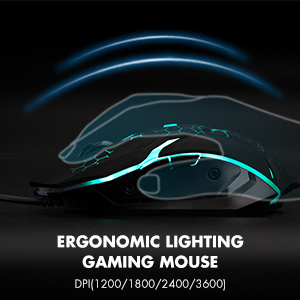
Image: The ergonomic design of the gaming mouse, highlighting its lighting and DPI settings.
- DPI деңгээли: 1200 / 1800 / 2400 / 3600 DPI.
- DPI жөндөө: басыңыз DPI баскычы (usually located behind the scroll wheel) to cycle through the available DPI settings.
5.2. Mouse Buttons
The mouse is equipped with 6 buttons for enhanced control:
- Сол чыкылдатуу баскычы
- Оң баскычты чыкылдатыңыз
- Жылдыруу дөңгөлөгү (Чыкылдатуучу)
- DPI баскычы
- Алга баскычы
- Артка баскычы
6. Шайкештик
The CHONCHOW US801 Gaming Keyboard and Mouse Combo offers wide compatibility with various operating systems and devices.
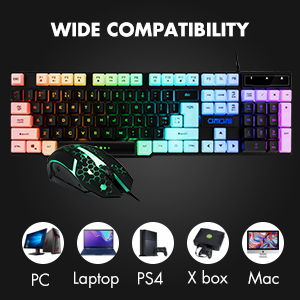
Image: Icons representing various compatible devices including PC, Laptop, PS4, Xbox, and Mac.
- Операциялык системалар: Windows 2000 / 2003 / XP / Vista / Win7 / Win8 / Win10
- Түзмөктөр: PC, Computer, Laptop, PS4, Xbox, Mac
7. Техникалык тейлөө
Туура тейлөө клавиатураңыздын жана чычканыңыздын узак мөөнөттүү иштешин жана оптималдуу иштешин камсыз кылат.
- Тазалоо: Use a soft, dry cloth to wipe down the surfaces of the keyboard and mouse. For deeper cleaning, especially for dust under keycaps, the keycaps are removable. Gently pull them off for cleaning and press them back into place. Avoid using harsh chemicals or abrasive materials.
- Төгүлүүлөр: The keyboard features drainage holes to help mitigate damage from minor spills. In case of a liquid spill, immediately disconnect the keyboard from your device, turn it upside down to drain, and allow it to dry completely before reconnecting.
- Сактагыч: Клавиатураны жана чычканды салкын, кургак жерде, күндүн нуру түз тийбеген жана өтө жогорку температурадан алыс сактаңыз.
8. Кыйынчылыктарды
If you encounter issues with your CHONCHOW US801 Gaming Keyboard and Mouse Combo, please refer to the following common solutions:
- Баскычтоп/чычкан жооп бербейт:
- Ensure both USB cables are securely plugged into your device's USB ports.
- Try connecting the keyboard and mouse to different USB ports.
- Компьютериңизди же оюн консолуңузду өчүрүп күйгүзүңүз.
- Test the devices on another computer to rule out system-specific issues.
- Backlight Issues (Not Bright / Partially Lit):
- Wait approximately 20 seconds after connecting; the keyboard's light control chip may be restarting due to static electricity or repeated connections.
- Ensure your computer is connected to the internet, then reconnect the keyboard. Wait for the "driver installation is complete" notification.
- жардамы менен жарыктыгын тууралаңыз FN + PG UP / PG DN.
- Ачкычтар катталбай жатат / арбактар көрсөтүлүүдө:
- Баскычтоптун таза жана клавиатуранын астындагы таштандылардан таза экенин текшериңиз.
- Verify that the WIN key lock is not accidentally engaged if you are experiencing issues with the Windows key.
- Чычкан курсору секирет же туура эмес:
- Чычкандын түбүндөгү оптикалык сенсорду тазалаңыз.
- Чычканды ылайыктуу жерде (мисалы, чычкан аянтчасында) колдонуп жатканыңызды текшериңиз.
- Курсор өтө сезгич болсо, DPI жөндөөлөрүн төмөнкү мааниге тууралаңыз.
If the problem persists after attempting these steps, please contact CHONCHOW customer support for further assistance.
9. Техникалык шарттар
| Өзгөчөлүк | Деталь |
|---|---|
| Бренд | Чончоу |
| Модель номери | US801 |
| Байланыш технологиясы | USB Wired |
| Баскычтоптун жайгашуусу | 104-Keys Full Size |
| Баскычтоптун арткы жарыгы | RGB (Rainbow Backlit) |
| Баскычтоптун атайын функциялары | 19 Anti-Ghosting Keys, 12 Multimedia Keys, WIN Key Lock, Ergonomic, Removable Keycaps |
| Чычкандын DPI деңгээлдери | 1200 / 1800 / 2400 / 3600 DPI |
| Чычкан баскычтары | 6 Buttons (Left, Right, Forward, Backward, DPI, Scroll Wheel) |
| Mouse Backlighting | 7 түстүү дем алуучу LED |
| Продукциянын өлчөмдөрү (клавиатура) | 17 x 5.1 x 1.3 дюйм |
| Элемент Салмагы | 1.94 фунт |
| Материал | Пластик |
10. Кепилдик жана колдоо
CHONCHOW stands behind the quality of its products. Your CHONCHOW US801 Gaming Keyboard and Mouse Combo is covered by the following:
- 30-Day Refund or Replacement: Сатып алынгандан кийин 30 күндүн ичинде келип чыккан ар кандай маселелер үчүн.
- 12-Month After-Sales Service: For quality-related problems within 12 months of purchase.
For friendly and easy-to-reach support, please contact our customer service team. Refer to your purchase documentation or the CHONCHOW official webбайланыш маалыматы үчүн сайт.