
1. Киришүү
The M-Wave ST-C2.1 Ahead Handlebar Stem is designed to allow precise adjustment of your bicycle's handlebar position. This stem features a 0-90° adjustable angle, enabling riders to fine-tune their optimal sitting and riding posture for enhanced comfort and control. It is compatible with 1 1/8 inch steerer tubes and handlebars with a 31.8 mm clamp диаметри.
2. Коопсуздук маалыматы
- Always ensure all bolts are tightened to the manufacturer's specified torque settings. Overtightening or undertightening can lead to component failure or injury.
- Regularly inspect the stem for any signs of damage, cracks, or wear. Replace immediately if any damage is found.
- If you are unsure about any installation or adjustment procedure, consult a professional bicycle mechanic.
- Do not modify the stem in any way.
- Wear appropriate safety gear when riding.
3. Пакеттин мазмуну
- 1 x M-Wave ST-C2.1 Ahead Handlebar Stem
4. Орнотуу жана орнотуу
Before installation, ensure you have the necessary tools, including appropriate Allen keys and a torque wrench. Proper torque application is critical for safety.
4.1 Attaching to Steerer Tube
- Remove your existing stem from the bicycle's steerer tube.
- Slide the M-Wave ST-C2.1 stem onto the 1 1/8 inch steerer tube. Ensure the stem is oriented correctly.
- Install the top cap and bolt, tightening it just enough to remove play from the headset, but allowing the fork to turn freely.
- Сабакты алдыңкы дөңгөлөк менен тууралаңыз.
- Tighten the two steerer clamp bolts on the side of the stem. Refer to the torque specification printed on the stem, typically 9-10 N.m. Tighten bolts alternately and evenly.
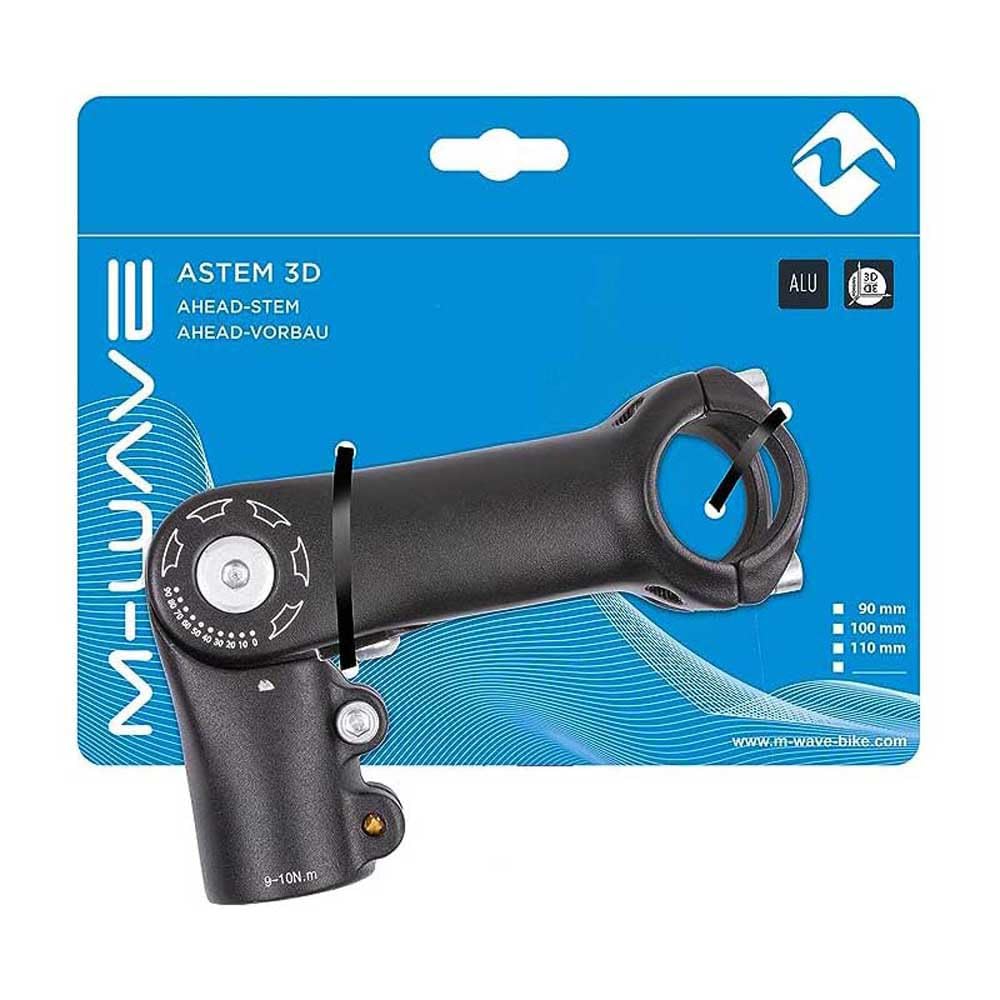
1-сүрөт: The M-Wave ST-C2.1 stem. The two bolts on the lower part clamp the stem to the steerer tube. The four bolts on the front clamp руль.
4.2 Attaching Handlebar
- Loosen the four bolts on the front faceplate of the stem.
- Carefully position your 31.8 mm diameter handlebar into the stem's clamp аймак.
- Re-install the faceplate and its four bolts.
- Tighten the four faceplate bolts evenly in a cross pattern, gradually increasing torque until the specified value (typically 5-6 N.m for handlebars) is reached. Ensure there is an even gap between the faceplate and the stem body.

2-сүрөт: Жакын план view of the handlebar clamp area, showing the four bolts that secure the handlebar.
5. Иштетүү жана жөндөө
The M-Wave ST-C2.1 stem allows for angle adjustment from 0° to 90° to customize your riding position.
- Locate the main adjustment bolt on the side of the stem, near the steerer clamp.
- Loosen this adjustment bolt sufficiently to allow the stem body to pivot. Do not remove the bolt completely.
- Adjust the stem to your desired angle. Reference the angle markings (0, 10, 20... 90) printed on the stem body for precise positioning.
- Once the desired angle is set, tighten the adjustment bolt firmly. Refer to the torque specification, which is typically 9-10 N.m.
- After adjustment, always check that the handlebar is secure and does not rotate or slip.
3-сүрөт: The adjustment bolt and angle markings (0-90°) on the side of the stem, used to set the handlebar angle.
6. Техникалык тейлөө
- Тазалоо: Wipe the stem clean with a damp кездеме. Финишке зыян келтирүүчү катаал химиялык заттардан алыс болуңуз.
- Bolt Inspection: Periodically check all bolts (steerer clamp, руль clamp, and angle adjustment) for tightness. Re-torque to specifications if necessary.
- Коррозия: If riding in wet or corrosive conditions, inspect bolts and threads for corrosion. Apply a thin layer of grease to bolt threads during reassembly to prevent seizing.
7. Кыйынчылыктарды
- Handlebar Slipping: If the handlebar slips, ensure the four faceplate bolts are tightened evenly and to the correct torque specification. Check for grease or dirt on the clampбеттери.
- Stem Rotating on Steerer: If the stem rotates on the steerer tube, ensure the two steerer clamp bolts are tightened evenly and to the correct torque specification (9-10 N.m). Also, verify the headset top cap bolt is tightened enough to remove play but not overtightened.
- Кыйкырык үндөр: Creaking can often be resolved by disassembling, cleaning, lightly greasing (where appropriate, e.g., bolt threads, not clamping surfaces), and reassembling the stem and handlebar components, ensuring all bolts are torqued correctly.
- Бурчту тууралоо кыйынчылыгы: If the adjustment bolt feels stiff or difficult to turn, ensure it is sufficiently loosened. Do not force it. If the issue persists, disassemble, clean, and lightly grease the pivot bolt and contact surfaces.
8. Техникалык шарттар
| Модел | ST-C2.1 |
| Бренд | M-Wave |
| Рулдук түтүктүн диаметри | 1 1/8 дюйм |
| Рутка Clamp Диаметри | 31.8 мм |
| Жөнгө салынуучу бурч | 0°тан 90°ка чейин |
| Length (External) | 90 мм |
| Материал | Алюминий |
| Түс | Кара |
| Элемент Салмагы | 0.39 килограмм |
| Продукциянын өлчөмдөрү (L x W) | 3.54" x 1.13" |
| UPC / GTIN | 887539033019 |
9. Кепилдик жана колдоо
This M-Wave product comes with a Limited Warranty. For specific details regarding warranty coverage, duration, and claims, please refer to the documentation included with your purchase or visit the official M-Wave website. For technical support or further assistance, please contact M-Wave customer service.