
Redragon M901-2
Redragon Perdition 3 M901-2 Gaming Mouse User Manual
Модель: M901-2
1. Киришүү
Thank you for choosing the Redragon Perdition 3 M901-2 Gaming Mouse. This manual provides detailed instructions for setting up, operating, maintaining, and troubleshooting your new gaming mouse. Please read this manual carefully to ensure optimal performance and longevity of your device.
2. Пакеттин мазмуну
- Redragon Perdition 3 M901-2 Gaming Mouse
- Adjustable Weight Set (8 individual weights)
- User Manual
3. Продукт бүтүп калдыview
The Redragon Perdition 3 M901-2 is a high-performance gaming mouse designed for precision and customization. It features a Pixart PMW3327 sensor, 18 programmable buttons, and customizable RGB lighting.

Сүрөт: бурчтуу view of the Redragon Perdition 3 M901-2 Gaming Mouse, showcasing its ergonomic design, RGB logo, and side buttons.
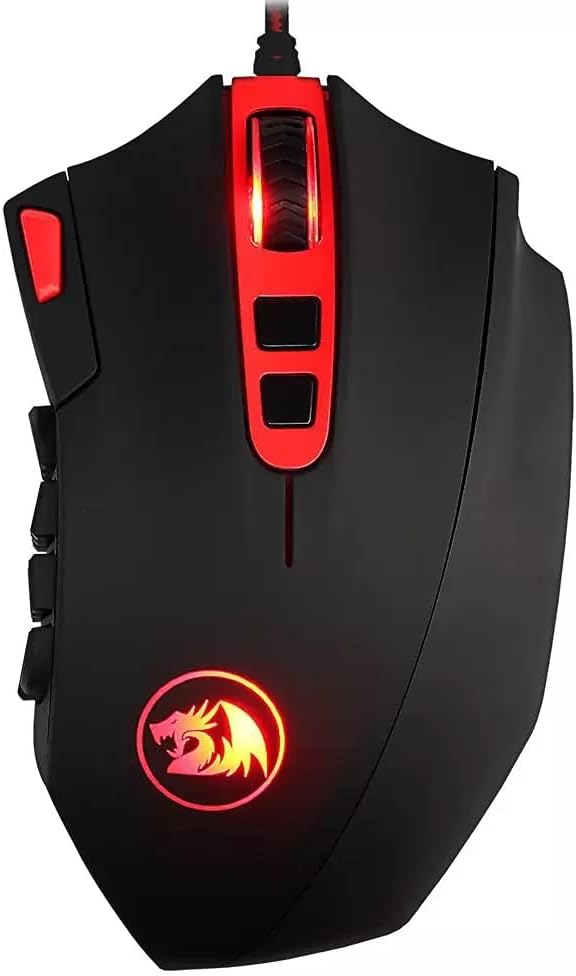
Сүрөт: алдыңкы view of the Redragon Perdition 3 M901-2 Gaming Mouse, highlighting the scroll wheel and top-mounted buttons.
Негизги өзгөчөлүктөрү:
- Pixart PMW3327 High Performance Sensor: Provides accurate tracking and responsiveness.
- 18 Программалануучу баскычтар: Includes 12 customizable side buttons for macros and in-game commands.
- Redragon Chroma Mk.II RGB Lighting: Customizable lighting effects and modes.
- Жөнгө салынуучу салмак системасы: Fine-tune the mouse's weight for personalized comfort and control.
4. Орнотуу
4.1 Чычканды туташтыруу
- Unpack the Redragon Perdition 3 M901-2 Gaming Mouse from its packaging.
- Locate an available USB port on your computer (PC or Notebook).
- Чычкандын USB туташтыргычын USB портуна кыстарыңыз.
- Your operating system (e.g., Windows 7 or later) will automatically detect and install the necessary drivers.

Сүрөт: бурчтуу view of the Redragon Perdition 3 M901-2 Gaming Mouse, showing the braided USB cable ready for connection.
4.2 Software Installation (Optional, for advanced customization)
To unlock the full potential of your Redragon Perdition 3 M901-2, including button programming, DPI settings, and RGB lighting customization, it is recommended to install the official Redragon software.
- Расмий Redragonго барыңыз webсайт.
- Колдоо же жүктөө бөлүмүнө өтүңүз.
- Locate and download the software for the M901-2 model.
- Орнотууну аяктоо үчүн экрандагы нускамаларды аткарыңыз.
5. Иштөө нускамалары
5.1 DPI жөндөө
The mouse features on-the-fly DPI adjustment. Use the dedicated DPI buttons (usually located near the scroll wheel) to cycle through preset DPI levels. For precise customization, use the Redragon software.
5.2 Программалануучу баскычтар
The Redragon Perdition 3 M901-2 features 18 buttons, including 12 side buttons, which can be programmed for various functions, macros, or key bindings. This is particularly useful for gaming (MMORPGs) and productivity tasks.

Сүрөт: каптал view of the Redragon Perdition 3 M901-2 Gaming Mouse, clearly displaying the 12 numbered programmable thumb buttons.
Баскычтарды программалоо үчүн:
- Redragon программасы орнотулуп, иштеп жатканын текшериңиз.
- Open the software interface.
- Select the button you wish to program.
- Assign a function, macro, or key combination.
- Save your settings to the mouse's onboard memory.
5.3 RGB Lighting Настройка
The mouse features Redragon Chroma Mk.II RGB lighting. You can customize lighting effects, colors, and brightness through the Redragon software. Explore various modes to match your setup or mood.

Сүрөт: бурчтуу view of the Redragon Perdition 3 M901-2 Gaming Mouse, showing the illuminated scroll wheel and logo with RGB lighting.
5.4 Adjustable Weight System
The Redragon Perdition 3 M901-2 includes an adjustable weight system with 8 individual weights, allowing you to fine-tune the mouse's balance and overall weight to your preference.

Сүрөт: Төмөнкү view of the Redragon Perdition 3 M901-2 Gaming Mouse, showing the circular compartment for the adjustable weights and the USB connector.
To adjust the weight:
- Carefully turn the mouse over.
- Салмак бөлүмүнүн капкагын астыңкы жагынан табыңыз.
- Open the compartment and add or remove weights as desired.
- Бөлүмдүн капкагын бекем жабыңыз.
6. Техникалык тейлөө
6.1 Тазалоо
- Тазалоодон мурун чычканды компьютериңизден ажыратыңыз.
- Чычкандын бетин сүртүү үчүн жумшак, кургак чүпүрөктү колдонуңуз.
- өжөр кир үчүн, жеңил гampчүпүрөктү суу же жумшак тазалоо эритмеси менен жууп салыңыз. Катуу химиялык заттардан алыс болуңуз.
- баскычтардын жана оптикалык сенсордун айланасын тазалоо үчүн кебез тампонду же кысылган абаны колдонуңуз.
6.2 Сактоо
When not in use, store the mouse in a clean, dry environment away from direct sunlight and extreme temperatures.
7. Кыйынчылыктарды
| Маселе | Мүмкүн чечим |
|---|---|
| Чычкан жооп бербей жатат |
|
| DPI же RGB жөндөөлөрү өзгөрбөйт |
|
| Программалоочу баскычтар иштебейт |
|
8. Техникалык шарттар
| Өзгөчөлүк | Деталь |
|---|---|
| Бренд | Redragon |
| Модель номери | M901-2 |
| Сериялар | Redragon Perdition 3 |
| Байланыш технологиясы | Wired (Com fio) |
| Кыймылды аныктоо | Оптикалык |
| Сенсор | Pixart PMW3327 |
| Button Quantity | 18 (including 12 programmable side buttons) |
| Өзгөчөлүктөр | 18 Programmable Buttons, LED Lights (RGB Chroma Mk.II), Adjustable Weight System |
| Колдун багыты | Туура |
| Продукциянын өлчөмдөрү | 20 x 16 x 7 см |
| Элемент Салмагы | 245 г |
| Power Source | Электр кубаты (USB) |
| Аппараттык платформа | Notebook, PC |
| Операция системасы | Windows 7 жана андан жогору |
| Түс | Кара жана Кызыл |
9. Кепилдик жана колдоо
Redragon products are designed for durability and performance. For warranty information, technical support, or to download the latest software and drivers, please visit the official Redragon webсайтка же кардарларды тейлөө бөлүмүнө кайрылыңыз. Сатып алуу квитанциясын кепилдик дооматтары үчүн сатып алуунун далили катары сактаңыз.
Ask a question about this manual
Ask about setup, troubleshooting, compatibility, parts, safety, or missing instructions. Manuals+ will review the question and use this page’s manual context to help answer it.