
Introduction
The Poly DA75 is a versatile USB-A/USB-C digital adapter designed to connect Poly Quick Disconnect (QD) headsets to computers. It ensures clear audio quality for call center environments, supporting both USB-A and USB-C connections for compatibility with various systems. This adapter is engineered to work seamlessly with platforms such as Avaya, Genesys, and Cisco, providing a reliable audio solution for professionals.
Негизги өзгөчөлүктөр төмөнкүлөрдү камтыйт:
- Универсалдуу байланыш: Equipped with both USB-A and USB-C connectors on the cable for broad compatibility with new and legacy equipment.
- Intelligent Headset Recognition: Automatically adjusts audio performance to the specific Poly Quick Disconnect headset for optimized call quality.
- Acoustic Protection: Incorporates features to manage safe volume levels, protecting user hearing.
- Платформа интеграциясы: Fully compatible with leading call center platforms including Avaya, Genesys, and Cisco.
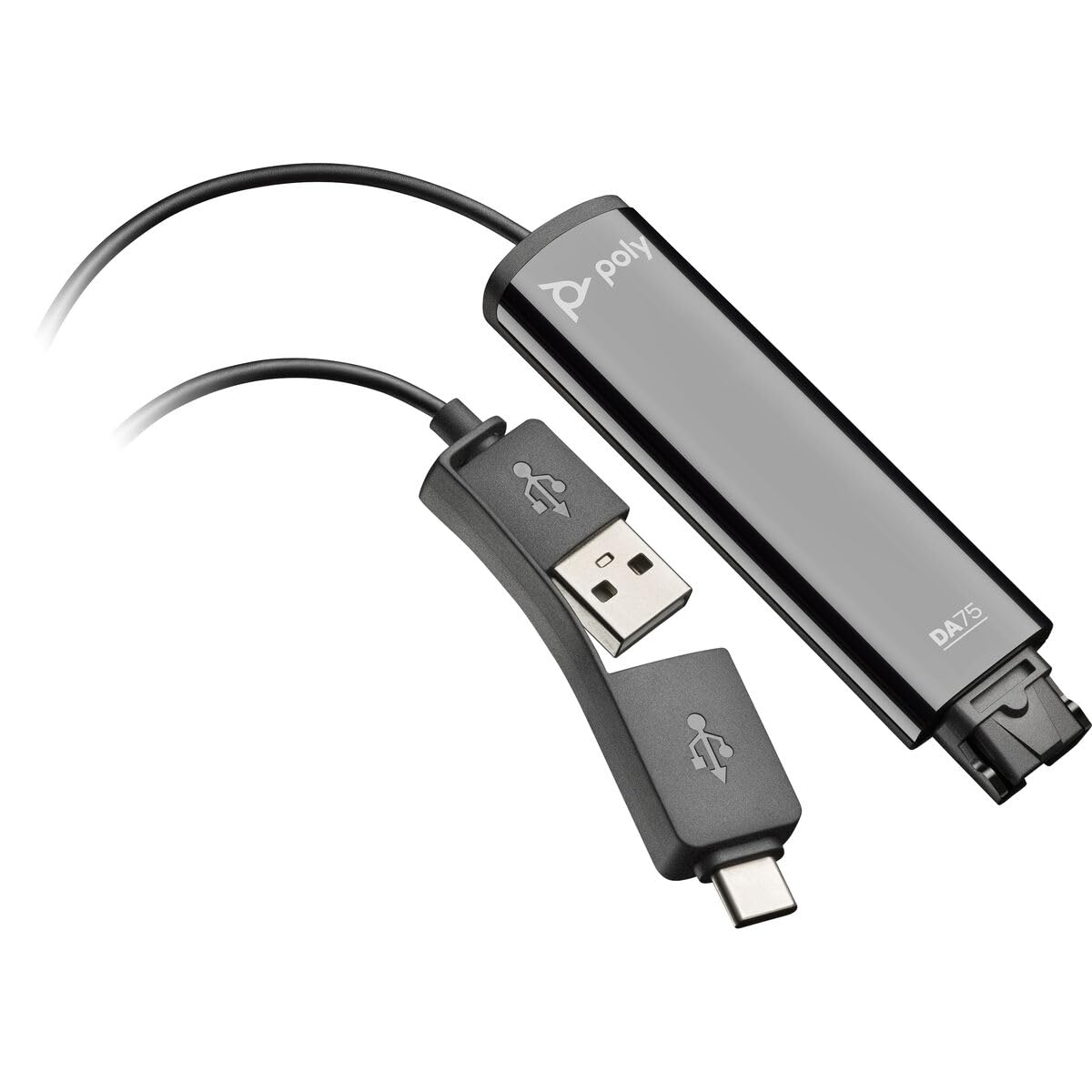
Image: The Poly DA75 USB-A/USB-C Digital Adapter, showing its dual USB-A and USB-C connectors and the Quick Disconnect port for headsets.
Кутуда эмне бар
The Poly DA75 package typically includes the following items:
- Poly DA75 USB-A/USB-C Digital Adapter
- Документтер (Ыкчам баштоо колдонмосу, коопсуздук маалыматы)
Note: Headsets are sold separately and are not included with the DA75 adapter.
Жайгашуу
Follow these steps to set up your Poly DA75 Digital Adapter:
- Гарнитураны туташтыруу: Connect your Poly Quick Disconnect (QD) headset to the QD port on the Poly DA75 adapter. Ensure the connection is secure.
- Компьютерге туташуу:
- If your computer has a USB-A port, use the USB-A connector on the DA75 cable.
- If your computer has a USB-C port, use the USB-C connector on the DA75 cable.
Plug the appropriate USB connector into an available USB port on your computer.
- Драйверди орнотуу: The DA75 is a plug-and-play device. Your operating system (Windows, macOS) should automatically detect the device and install the necessary drivers. This process may take a few moments.
- Түзмөктү таанууну текшерүү:
- Windows: барыңыз Орнотуулар > Система > Үн or Башкаруу панели > Үн. The Poly DA75 should appear as an audio input and output device.
- MacOS: барыңыз Система жөндөөлөрү > Үн. The Poly DA75 should appear as an input and output device.
Select the Poly DA75 as your default communication device for both playback and recording.
- Программанын конфигурациясы: If you are using communication software (e.g., Avaya, Genesys, Cisco, Microsoft Teams, Zoom), ensure that the Poly DA75 is selected as the audio device within the application's settings.
Иштөө нускамалары
The Poly DA75 adapter facilitates audio communication through your connected Poly QD headset. Its operation is primarily managed through your computer's operating system and communication software.
- Чалууларды кабыл алуу/кабыл алуу: Use your communication software to initiate or answer calls. The audio will be routed through your connected Poly QD headset via the DA75 adapter.
- Үндү көзөмөлдөө: Adjust the listening volume using your computer's system volume controls or the volume controls within your communication application.
- Микрофондун үнүн өчүрүү: Mute and unmute your microphone using the controls provided by your communication software.
- Audio Optimization: The DA75 automatically optimizes audio for your specific Poly QD headset. No manual adjustments are typically required for audio profiles.
Техникалык тейлөө
To ensure the longevity and optimal performance of your Poly DA75 Digital Adapter, follow these maintenance guidelines:
- Тазалоо: Gently wipe the adapter with a soft, dry, anti-static cloth. Do not use liquid cleaners or abrasive materials.
- Сактагыч: Адаптерди салкын, кургак жерде күндүн тике тийген нурунан жана экстремалдык температурадан алыс сактаңыз.
- Колдонуу: Avoid bending or twisting the cable excessively, especially near the connectors, to prevent internal damage.
- Байланыш: Ensure the Quick Disconnect (QD) connection and USB connections are clean and free of debris before connecting.
Проблемаларды чечүү
If you encounter issues with your Poly DA75 Digital Adapter, refer to the following troubleshooting steps:
| Көйгөй | Мүмкүн себеп | Чечим |
|---|---|---|
| Гарнитурадан аудио жок |
|
|
| Микрофон иштебей жатат |
|
|
| Adapter not recognized by computer |
|
|
Техникалык шарттар
| Өзгөчөлүк | Деталь |
|---|---|
| Модель номери | 218266-01 |
| Бренд | POLY |
| Туташтыргыч түрү | USB-A, USB-C (dual connector) |
| Шайкеш түзмөктөр | Poly Quick Disconnect (QD) Headsets |
| Өзгөчө колдонуулар | PC, Call Center Platforms (Avaya, Genesys, Cisco) |
| Түс | Кара |
| Элементтин өлчөмдөрү (L x W x Y) | 0.98 x 0.39 x 2.95 дюйм |
| Элемент Салмагы | 30 грамм |
| Порттардын саны | 2 (USB-A/USB-C to QD) |
| UPC | 197029650054, 017229175112 |
Кепилдик жана колдоо
Кепилдик маалыматы: The Poly DA75 Digital Adapter comes with a 2 жылдык өндүрүүчүнүн чектелген кепилдик. Бул кепилдик нормалдуу колдонуудагы материалдардагы жана жасалгадагы кемчиликтерди камтыйт. Кепилдик дооматтары үчүн сатып алганыңыздын далилин сактап коюңуз.
Техникалык колдоо: For technical assistance, product inquiries, or warranty service, please contact Poly customer support. Visit the official Poly website for the most up-to-date support contact information, FAQs, and additional resources.
Онлайн ресурстар: Poly колдоо Webсайт


