
Introduction
Thank you for choosing the JBL Cinema SB190 Soundbar. This manual provides essential information for setting up, operating, and maintaining your soundbar system. Please read it thoroughly to ensure proper use and optimal performance.
Маанилүү коопсуздук маалыматы
Always follow these basic safety precautions when using your soundbar system:
- Бул нускамаларды кунт коюп окуп чыгыңыз.
- Бул нускамаларды келечектеги маалымат үчүн сактаңыз.
- Бардык эскертүүлөргө кулак сал.
- Бардык нускамаларды аткарыңыз.
- Бул аппаратты суунун жанында колдонбоңуз.
- Кургак чүпүрөк менен гана тазалаңыз.
- Эч кандай желдетүүчү тешиктерди жаап албаңыз. Өндүрүүчүнүн көрсөтмөлөрүнө ылайык орнотуу.
- Радиаторлор, жылуулук регистрлери, мештер же башка аппараттар (анын ичинде) сыяктуу жылуулук булактарынын жанына орнотпоңуз ampкөтөргүчтөр) жылуулукту пайда кылуучу.
- Электр шнурунун басылып кетүүсүнөн же кысып калуудан сактаңыз, өзгөчө сайгычтарда, розеткаларда жана алар аппараттан чыга турган жеринде.
- Өндүрүүчү тарабынан көрсөтүлгөн тиркемелерди/аксессуарларды гана колдонуңуз.
- Бул аппаратты чагылгандуу бороондордо же узак убакыт бою колдонбогондо электр розеткасынан ажыратыңыз.
- Бардык тейлөөлөрдү квалификациялуу тейлөө кызматкерлерине тапшырыңыз. Аппарат кандайдыр бир зыянга учураганда, мисалы, кубат берүүчү шнур же сайгыч бузулганда, суюктук төгүлгөндө же аппараттын ичине нерселер түшкөндө, аппарат жамгырга же нымдуулукка дуушар болгондо, нормалдуу иштебей калганда тейлөө талап кылынат. , же түшүрүлгөн.
Кутуда эмне бар
Your JBL Cinema SB190 package includes the following components:
- Саундбар
- Зымсыз сабвуфер
- Батареялар менен алыстан башкаруу
- Power cords (region specific)
- HDMI кабели
- Дубалга орнотулган кронштейн комплект бурамалар менен
- Тез баштоо колдонмосу
- Кепилдик картасы
- Коопсуздук баракчасы

Image: Included accessories for the JBL Cinema SB190, featuring the remote control, HDMI cable, power cords, and wall-mount hardware.
Продукт бүттүview
Soundbar Front and Top Panel

Сүрөт: алдыңкы view of the JBL Cinema SB190 Soundbar, showcasing анын кооз дизайны.
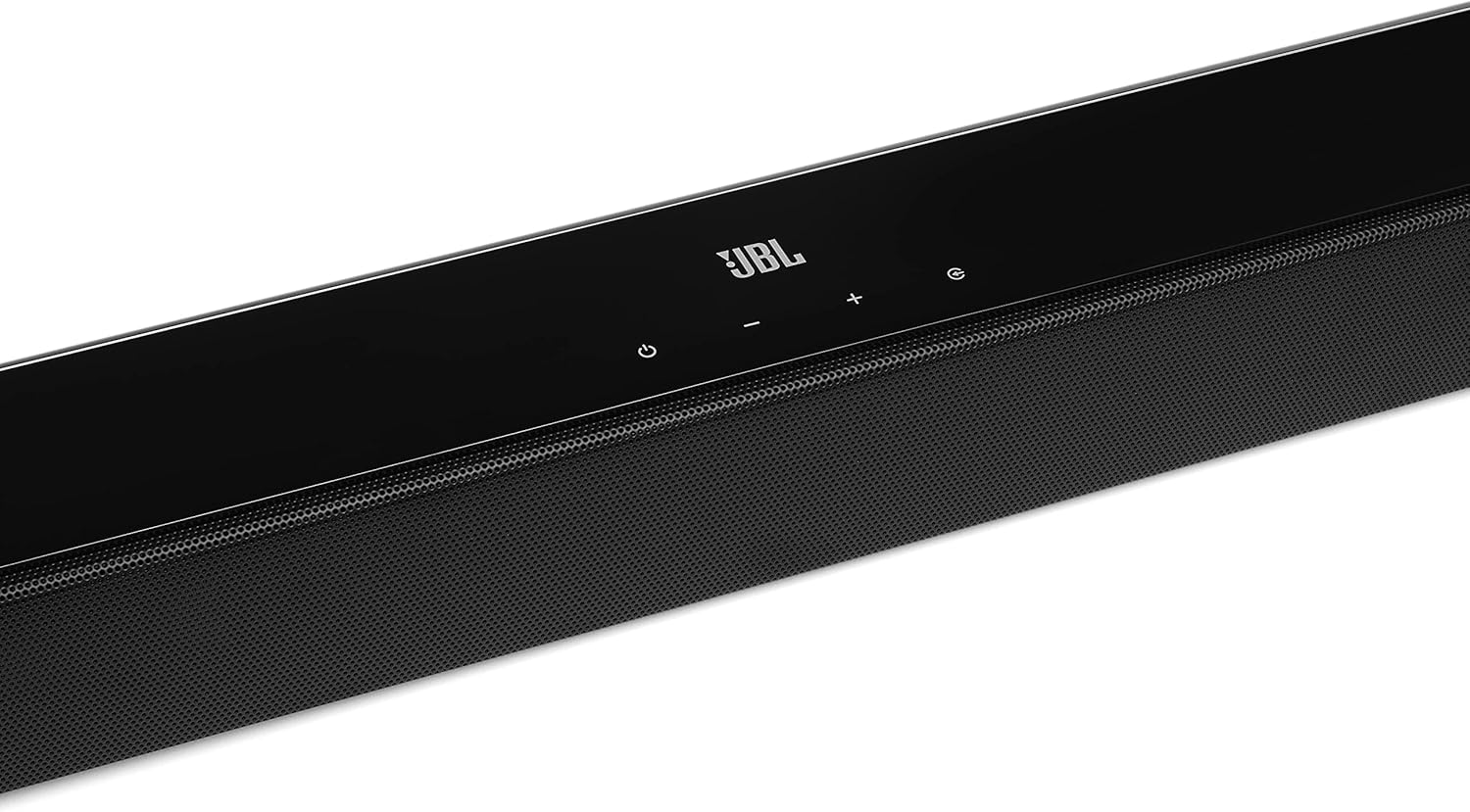
Image: Close-up of the top panel controls on the JBL Cinema SB190 Soundbar, including power, volume, and source selection buttons.
The soundbar features a minimalist design with essential controls located on the top panel for easy access. These include power, volume up/down, and input selection.
Soundbar Rear Panel Connections

Image: Rear panel of the JBL Cinema SB190 Soundbar, showing the power input, HDMI eARC, HDMI In, and Optical In ports.
The rear panel provides various connection options for your audio sources and TV, including HDMI eARC, HDMI In, and Optical In. A power input is also located here.
Зымсыз сабвуфер

Сүрөт: алдыңкы view of the JBL Cinema SB190 Wireless Subwoofer, featuring the JBL logo at the bottom.

Сүрөт: Арткы view of the JBL Cinema SB190 Wireless Subwoofer, showing the power input and pairing button.
The wireless subwoofer provides deep bass and connects automatically to the soundbar. Its rear panel includes the power input and a pairing button if manual pairing is required.
Алыстан башкаруу
The included remote control allows full command over your soundbar system, including power, volume, input selection, sound modes (Music, Movie, News), Voice enhancement, and Bass level adjustment.
Жайгашуу
1. Жайгаштыруу
Саундбар: Place the soundbar on a flat surface directly in front of your TV, centered. Ensure no objects obstruct the front of the soundbar. Alternatively, you can wall-mount the soundbar using the provided bracket kit.
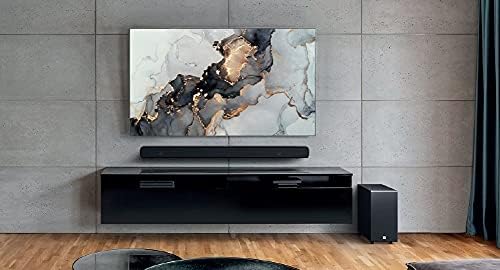
Image: The JBL Cinema SB190 Soundbar positioned below a television, with the wireless subwoofer to the side.
ЛГурченко: The wireless subwoofer can be placed anywhere in the room, ideally within 50 feet (15 meters) of the soundbar, for optimal bass distribution. Avoid placing it in a corner directly, as this can sometimes lead to boomy bass.
2. Байланыштар
Choose one of the following connection methods to connect your soundbar to your TV:
- HDMI eARC (Сунушталат): For the highest quality audio, connect an HDMI cable (included) from the HDMI eARC port on your soundbar to the HDMI eARC port on your TV. This connection supports Virtual Dolby Atmos and allows for TV remote control of the soundbar volume.

Image: HDMI icon, representing the HDMI eARC connection.
- Оптикалык кириш: If your TV does not have an HDMI eARC port, connect an optical cable (not included) from the OPTICAL IN port on your soundbar to the optical output on your TV.

Image: TV icon, indicating connection to a television.
- HDMI Кирүү: You can also connect an external device (e.g., Blu-ray player, game console) directly to the HDMI IN port on the soundbar. The video signal will pass through to your TV via the HDMI eARC/ARC connection.
3. Power Connection
- Connect the power cords to the soundbar and subwoofer.
- Plug the power cords into an AC outlet.
- The soundbar and subwoofer will automatically power on and attempt to pair. The subwoofer's LED indicator will turn solid white once successfully paired.
Саундбарыңызды иштетүү
Күйгүзүү/өчүрүү
басыңыз Күч системаны күйгүзүү же өчүрүү үчүн үн панелиндеги же алыстан башкаруу пультундагы баскычты басыңыз.
Үндү көзөмөлдөө
колдонуу Көлөм + or Көлөмү - үн деңгээлин жөндөө үчүн саундбардагы же алыстан башкаруу пультундагы баскычтарды басыңыз.
Киргизүүнү тандоо
басыңыз Булак button on the soundbar or the dedicated input buttons (HDMI IN, HDMI ARC, OPT, BT) on the remote control to switch between audio sources.
Үн режимдери
The remote control features dedicated buttons for optimizing audio for different content types:
- МУЗЫКА: Enhances audio for music playback.
- КИНО: Optimizes sound for cinematic experiences, including Virtual Dolby Atmos effects.
- ЖАНЫЛЫКТАР: Enhances vocal clarity for news and dialogue-heavy content.
Voice and Bass Adjustment
The remote control allows for fine-tuning of voice clarity and bass levels:
- ҮН: Press the VOICE button repeatedly to cycle through different levels of voice enhancement. This helps make dialogue clearer.
- Бас: Press the BASS button repeatedly to adjust the subwoofer's bass output level.
Bluetooth Жупташтыруу
To stream audio wirelessly from your mobile device:
- басыңыз BT button on the remote control or soundbar. The soundbar's indicator will flash, indicating pairing mode.
- Мобилдик түзмөгүңүздө Bluetooth'ту иштетип, жеткиликтүү түзмөктөрдүн тизмесинен "JBL Cinema SB190" тандаңыз.
- Once connected, the indicator on the soundbar will turn solid. You can now stream audio from your device.

Image: Bluetooth icon, representing wireless audio streaming.
Техникалык тейлөө
To ensure the longevity and optimal performance of your JBL Cinema SB190 Soundbar:
- Тазалоо: Саундбардын жана сабвуфердин беттерин тазалоо үчүн жумшак, кургак чүпүрөктү колдонуңуз. Суюк тазалоочу каражаттарды же абразивдүү материалдарды колдонбоңуз, анткени алар каптамага зыян келтириши мүмкүн.
- Вентиляция: Ensure that the ventilation openings on the soundbar and subwoofer are not blocked to prevent overheating.
- Сактагыч: Эгерде аппаратты узак убакытка сактасаңыз, аны розеткадан сууруп, салкын, кургак жерде сактаңыз.
Проблемаларды чечүү
Саундбарыңызда көйгөйлөргө туш болсоңуз, төмөнкү жалпы көйгөйлөрдү жана чечимдерди караңыз:
No Sound from Soundbar
- Саундбардын күйүп турганын жана үнү өчүрүлбөгөнүн же өтө төмөн коюлбаганын текшериңиз.
- Verify that the correct input source is selected on the soundbar (e.g., HDMI ARC, Optical, Bluetooth).
- Check all cable connections (HDMI, Optical) between the soundbar and your TV/source device. Ensure they are securely plugged in.
- If using HDMI ARC/eARC, ensure your TV's HDMI ARC/eARC feature is enabled in its settings.
- Try restarting both the soundbar and your TV.
Сабвуферден үн жок
- Ensure the subwoofer is plugged into a power outlet and powered on.
- Check the LED indicator on the subwoofer. If it's not solid white, it may not be paired with the soundbar.
- Сабвуферди кол менен жупташтыруу үчүн:
- Press and hold the pairing button on the back of the subwoofer until the LED flashes rapidly.
- On the soundbar, press and hold the Күч button for 5 seconds. The soundbar will enter pairing mode.
- Once paired, the LED on the subwoofer will turn solid white.
Audio/Video Sync Issues
- If using HDMI eARC, this feature is designed to minimize sync issues. Ensure your TV's firmware is up to date.
- Some TVs have an audio delay setting (lip-sync) that can be adjusted. Consult your TV's manual.
- If connecting via Optical, audio lag can sometimes occur. Try connecting via HDMI eARC if available.
Bluetooth туташуу көйгөйлөрү
- Ensure Bluetooth is enabled on your mobile device and the soundbar is in pairing mode.
- Түзмөгүңүздү саундбарга жакыныраак жылдырыңыз.
- Түзмөгүңүздөгү Bluetooth жупташтыруу тизмесин тазалап, кайра жупташтырып көрүңүз.
- Башка Bluetooth түзмөктөрү тоскоолдук кылбасын текшериңиз.
Техникалык шарттар
| Өзгөчөлүк | Деталь |
|---|---|
| Модель аты | Кинотеатр SB190 |
| Динамик түрү | Саундбар |
| Көлөмдүү үн каналынын конфигурациясы | 2.1 |
| Total Speaker Power Output | 380 Ватт |
| Сабвуфердин диаметри | 6.5 дюйм |
| Өзгөчөлүктөр | Bluetooth 5.1 streaming, Dedicated sound mode to enhance voice clarity, HDMI In and Optical In connection, HDMI eARC capable, Virtual Dolby Atmos technology |
| Байланыш технологиясы | Bluetooth, Wired (HDMI, Optical) |
| Башкаруу ыкмасы | Алыстан |
| Продукциянын өлчөмдөрү (Soundbar) | 89.9W x 6.2D x 6.6H Centimetres |
| Элемент Салмагы | 7.5 Kilograms (Total system) |
| Материал | Пластик |
| Түс | Кара |
| Камтылган компоненттер | Soundbar, Wireless subwoofer, Remote control with batteries, Power cords, HDMI cable, Wall-mount bracket kit with screws, Quick start guide, Warranty card, Safety sheet |
Кепилдик жана колдоо
For detailed warranty information, please refer to the warranty card included in your product package. For technical support, product registration, or further assistance, please visit the official JBL support webсайтка же кардарларды тейлөөгө кайрылыңыз.
Көбүрөөк маалымат жана колдоо булактарын таба аласыз Amazonдагы JBL дүкөнү.