1. Киришүү
Thank you for choosing the SNDWAY SW-TG100 Laser Distance Meter. This device is designed for precise and rapid measurement of distances, areas, and volumes. It utilizes laser technology to provide accurate readings up to 100 meters, making it an essential tool for professionals and DIY enthusiasts in construction, interior design, and various other fields. Please read this manual carefully before using the device to ensure safe and optimal operation.
2. Коопсуздук маалыматы
Бул түзмөк 2-класстагы лазерди чыгарат. Төмөнкү коопсуздук чараларын сактаңыз:
- Do not stare into the laser beam directly. Direct exposure to the laser can cause eye damage.
- Лазер нурун адамдарга же жаныбарларга багыттабаңыз.
- Аппаратты ажыратпаңыз же өзгөртпөңүз. Unauthorized modifications can lead to hazardous laser radiation exposure.
- Аппаратты балдар жетпеген жерде сактаңыз.
- Аппаратты ушул колдонмодо сүрөттөлгөн максатта гана колдонуңуз.
- Түзмөктү жарылуучу чөйрөдө же тез күйүүчү материалдардын жанында колдонуудан алыс болуңуз.
3. Продукт бүтүп калдыview
The SNDWAY SW-TG100 is a compact and ergonomic laser distance meter. Below is an image illustrating the device's general appearance.
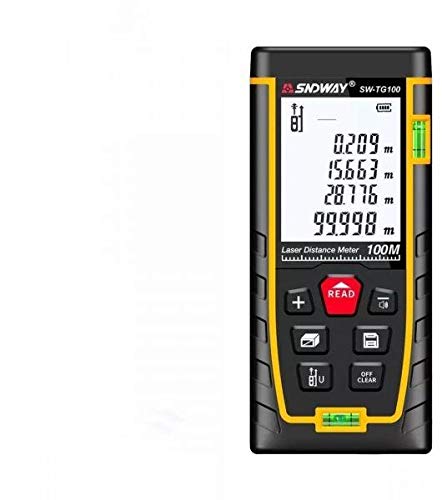
Сүрөт 1: Алдыңкы view of the SNDWAY SW-TG100 Laser Distance Meter. The image shows the device's display screen, measurement buttons, and the laser emission/reception lens.
Негизги компоненттер, адатта, төмөнкүлөрдү камтыйт:
- LCD дисплей: Shows measurement results, unit, battery status, and function indicators.
- Өлчөө баскычы: Initiates single or continuous measurements.
- Функция баскычтары: For selecting measurement modes (distance, area, volume, Pythagorean, etc.), unit conversion, and saving data.
- Clear/Off Button: Clears the last measurement or turns the device off.
- Лазердик диафрагма: Where the laser beam is emitted and received.
- Батарея бөлүмү: (If applicable) For inserting or accessing batteries.
4. Орнотуу
4.1 Күйгүзүү/өчүрүү
- Күйгүзүү үчүн: басыңыз [MEAS] button briefly. The display will light up.
- Өчүрүү үчүн: басып, кармап туруңуз [CLEAR/OFF] button for a few seconds until the display turns off. The device will also automatically power off after a period of inactivity to conserve battery.
4.2 Батареяны орнотуу (эгер бар болсо)
While the product specifications indicate no batteries are required, this typically implies an internal rechargeable battery. If your model requires external batteries, open the battery compartment cover located on the back or bottom of the device. Insert the specified battery type (e.g., AAA batteries) according to the polarity indicators (+/-). Close the compartment cover securely.
4.3 Бирдикти орнотуу
Өлчөө бирдигин өзгөртүү үчүн (мисалы, метр, фут, дюйм) баскычын басыңыз [UNIT] керектүү бирдик көрсөтүлгөнгө чейин баскычын кайра-кайра басыңыз.
5. Иштөө нускамалары
5.1 Бир аралыкты өлчөө
- Аппаратты күйгүзүңүз.
- Лазерди максаттуу бетке багыттаңыз.
- басыңыз [MEAS] button once. The laser will activate.
- басыңыз [MEAS] button again. The measurement will be taken, and the result will appear on the display.
5.2 Аянтты өлчөө
- басыңыз [ФУНКЦИЯ] button until the area measurement icon (usually a square or rectangle) appears on the display.
- Measure the first side (e.g., length) by pointing the laser and pressing [MEAS].
- Measure the second side (e.g., width) by pointing the laser and pressing [MEAS] кайра.
- Түзмөк автоматтык түрдө аянтты эсептеп, көрсөтөт.
5.3 Көлөмдү өлчөө
- басыңыз [ФУНКЦИЯ] button until the volume measurement icon (usually a cube) appears on the display.
- Measure the length by pointing the laser and pressing [MEAS].
- Measure the width by pointing the laser and pressing [MEAS].
- Measure the height by pointing the laser and pressing [MEAS].
- Түзмөк автоматтык түрдө көлөмдү эсептеп, көрсөтөт.
5.4 Үзгүлтүксүз өлчөө (көзөмөл)
This mode allows for dynamic measurement, displaying the distance in real-time as you move the device.
- басып, кармап туруңуз [MEAS] button (or press it twice quickly, depending on the model) to enter continuous measurement mode.
- Move the device slowly towards or away from the target. The display will update with the current distance.
- Басыңыз [MEAS] or [CLEAR/OFF] үзгүлтүксүз өлчөө режиминен чыгуу.
6. Техникалык тейлөө
- Тазалоо: жумшак колдонуу, damp аппаратты тазалоо үчүн чүпүрөк сasing. Do not use abrasive cleaners or solvents. Clean the laser lens carefully with a soft, lint-free cloth, similar to cleaning camera lenses.
- Сактагыч: Store the device in a cool, dry place, away from direct sunlight and extreme temperatures. If storing for an extended period, remove any external batteries (if applicable).
- Таасирден качуу: Protect the device from drops and strong impacts, which can affect its accuracy and functionality.
7. Кыйынчылыктарды
| Көйгөй | Мүмкүн себеп | Чечим |
|---|---|---|
| Түзмөк күйбөй жатат. | Батарея аз же түгөнүп калган. | Charge the device or replace batteries (if applicable). |
| Туура эмес өлчөө. | Dirty laser lens; unstable measurement surface; strong light interference. | Clean the laser lens; ensure a stable measurement point; measure in less bright conditions if possible. |
| Дисплейде "Ката" билдирүүсү. | Measurement out of range; poor reflection from target. | Ensure target is within measurement range (0.05m-100m); use a reflective target plate if measuring against highly reflective or transparent surfaces. |
8. Техникалык шарттар
| Өзгөчөлүк | Деталь |
|---|---|
| Өндүрүүчү | SNDWAY |
| Модел | SW-TG100 |
| Өлчөө диапазону | 100 метрге чейин |
| Өлчөө тактыгы | Typically ±2mm (specific accuracy may vary based on conditions) |
| Өлчөө бирдиктери | m / ft / in |
| Лазердик класс | 2-класс |
| Элемент Салмагы | 260 г |
| Пакеттин өлчөмдөрү | 16 x 8.8 x 5.2 см |
| Батареялар талап кылынат | No (implies internal rechargeable battery) |
| Дата биринчи жеткиликтүү | 7-июль, 2021-жыл |
9. Кепилдик жана колдоо
SNDWAY products are manufactured to high-quality standards. For specific warranty information, please refer to the warranty card included with your product or contact the retailer from whom you purchased the device. For technical support, troubleshooting assistance beyond this manual, or service inquiries, please contact SNDWAY customer service through their official webсайт же сатып алуу менен камсыз болгон байланыш маалыматы.
Кепилдик дооматтары үчүн сатып алганыңыздын далилин сактап коюңуз.