
1. Introduction and Overview
The AUTOOL LM110+ Digital Refrigeration Manifold Gauge is an advanced instrument designed for the installation, testing, and maintenance of refrigeration equipment, including air conditioners and cold storage units. This device offers digital readings, multi-unit switching, and a built-in database of 89 refrigerants for accurate measurements.
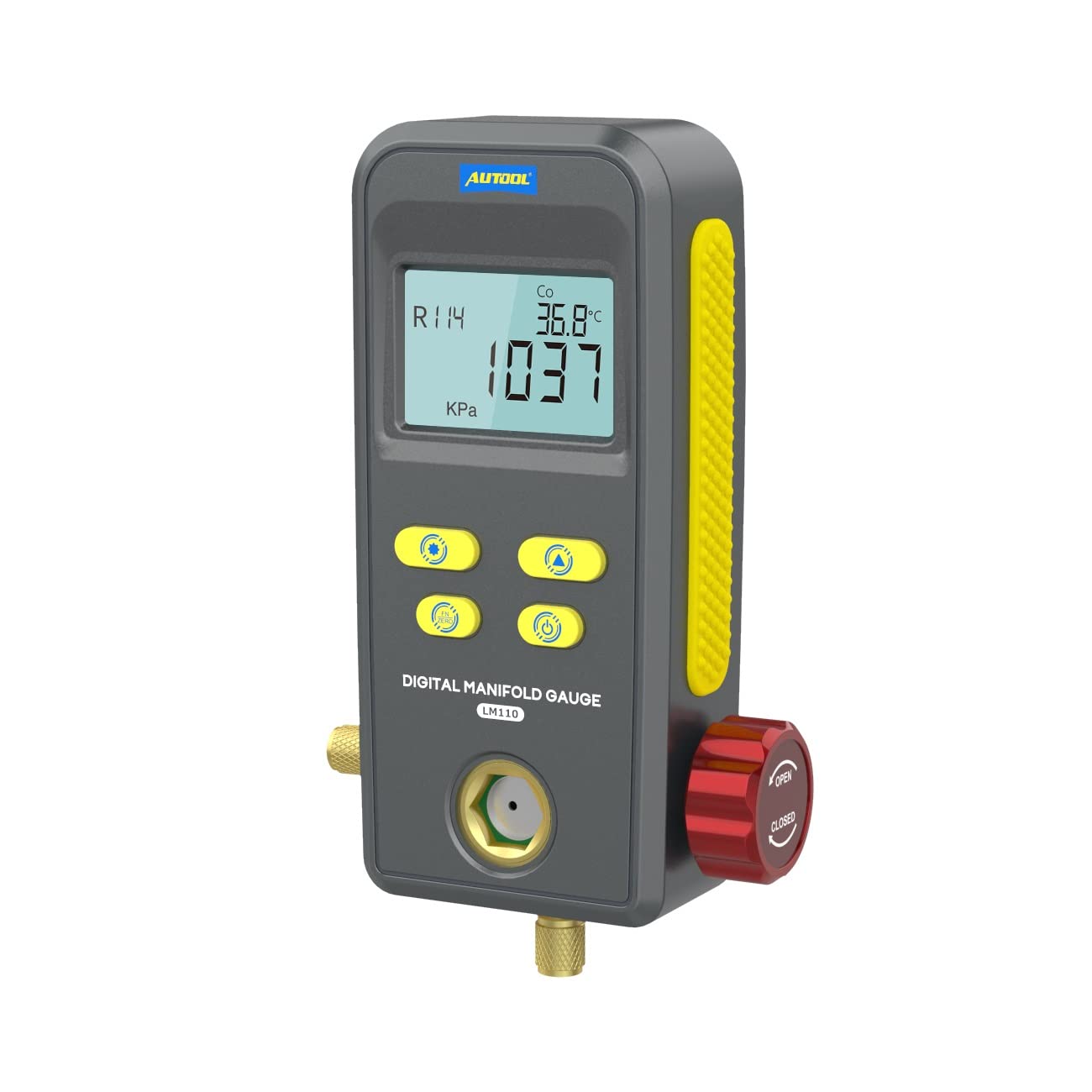
Figure 1: AUTOOL LM110+ Digital Refrigeration Manifold Gauge main unit. This image shows the front view of the digital manifold gauge, highlighting its display and control buttons.
Key functionalities include refrigerant filling and pressure inspection, vacuum testing, and pressure leakage testing. Its robust design features high-strength engineering plastics and flexible non-slip silicone for durability and comfortable handling.
2. Өзгөчөлүктөрү
- Санариптик дисплей: Large LCD display with backlight for clear readings in various lighting conditions.
- Мыкты курулуш: Made from high-strength engineering plastics and flexible non-slip silicone for durability. Features heavy-duty valve switches and 1/4-inch imports.
- Көп функциялуу: Supports refrigerant filling, pressure inspection, vacuum testing, and pressure leakage testing with time record.
- өнүккөн технология: Incorporates a 32-bit digital processing unit and high-precision data acquisition unit for efficient and stable performance.
- Refrigerant Database: Built-in database of 89 refrigerants (NIST) for accurate pressure condensation and evaporation temperature readings.
- Реалдуу убакыттагы мониторинг: Detects and displays original pressure, current pressure, leakage pressure, and test time during leak tests. Shows current vacuum pressure and vacuum percentage during vacuum operations.
- Байкоо терезеси: A visual window allows observation of the refrigerant filling status.
3. Техникалык шарттар

Figure 2: Detailed specifications of the AUTOOL LM110+ Digital Refrigeration Manifold Gauge. This image provides a visual summary of the technical data.
| Параметр | Нарк |
|---|---|
| Басым сыноо түрү | Өлчөмчү басым |
| Басым сыноо бирдиктери | KPa, MPa, Bar, inHg, PSI |
| Басым сыноо диапазону | 0 KPa – 6000 KPa |
| Басым сыноосунун резолюциясы | 1 KPa |
| Басым сыноосунун тактыгы | +/- 0.5 %(FS) + 5dgt |
| Ашыкча басымдын чеги | 10000 KPa (10 MPa; 100 bar) |
| Вакуумдук сыноо түрү | Салыштырмалуу вакуум |
| Вакуумдук сыноо бирдиктери | KPa, MPa, Bar, inHg, PSI |
| Вакуумдук сыноо диапазону | -101 KPa – 0 KPa |
| Vacuum Test Resolution | 1 KPa |
| Built-in Refrigerants | 89 types (NIST) |
| Электр камсыздоо | 3 x 1.5V (SIZE.AA / LR6) |
| Өлчөмдөрү (L x W x Y) | 200 x 150 x 130 мм (7.87 x 5.91 x 5.12 дюйм) |
| Weight (excludes battery) | 1.046 кг (2.31 фунт) |
| Материал | Silicone, Engineering Plastics |
4. Орнотуу
Before using the AUTOOL LM110+ Digital Refrigeration Manifold Gauge, ensure proper setup:
- Батарея орнотуу: Open the battery compartment and insert three 1.5V AA/LR6 batteries, ensuring correct polarity.
- Шланг туташтыруу: Connect the test pipes (hoses) to the appropriate ports on the manifold gauge and to the refrigeration system being serviced. Ensure all connections are secure to prevent leaks.
- Күйгүзүү: Press the power button to turn on the device. The LCD display should illuminate.
- Муздаткычты тандоо: Use the device's controls to select the specific refrigerant type (e.g., R134a, R410a) relevant to your application from the built-in database.

3-сүрөт: Мисamples of applicable scenes for the AUTOOL LM110+ Digital Refrigeration Manifold Gauge, including automobile air conditioning, household air conditioning, cold storage, and general refrigeration equipment.
5. Иштөө нускамалары
5.1 Refrigerant Filling and Pressure Inspection
This function is used for refrigeration system repair, maintenance, refrigerant filling, and operation inspection. The built-in refrigerant database provides pressure condensation and evaporation temperature readings.
- Connect the gauge to the refrigeration system according to standard procedures for refrigerant charging.
- Select the correct refrigerant type on the device.
- Monitor the pressure readings and corresponding condensation/evaporation temperatures on the display during the filling process.

Figure 4: Display showing refrigerant filling and testing. This image illustrates how the gauge displays refrigerant type, condensation/evaporation temperature, measuring unit, and pressure during operation.
5.2 Vacuum Operation and Testing
The vacuum operation mode tests the vacuum pressure value and calculates the vacuum degree of the refrigeration system.
- Connect the gauge to the system for vacuuming.
- Activate the vacuum test function on the device.
- Observe the real-time display of current vacuum pressure and the percentage of vacuum level.
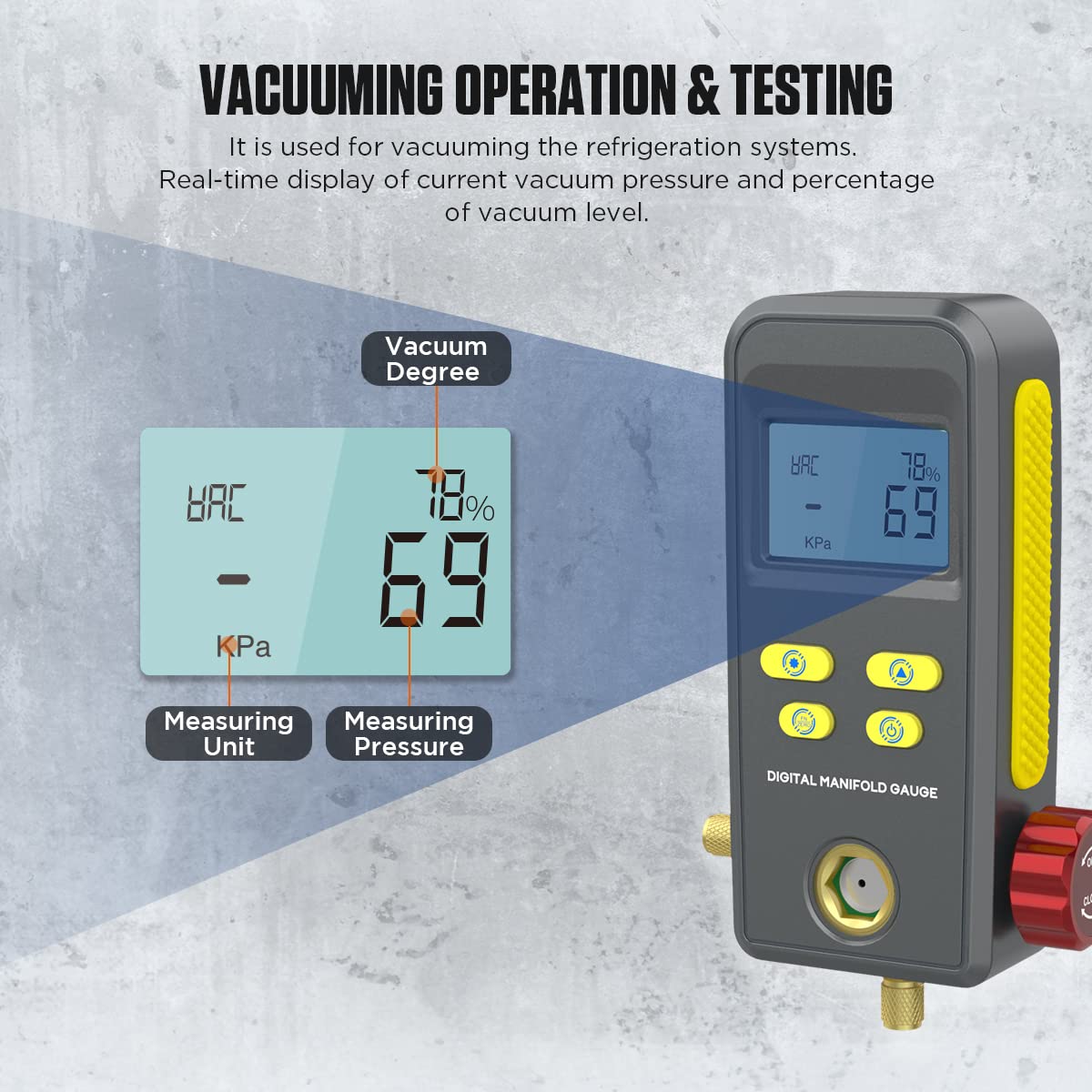
Figure 5: Display showing vacuuming operation and testing. This image demonstrates the gauge's ability to show vacuum degree, measuring unit, and pressure during vacuum tests.
5.3 Басымдын агып кетүүсүн текшерүү
The pressure leak test function is used to inspect how much pressure changes over a specific time after a refrigeration system has been filled with refrigerant or vacuumed.
- After charging or vacuuming, initiate the pressure leak test.
- The device will display the original pressure, current pressure, leakage pressure (difference), and the elapsed test time.
- Monitor these values to determine if there is a leak in the system.
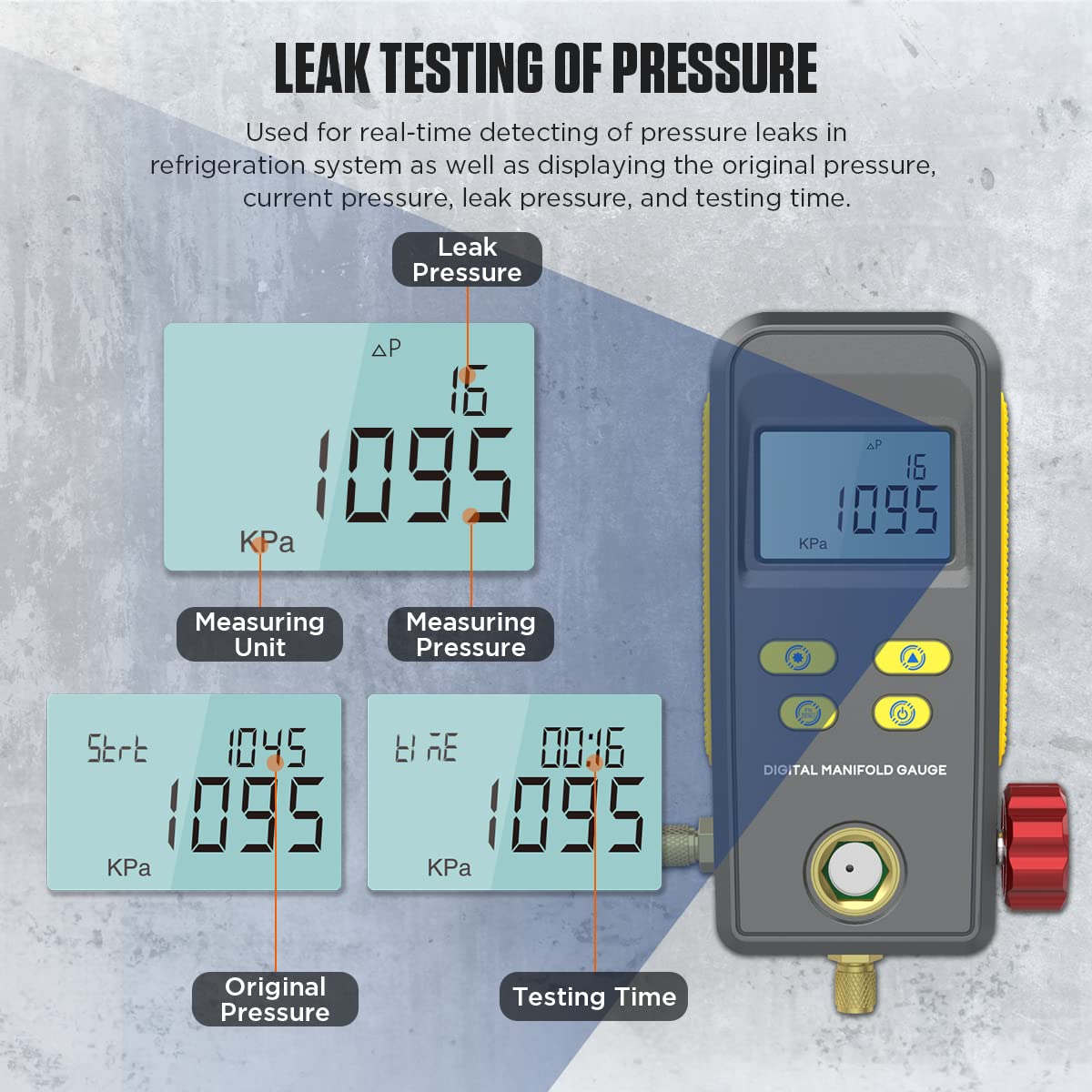
Figure 6: Display showing leak testing of pressure. This image illustrates how the gauge displays leak pressure, measuring unit, measuring pressure, original pressure, and testing time.
5.4 Бирдикти которуу
The LM110+ supports various pressure and temperature unit displays for user convenience.
- Басым бирдиктери: KPa, MPa, Bar, PSI, inHg.
- Температура бирдиктери: °C, °F.
Refer to the device's buttons for switching between units as needed during operation.

Figure 7: Display showing support for various unit switching. This image highlights the multiple pressure units (KPa, MPa, Bar, PSI, inHg) and temperature units (°C, °F) available on the gauge.
5.5 Refrigerant Observation Window
The manifold gauge includes a visual window to observe the refrigerant filling status, allowing for better control and monitoring during charging.

Figure 8: Close-up of the refrigerant observation window. This image shows the transparent window on the gauge, allowing users to visually inspect the refrigerant flow and status.
6. Техникалык тейлөө
To ensure the longevity and accuracy of your AUTOOL LM110+ Digital Refrigeration Manifold Gauge, follow these maintenance guidelines:
- Тазалоо: Аппаратты жумшак, кургак чүпүрөк менен сүртүңүз. Абразивдүү тазалагычтарды же эриткичтерди колдонбоңуз.
- Сактагыч: Store the gauge in a clean, dry place away from extreme temperatures and direct sunlight. Use the provided package box for protection when not in use.
- Батареяны алмаштыруу: Replace batteries promptly when the low battery indicator appears to prevent data loss or device malfunction. Remove batteries if the device will not be used for an extended period.
- Шланг текшерүү: Regularly inspect test pipes for cracks, wear, or damage. Replace damaged hoses immediately to ensure accurate readings and prevent refrigerant leaks.
- Калибрлөө: While the device is factory calibrated, periodic checks against known standards are recommended for professional use to maintain accuracy.
7. Кыйынчылыктарды
If you encounter issues with your AUTOOL LM110+ Digital Refrigeration Manifold Gauge, consider the following common troubleshooting steps:
- Түзмөк күйбөй жатат:
- Батареялардын туура орнотулганын жана жетиштүү заряддалганын текшериңиз. Зарыл болсо, жаңы батареялар менен алмаштырыңыз.
- Батарея отсеги бекем жабылганын текшериңиз.
- Туура эмес окуулар:
- Verify that the correct refrigerant type is selected on the device.
- Check all hose connections for leaks. Even small leaks can affect pressure readings.
- Ensure the system is properly purged of air before taking measurements.
- If persistent, consider professional calibration.
- Дисплей маселелери:
- If the backlight is not working, check battery levels.
- If the display is frozen or showing erratic characters, try turning the device off and on again.
- Leak Test Fails/Indicates Leak:
- Double-check all connections on the refrigeration system and the gauge itself.
- Perform a visual inspection for obvious signs of refrigerant leakage (e.g., oil residue).
- If a leak is confirmed, locate and repair it before retesting.
Бул кадамдар менен чечилбеген көйгөйлөр үчүн кардарларды колдоо кызматына кайрылыңыз.
8. Кепилдик жана колдоо
AUTOOL provides a warranty for the LM110+ Digital Refrigeration Manifold Gauge. For damage caused by non-human factors, AUTOOL promises to resend parts for free within 3 years from the date of purchase.
For any technical assistance, warranty claims, or product inquiries, please contact AUTOOL customer support. We aim to respond to all inquiries within 24 hours.
Байланыш маалыматы: Refer to the product packaging or the official AUTOOL webакыркы байланыш маалыматы үчүн сайт.