
Жөн гана45 DO-D003
SimplyAV Dongler ProAV 4K USB Type-C пигтейлдик донгл адаптери, зым менен
Модель: DO-D003
Продукт бүттүview
SimplyAV Dongler ProAV 4K USB Type-C Pigtail Dongle адаптери (DO-D003 модели) жогорку өндүрүмдүүлүктөгү видео жана аудио байланышын камсыз кылуу үчүн иштелип чыккан. Бул адаптер USB Type-C иштетилген түзмөктөрдү HDMI дисплейлерине туташтырууну жеңилдетет, HDR менен өтө жогорку сапаттагы 4K видеону жана маалыматтарды үзгүлтүксүз өткөрүү үчүн 18 Гбит/сек өткөрүү жөндөмүн колдойт.

1-сүрөт: SimplyAV Dongler ProAV 4K USB Type-C өрүмдүү донгл адаптери, showcasinанын компакттуу дизайны жана интеграцияланган жабдыгы.
Негизги өзгөчөлүктөрү:
- Жогорку өндүрүмдүүлүк: Кесипкөй AV орнотууларында жандуу түстөр, терең контраст жана жылмакай ойнотуу үчүн HDR менен ультра жогорку сапаттагы 4K видеону камсыз кылат.
- Тез 18 Гбит/сек өткөрүү жөндөмдүүлүгү: Видео жана аудио чыгаруунун үзгүлтүксүз иштеши үчүн жогорку ылдамдыктагы маалыматтарды берүүнү камсыздайт, кечигүүнү жок кылат жана оюндардын, агымдардын жана презентациялардын иштешин жакшыртат.
- Коопсуз кур менен бекитилүүчү кочкул куйруктуу донгл: Коопсуз жана ишенимдүү туташуу үчүн иштелип чыккан, портторго түшкөн чыңалууну азайтат жана колдонуу учурунда кокусунан үзүлүп калуудан сактайт.
- USB Type-C шайкештиги: USB-C менен иштеген ноутбуктар, планшеттер жана смартфондор менен иштейт, HDMI дисплейлерине, проекторлоруна жана мониторлоруна үзгүлтүксүз туташат.
- Бышык жана ишенимдүү курулуш: Жогорку сапаттагы материалдар менен узак мөөнөттүү иштөө үчүн иштелип чыккан, бул аны Pro AV адистери, контент жаратуучулар жана IT орнотуулары үчүн ишенимдүү тандоо кылат.

Figure 2: ашыкview SimplyAV The Donglerдин негизги функциялары, анын ичинде 4K HDR колдоосу, 18 Гбит/сек өткөрүү жөндөмдүүлүгү жана USB-Cден HDMIге конвертациялоо.
Орнотуу жана туташуу
Бул бөлүмдө SimplyAV The Dongler адаптерин орнотуу жана туташтыруу боюнча көрсөтмөлөр берилген.
Адаптерди туташтыруу:
- Агып чыкмадагы USB Type-C (Эркек) киргизүүсүн аныктаңыз. Бул сиздин баштапкы түзмөгүңүзгө (ноутбук, планшет, смартфон) сайылуучу туташтыргыч.
- HDMI (аял) чыгышын донглден табыңыз. Бул жерден сиз HDMI кабелиңизди дисплей түзмөгүңүзгө (HDTV, монитор, проектор) туташтырасыз.
- Баштапкы түзмөгүңүз колдой турганын текшериңиз DisplayPort Alt режими видео чыгаруу үчүн USB Type-C порту аркылуу. Бул адаптердин туура иштеши үчүн абдан маанилүү.
- Ачкычтын USB Type-C (эркек) учун баштапкы түзмөгүңүздөгү USB Type-C портуна туташтырыңыз.
- Гендоллдогу HDMI (аял) портунан стандарттуу HDMI кабелин (кошулмада жок) дисплей түзмөгүңүздөгү HDMI киргизүүсүнө туташтырыңыз.
- Эгер коопсуз жабууну колдонсоңуз, кокустан ажырап калуудан же уурдалып кетүүдөн сактануу үчүн аны бар HDMI кабелиңизге же башка коопсуз түйүнгө туташтырыңыз. Жабууда жаңы донглдорду кошуу үчүн кең аралык жана алты бурчтуу аспап менен тууралоого боло турган кошумча коопсуз механизм бар.

3-сүрөт: Dongler адаптеринин USB Type-C киргизүү, HDMI чыгаруу, кең аралык жана коопсуз жип функцияларын көрсөткөн диаграмма.
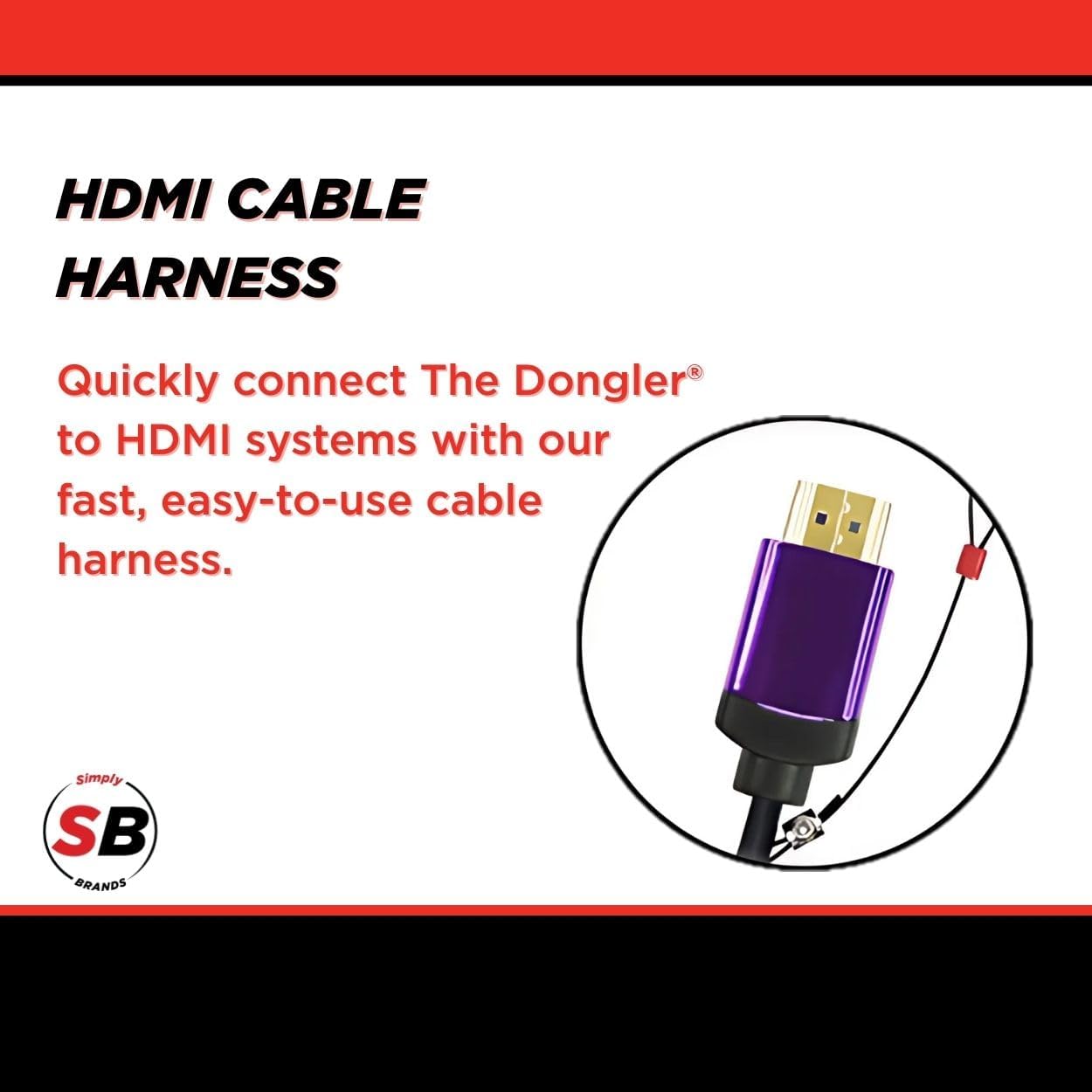
Сүрөт 4: Жакын пландан view HDMI кабелдик жабдыктары, HDMI системаларына тез жана оңой туташуу үчүн иштелип чыккан.
Иштөө нускамалары
Туташтырылгандан кийин, SimplyAV Dongler адаптери автоматтык түрдө иштейт. Көпчүлүк операциялык тутумдар үчүн кошумча драйверлер же программалык камсыздоо талап кылынбайт.
Көрсөтүлүүчү мазмун:
- Адаптерди жана дисплейди туташтыргандан кийин, булак түзмөгүңүз тышкы дисплейди автоматтык түрдө аныкташы керек.
- Экраныңызды каалагандай кеңейтүү, көчүрүү же проекциялоо үчүн баштапкы түзмөгүңүздөгү (мисалы, ноутбук, смартфон) дисплей жөндөөлөрүн тууралаңыз.
- Адаптер HDR менен 60Гц жыштыктагы 4K чечилишин колдойт, бул шайкеш келген мазмун жана дисплейлер үчүн жогорку сапаттагы видео чыгарууну камсыз кылат.
- Оптималдуу иштөө үчүн, HDMI кабелиңиз жана дисплей түзмөгүңүз 4K чечилишин жана HDRди колдой турганын текшериңиз.
Техникалык тейлөө жана кам көрүү
SimplyAV The Dongler адаптериңиздин узак мөөнөттүү иштешин жана оптималдуу иштешин камсыз кылуу үчүн, төмөнкү техникалык тейлөө көрсөтмөлөрүн аткарыңыз:
- Тазалоо: Адаптерди тазалоо үчүн жумшак, кургак чүпүрөктү колдонуңуз. Суюк тазалоочу каражаттарды же абразивдүү материалдарды колдонуудан алыс болуңуз.
- Сактагыч: Адаптерди колдонбогон учурда салкын, кургак жерде сактаңыз. Ашыкча температурадан жана түз күн нурунан алыс кармаңыз.
- Колдонуу: Туташтыргычтарга күч келбеши үчүн, адаптерди кабелдерден эмес, корпусунан кармаңыз.
- Коопсуз жип: Бекитилген жипти жана анын туташтыруучу жерлерин эскирүүнүн же бузулуунун белгилерин үзгүлтүксүз текшерип туруңуз.

5-сүрөт: Donglerдин уурулукка туруктуу дизайны, кесилүүгө туруктуу болот шакекче жана бекем бекитүү үчүн айкалышкан кулпу менен жабдылган.
Проблемаларды чечүү
Эгерде сиз SimplyAV The Dongler адаптериңиз менен көйгөйлөргө туш болсоңуз, төмөнкү жалпы көйгөйлөрдү чечүү кадамдарын караңыз:
| Көйгөй | Мүмкүн себеп | Чечим |
|---|---|---|
| Видео же аудио чыгаруу жок. |
|
|
| Төмөн чечилиш же дисплейдин жымыңдашы. |
|
|
| үзгүлтүктүү байланыш. |
|
|
Техникалык шарттар
| Атрибут | Деталь |
|---|---|
| Бренд аты | Simply45 |
| Модель номери | DO-D003 |
| Элемент Салмагы | 1.44 унция |
| Продукциянын өлчөмдөрү (L x W x Y) | 8.6 x 5.7 x 0.2 дюйм |
| Түс | Кара |
| Шайкеш түзмөктөр | Проектор, телевизор (каалаган HDMI дисплей) |
| Продукт үчүн атайын колдонуу | Агым, Оюндар, Презентациялар |
| Туташтыргыч түрү | USB түрү C (киргизүү), HDMI (чыгуу) |
| өткөрүү жөндөмдүүлүгү | 18 Гбит/сек |
| Video колдоо | 4K HDMI, HDR |
| HDCP колдоо | HDCP 2.2 |
Кепилдик жана колдоо
SimplyAV Dongler ProAV 4K USB Type-C Pigtail Dongle адаптеринин (DO-D003 модели) кепилдик мөөнөтү жана кардарларды тейлөө боюнча түз байланыштар жөнүндө маалымат берилген продукт маалыматтарында жок. Сураныч, өндүрүүчүнүн расмий маалыматына кайрылыңыз. webКепилдик шарттары жана колдоо параметрлери жөнүндө кененирээк маалымат алуу үчүн сайтка же сатып алуу пунктуңузга кайрылыңыз.
Жалпы суроолор же техникалык жардам алуу үчүн, сиз төмөнкү дарекке кайрылсаңыз болот Amazon'догу Simply45 дүкөнү же алардын расмий колдоо каналдарын табуу үчүн онлайн режиминде "Simply45" деп издеңиз.
Ask a question about this manual
Ask about setup, troubleshooting, compatibility, parts, safety, or missing instructions. Manuals+ will review the question and use this page’s manual context to help answer it.