
Introduction
This manual provides detailed instructions for setting up, operating, maintaining, and troubleshooting your ASUS TUF Gaming VG247Q1A 24-inch 1080P Monitor. Please read this manual thoroughly before using the monitor to ensure proper operation and to prevent damage.

Image: ASUS TUF Gaming VG247Q1A Monitor, front view.
Жайгашуу
Пакеттин мазмуну
Орнотууну улантуудан мурун пакетте бардык элементтер бар экенин текшериңиз.
- VG247Q1A Monitor
- Электр зымы
- Кепилдик картасы
- Ыкчам баштоо колдонмосу (QSG)
- HDMI кабели
- DisplayPort кабели

Image: Illustration of the items included in the monitor package, including the monitor, cables, and documentation.
Монитор Ассамблеясы
- Мониторду жана анын компоненттерин таңгактан этияттык менен алып салыңыз.
- Attach the stand base to the stand neck, then secure it to the monitor panel. Refer to the Quick Start Guide for specific instructions and diagrams.
- Чогулган мониторду туруктуу, жалпак бетке коюңуз.
Мониторду туташтыруу
Мониторду компьютериңизге же башка түзмөктөргө тиешелүү кабелдерди колдонуп туташтырыңыз.
- Кубат туташуу: Кубат шнурын монитордун кубат киресине, андан кийин розеткага туташтырыңыз.
- Видео туташуу:
- For optimal performance, use the included DisplayPort cable to connect the monitor to your graphics card's DisplayPort output.
- Alternatively, use an HDMI cable to connect to an HDMI port on your device. The monitor has two HDMI (v1.4) ports.
- Аудио туташуусу: If desired, connect headphones or external speakers to the 3.5mm earphone jack on the monitor.

Сүрөт: Арткы view of the monitor highlighting the DisplayPort, HDMI (x2), and earphone jack connections.
Монитор ошондой эле альтернативдүү орнотуу чечимдери үчүн VESA орнотуусун (100x100 мм) колдойт.
Иштөө нускамалары
Күйгүзүү/өчүрүү
Аны күйгүзүү же өчүрүү үчүн монитордо жайгашкан кубат баскычын басыңыз. Монитор активдүү болгондо кубат индикаторунун жарыгы күйөт.
Экрандагы дисплей (OSD) менюсу
Access the OSD menu using the joystick or buttons on the back/bottom of the monitor to adjust various settings.
- Навигация: Use the joystick to navigate through menu options.
- Тандоо: Press the joystick or corresponding button to select an option.
- Чыгуу: Use the designated button or move the joystick to exit the menu.
Негизги функциялар жана жөндөөлөр
- Жаңыртуу ылдамдыгы (165 Гц): The monitor supports a high refresh rate of 165Hz for smoother motion. Ensure your graphics card settings are configured to utilize this refresh rate.
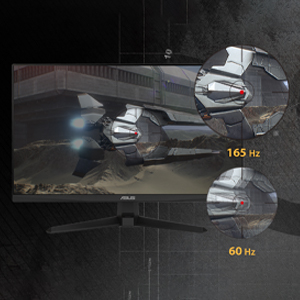
Image: Visual comparison demonstrating the smoothness of 165Hz refresh rate versus 60Hz.
- ASUS Extreme Low Motion Blur (ELMB): This technology provides a 1ms Moving Picture Response Time (MPRT) to reduce motion blur. Activate it through the OSD menu for clearer fast-paced visuals.
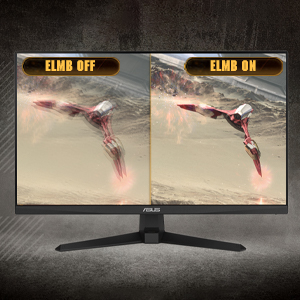
Image: Side-by-side comparison of ELMB off and ELMB on, showing reduced motion blur with ELMB active.
- AMD FreeSync™ Premium: This technology synchronizes the monitor's refresh rate with your AMD graphics card's frame rate to eliminate screen tearing and stuttering. Ensure it is enabled in both the monitor OSD and your graphics card software.
Image: Comparison of screen tearing with FreeSync Premium off versus smooth gameplay with FreeSync Premium on.
- Shadow Boost: Enhances image details in dark areas without over-exposing bright areas, providing better visibility in dimly lit game scenes.
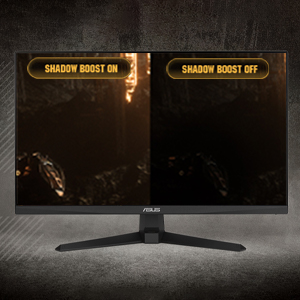
Image: Side-by-side comparison of a dark game scene with Shadow Boost off and Shadow Boost on, showing improved visibility in dark areas.
- Көзгө кам көрүүнүн өзгөчөлүктөрү:
- Ultra-Low Blue Light: Reduces harmful blue light emissions to protect your eyes during long viewing sessions. Adjust the blue light filter level in the OSD menu.

Image: Graphic illustrating the effect of Ultra-Low Blue Light technology on screen output.
- Flicker-Free технологиясы: Eliminates screen flickering to minimize eye strain. This feature is always active.

Image: Side-by-side comparison of a screen with and without flicker-free technology, demonstrating reduced flickering.
- Ultra-Low Blue Light: Reduces harmful blue light emissions to protect your eyes during long viewing sessions. Adjust the blue light filter level in the OSD menu.
- GamePlus: Provides in-game enhancements such as crosshairs, timers, FPS counters, and display alignment tools. Access these features via the OSD menu.
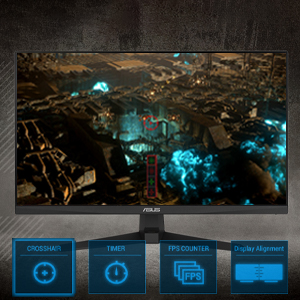
Image: Monitor screen displaying various GamePlus overlays like crosshair, timer, and FPS counter.
- GameVisual: Offers several preset display modes optimized for different content types (e.g., Scenery, Racing, Cinema, RTS/RPG, FPS, sRGB, MOBA). Select the appropriate mode for your current activity.

Image: Side-by-side comparison of a game scene with GameVisual off and GameVisual on, showing optimized visual settings.
Техникалык тейлөө
Туура тейлөө мониторуңуздун узак мөөнөттүү жана оптималдуу иштешин камсыз кылат.
- Экранды тазалоо:
- Мониторду өчүрүп, электр зымдарын сууруп алыңыз.
- Жумшак, түксүз кездемени жеңил колдонуңуз dampсуу же абразивдүү эмес экран тазалагыч менен иштетиңиз.
- Wipe the screen gently. Avoid applying pressure or using harsh chemicals.
- Тазалоо Casing:
- Мониторду сүртүү үчүн жумшак, кургак чүпүрөктү колдонуңуз casing.
- Финишке зыян келтирүүчү абразивдүү тазалагычтарды же эриткичтерди колдонуудан алыс болуңуз.
- Сактагыч:
- If storing the monitor for an extended period, unplug all cables and pack it in its original packaging if possible.
- Күн нурунан жана экстремалдык температурадан алыс салкын, кургак жерде сактаңыз.
Проблемаларды чечүү
If you encounter issues with your monitor, refer to the following common solutions.
| Көйгөй | Мүмкүн чечим |
|---|---|
| Экранда сүрөт жок |
|
| Сүрөт бүдөмүк же бурмаланган |
|
| Динамиктерден/наушниктерден үн чыкпайт |
|
| Оюн учурунда экрандын жыртылышы же кекечтениши |
|
Бул чечимдерди колдонуп көргөндөн кийин көйгөй чечилбесе, ASUS кардарларды колдоо кызматына кайрылыңыз.
Техникалык шарттар
| Өзгөчөлүк | Деталь |
|---|---|
| Бренд | ASUS |
| Модель номери | VG247Q1A |
| Screen Size | 24 дюйм |
| Резолюция | FHD 1080p (1920 x 1080 пиксел) |
| Аспект катышы | 16:9 |
| Жаңыртуу ылдамдыгы | 165 Гц |
| Жооп убактысы | 1 Milliseconds (MPRT) |
| Дисплей түрү | LCD |
| Панел түрү | VA (Note: Not explicitly stated, but common for these specifications) |
| Viewбурч | 170 градус |
| Жарыктык | Бир чарчы метрге 350 Кандела |
| Контраст катышы | 1000:1 |
| Screen Finish | Жылтырак |
| Байланыш | 2x HDMI (v1.4), 1x DisplayPort (v1.2), 1x Earphone Jack |
| Adaptive Sync Technology | FreeSync Premium |
| Өзгөчөлүктөр | ASUS Extreme Low Motion Blur (ELMB), Shadow Boost, Blue Light Filter, Built-In Speakers, Flicker-Free, GamePlus, GameVisual |
| Элементтин өлчөмдөрү (D x W x Y) | 15.53"D x 21.3"W x 6.85"H |
| Элемент Салмагы | 7.3 фунт |
| VESA Монтаждоо | 100x100mm compatible (Mount not included) |
| Энергияны керектөө | 14.52 Ватт |
| Тtage | 240 вольт |
Кепилдик жана колдоо
Your ASUS TUF Gaming VG247Q1A monitor comes with a manufacturer's warranty.
- Кепилдик түрү: 3 жылдык Өндүрүүчүнүн Кепилдиги
- Кепилдиктин сүрөттөлүшү: 3 Year Warranty with ARR (Advanced Replacement Service)
For technical support, warranty claims, or further assistance, please visit the official ASUS support website or contact their customer service. Refer to the warranty card included in your package for specific contact details and terms.