
Introduction
Thank you for choosing the SONICAKE Rude Mouse Distortion Pedal. This manual provides essential information for the proper setup, operation, and maintenance of your new guitar effects pedal. Please read this manual thoroughly to ensure optimal performance and longevity of your device.
Продукт бүттүview
The SONICAKE Rude Mouse is a compact, all-analog distortion pedal designed to deliver a wide range of classic and modern distortion tones. It features two distinct modes, "Classic" and "Hot," offering versatility from creamy overdrive to aggressive fuzz. Its true bypass design ensures your guitar's signal remains uncolored when the effect is disengaged.
- 100% Analog Circuit: Provides authentic and rich distortion, overdrive, and fuzz tones.
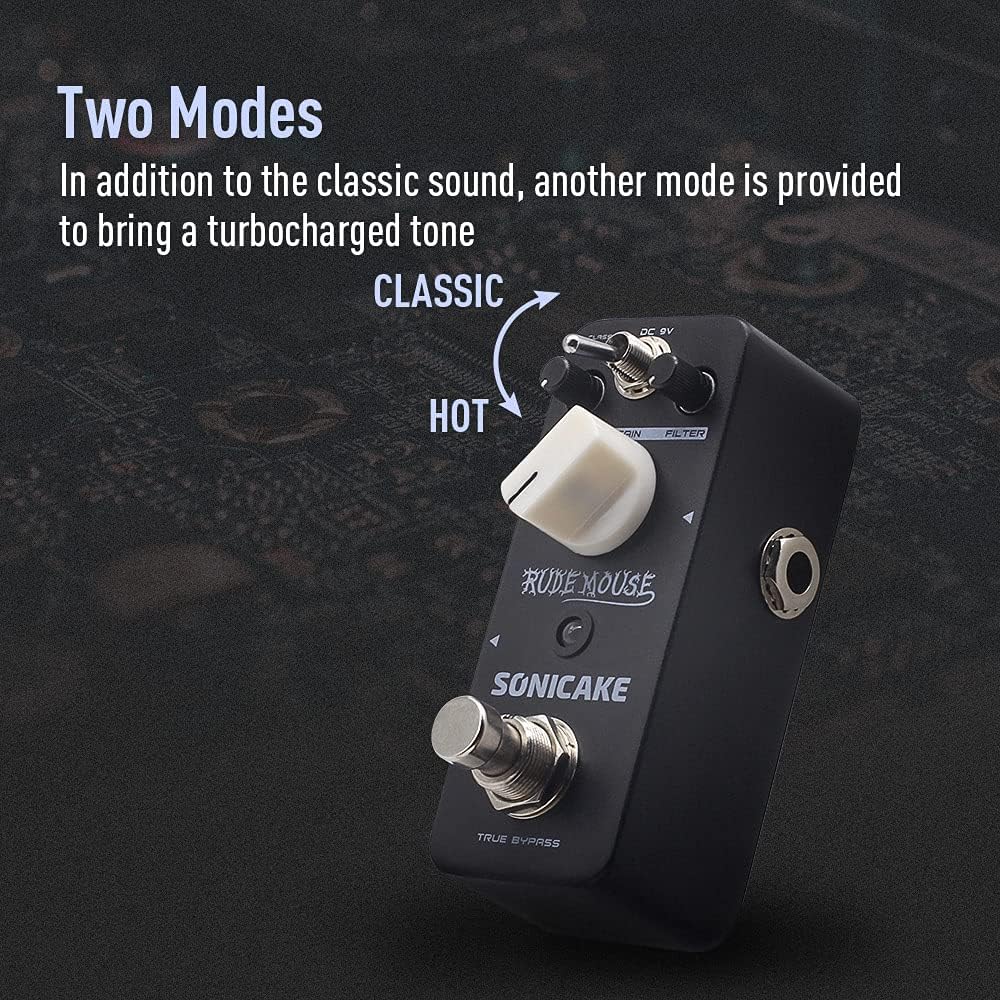
- Эки режим: Switch between "Classic" for vintage distortion and "Hot" for a more aggressive, turbo-charged sound.
- Чыпка башкаруу: Offers a broad tonal range, from dark to bright, allowing precise sound sculpting.
- Чыныгы айланып өтүү: Maintains the integrity of your guitar's signal when the pedal is off.
- Туруктуу курулуш: Housed in a robust zinc-alloy die-cast casinишенимдүүлүк үчүн g.
- Компакт өлчөмү: Designed for portability and efficient pedalboard space utilization.


Башкаруу жана функциялар
Familiarize yourself with the controls of the Rude Mouse pedal:

- DC 9V киргизүү: Connect a standard 9V DC power adapter (center negative) here. The pedal requires a stable power supply for operation.
- LEVEL баскычы: Controls the overall output volume of the effect. Adjust to balance the effect volume with your clean signal.
- GAIN баскычы: Adjusts the amount of distortion. Turning clockwise increases the intensity of the distortion.
- FILTER Knob: Shapes the tone of the distorted sound. This control allows you to dial in a wide range of frequencies, from dark and bass-heavy to bright and cutting.
- MODE Switch (Classic/Hot): Toggles between two distinct distortion voicings.
- Классикалык: Provides a vintage, smooth distortion tone.
- Ысык: Delivers a more aggressive, higher-gain distortion with increased saturation.
- Чыгуу Джек: Connect this to your ampкөтөргүч же сигнал чынжырыңыздагы кийинки педаль.
- Киргизүү Джек: Connect your guitar or the preceding pedal in your signal chain here.
- ЧЫНЫГЫ БАЙПАС бут өчүргүч: Engages or disengages the effect. When engaged, the LED indicator will illuminate. When disengaged, the pedal is bypassed, and your signal passes through unaffected.
Жайгашуу
Follow these steps to set up your SONICAKE Rude Mouse pedal:
- Кубат туташуу: Connect a standard 9V DC power adapter (center negative) to the DC 9V input jack (1). Ensure the power supply meets the specified voltage жана полярдуулук талаптары. (Note: Power adapter is not included.)
- Киргизүү байланышы: Connect your guitar to the Input Jack (7) using a standard 1/4-inch instrument cable.
- Чыгуу туташуу: Connect the Output Jack (6) to your amplifier's input or to the input of the next pedal in your effects chain using a standard 1/4-inch instrument cable.
- Баштапкы жөндөөлөр: Before powering on, set the LEVEL knob to a low position, and the GAIN and FILTER knobs to their middle positions (12 o'clock).
- Күйгүзүү: Бардык байланыштар коопсуз болгондон кийин, күйгүзүңүз ampкөтөргүчтү, андан кийин педалды басыңыз.


Иштөө нускамалары
To achieve various distortion sounds:
- Эффектти ишке киргизүү: Press the TRUE BYPASS Footswitch (8) to activate the distortion effect. The red LED indicator will light up.
- Деңгээлин тууралоо: Use the LEVEL knob (2) to set the desired output volume. Start low and increase gradually to avoid sudden loud sounds.
- Күчөтүүнү орнотуу: Rotate the GAIN knob (3) to control the amount of distortion. Lower settings provide a mild crunch, while higher settings deliver heavy, saturated distortion.
- Shape Tone with Filter: Adjust the FILTER knob (4) to fine-tune the tonal characteristics. Turning it clockwise generally brightens the sound, while counter-clockwise makes it darker. Experiment to find the sweet spot for your guitar and ampөмүрлүү.
- Режимди тандоо: Use the MODE Switch (5) to toggle between "Classic" and "Hot" voicings.
- For a more traditional, smooth distortion, select Classic.
- For a more aggressive, modern, and higher-gain sound, select Ысык.
- Disengage Effect: Press the TRUE BYPASS Footswitch (8) again to bypass the effect. The LED indicator will turn off, and your signal will pass through the pedal without modification.
Техникалык тейлөө
- Тазалоо: Use a soft, dry cloth to clean the pedal's exterior. Avoid using abrasive cleaners or solvents, as they may damage the finish.
- Сактагыч: Педалды кургак чөйрөдө, экстремалдык температурадан жана тике күн нурунан алыс сактаңыз.
- Электр камсыздоо: Always use a regulated 9V DC power supply with a center-negative plug. Incorrect power supplies can damage the unit and void the warranty.
- Байланыштары: Ensure all cables are securely connected but do not overtighten. Periodically check cables for wear and tear.
Проблемаларды чечүү
| Көйгөй | Мүмкүн себеп | Чечим |
|---|---|---|
| Педал иштетилгенде үн чыкпайт. | Incorrect power supply, faulty cables, incorrect connections, LEVEL knob set too low. | Verify 9V DC center-negative power supply. Check all instrument cables. Ensure guitar is connected to INPUT and amplifier to OUTPUT. Increase LEVEL knob. |
| Weak or distorted sound (unintended). | Low battery (if applicable, though this pedal is not battery-powered), incorrect impedance, faulty cables. | Ensure proper power supply. Check cable integrity. Ensure correct input/output impedance matching with other gear. |
| Керексиз ызы-чуу же ызы-чуу. | Негизги цикл, туура эмес электр менен жабдуу, башка электроникадан келген тоскоолдук. | Use a high-quality, isolated power supply. Try a different power outlet. Move pedal away from other electronic devices. Check for faulty cables. |
| LED not lighting up. | No power, pedal not engaged. | Ensure power supply is connected and functional. Press the footswitch to engage the effect. |
Техникалык шарттар
| Өзгөчөлүк | Деталь |
|---|---|
| Модель номери | QSS-18 |
| Бренд | SONICAKE |
| Элемент Салмагы | 7.3 унция (208 грамм) |
| Продукциянын өлчөмдөрү | Узундугу 2.05" x Туурасы 1.65" x Бийиктиги 3.68" (Узундугу 52 мм x Туурасы 42 мм x Бийиктиги 93.5 мм) |
| Дене материалы | Zinc-alloy die-cast casing |
| Power Source | Зымдуу электр (9V DC, борбордук терс) |
| Тtage | 9 вольт |
| Сигнал форматы | Аналог |
| Туташтыргыч түрү | 1/4 дюймдук (6.35 мм) аудио уяча |


Кепилдик жана колдоо
For warranty information, please refer to the documentation included with your purchase or visit the official SONICAKE website. If you encounter any issues or require technical assistance, please contact SONICAKE customer support through their official channels.
Көбүрөөк маалымат жана байланыш маалыматтарын даректен таба аласыз SONICAKE Amazon Store.
Маанилүү маалымат
- Сериялык номери: For product identification and warranty purposes, please note your pedal's serial number: 60190008971.
- UPC: 0843037101667
- EAN: 6971002021666
Видео ресурстар
While this manual provides comprehensive instructions, visual demonstrations can be helpful. Please note that specific product videos were not available in the provided data for embedding. For official product videos and demonstrations, please visit the SONICAKE official webсайтында же алардын расмий YouTube каналында.