LILYGO T-SIM7000G ESP32-WROVER-B Development Board User Manual
Model: T-SIM7000G
1. Киришүү
The LILYGO T-SIM7000G ESP32-WROVER-B is a versatile development board integrating an ESP32 microcontroller with a SIM7000G module for cellular communication (2G/NB-IoT/LTE Cat-M1) and GPS functionality. It features a solar charging interface, a Nano SIM slot, and an 18650 battery holder, making it suitable for various IoT applications requiring low-power, remote connectivity, and location tracking.
2. Продукт бүтүп калдыview
This section provides a visual guide to the components of the LILYGO T-SIM7000G development board and its included accessories.
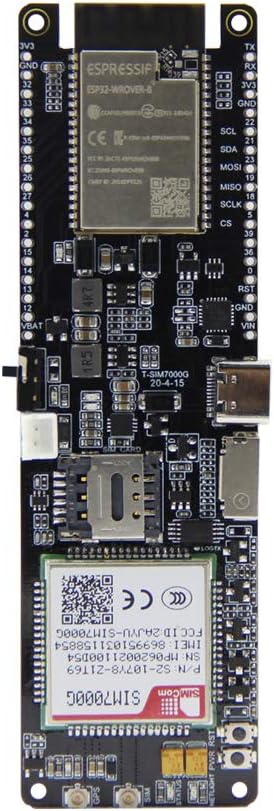
Сүрөт 2.1: Алдыңкы view of the LILYGO T-SIM7000G development board, showing the ESP32-WROVER-B module and SIM7000G cellular module.
2.2-сүрөт: Артка view of the LILYGO T-SIM7000G development board, featuring the 18650 battery holder and pinout labels.
Figure 2.3: Labeled components of the LILYGO T-SIM7000G board, including USB Interface, Nano SIM Slot, Solar Charging Cable Interface, Power Switch, Reset Button, Battery Power Protection Reset, and SD Card slot. Identifiers visible on the SIM7000G module include P/N:S2-107Y8-Z1T69, SN:MP0620021100D54, IMEI:869951031158854, SW:1529B03SIM7000G.
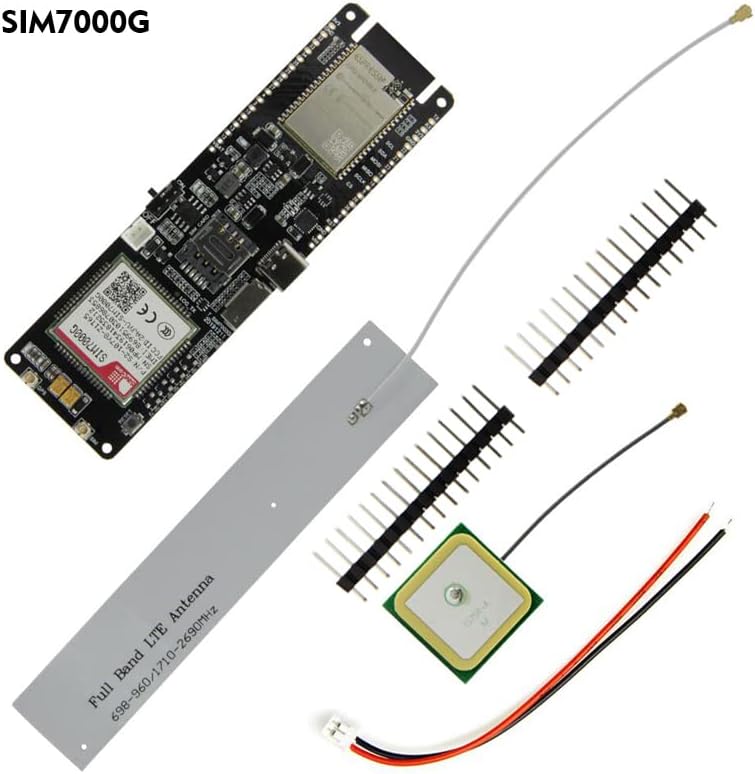
Figure 2.4: The LILYGO T-SIM7000G development board kit contents, typically including the main board, SIM antenna, GPS antenna, and pin headers.
Figure 2.5: Pinout diagram for the LILYGO T-SIM7000G ESP32, detailing GPIOs, power, and communication interfaces. Note: If GPIO12 is HIGH during external device startup, the program may enter an infinite reboot loop.
3. Орнотуу
3.1. Антенна туташтыруу
Connect the provided SIM antenna and GPS antenna to their respective U.FL connectors on the board. Ensure a secure connection. The SIM antenna is typically a thin wire, and the GPS antenna is a square ceramic patch.
Figure 3.1: SIM and GPS antennas connected to the LILYGO T-SIM7000G board.
3.2. Батареяны орнотуу
Insert an 18650 Lithium rechargeable cell into the battery holder on the back of the board. Observe correct polarity. The board supports solar charging via the dedicated interface, allowing for continuous operation in remote locations.
3.2-сүрөт: Мисample of connecting a solar panel to the LILYGO T-SIM7000G for battery charging.
3.3. SIM картаны салуу
Insert a Nano SIM card into the Nano SIM slot. Ensure the USIM card you use supports 2G (GSM) or NB-IoT access for cellular connectivity. The SIM7000G module does not support standard 4G networks (e.g., for smartphones), but it does support LTE Cat-M1, which is a narrowband IoT variant of LTE.
3.4. Драйверди орнотуу
Before connecting the board to your computer via USB, install the CH9102 driver. This driver is necessary for your computer to recognize the board and enable serial communication for programming and debugging. Drivers can typically be found on the LILYGO GitHub page or through a web search for "CH9102 driver".
3.5. Баштапкы кубаттуулук
After connecting antennas, battery, and SIM card, connect the board to your computer using a USB cable. Use the power switch located on the side of the board to turn on the device. The board can then be programmed using environments such as Arduino IDE, PlatformIO, or MicroPython.
4. Иштөө нускамалары
4.1. Программалоо жана иштеп чыгуу
The LILYGO T-SIM7000G is based on the ESP32-WROVER-B module, allowing development with various platforms. Refer to the official LILYGO GitHub repository for examples and libraries: github.com/Xinyuan-LilyGO/LilyGO-T-SIM7000G.
Arduino IDE: Install the ESP32 board definitions and necessary libraries.
ПлатформаIO: Configure your project for the ESP32 platform.
MicroPython: Flash MicroPython firmware and use a serial terminal for programming.
4.2. Cellular Communication (SIM7000G)
The integrated SIM7000G module supports 2G (GSM), NB-IoT, and LTE Cat-M1. It is important to note that the SIM7000G does not support standard 4G/LTE (e.g., for smartphones). Ensure your SIM card and service plan are compatible with these specific IoT network types.
AT буйруктары: The SIM7000G module is controlled via AT commands. Libraries like TinyGSM can simplify interaction.
Тармакка кирүү: Configure the Access Point Name (APN) according to your cellular provider's requirements.
4.3. GPS функциясы
The SIM7000G module includes GPS capabilities. Ensure the GPS antenna is connected and has a clear view of the sky for optimal signal reception and accuracy. GPS data can be accessed via AT commands.
4.4. Электр энергиясын башкаруу
The board features an 18650 battery holder and a solar charging input. The ESP32 supports deep sleep modes for power optimization. Careful consideration of power consumption in deep sleep is advised, as some components may still draw current, potentially leading to higher than expected battery drain.
5. Техникалык тейлөө
Батареяга кам көрүү: Use high-quality 18650 batteries. Avoid over-discharging or over-charging. If using solar charging, ensure the solar panel is appropriately sized for the battery and charging circuit to prevent damage.
Программалык камсыздоонун жаңыртуулары: The SIM7000G module supports Firmware Over-The-Air (FOTA) updates. Refer to the module's documentation for details on this process. Regularly check for ESP32 firmware updates for improved performance and security.
Экологиялык шарттар: Operate the board within its specified temperature and humidity ranges. Avoid exposure to moisture, dust, and extreme temperatures to ensure longevity.
Тазалоо: Use a soft, dry, anti-static cloth to clean the board. Avoid liquids or abrasive cleaners, which can damage components.
6. Кыйынчылыктарды
6.1. Байланыш маселелери
No Cellular Connection:
Ensure the SIM antenna is securely connected.
Verify that your Nano SIM card is active and supports 2G (GSM), NB-IoT, or LTE Cat-M1. Standard 4G/5G SIMs may not work with the SIM7000G module.
Check the Access Point Name (APN) settings in your code; these must match your cellular provider's requirements.
Confirm that the cellular network in your area supports the SIM7000G's frequency bands.
GPS оңдоолор жок:
Ensure the GPS antenna is securely connected and has an unobstructed view асмандын.
GPS accuracy can vary based on environmental factors. Expect typical accuracy in the range of several meters, not sub-meter precision.
USB туташуусу таанылган жок:
Install the CH9102 driver for your operating system.
Компьютериңиздеги башка USB кабелин же портун колдонуп көрүңүз.
6.2. Programming and Software Issues
Жүктөө каталары:
Reduce the upload speed in your IDE settings (e.g., Arduino IDE Tools -> Upload speed) if you encounter frequent upload failures.
Ensure the correct board and COM port are selected in your development environment.
Infinite Reboot Loop:
Check if GPIO12 is inadvertently pulled HIGH during startup, especially if external devices are connected to it. This can prevent the ESP32 from booting correctly.
Complex Functionality (e.g., SMS Receive, MQTT over TLS):
Some advanced features may require more in-depth understanding of AT commands and module interaction. Refer to the SIM7000G datasheet and community forums for detailed examples and support.
6.3. Power Management Issues
High Battery Drain in Deep Sleep:
While the ESP32 supports deep sleep, ensure all peripheral components (SIM7000G, sensors, etc.) are properly powered down or put into low-power modes to minimize current draw.
Consider adding external power monitoring or cutoff circuits for critical low-voltage protection, as the board may not have an integrated controller to force shutdown at low battery levels.
7. Техникалык шарттар
Key technical specifications for the LILYGO T-SIM7000G development board:
Өзгөчөлүк
Деталь
MCU
ESP32-WROVER-B (Dual-core, 240MHz)
Flash Memory
16 MB
PSRAM
8 MB
Уюлдук модул
SIM7000G (Global)
Уюлдук байланыш
2G (GSM), NB-IoT, LTE Cat-M1
SIM карта түрү
Nano SIM
GPS / GNSS
Beidou, GPS, GLONASS
Зымсыз байланыш
Wi-Fi (802.11 b/g/n), Bluetooth (v4.2 BR/EDR and BLE)
Перифериялык интерфейстер
I2C, SPI, UART, SDIO, I2S, CAN, GPIO
USB интерфейси
1x USB (for power, programming, serial communication)
Операция системасы
FreeRTOS (ESP32)
Электр камсыздоо
3.0V ~ 4.3V (via 18650 battery or USB)
Заряддоо
Integrated 18650 battery charger, Solar charging input
Өлчөмдөрү (L x W x Y)
4.37" x 1.46" x 0.79" (болжол менен 111 мм x 37 мм x 20 мм)
Камтылган аксессуарлар
USB cable, SIM antenna, GPS antenna, Pin headers
Figure 7.1: Detailed specifications table for the SIM7000G module, including frequency bands, power consumption, data transfer rates, GNSS support, and protocols.
Figure 7.2: Comparison table highlighting differences between the T-SIM7000G (Global) and T-SIM7000A (America) versions, primarily in cellular module and regional support.
8. Кепилдик жана колдоо
8.1. Кепилдик маалыматы
Бул продукт үчүн кепилдиктин так чоо-жайы жеткиликтүү маалыматта берилген эмес. Сураныч, чекене сатуучуга же өндүрүүчүнүн расмий өкүлүнө кайрылыңыз. website for current warranty policies.
8.2. Техникалык колдоо
For technical assistance, detailed documentation, and code examples, please visit the official LILYGO GitHub repository:
If you have further questions, you may contact LILYGO directly through their official channels, typically found on their webсайт же продукт баракчалары.
Ask a question about this manual
Ask about setup, troubleshooting, compatibility, parts, safety, or missing instructions. Manuals+ will review the question and use this page’s manual context to help answer it.