
1. Киришүү
Сатып алганыңыз үчүн рахматasing the Kimwood Bluetooth Headset. This manual provides detailed instructions on how to set up, operate, and maintain your headset. Please read this manual carefully before use to ensure optimal performance and longevity of your device.

Figure 1.1: Kimwood Bluetooth Headset with its charging case.
2. Коопсуздук маалыматы
- Гарнитураны экстремалдык температурага, нымдуулукка же жегич заттардын таасирине тийгизбеңиз.
- Гарнитураны түшүрүүдөн же катуу таасирлерге дуушар кылуудан качыңыз.
- Do not disassemble or modify the headset. This will void the warranty and may cause damage.
- Гарнитураны балдардан жана үй жаныбарларынан алыс кармаңыз.
- Берилген заряддоо кабелин жана туура келген кубат адаптерин гана колдонуңуз.
3. Пакеттин мазмуну
Сураныч, пакетте төмөнкү нерселерди текшериңиз:
- Kimwood Bluetooth Headset
- Заряддоо кутусу
- USB Type-C кубаттоочу кабель
- User Manual

3.1-сүрөт: Пакетке кирген буюмдар.
4. Продукт бүтүп калдыview
Familiarize yourself with the components of your Kimwood Bluetooth Headset:
| Жок. | Компонент | Функция |
|---|---|---|
| 1 | Кубат/Көп функциялуу баскыч | Power On/Off, Play/Pause, Answer/End Call, Voice Assistant |
| 2 | Көлөмдү жогорулатуу/Кийинки трек | Increase volume, skip to next track (long press) |
| 3 | Көлөмдү төмөндөтүү/Мурунку трек | Decrease volume, go to previous track (long press) |
| 4 | Микрофон | Picks up your voice for calls |
| 5 | Заряддоо порту (Type-C) | Connects to charging cable |
| 6 | LED көрсөткүч | Shows power, pairing, and charging status |
5. Орнотуу
5.1 Гарнитураны жана кутуну заряддоо
Биринчи колдонуудан мурун, гарнитураны жана анын заряддоо кутусун толук заряддаңыз.
- Connect the USB Type-C cable to the charging port on the case.
- Кабелдин экинчи учун USB кубат булагына туташтырыңыз (мисалы, компьютер, дубал адаптер).
- Заряддоо корпусундагы санарип дисплей батарейканын пайызын көрсөтөтtage. Толук заряддалганда, ал "100" дегенди көрсөтөт.
- Place the headset into the charging case. The headset will automatically begin charging.
The charging case has a 500mAh battery, and the earphone has a 100mAh battery. A full charge takes approximately 1.5 hours.

Figure 5.1: Charging the headset and case.
5.2 Bluetooth түзмөгү менен жупташтыруу
The headset supports Bluetooth 5.1 for stable and automatic connections.
- Take the headset out of the charging case. It will automatically power on and enter pairing mode (LED indicator will flash blue).
- Түзмөгүңүздө (смартфон, планшет, компьютер) Bluetooth функциясын иштетиңиз.
- Издөө available Bluetooth devices and select "VYK-B26" from the list.
- Once connected, the LED indicator on the headset will stop flashing and remain solid blue. A voice prompt will confirm the connection.
After the initial pairing, the headset will automatically connect to the last paired device when taken out of the case.

Figure 5.2: Automatic pairing process.
5.3 Гарнитураны тагынуу
The ear-hook design allows for comfortable wear on either the left or right ear. The microphone and ear hook can be rotated to fit your preference.
- Adjust the ear hook to fit securely around your ear.
- Rotate the microphone arm up to 180 degrees and the ear hook up to 360 degrees to find the optimal position for comfort and clear voice pickup.

Figure 5.3: Adjusting the headset for left or right ear use.
6. Иштөө нускамалары
6.1 Күйгүзүү/өчүрүү
- Күйгүзүү: Take the headset out of the charging case, or long-press the Multi-function Button for 3 seconds.
- Өчүрүү: Place the headset back into the charging case, or long-press the Multi-function Button for 5 seconds.
6.2 Чакыруу функциялары
- Чалууга жооп берүү/аяктоо: Көп функциялуу баскычты кыска басыңыз.
- Чакырууну четке кагуу: Long press the Multi-function Button for 2 seconds.
- Микрофондун үнүн басуу/ачуу: During a call, long press the Volume Up or Volume Down button for approximately 3 seconds.

Figure 6.1: Mute function and unidirectional microphone for clear calls.
6.3 Музыканы ойнотуу
- Ойнотуу/тындыруу: Көп функциялуу баскычты кыска басыңыз.
- Кийинки трек: Үндү жогорулатуу баскычын кыска басыңыз.
- Мурунку трек: Үндү азайтуу баскычын кыска басыңыз.
6.4 Үндү башкаруу
- Көлөмүн жогорулатуу: Үндү жогорулатуу баскычын кыска басыңыз.
- Көлөмдү азайтуу: Үндү азайтуу баскычын кыска басыңыз.
6.5 Үн жардамчысы
Activate your device's voice assistant (Siri, Google Assistant, etc.) directly from the headset.
- Үн Жардамчысын жандыруу: While the headset is connected and in standby mode, long press the Multi-function Button for 2 seconds.
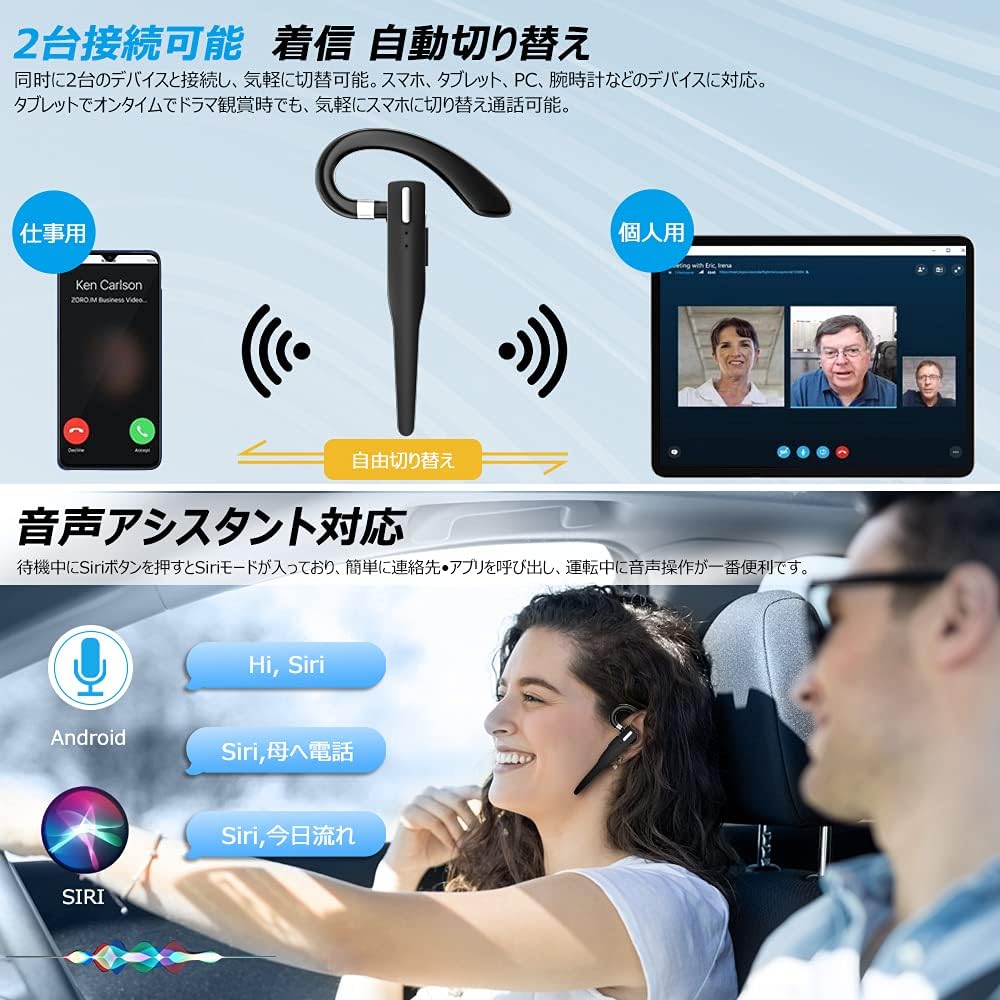
Figure 6.2: Multi-device connectivity and voice assistant features.
6.6 Көп түзмөктүү туташуу
Гарнитура бир эле учурда эки Bluetooth түзмөгүнө туташа алат, бул алардын ортосунда үзгүлтүксүз которулууга мүмкүндүк берет.
- Pair the headset with the first device as described in Section 5.2.
- Биринчи түзмөктө Bluetooth'ду өчүрүңүз. Гарнитура жупташтыруу режимине кайра кирет.
- Гарнитураны экинчи аппарат менен жупташтырыңыз.
- Turn on Bluetooth on the first device. The headset should now be connected to both devices.
- The headset will automatically switch audio output to the device that is actively playing media or receiving a call.
7. Техникалык тейлөө
7.1 Тазалоо
- Wipe the headset and charging case with a soft, dry, lint-free cloth.
- Катуу химиялык заттарды, тазалоочу эриткичтерди же күчтүү жуучу каражаттарды колдонбоңуз.
7.2 Сактоо
- Колдонулбай турган учурда, гарнитураны чаңдан жана бузулуудан коргоо үчүн кубаттоочу кутучасында сактаңыз.
- Аппаратты салкын, кургак жерде, тике күн нурунан жана экстремалдык температурадан алыс сактаңыз.

Figure 7.1: The compact charging case provides convenient storage.
8. Кыйынчылыктарды
Эгерде сиз гарнитураңыз менен көйгөйлөргө туш болсоңуз, төмөнкү кеңири таралган көйгөйлөрдү жана чечимдерди караңыз:
| Көйгөй | Мүмкүн себеп | Чечим |
|---|---|---|
| Гарнитура күйбөйт. | Батарея аз. | Charge the headset and charging case. |
| Түзмөк менен жупташтыруу мүмкүн эмес. | Bluetooth is off on device; headset not in pairing mode; too far from device. | Ensure Bluetooth is on; take headset out of case to enter pairing mode; keep within 10 meters. |
| Үн жок же үнү төмөн. | Volume too low; headset not connected; sound output set to another device. | Increase volume on headset and device; re-pair headset; check device's audio output settings. |
| Микрофон иштебей жатат. | Microphone muted; incorrect audio input settings on device. | Unmute microphone (long press Volume Up/Down); check device's audio input settings. |
| Connection unstable or drops. | кийлигишүү; аппараттан өтө алыс; аз батарея. | Move closer to device; avoid strong electromagnetic interference; charge headset. |
9. Техникалык шарттар
| Өзгөчөлүк | Деталь |
|---|---|
| Модел | VYK-B26 |
| Bluetooth версиясы | 5.1 |
| Noise Cancellation | CVC8.0 |
| Гарнитуранын Батарея сыйымдуулугу | 100mAh |
| Заряддоо корпусунун батареясынын сыйымдуулугу | 500mAh |
| Talk Time | 12 саатка чейин |
| Музыканы ойнотуу убактысы | 12 саатка чейин |
| Жалпы колдонуу убактысы (кутучасы менен) | 72 саатка чейин |
| Күтүү убактысы | 400 саатка чейин |
| Заряддоо убактысы | Болжол менен 1.5 саат |
| Заряддоо порту | USB Type-C |
| Суу өткөрбөйт рейтинги | IPX7 (терге чыдамдуу) |
| Шайкештик | iOS, Android, Windows (Bluetooth-enabled devices) |

Figure 9.1: Advanced Bluetooth 5.1 and CVC8.0 Noise Cancelling features.
10. Кепилдик жана колдоо
Kimwood products are designed for reliability and performance. For warranty information and technical support, please refer to the contact details provided on the product packaging or visit the official Kimwood webсайт. Кепилдик дооматтары үчүн сатып алганыңыздын далилин сактап коюңуз.