
1. Киришүү
The CAMMHD C2 is a compact, head-mounted 4K video camera designed for hands-free recording. It features 6-axis anti-shake stabilization, Wi-Fi connectivity for app control, and a long-lasting 2200mAh battery, making it suitable for various activities such as vlogging, travel, and sports. This manual provides detailed instructions for the proper use and maintenance of your CAMMHD C2 camera.

Figure 1: CAMMHD C2 4K Head-Mounted Video Camera
2. Пакеттин мазмуну
Төмөндө тизмеленген нерселердин баары пакетиңизге камтылганын текшериңиз. Эгерде кандайдыр бир нерселер жок болсо же бузулса, кардарларды колдоо менен байланышыңыз.
- CAMMHD C2 4K Head-Mounted Camera
- Headband Bracket
- Туулга кронштейн
- 3M Жабыштыргычтар
- Mounting Bracket Tools
- USB Type-C кубаттоочу кабель
- Кубаттуу адаптер
- 32GB Memory Card (pre-installed or separate)
- User Manual

2-сүрөт: Кошумча аксессуарлар
3. Продукт бүтүп калдыview
Камеранын компоненттери жана башкаруу элементтери менен таанышыңыз.
3.1 Камеранын компоненттери
- Объектив: Видео жана сүрөткө тартат.
- Power/Wi-Fi Button: Powers the device on/off and activates Wi-Fi.
- Сүрөт баскычы: Takes still images.
- Жазуу баскычы: Видео жазууну баштайт жана токтотот.
- Индикатор жарыгы: Displays device status (power, recording, Wi-Fi).
- TF карта уячасы: Insert microSD card for storage.
- Тип-C Port: Заряддоо жана маалыматтарды өткөрүү үчүн.
- Калыбына келтирүү баскычы: Аппаратты баштапкы абалга келтирет.

Сүрөт 3: Алдыңкы view of the CAMMHD C2 camera

4-сүрөт: Төмөнкү view of the CAMMHD C2 camera showing ports
4. Орнотуу
4.1 Алгачкы заряддоо
Before first use, fully charge the camera using the provided USB Type-C cable and power adapter. The indicator light will show charging status.
4.2 Эстутум картасын салуу
Locate the TF card slot. Gently insert the provided 32GB microSD card (or another compatible card up to 512GB) until it clicks into place. Ensure the camera is powered off before inserting or removing the memory card.
4.3 Камераны орнотуу
The CAMMHD C2 offers versatile mounting options:
4.3.1 Head-Worn Installation
Attach the camera to the headband bracket. Adjust the headband for a comfortable and secure fit on your head. This method provides a first-person perspective.
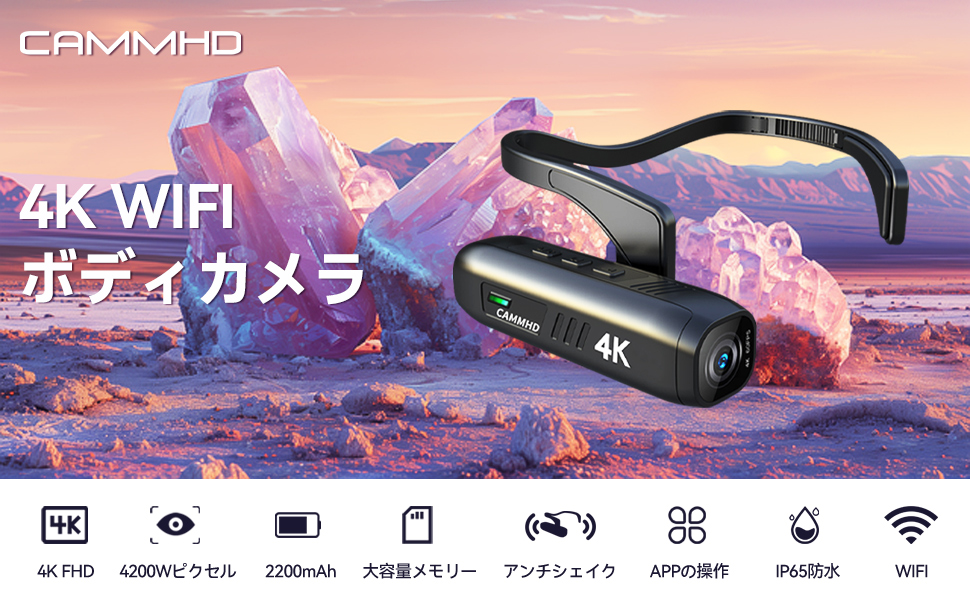
Figure 5: Head-worn installation for hands-free recording
4.3.2 Helmet-Mounted Installation
Use the helmet bracket and 3M adhesive pads to securely attach the camera to your helmet. Ensure the adhesive surface is clean and dry before application for optimal adhesion.

Figure 6: Helmet-mounted installation for secure attachment
5. Операция
5.1 Күйгүзүү/өчүрүү
басып, кармап туруңуз Кубат/Wi-Fi баскычы for a few seconds to turn the camera on or off. The indicator light will illuminate when powered on.
5.2 Видеону жаздыруу
басыңыз Жазуу баскычы once to start video recording. Press it again to stop recording. The indicator light will change to show recording status.
5.3 Сүрөт тартуу
басыңыз Сүрөт баскычы once to capture a still image.
5.4 Wi-Fi туташуусу жана колдонмону башкаруу
The CAMMHD C2 supports Wi-Fi connectivity for real-time viewбашкаруу, көзөмөлдөө жана file transfer via a smartphone app.
- Download the "Viidure Camera" app from your smartphone's app store.
- Power on the CAMMHD C2 camera.
- басыңыз Кубат/Wi-Fi баскычы briefly to activate Wi-Fi mode on the camera. The indicator light will show Wi-Fi status.
- On your smartphone, go to Wi-Fi settings and connect to the camera's Wi-Fi network (e.g., "M20Pro_20F_XXXXXXXXXX"). The default Wi-Fi password is 12345678.
- Open the "Viidure Camera" app. You can now view жаша фооtage, control recording, adjust settings, and transfer fileтүз эле смартфонуңузга туташтырыңыз.
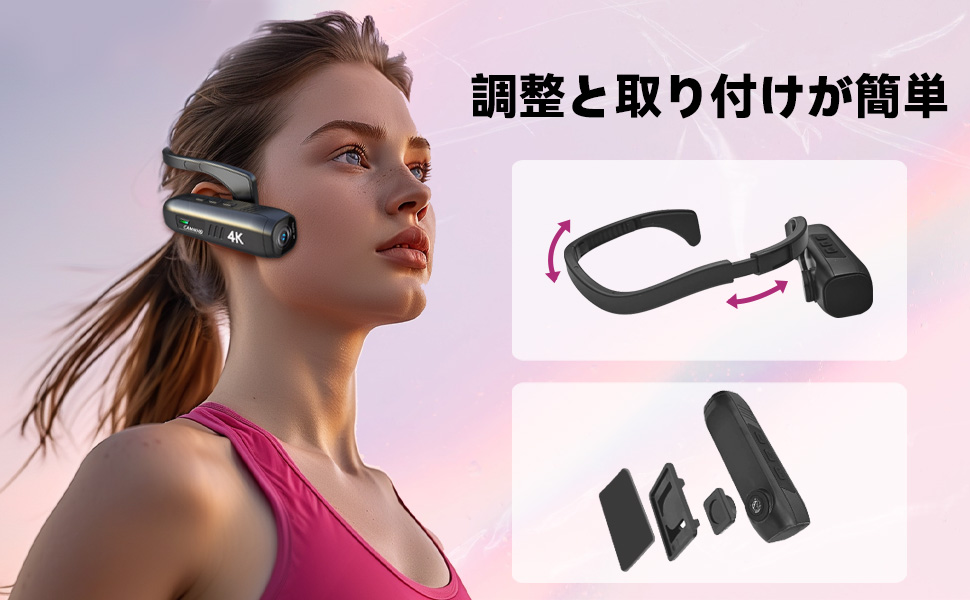
Figure 7: Wi-Fi app control interface
5.5 Негизги өзгөчөлүктөрү
- 4K жогорку чечилиште: Records videos in 3840 x 2160 4K at 30fps or 2704 x 1520 2K at 30fps for clear and vivid footage.
- 6-Axis Anti-Shake: Advanced stabilization technology minimizes blur from movement, ensuring smooth video.
- Батареянын узак иштөө мөөнөтү: Integrated 2200mAh battery provides approximately 5-7 hours of continuous recording.
- Кең бурчтуу объектив: 130-degree wide-angle lens captures a broader field of view.
- Кеңейтүүчү сактагыч: 512 ГБ чейин microSD карталарын колдойт.
6. Техникалык тейлөө
- Keep the camera lens clean using a soft, lint-free cloth. Avoid abrasive materials.
- Камераны салкын, кургак жерде күндүн тике тийген нурунан жана экстремалдык температурадан алыс сактаңыз.
- Regularly back up your recorded data to prevent loss.
- Ensure the Type-C port cover is securely closed when not in use to protect against dust and moisture.
7. Кыйынчылыктарды
| Көйгөй | Мүмкүн себеп | Чечим |
|---|---|---|
| Камера күйбөйт. | Батареянын аздыгы; аппараттын бузулушу. | Charge the camera fully. If problem persists, contact support. |
| Wi-Fi'га туташпай жатат. | Incorrect password; Wi-Fi not activated on camera; app issue. | Ensure Wi-Fi is active on camera. Verify password (12345678). Restart camera and app. |
| Видеонун сапаты начар. | Lens is dirty; low light conditions; incorrect resolution settings. | Clean the lens. Ensure adequate lighting. Check resolution settings in the app. |
| Камера катып калат же жооп бербей калат. | Программанын катасы. | Кайра орнотуу баскычын басыңыз. |
8. Техникалык шарттар
| Өзгөчөлүк | Деталь |
|---|---|
| Бренд | CAMMHD |
| Модел | C2 |
| Видео тартуунун резолюциясы | 4K (3840 x 2160) @ 30fps, 2K (2704 x 1520) @ 30fps |
| Фото сенсор технологиясы | CMOS (Sony 386 sensor) |
| Видео тартуу форматы | MP4 |
| Аудио формат | WAV |
| Байланыш | USB, Wi-Fi |
| Өзгөчөлүктөр | 4K, Wi-Fi, Vlog, 6-axis Anti-shake |
| Батарея сыйымдуулугу | 2200mAh литий-иону |
| Батареянын орточо иштөө мөөнөтү | 5-7 саат |
| Сактоо колдоо | Up to 512GB microSD card (32GB included) |
| Салмагы | 75г |
| Өлчөмдөр (D x W x H) | 28 x 26 x 101 мм |
9. Кепилдик жана колдоо
The CAMMHD C2 camera comes with a 1 жылдык кепилдик from the date of purchase. For technical support, warranty claims, or any inquiries, please contact CAMMHD customer service through the retailer where you purchased the product or visit the official CAMMHD webсайт.
Онлайн ресурстар: For additional support, FAQs, and firmware updates, please refer to the CAMMHD official store or product page: CAMMHD Official Store