
1. Киришүү
This manual provides detailed instructions for the safe and effective operation, setup, and maintenance of your SUGON 2020D Hot Air Rework Station. Please read this manual thoroughly before using the device to ensure proper function and to prevent damage or injury.
The SUGON 2020D is a high-power 700W hot air rework station designed for precision soldering and desoldering tasks. It features rapid heating, adjustable temperature and airflow, three memory storage channels, and an automatic sleep function for enhanced safety and efficiency.
2. Коопсуздук нускамалары
ЭСКЕРТҮҮ: Бул коопсуздук нускамаларын аткарбоо электр шокуна, өрткө же олуттуу жаракатка алып келиши мүмкүн.
- Always operate the rework station in a well-ventilated area to avoid inhaling fumes.
- Do not touch the hot air gun nozzle or heated components directly. They can reach very high temperatures.
- электр менен жабдууну камсыз кылуу voltage matches the requirements of the station (110V).
- Жумушчу жайды таза жана күйүүчү материалдардан сактаңыз.
- Never leave the rework station unattended while it is powered on or hot.
- Allow the hot air gun to cool down completely before storing.
- Do not use the station if the power cord or any part of the unit is damaged.
- Балдар жетпеген жерде сактаңыз.
3. Пакеттин мазмуну
Пакетте бардык буюмдар бар экенин текшериңиз:
- SUGON 2020D Hot Air Rework Station Main Unit
- Ысык аба мылтыгынын туткасы
- Hot Air Gun Holder/Bracket
- Электр кабели
- 5 x Hot Air Nozzles (various sizes)
- Колдонуучунун Колдонмосу (бул документ)
4. Продукт бүтүп калдыview
The SUGON 2020D Hot Air Rework Station consists of a main control unit and a hot air gun. The main unit features a digital display for temperature and airflow, control buttons, and a rotary knob for adjustments. A side bracket provides convenient storage for the hot air gun and nozzles.

Figure 4.1: SUGON 2020D Hot Air Rework Station. This image displays the complete rework station, including the main control unit, the hot air gun, and a set of five interchangeable nozzles.

Figure 4.2: Station in use. The rework station is shown on a workbench, positioned next to a circuit board, illustrating a typical operational setup.
4.1 Main Unit Controls and Display
- Санариптик дисплей: Shows current temperature and airflow settings.
- Температураны жөндөө баскычтары: Up/Down arrows for precise temperature control.
- Аба агымын жөндөө баскычы: Rotary knob to adjust air volume.
- Memory Channels (CH1, CH2, CH3): Buttons to save and recall frequently used temperature and airflow settings.
- Кубат которгучу: Негизги кубаттуулукту күйгүзүү/өчүрүү.
4.2 Hot Air Gun and Nozzles
The hot air gun features a comfortable grip and a quick-change nozzle bracket. The station includes five different nozzles for various applications.

Figure 4.3: Assortment of Hot Air Nozzles. This image displays the five different hot air nozzles included with the rework station, designed for various applications.

Figure 4.4: Hot Air Gun Handle Holder. A close-up view of the holder designed to securely store the hot air gun when not in active use, activating the automatic sleep function.

Figure 4.5: Integrated Nozzle Storage Rack. This image shows the side-mounted rack with five slots for convenient storage and quick access to different hot air nozzles.
5. Орнотуу
- Пакеттен чыгаруу: Бардык компоненттерди таңгактан кылдаттык менен алып салыңыз жана кандайдыр бир бузулууларды текшериңиз.
- Жайгашкан жери: Place the rework station on a stable, heat-resistant surface in a well-ventilated area.
- Ысык аба мылтыгына туташуу: Plug the hot air gun cable securely into the designated port on the main unit.
- Install Handle Holder: Attach the hot air gun holder to the side of the main unit.
- Туташуу кубаты: Plug the power cord into the main unit and then into a grounded 110V AC power outlet.
- Initial Nozzle Installation: Select a desired nozzle and attach it to the hot air gun. Ensure it is securely fastened.
6. Иштөө нускамалары
6.1 Күйгүзүү/өчүрүү
Flip the main power switch located on the front panel to the "ON" position to power on the station. The display will illuminate. Flip to "OFF" to power down.
6.2 Температураны жана аба агымын жөнгө салуу
- Температура: колдонуу ▲ жана ▼ buttons next to "TEMP" on the display to adjust the desired temperature. The range is 212°F to 932°F (100°C to 500°C).
- Аба агымы: Rotate the large "AIR" knob on the front panel to increase or decrease the air volume. The display will show the current airflow level.
6.3 Memory Channels (CH1, CH2, CH3)
The station allows you to save and recall three different temperature and airflow presets.
- Алдын ала орнотууну сактоо үчүн: Adjust the temperature and airflow to your desired settings. Press and hold the desired channel button (CH1, CH2, or CH3) for a few seconds until the display indicates the setting has been saved.
- Алдын ала орнотууну кайра чакырып алуу үчүн: Briefly press the desired channel button (CH1, CH2, or CH3). The station will automatically adjust to the saved settings.

Figure 6.1: Memory Channel Buttons. This image highlights the CH1, CH2, and CH3 buttons used for saving and recalling temperature and airflow presets.
6.4 Фаренгейт/Цельсий которуштуруу
To switch between Fahrenheit (°F) and Celsius (°C) temperature display:
- экөөнү тең басып, кармап туруңуз ▲ (жогоруда) жана ▼ (down) temperature adjustment buttons simultaneously.
- The display will show "C-C" for Celsius or "F-F" for Fahrenheit to confirm the change.

Figure 6.2: Temperature Unit Switching. This image illustrates the display showing "C-C" for Celsius and "F-F" for Fahrenheit, indicating the selected temperature unit.
6.5 Автоматтык уйку функциясы
The SUGON 2020D features a magnetic induction automatic sleep function. When the hot air gun handle is placed back into its holder, the station will automatically enter sleep mode, reducing temperature and airflow to save energy and prolong heating element life. Lifting the handle from the holder will reactivate the station to its last used settings.
6.6 Nozzle Changing
The quick-change nozzle bracket allows for easy and safe nozzle replacement without waiting for the gun to cool down completely.
- To Remove a Nozzle:
- Place the hot air gun into the nozzle storage rack on the left side of the machine.
- Align the air gun handle with the air nozzle.
- Turn the wind nozzle to the left to detach it.
- Move the detached nozzle to the edge of the rack for removal.
- To Install a Nozzle:
- Select the desired nozzle from the storage rack.
- Align the nozzle with the hot air gun's tip.
- Connect the air nozzle and air gun, then turn the nozzle to the right until it is securely fastened.
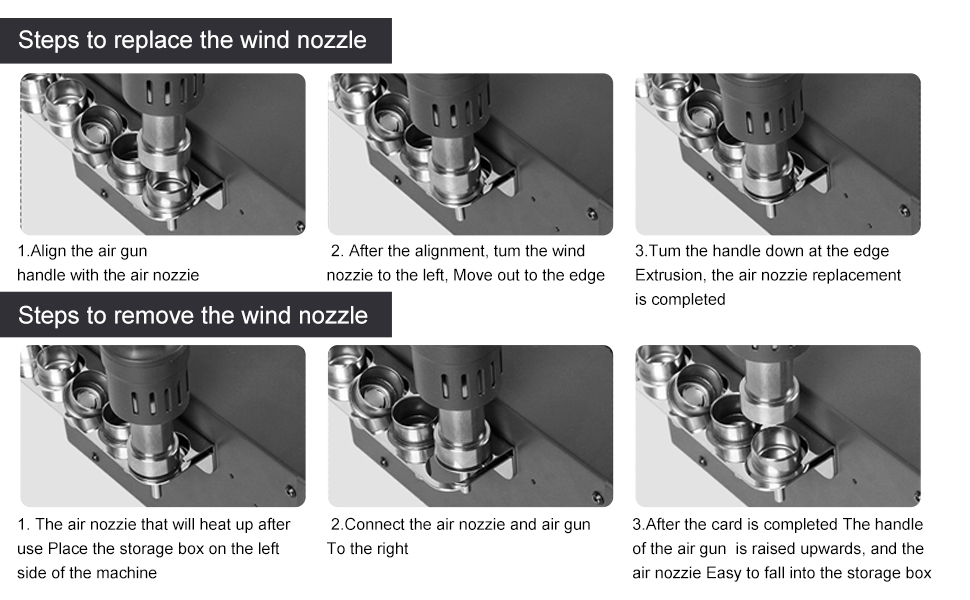
Figure 6.3: Nozzle Replacement Procedure. This diagram illustrates the step-by-step process for both removing and installing hot air nozzles using the integrated quick-change bracket.

Figure 6.4: Dual Mode Nozzle Switching. This image shows the difference between spiral wind nozzles and straight wind nozzles, indicating the two primary airflow types available.
7. Техникалык тейлөө
- Тазалоо: Ensure the unit is powered off and cooled down before cleaning. Wipe the exterior with a soft, damp кездеме. Абразивдүү тазалагычтарды же эриткичтерди колдонбоңуз.
- Соплолорду тазалоо: Periodically clean the nozzles to prevent blockages and ensure optimal airflow.
- Жылытуу элементи: The heating element is a consumable part. If the station experiences reduced heating performance or inconsistent temperatures, the heating element may need replacement. Refer to the manufacturer's guidelines or contact support for replacement procedures and parts. The unit typically includes spare heating elements.
- Аба чыпкасы: Check and clean the air intake filter (if present) regularly to maintain proper airflow and prevent dust accumulation.
8. Кыйынчылыктарды
| Көйгөй | Мүмкүн себеп | Чечим |
|---|---|---|
| Станция күйбөй жатат. | No power supply; power cord loose; power switch off. | Check power outlet and connections. Ensure power switch is ON. |
| Hot air gun not heating or heating slowly. | Faulty heating element; incorrect temperature setting; air gun not properly connected. | Verify temperature setting. Check hot air gun connection. Consider replacing the heating element (refer to Maintenance section). |
| Аба агымы жок же начар. | Airflow setting too low; blocked nozzle; fan malfunction. | Increase airflow setting. Clean or replace nozzle. Contact support if fan issue persists. |
| Automatic sleep function not working. | Hot air gun not placed correctly in holder; sensor malfunction. | Ensure the hot air gun is fully seated in its holder. |
9. Техникалык шарттар
- Модел: 2020D
- Күч: 700 Ватт
- Тtage: 110 Вольт
- Температура диапазону: 212°F - 932°F (100°C - 500°C)
- Температуранын туруктуулугу: ±2°C (static)
- Дисплей түрү: LED
- Airflow Type: Brushless fan, soft wind
- Автоматтык уйку: Yes, magnetic induction
- Эс тутум каналдары: 3 (CH1, CH2, CH3)
- Өлчөмдөрү (пакет): 11.5 x 11 x 9 дюйм
- Элемент Салмагы: 7.28 фунт
- Материал: Copper (heating element components)
- Сертификаттар: FCC, CE, RoHS
10. Кепилдик жана колдоо
Кепилдик маалыматы, техникалык колдоо же тейлөө боюнча суроо үчүн, түздөн-түз сатуучуга же өндүрүүчүгө кайрылыңыз. Сатып алганыңыздын далили катары сатып алуу дүмүрчөгүңүздү сактаңыз.
Кошумча жардам алуу үчүн, сиз иш сапары менен болот HengTianMei Store on Amazon.