
1. Продукт бүтүп калдыview
The Wantek 600-RJ1 is a corded RJ9 telephone headset designed for clear communication in office and home environments. It features a noise-cancelling microphone and comfortable ear cushions for extended wear. This headset is specifically designed for use with compatible landline phone models, not for cell phones or computers.
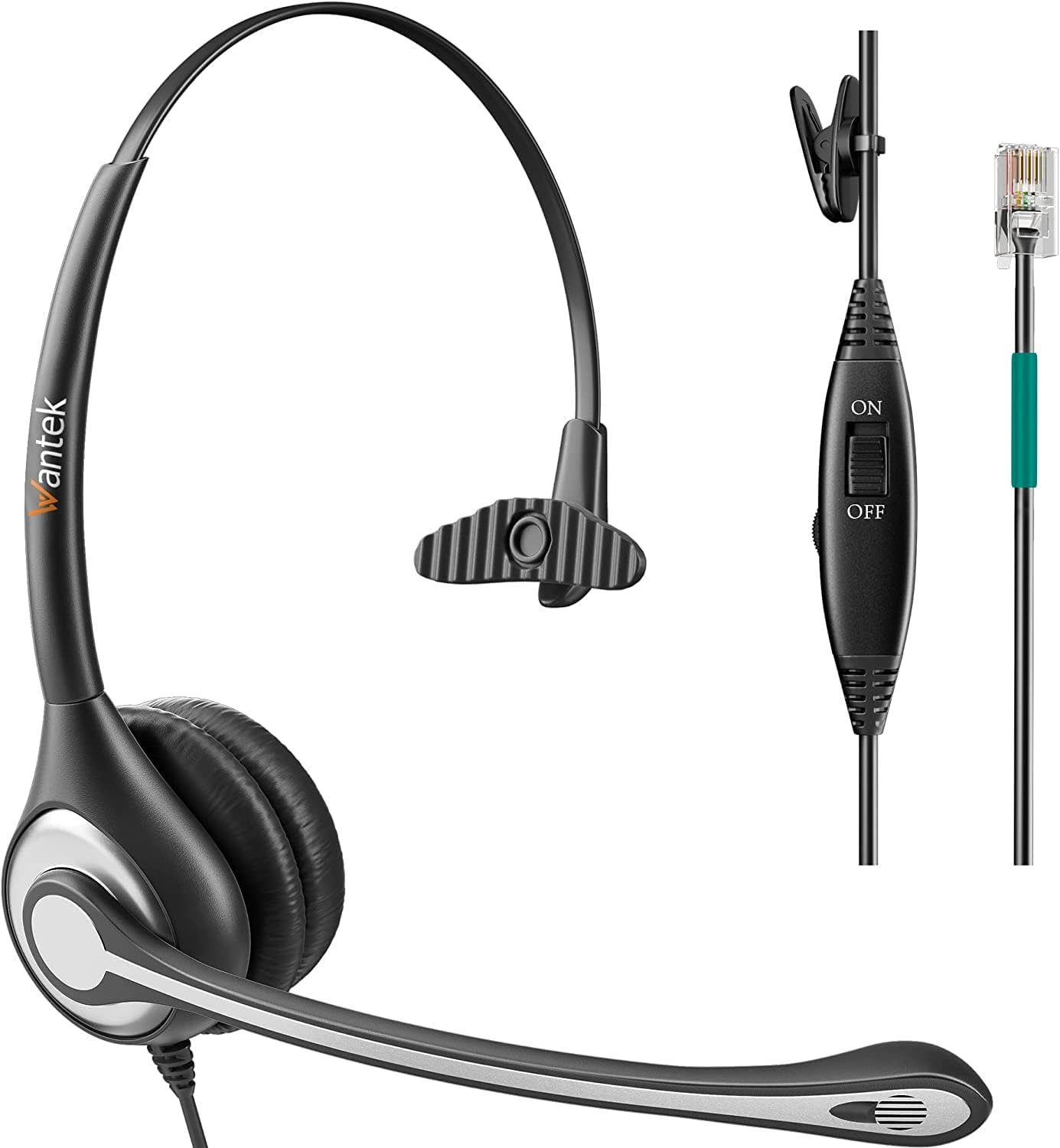
Image 1: The Wantek 600-RJ1 Corded RJ9 Telephone Headset, a black headset with a microphone boom, designed for landline phones.
2. Негизги өзгөчөлүктөрү
- Кеңири шайкештик: Designed for specific landline phone models from brands like Plantronics, Avaya, Polycom, Yealink, and more. (Refer to the compatibility section for a detailed list).
- Ызы-чууну жок кылуучу микрофон: Reduces background noise for crystal-clear calls.
- Күн бою комфорт: Super lightweight design with an adjustable headband and soft leatherette ear cushions.
- Туруктуу курулуш: Precision design with quality plastics for long-lasting use.
- In-line Controls: Features microphone mute and volume control for convenient call management.
- Rotatable Microphone Arm: The microphone arm can rotate 330 degrees, allowing the headset to be worn on either the left or right ear.

Image 2: Close-up of the Wantek 600-RJ1 headset highlighting its adjustable headband, microphone mute switch, volume control, and noise-cancelling microphone.

Image 3: Diagram illustrating the multiple adjustable nodes of the headset, including headband adjustment, 270-degree rotatable earcups, and 270-degree rotatable microphone arm for personalized fit.
3. Пакеттин мазмуну
- Wantek 600-RJ1 Telephone Headset
- RJ9 туташуу кабели
- Колдонуучунун Колдонмосу (бул документ)
1-видео: Кутучаны ачуу жана бүтүрүүview of the Wantek Corded Office Telephone Headset RJ9 with Mic, demonstrating its components and features.
4. Орнотуу нускамалары
- Identify the RJ9 Jack: Locate the RJ9 headset jack on your compatible landline phone. This is a small, typically square port.
- Гарнитураны туташтыруу: Plug the RJ9 connector from the headset cable firmly into the RJ9 jack on your phone. Ensure it clicks into place.
- Ыңгайлуулук үчүн тууралоо: Place the headset on your head. Adjust the headband for a secure yet comfortable fit. Position the microphone boom approximately 1/2 to 1 inch from your mouth.

Image 4: A visual guide to compatible landline phone brands for the RJ9 headset, explicitly stating it is not for computers or cell phones.
Video 2: Demonstrates the unboxing, features, and connection process of the Telephone Headset with Mic to a landline phone.
5. Иштөө нускамалары
5.1 Гарнитураны тагынуу
- The headset is designed to be worn over the head. Adjust the headband to fit comfortably.
- The microphone arm can rotate 330 degrees, allowing you to position the microphone on either your left or right side.
- Adjust the microphone boom so that the microphone is close to your mouth (approximately 1/2 to 1 inch away) for optimal voice pickup and noise cancellation.

Image 5: A woman wearing the Wantek 600-RJ1 headset, demonstrating its comfortable fit and microphone positioning.
5.2 Сап ичиндеги башкаруу элементтерин колдонуу
- Микрофондун үнүн басуу которгучу: Use the ON/OFF switch on the in-line control to mute or unmute your microphone during a call.
- Үндү көзөмөлдөө: Slide the volume adjuster up or down to increase or decrease the listening volume.
Video 3: A demonstration of the Wantek phone headset with mic, showcasing its features and how to wear it.
5.3 Quick Disconnect (QD) Feature
The headset features a Quick Disconnect (QD) plug, allowing you to detach the headset from the phone's base without interrupting the call or removing the headset. This is useful for temporarily stepping away from your desk.
Видео 4: Бүттүview of a QD Headset with QD-RJ09 Cables, illustrating the quick disconnect functionality.
6. Техникалык тейлөө
- Тазалоо: Гарнитураны тазалоо үчүн жумшак, кургак чүпүрөктү колдонуңуз. Катуу химиялык заттарды же абразивдүү материалдарды колдонуудан алыс болуңуз.
- Сактагыч: Колдонбогондо гарнитураны салкын, кургак жерде сактаңыз. Экстремалдуу температурадан сактаныңыз.
- Кабельге кам көрүү: Do not pull on the cable excessively or bend it sharply, as this can damage the internal wiring.
- Кулак жаздыктарын алмаштыруу: Ear cushions may be replaced if they show signs of wear. Contact customer support for replacement options.
7. Кыйынчылыктарды
- Үн жок/ Үн сапаты начар:
- Ensure the RJ9 connector is fully inserted into the phone's headset jack.
- Check the in-line volume control and adjust it to an audible level.
- Verify that the microphone mute switch is in the "ON" position.
- Confirm your phone model is listed as compatible.
- Микрофон иштебейт/Төмөн үн:
- Ensure the microphone mute switch is in the "ON" position.
- Position the microphone closer to your mouth.
- Check phone settings for microphone input levels if applicable.
- Статикалык же интерференция:
- Бардык байланыштар коопсуз экенин текшериңиз.
- Move the headset away from other electronic devices that might cause interference.
8. Техникалык шарттар
| Бренд | Wantek |
| Модель аты | 601 (Product Variant: 600-RJ1) |
| Байланыш технологиясы | Зымдуу |
| Наушник уясы | RJ9 Jack |
| Noise Control | Активдүү ызы-чууну жокко чыгаруу |
| Кулак жайгаштыруу | On Ear |
| Материал | Пластик |
| Элемент Салмагы | 6.4 унция |
| Камтылган компоненттер | Кабель |
9. Кепилдик жана колдоо
The Wantek 600-RJ1 Telephone Headset comes with a 30-day money-back and replacement policy. Lifetime technical support is also provided. For any issues or inquiries, please refer to the contact information provided with your purchase or visit the official Wantek webсайт.