
1. Киришүү
The EVTSCAN IT811 is a digital insulation resistance tester designed for accurate measurement of insulation resistance in various electrical systems. This device features a clear LCD display, over-range indication, and an automatic power-off function to conserve battery life. It is suitable for testing motors, cables, electromechanical equipment, telecommunications equipment, and power facilities.

Сүрөт 1: Алдыңкы view of the EVTSCAN IT811 Insulation Resistance Meter, showing the LCD display, rotary switch, and control buttons.
2. Коопсуздук маалыматы
Please read and understand all safety instructions before operating the EVTSCAN IT811 Insulation Resistance Meter. Failure to follow these instructions may result in electric shock, fire, or damage to the device.
- Always wear appropriate personal protective equipment (PPE), such as insulated gloves and safety glasses, when working with electrical systems.
- Do not use the meter if it appears damaged or if the test leads are frayed or broken.
- Never exceed the maximum input ratings specified for the meter.
- Ensure the circuit under test is de-energized and locked out before connecting test leads for insulation resistance measurements.
- Avoid touching the test lead tips or the circuit under test during measurement.
- Эсептегичти нымдуу чөйрөдө же жарылуучу газдар же чаңдар бар жерде иштетпеңиз.
- Батареянын аз көрсөткүчү так көрсөткүчтөрдү камсыз кылуу үчүн батарейкаларды дароо алмаштырыңыз.
3. Продукциянын компоненттери
The package for your EVTSCAN IT811 Insulation Resistance Meter includes the following items:
- 1 x Insulation Resistance Tester (IT811)
- 2 х Тесттер
- 2 x Аллигатор клиптери
- 1 x Ташуу сумкасы
- 1 x User Manual
4. Орнотуу
4.1 Батареяны орнотуу
The EVTSCAN IT811 requires six (6) 1.5V dry batteries (AA size, not included) for operation. To install the batteries:
- Батарея уясынын капкагын эсептегичтин арткы жагында табыңыз.
- Батарея отсегин ачуу үчүн бурагычты колдонуңуз.
- Insert six 1.5V AA batteries, ensuring correct polarity as indicated inside the compartment.
- Батарея уясынын капкагын ордуна коюңуз жана аны бурама менен бекитиңиз.
The meter will display a low-voltage indication when the battery power is insufficient, signaling that batteries need replacement.
4.2 Сыноо өткөргүчтөрүн туташтыруу
Connect the test leads to the appropriate input jacks on the meter based on the desired measurement function.
- For Insulation Resistance Measurement: Connect the red test lead to the 'L' (Line) jack and the black test lead to the 'E' (Earth) jack.
- AC Voltage Measurement: Connect the red test lead to the 'V~' (AC Voltage) jack and the black test lead to the 'G' (Ground) jack.

2-сүрөт: Каптал view of the EVTSCAN IT811, showing the kickstand and the general layout of the back panel, where the battery compartment is located.
5. Иштөө нускамалары
5.1 Күйгүзүү/өчүрүү
To power on the meter, rotate the central rotary switch from the 'OFF' position to any desired measurement range. The meter will automatically power off approximately 15 minutes after the last operation to save battery life.
5.2 Изоляциянын каршылыгын өлчөө
Follow these steps to measure insulation resistance:
- Ensure the circuit under test is de-energized and safely isolated.
- Connect the test leads to the 'L' and 'E' jacks on the meter. Attach the alligator clips to the test leads and then to the circuit points where insulation resistance is to be measured.
- Rotate the central switch to the desired insulation test voltage: 100V, 250V, 500V, or 1000V.
- басып, кармап туруңуз TEST/STOP button to initiate the measurement. The 'HV' indicator will illuminate, indicating high voltage чыгаруу.
- Read the insulation resistance value displayed on the LCD.
- бошотуңуз TEST/STOP button to stop the measurement. The 'HV' indicator will turn off.
- To hold the displayed reading, press the БЕРҮҮ button during or after a measurement. Press it again to release the hold function.
5.3 AC томtage Өлчөө
AC көлөмүн өлчөө үчүнtage:
- Connect the test leads to the 'V~' and 'G' jacks on the meter.
- Rotate the central switch to the '750V~' ACV range.
- Сыноо өткөргүчтөрүн AC Voltage булагы.
- AC томун окууtage мааниси ЖКда көрсөтүлөт.
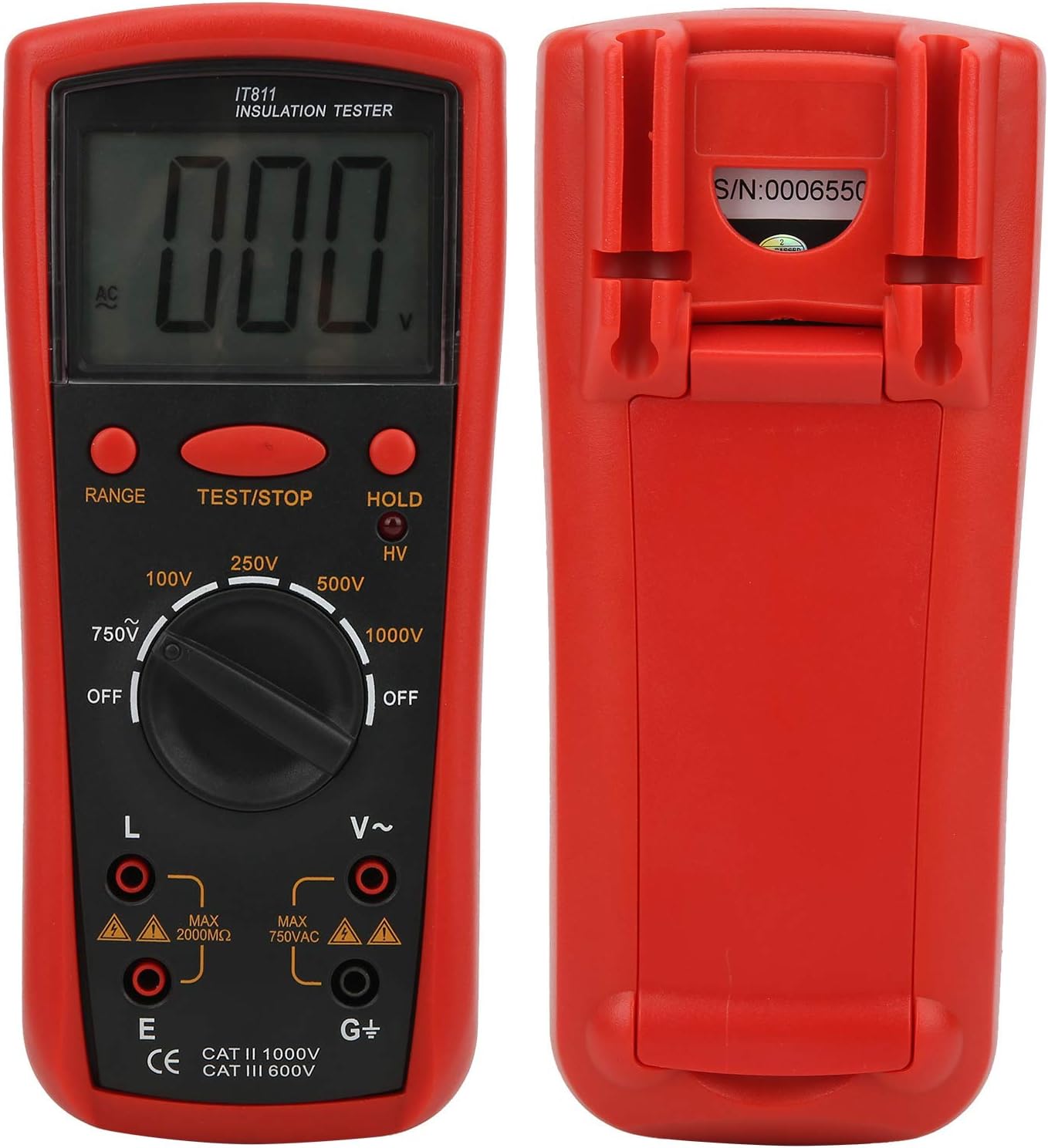
Сүрөт 3: Алдыңкы жана арткы views of the EVTSCAN IT811, illustrating the input jacks and overall design.
6. Техникалык тейлөө
6.1 Тазалоо
Эсептегичти сүртүңүзasing жумшак менен, гamp кездеме. Абразивдүү тазалагычтарды же эриткичтерди колдонбоңуз. Сактоодон же кийинки колдонуудан мурун эсептегичтин кургак экенин текшериңиз.
6.2 Батареяны алмаштыруу
When the low battery indicator appears on the display, replace all six 1.5V AA batteries as described in Section 4.1. Remove batteries if the meter will not be used for an extended period to prevent leakage.
6.3 Сактоо
Store the meter in a cool, dry place, away from direct sunlight and extreme temperatures. Use the provided carrying bag for protection.
7. Кыйынчылыктарды
If you encounter issues with your EVTSCAN IT811, refer to the following common problems and solutions:
- Display shows '1' or 'OL': This indicates an over-range condition. The measured value exceeds the maximum range of the selected setting. Try a higher range if available, or verify the circuit condition.
- Эч кандай дисплей же начар дисплей: The batteries may be low or incorrectly installed. Replace the batteries as per Section 4.1.
- Так эмес окуулар: Check that the test leads are securely connected to both the meter and the circuit under test. Ensure the test leads are not damaged. Clean the input terminals if necessary.
- Эсептегич күйбөйт: Ensure batteries are correctly installed and have sufficient charge. Check that the rotary switch is moved from the 'OFF' position.
If the problem persists, contact EVTSCAN customer support for further assistance.
8. Техникалык шарттар
| Өзгөчөлүк | Спецификация |
|---|---|
| Дисплей | 64x44mm LCD, Max Display "1999" |
| Чектен ашкан көрсөткүч | Highest digit displays "1" |
| Электр камсыздоо | 6 x 1.5V Dry Battery (AA size) |
| Авто өчүрүү | Approx. 15 minutes after power on |
| Энергияны керектөө | Test no-load power consumption <300mW |
| Айлана-чөйрөнү колдонуу | Temperature: 0℃-40℃, Relative Humidity: 30%RH-85%RH |
| Output Voltage | 100V / 250V / 500V / 1000V ±10% |
| Test Current (at specified R) | 100V (R=100kΩ): 1mA ±10% 250V (R=250kΩ): 1mA 500V (R=500kΩ): 1mA 1000V (R=1MΩ): 1mA |
| Изоляцияга каршылык диапазону | 100V: 0.1MΩ-20MΩ ±(4% of Reading ±2 Digit) 250V: 0.1MΩ-20MΩ 500V: 0.1MΩ-50MΩ 1000V: 0.1MΩ-100MΩ Extended Ranges: 250V: 20MΩ-500MΩ 500V: 50MΩ-1000MΩ 1000V: 100MΩ-2000MΩ |
| Кыска туташуу ток | 100V: Approx. 1.2mA 250V/500V/1000V: Approx. 1.6mA |
| Медиандык каршылык | 100V/250V/500V: 2 MΩ 1000V: 5MΩ |
| AC Voltage Өлчөө | AC750V ±(2% Reading + 5 Digit) |
| Jacks Location | Insulation Resistance: L, E AC750V: V~, G |
| AC750V Input Impedance | 1МΩ |
| AC750V Frequency Response | (50-200) Hz |
| Материал | ABS |
| Элемент Салмагы | 770 г |
9. Кепилдик жана колдоо
Specific warranty information for the EVTSCAN IT811 Insulation Resistance Meter is not provided in this manual. For details regarding warranty coverage, terms, and conditions, please refer to the product packaging or contact EVTSCAN customer support directly.
For technical assistance, troubleshooting beyond what is covered in this manual, or any other inquiries, please reach out to EVTSCAN customer service through their official webсайт же сатып алуу менен камсыз болгон байланыш маалыматы.