
Cecotec Conga 9090 Ai
Cecotec Conga 9090 IA Robot Vacuum Cleaner
User Manual
Introduction
Thank you for choosing the Cecotec Conga 9090 IA Robot Vacuum Cleaner. This advanced 4-in-1 robot is designed to vacuum, sweep, mop, and scrub simultaneously, providing comprehensive floor cleaning. Equipped with Artificial Intelligence and laser technology, it offers maximum cleaning precision by recognizing household objects and adapting its cleaning path. This manual provides essential information for the safe and efficient operation and maintenance of your robot vacuum cleaner.
Коопсуздук нускамалары
Please read these safety instructions carefully before using the appliance and keep them for future reference. Failure to follow these instructions may result in electric shock, fire, or serious injury.
- кубаттуулукту камсыз кылыңызtage томуна дал келетtage прибордун рейтингинде көрсөтүлгөн.
- Шайманды, электр шнурын же сууга же башка суюктукка чөмүлбөңүз.
- Шайманды жылуулук булактарынан, түз күн нурунан, нымдуулуктан жана курч бурчтардан алыс кармаңыз.
- Do not use the appliance on wet surfaces or in areas with standing water.
- Балдар шайман менен ойнобосун текшериңиз.
- Before cleaning or maintenance, always unplug the appliance from the power outlet.
- Электр зымы же сайгычы бузулуп калса, шайманды иштетпеңиз.
- Чатылып калбашы же бузулуп калбашы үчүн, тазалоочу жайды иштетүүдөн мурун бошоп калган кабелдерди, майда буюмдарды же морт буюмдарды алып салыңыз.
Пакеттин мазмуну
Таңгактан чыгарганда бардык компоненттер бар экенин жана жакшы абалда экендигин текшериңиз.
- Cecotec Conga 9090 IA Robot Vacuum Cleaner
- Special Silicone Brush for pets
- Халиско Бреш
- Vibration Wash Basin (Water Tank)
- Solid Tank (Dust Bin)
- Алыстан башкаруу
- 2 Моп
- 2 Каптал щеткалар
- 1 Жогорку натыйжалуу чыпка
- Self-Cleaning Brush
- Кубаттоочу станция
- Кубаттуу адаптер

Image: The Conga 9090 IA robot vacuum cleaner along with its comprehensive set of accessories, including various brushes, remote control, and a mobile phone showing the companion app.
Продукт бүттүview
The Conga 9090 IA features advanced components for intelligent and efficient cleaning.
- AI and Laser Technology: The robot uses a front camera and a three-dimensional sensor to recognize common household objects and adapt its cleaning path accordingly. It also identifies floors and rooms, automatically mapping them.
- Халиско щеткасы: A specialized brush designed for effective cleaning on various floor types.
- Twerking Scrub Tank: Provides three intelligent scrubbing levels for thorough mopping.
- Room Assist: Intelligent room management for customized cleaning.

Image: The robot vacuum intelligently detects and navigates around obstacles like shoes, thanks to its advanced AI and laser technology.

Image: The robot vacuum positioned on a floor, ready to clean various small debris, demonstrating its powerful suction.

Image: The robot vacuum near its charging base, illustrating its object detection capabilities for items such as socks and power cables.
Жайгашуу
- Заряддоо станциясын жайгаштыруу: Place the charging station against a wall in an open area, ensuring there are no obstacles within 1 meter to the sides and 2 meters in front. Connect the power adapter to the charging station and a power outlet.
- Баштапкы төлөм: Place the robot on the charging station. Ensure the charging contacts on the robot align with those on the station. The robot will begin charging automatically. For first use, fully charge the robot (approximately 3-4 hours).
- Каптал щеткаларды орнотуу: Snap the left (L) and right (R) side brushes into their corresponding slots on the bottom of the robot until they click into place.
- Install Main Brush: If not already installed, insert the Jalisco brush into its compartment on the underside of the robot.
- Download the Conga App: Издөө "Conga" in your smartphone's app store (iOS or Android) and download the official application.
- Wi-Fi'га туташуу: Follow the in-app instructions to connect your robot to your home Wi-Fi network. This will enable smart features, mapping, and remote control.
Иштөө нускамалары
Your Conga 9090 IA offers various cleaning modes and smart functionalities.
Тазалоо режимдери
- Авто режим: The robot automatically plans the optimal cleaning path for your entire home.
- Edge режими: Дубалдарды жана эмеректердин четтерин тазалайт.
- Spot режими: Тазалоого белгилүү бир кир аймакты топтоштурат.
- Скраб режими: Utilizes the vibration wash basin for deep mopping. You can select from three intelligent scrubbing levels via the app.
- Чектелген аймактар: Use the app to define no-go zones or virtual walls to prevent the robot from entering specific areas.

Image: The robot vacuum demonstrating its ability to respect virtual boundaries, preventing it from entering designated areas like a play zone.
Smart Features
- Колдонмону башкаруу: Use the Conga app to start/stop cleaning, select modes, schedule cleaning, view maps, and manage rooms.
- Үн менен башкаруу: The robot is compatible with Amazon Echo and Google Home. You can control it using voice commands.

Image: The robot vacuum can be controlled via voice commands through smart home devices like Amazon Echo.
Техникалык тейлөө
Үзгүлтүксүз тейлөө оптималдуу иштешин камсыз кылат жана робот чаң соргучуңуздун иштөө мөөнөтүн узартат.
Тазалоо графиги
- Ар бир колдонуудан кийин: Empty the dust bin and clean the main brush.
- Апта сайын: Clean the side brushes, filters, and sensors.
- Ай сайын: Clean the charging contacts and wheels. Replace filters and brushes as needed.
Detailed Cleaning Instructions
- Чаң челек жана чыпкалар: Open the robot's cover, remove the dust bin, and empty its contents. Tap the filter gently to remove dust. Do not wash the HEPA filter with water.
- Суу резервуары жана швабра: Remove the water tank and empty any remaining water. Detach and wash the mop pad with water. Allow it to air dry completely before reattaching.
- Main Brush (Jalisco Brush): Remove the main brush cover and lift out the brush. Use the provided cleaning tool to remove hair and debris.
- Каптал щеткалар: Pull the side brushes upwards to remove them. Clean any tangled hair or debris. If damaged, replace them.
- Сенсорлор жана заряддоо байланыштары: Use a clean, dry cloth to wipe the anti-drop sensors (on the bottom) and the charging contacts (on the robot and charging station).
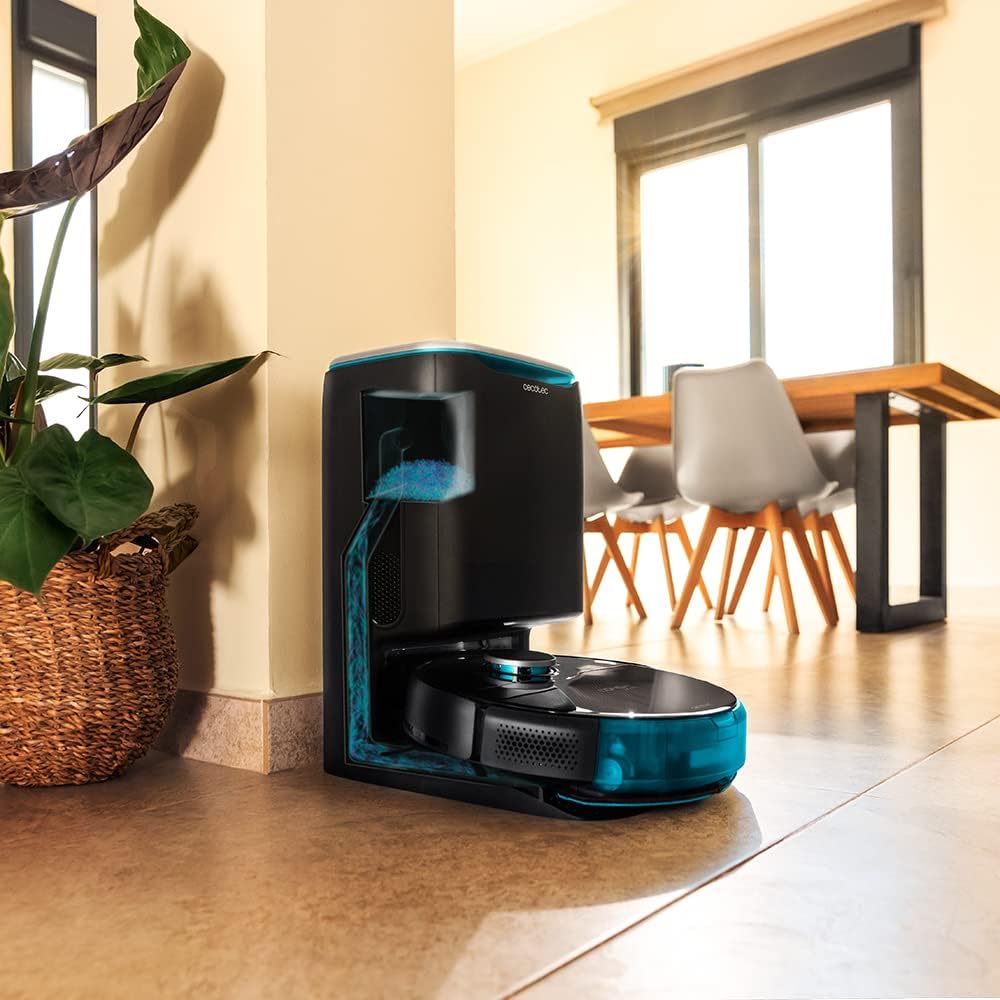
Image: The robot vacuum is compatible with the CongaHome 10.000 self-emptying station for convenient dust disposal.
Проблемаларды чечүү
If you encounter issues with your robot vacuum cleaner, refer to the table below for common problems and solutions.
| Көйгөй | Мүмкүн себеп | Чечим |
|---|---|---|
| Робот күйбөйт жана заряддалбайт. | Батареянын аздыгы; заряддоо контакттары кир; кубат адаптери туташкан эмес. | Place robot on charging station; clean charging contacts; ensure power adapter is securely connected. |
| Начар тазалоо көрсөткүчү. | Чаң урнасы толгон; щеткалар чаташкан; фильтр бүтүп калган. | Empty dust bin; clean main and side brushes; clean or replace filter. |
| Робот бат-баттан тыгылып калат. | Өтө көп тоскоолдуктар; сенсорлор кир. | Clear the cleaning area of loose cables and small objects; clean all sensors. |
| Колдонмонун туташуу маселелери. | Туура эмес Wi-Fi сырсөзү; алсыз Wi-Fi сигналы; робот жупташтыруу режиминде эмес. | Verify Wi-Fi password; ensure robot is within Wi-Fi range; reset robot and re-attempt pairing as per app instructions. |
| Робот адаттан тыш ызы-чуу чыгарат. | Brush or wheel obstructed; foreign object inside. | Check and clean main brush, side brushes, and wheels for obstructions. |
Техникалык шарттар
| Өзгөчөлүк | Деталь |
|---|---|
| Бренд | Cecotec |
| Модель аты | Conga 9090 AI |
| Модель номери | 05416 |
| Түс | Кара |
| Продукциянын өлчөмдөрү | 17.5 x 40 x 54.2 см |
| Элемент Салмагы | 4.1 килограмм |
| Сыйымдуулугу (чаң урнасы) | 2.5 литр |
| Ызы-чуу деңгээли | 64 дБ |
| Автоматтык өчүрүү | Жок |
| Шайкеш түзмөктөр | Amazon Echo, Google Home |
| Өзгөчө өзгөчөлүк | Программалануучу |
Кепилдик жана колдоо
For warranty information, technical support, or service requests, please refer to the warranty card included with your product or visit the official Cecotec webсайт. Сатып алуу квитанциясын кепилдик дооматтары үчүн сатып алуунун далили катары сактаңыз.
Сиз да зыярат кылсаңыз болот Amazon'догу Cecotec дүкөнү көбүрөөк продукт маалымат жана колдоо ресурстар үчүн.
Ask a question about this manual
Ask about setup, troubleshooting, compatibility, parts, safety, or missing instructions. Manuals+ will review the question and use this page’s manual context to help answer it.