
Anova Culinary AN900-10
Anova Precision Smart Oven User Manual
Модели: AN900-10
Introduction
The Anova Precision Smart Oven is a versatile countertop appliance designed to bring professional-grade cooking capabilities to your home kitchen. It combines convection, steam, bake, broil, roast, and dehydrate functions, offering precise temperature control for a wide range of culinary tasks. This manual provides essential information for the safe and effective operation and maintenance of your Anova Precision Smart Oven.
For optimal performance and longevity, please read this manual thoroughly before first use and retain it for future reference.
Коопсуздук маалыматы
Өрт, электр тогуна урунуу жана адамдардын жаракат алуу коркунучун азайтуу үчүн электр шаймандарын колдонууда ар дайым негизги коопсуздук чараларын сактаңыз.
- ысык беттерге тийбеңиз. Туткаларды же туткаларды колдонуңуз.
- Электр шокунан коргоо үчүн шнурду, вилкаларды же шайманды сууга же башка суюктукка салбаңыз.
- Кандайдыр бир шайманды балдар же алардын жанында колдонуп жатканда, катуу көзөмөл керек.
- Колдонбогондо жана тазалоодон мурун розеткадан ажыратыңыз. Бөлүктөрүн кийүүдөн же чечүүдөн мурун муздатыңыз.
- Эч кандай шайманды зымы же сайы бузулган, же шайман иштебей калгандан кийин же кандайдыр бир түрдө бузулгандан кийин иштетпеңиз.
- Шаймандын өндүрүүчүсү сунуш кылбаган кошумча тиркемелерди колдонуу жаракатка алып келиши мүмкүн.
- Сыртта колдонбоңуз.
- Шнур столдун же столдун четине илинип калышына же ысык беттерге тийбеңиз.
- Ыстык газ же электр мешине же ысытылган мештин жанына коюуга болбойт.
- Курамында ысык май же башка ысык суюктуктар бар шайманды жылдырууда өтө этияттык керек.
- Шайманды максаттуу колдонуудан башка максатта колдонбоңуз.
Компоненттер бүттүview
Familiarize yourself with the main components of your Anova Precision Smart Oven:
- Меш боштугу: Негизги тамак бышыруу камерасы.
- Суу багы: Removable tank for steam generation. Located on the side.
- Башкаруу панели: Digital display and knobs for setting temperature, time, and cooking modes.
- Тамак-аш пробкасы: Detachable probe for precise internal temperature monitoring.
- Removable Racks: Multiple racks for various cooking needs.
- Бышыруу табасы: Included pan for general baking and roasting.

Сүрөт 1: Алдыңкы view of the Anova Precision Smart Oven, showing the main oven cavity, control panel, and side-mounted water tank.

2-сүрөт: Интерьер view of the Anova Precision Smart Oven, illustrating the two removable racks and the included baking pan.

Figure 3: A user demonstrating the removal of the clear water tank from the side of the Anova Precision Smart Oven for refilling or cleaning.
Жайгашуу
Пакеттен чыгаруу жана жайгаштыруу
- Духовканы жана бардык аксессуарларды таңгактан этияттык менен чыгарып алыңыз.
- Remove any protective film or packaging materials from the oven.
- Place the oven on a stable, level, heat-resistant surface with adequate clearance from walls and other appliances for ventilation. Ensure at least 4 inches of space on all sides and above the oven.
- Розеткага оңой жетүүгө болорун текшериңиз.
Алгачкы тазалоо
- Биринчи колдонуудан мурун мештин ичин жана сыртын жарнама менен сүртүңүзamp кездеме.
- Wash the removable racks, baking pan, and water tank with warm, soapy water. Rinse thoroughly and dry completely.
Суу резервуарды даярдоо
- Remove the water tank from its housing on the side of the oven.
- Fill the water tank with distilled water. Do not use tap water as it can lead to mineral buildup.
- Securely reinsert the water tank into its housing until it clicks into place.
Power Connection
Plug the oven into a grounded electrical outlet. The display will illuminate, indicating the oven is ready for use.
Иштөө нускамалары
Башкаруу панелиview
The Anova Precision Smart Oven features an intuitive control panel with a digital display and rotary knobs for setting cooking parameters. The display shows temperature, time, and current cooking mode.
Connecting to the Anova App
For enhanced control and access to a recipe library, download the Anova Oven app on your smartphone. Follow the in-app instructions to connect your oven via Wi-Fi.
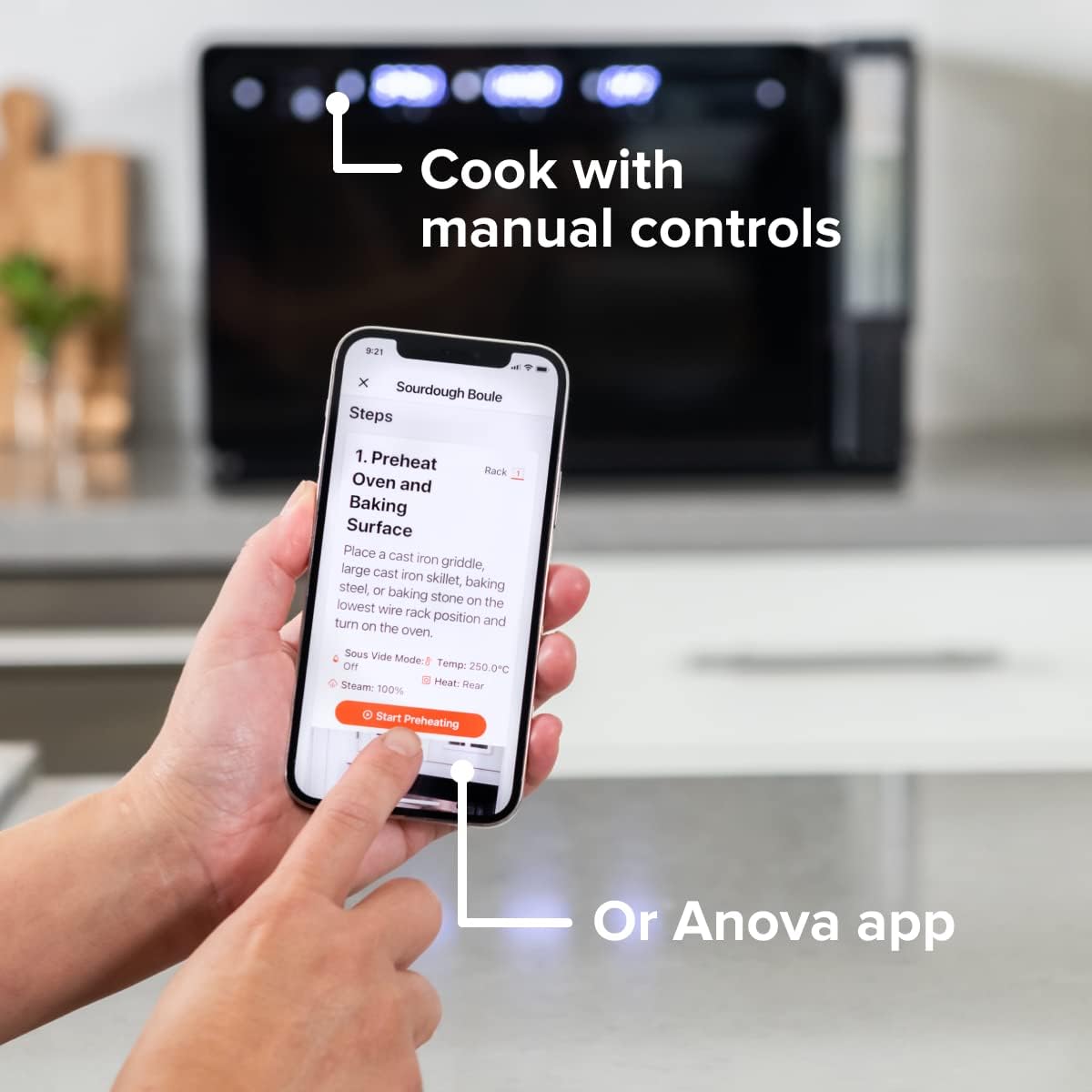
Figure 4: A user interacting with the Anova app on a smartphone, demonstrating remote control capabilities for the oven.
Basic Cooking Modes
The oven offers several cooking modes:
- Конвекция: Uses a fan to circulate hot air for even cooking and browning.
- Steam: Injects steam into the oven cavity, ideal for baking bread, steaming vegetables, or sous vide style cooking.
- Combi (Convection + Steam): Combines hot air and steam for moist interiors and crispy exteriors.
- Бышыруу/куруу: Standard oven functions for baking and roasting.
- Бройл: Кууруп, кызартуу үчүн үстүнкү элементтен чыккан жогорку температура.
- Суусуздандыруу: Low heat and fan circulation for drying foods.
Setting a Program (Manual Control)
- Turn the mode knob to select your desired cooking mode.
- Adjust the temperature using the temperature knob.
- Убакыт баскычын колдонуу менен бышыруу убактысын коюңуз.
- Даярдоону баштоо үчүн Start/Pause баскычын басыңыз.
- To use the food probe, insert it into the thickest part of your food before starting. The oven will cook until the target internal temperature is reached.
Sous Vide режими
The Anova Precision Oven can achieve sous vide style results without a water bath. Use the steam function and the food probe to cook food to a precise internal temperature, ensuring tenderness and juiciness.
Steam Injection for Baking
For perfect breads with crispy crusts and soft interiors, utilize the steam injection feature. Ensure the water tank is filled before starting a steam-assisted baking program.

Figure 5: Two loaves of freshly baked bread, showcasing the results of steam injection for a perfect crust and crumb. The Anova Precision Smart Oven is visible in the background.
Тейлөө жана тазалоо
Regular cleaning and maintenance will ensure the longevity and optimal performance of your Anova Precision Smart Oven.
Күнүмдүк тазалоо
- After each use, allow the oven to cool completely.
- Жарнама менен ички жана тышкы беттерин сүртүңүзamp кездеме жана жумшак жуугуч. Абразивдүү тазалагычтардан же тазалоочу жайлардан алыс болуңуз.
- Remove and clean the racks and baking pan with warm, soapy water.
- Empty and rinse the water tank after each use, especially if using steam functions. Allow it to air dry before reinserting.
Descaling (Steam Function Users)
If you frequently use the steam function, mineral buildup may occur. The oven may indicate when descaling is needed. Refer to the Anova app or online resources for detailed descaling instructions using a descaling solution.
Сактагыч
Духовканы көпкө колдонбогондо, анын таза жана кургак экенине ынаныңыз. Аны салкын, кургак жерде сактаңыз.
Проблемаларды чечүү
This section addresses common issues you might encounter with your Anova Precision Smart Oven.
| Көйгөй | Мүмкүн себеп | Чечим |
|---|---|---|
| Oven not turning on. | розеткага кошулбаган; күч уtagд; өчүргүч иштен чыкты. | Меш иштеген розеткага бекем сайылганын текшериңиз. Үйдөгү автоматтык өчүргүчтү текшериңиз. |
| буу чыгарылбайт. | Water tank empty or not properly seated; mineral buildup. | Fill water tank with distilled water and ensure it is correctly inserted. Perform descaling if necessary. |
| Тамак бир калыпта бышпайт. | Improper rack placement; overcrowding; fan obstruction. | Refer to recipe for recommended rack position. Avoid overcrowding the oven. Ensure nothing obstructs the convection fan. |
| Wi-Fi туташуу маселелери. | Туура эмес Wi-Fi сырсөзү; роутер өтө алыс; тармак кийлигишүүсү. | Double-check Wi-Fi password. Move oven closer to router or use a Wi-Fi extender. Restart oven and router. |
If the problem persists after attempting these solutions, please contact Anova Customer Support.
Техникалык шарттар
- Бренд: Анова Кулинария
- Модель аты: Precision Oven
- Модель номери: АН900-10
- Продукциянын өлчөмдөрү: 18"D x 22"W x 14"H
- Элемент Салмагы: 59 фунт
- Түсү: Кара
- Башкаруу түрү: баскыч
- Кубат булагы: Электр
- Камтылган компоненттер: Water tank, pan, temp probe
- Өзгөчө өзгөчөлүгү: Программалануучу
Кепилдик жана колдоо
The Anova Precision Smart Oven comes with a manufacturer's warranty. Please refer to the warranty card included with your product or visit the official Anova Culinary webдеталдуу кепилдик шарттары жана шарттары үчүн сайт.
For technical support, troubleshooting assistance, or to inquire about replacement parts, please contact Anova Customer Support:
- Онлайн колдоо: зыярат кылыңыз Anova Culinary Store on Amazon же алардын кызмат адамы webсайт.
- Колдонуучунун колдонмосу (PDF): Колдонуучунун толук колдонмосун төмөнкү даректен жүктөп алсаңыз болот бул шилтеме.

Figure 6: The Anova Precision Smart Oven integrated with a smart home assistant (Alexa), demonstrating its connectivity features.
Ask a question about this manual
Ask about setup, troubleshooting, compatibility, parts, safety, or missing instructions. Manuals+ will review the question and use this page’s manual context to help answer it.