1. Киришүү
Сатып алганыңыз үчүн рахматasing the E58 Eachine JY019 Foldable RC Quadcopter. This manual provides essential information for the safe operation, setup, and maintenance of your drone. Please read it thoroughly before first use to ensure proper functionality and to avoid damage.
1.1 Пакеттин мазмуну
Пакетти ачканда, төмөнкү компоненттердин бардыгы камтылганын текшериңиз:
- 1 x RC Quadcopter (2MP Camera)
- 1 x Өткөргүч (алыстан башкаруу пульту)
- 1 x 3.7V 500mAh Lipo Battery (for drone)
- 1 x USB заряддоо кабели
- 4 x Protection Covers (Propeller Guards)
- 4 x Spare Blades (Propellers)
- 1 x Screwdriver
- 1 х Колдонуучунун колдонмосу (бул документ)

1.1-сүрөт: Бүттүview of the E58 Eachine JY019 drone and its included accessories. The image displays the folded drone, remote controller, propellers, propeller guards, USB charging cable, screwdriver, and the drone battery.

1.2-сүрөт: The retail packaging for the JY019 Pocket Drone, showing the drone in both folded and unfolded states, along with the remote controller. This image confirms the product model and its compact design.
2. Коопсуздук боюнча көрсөтмөлөр
Жаракат алуунун же зыяндын алдын алуу үчүн, төмөнкү коопсуздук чараларын сактаңыз:
- Always operate the drone in open areas, away from people, animals, buildings, and obstacles.
- Катуу шамалда же жагымсыз аба ырайында учпаңыз.
- Keep a safe distance from the rotating propellers. Do not touch them during operation.
- Ар бир учуудан мурун дрондун батареясы толук заряддалганын текшериңиз.
- Батареяны ашыкча заряддабаңыз.
- Supervise children when they are operating the drone.
- Do not attempt to modify or disassemble the drone or its components.
- Turn off the drone and remote controller when not in use.
- Батареяларды жергиликтүү эрежелерге ылайык таштаңыз.
3. Продукт бүтүп калдыview
3.1 Drone Features
- Бүктөлүүчү Дизайн: Ыкчам жана оңой ташуу үчүн көчмө.
- HD 2.0MP Camera: 120° Wide-Angle lens for high-resolution images and videos (720P).
- Бийиктикте кармоо режими: Maintains a consistent altitude for stable flight and video recording.
- Учуу траекториясы: Allows drawing a flight path on your mobile device for the drone to follow.
- One Key Take Off/Landing: Simplifies flight initiation and termination.
- 360° айлануу: Performs aerial stunts with a single button.
- 6-октуу гироскоп: Provides stable and easy control.

3.1-сүрөт: Illustration of the drone's 120° wide-angle 720P HD camera, highlighting its field of view and image capture capabilities. A simulated phone screen shows the live video feed from the drone.

3.2-сүрөт: Dimensions of the E58 Eachine JY019 drone. The image shows the drone both folded (12.5cm x 7.5cm x 5cm) and unfolded (27cm x 19.5cm x 5cm), demonstrating its compact and portable design.
3.2 Remote Controller Layout
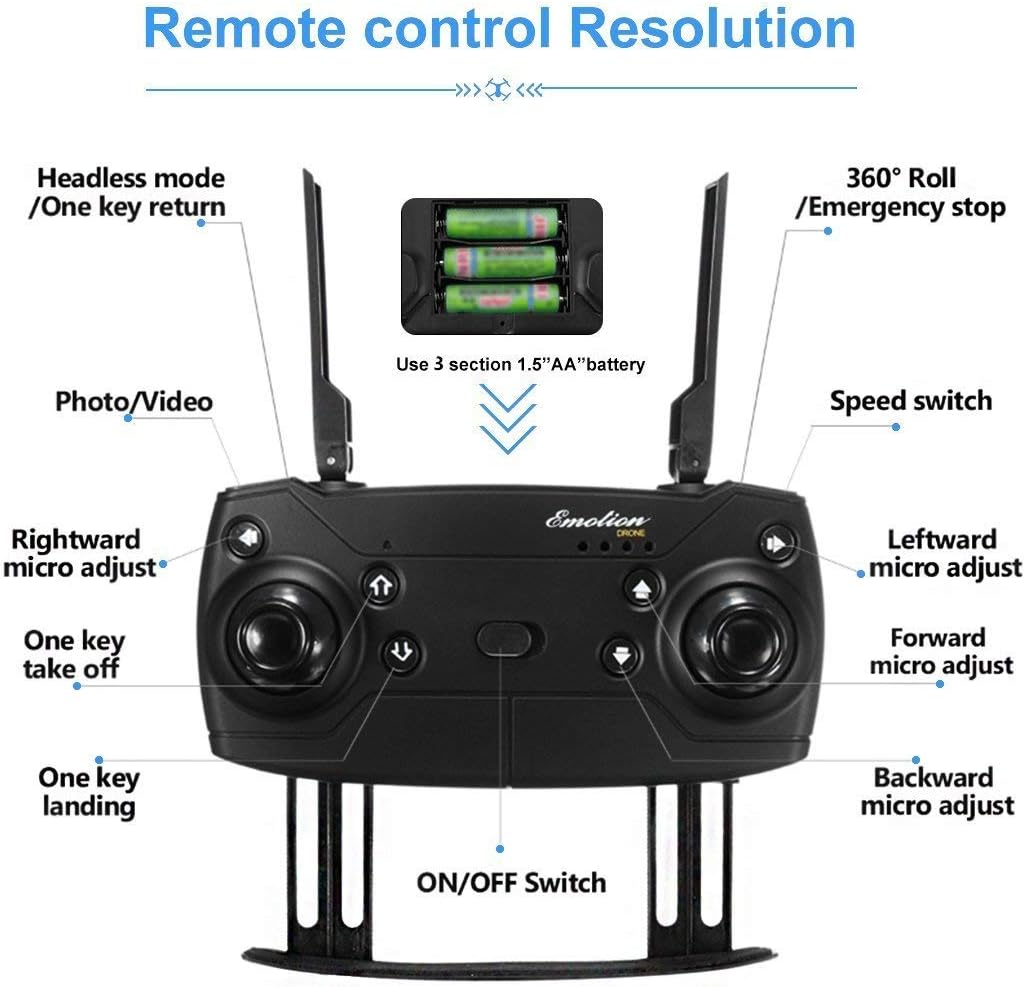
3.3-сүрөт: Detailed layout of the remote controller for the E58 Eachine JY019 drone. Key functions such as Headless mode/One key return, 360° Roll/Emergency stop, Photo/Video button, Speed switch, One key take off/landing, and various micro-adjustments (rightward, leftward, forward, backward) are clearly labeled. The battery compartment for 3 x 1.5V AA batteries is also indicated.
Familiarize yourself with the remote controller's buttons and joysticks:
- Сол джойстик: Бийиктикке (өйдө/төмөн) жана айланууну (солго/оңго) көзөмөлдөйт.
- Оң Джойстик: Алдыга/артка жана солго/оңго учууну башкарат.
- Бир баскычтуу учуу/конуу баскычы: Автоматтык түрдө учууну же конууну баштайт.
- Сүрөт/Видео баскычы: Сүрөткө тартат же видео жаздырууну баштайт/токтотот.
- Ылдамдык которуштуруу: Adjusts flight speed (e.g., low, medium, high).
- Headless Mode/One Key Return: Activates headless mode or returns the drone to the take-off point.
- 360° Roll/Emergency Stop: Performs a 360-degree flip or initiates an emergency stop.
- Кесүү баскычтары: Fine-tune the drone's stability (forward/backward, left/right, rotation).
- Кубат которгучу: Башкаргычты күйгүзөт/өчүрөт.
4. Орнотуу
4.1 Дрондун батареясын кубаттоо
- Connect the 3.7V 500mAh Lipo Battery to the USB Charging Cable.
- Plug the USB Charging Cable into a USB power source (e.g., computer USB port, USB wall adapter).
- The charging indicator light will show the charging status. Charging time is approximately 60-70 minutes.
- Толук заряддалгандан кийин, батареяны заряддагычтан ажыратыңыз.
4.2 Дрон батареясын орнотуу
- Дрондун өчүрүлгөнүн текшериңиз.
- Дрондогу батарея бөлүкчөсүн табыңыз.
- Carefully insert the charged 3.7V 500mAh Lipo Battery into the compartment.
- Батареянын капкагын бекитиңиз.

4.1-сүрөт: Жакын план view of the drone's battery compartment, showing the slot where the Lipo battery is inserted. The image illustrates the mechanism for securing the battery.
4.3 Өткөргүч батареяларды орнотуу
- Алыстан башкаруунун артындагы батарея капкагын ачыңыз.
- Туура полярдуулукту (+/-) камсыз кылып, 3 x 1.5V AA батарейкаларын салыңыз.
- Батареянын капкагын бекем жабыңыз.
4.4 Дронду даярдоо
- Carefully pull out all four arms of the drone until they are fully extended and locked into place.
- Дронду тегиз, тегиз жерге орнотуңуз.
- (Optional) Attach the propeller protection covers for added safety, especially for beginners.

4.2-сүрөт: Quick start guide showing the initial steps for preparing the drone for flight. This includes unfolding the drone arms and placing it on a flat surface, as well as turning on the remote controller.
5. Иштөө нускамалары
5.1 Дрон менен контроллерди жупташтыруу
- Turn on the drone by pressing the power button. The drone's indicator lights will flash.
- Turn on the remote controller using its power switch.
- Push the left throttle joystick fully up and then pull it fully down. The drone's lights will stop flashing and become solid, indicating successful pairing.
- For more stable flight, it is recommended to calibrate the gyroscope after pairing. Push both joysticks 45 degrees towards the outside bottom corners simultaneously until the lights flash and then become solid again.
5.2 One Key Take Off / Landing

5.1-сүрөт: Visual guide demonstrating the One Key Take Off and One Key Landing functions. The drone is shown ascending from a launch pad for take-off and descending for landing, simplifying flight control.
- One Key Take Off: After pairing and calibration, press the "One Key Take Off" button. The drone will automatically ascend and hover at a certain altitude.
- Бир негизги конуу: During flight, press the "One Key Landing" button. The drone will slowly descend and land gently on the ground.
5.3 Учууну башкаруунун негизги каражаттары
- Өтүү/Төмөн: Push the left joystick up to ascend, pull down to descend.
- Солго/Оңго буруңуз: Push the left joystick left to turn left, push right to turn right.
- Алдыга артка: Push the right joystick up to fly forward, pull down to fly backward.
- Fly Left/Right (Sideways): Push the right joystick left to fly left, push right to fly right.
5.4 Өзгөчөлүктөр
- Бийиктикте кармоо режими: The drone automatically maintains its current altitude, allowing for stable hovering and easier control, especially for photography and videography. This function is achieved by analyzing air pressure data.
- 360° айлануу: To perform a 360-degree flip, press the "360° Roll" button and then push the right joystick in the desired flip direction (forward, backward, left, or right). Ensure sufficient altitude before attempting.
- Учуу траекториясы: (Requires mobile app connection) Open the dedicated mobile app and select the trajectory flight mode. Draw a desired flight path on your phone screen, and the drone will automatically follow the recorded route.
- Башсыз режим: When activated, the drone's orientation becomes irrelevant to the controller's direction. The drone will move relative to the pilot's perspective, making it easier for beginners to control.
- Бир ачкыч менен кайтаруу: In headless mode, pressing the "One Key Return" button will cause the drone to fly back towards the take-off point.

5.2-сүрөт: Explanation of the 360° Flip and Altitude Hold features. The image illustrates the drone performing a flip and maintaining a stable height, emphasizing the benefits of the atmospheric pressure sensor for stable hovering.
5.5 Camera Operation (2MP HD)
The drone is equipped with a 2MP HD camera capable of 720P video recording. To utilize the camera features:
- Мобилдик колдонмо туташуусу: Download and install the recommended mobile application (refer to the product packaging or quick start guide for app name/QR code). Connect your smartphone to the drone's Wi-Fi network.
- Live FPV: Once connected, the live view from the drone's camera will be displayed directly on your phone screen (FPV Range: About 30m).
- Сүрөткө тартуу: Press the "Photo/Video" button on the remote controller once to take a photo. Photos will be saved to your phone's album via the app.
- Видеолорду жаздыруу: Press and hold the "Photo/Video" button to start video recording. Press and hold again to stop recording. Videos will be saved to your phone's album via the app.
6. Техникалык тейлөө
- Тазалоо: Дронду жана пультту тазалоо үчүн жумшак, кургак чүпүрөктү колдонуңуз. Күчтүү химиялык заттарды же эриткичтерди колдонбоңуз.
- Пропеллер текшерүү: Regularly check propellers for damage (bends, cracks). Replace any damaged propellers using the provided spare blades and screwdriver.
- Батареяга кам көрүү: Батареяларды салкын, кургак жерде сактаңыз. Толук заряддалган же толугу менен түгөнгөн батареяларды узак убакытка сактабаңыз. Узак мөөнөткө сактоо үчүн аларды болжол менен 50% га чейин заряддаңыз.
- Сактагыч: When not in use, fold the drone arms and store it in a safe, dry place away from direct sunlight and extreme temperatures.
7. Кыйынчылыктарды
| Көйгөй | Мүмкүн себеп | Чечим |
|---|---|---|
| Drone does not respond to controller. | Not paired; low battery (drone/controller); interference. | Re-pair drone and controller. Charge/replace batteries. Fly in an open area away from other Wi-Fi signals. |
| Учуу учурунда учкучсуз учат. | Not calibrated; uneven surface at take-off; wind. | Perform gyroscope calibration on a flat surface. Use trim buttons to adjust. Avoid flying in windy conditions. |
| Пропеллерлер айланбай жатат. | Obstruction; motor damage; battery not connected. | Check for tangled hair/debris. Ensure battery is properly connected. Contact support if motors are damaged. |
| Камерадагы сүрөт/видео сапаты начар. | Low light; camera lens dirty; unstable flight. | Ensure good lighting. Clean camera lens. Fly in Altitude Hold mode for stability. |
| Кыска учуу убактысы. | Battery not fully charged; old battery; aggressive flying. | Ensure battery is fully charged. Consider replacing old batteries. Fly more gently. |
8. Техникалык шарттар
| Өзгөчөлүк | Деталь |
|---|---|
| Элемент түрү | RC квадрокоптер |
| Модел | sbn (JY019) |
| Flying убакыт | 7-9 мүнөт |
| R / C Расстояние | 80-100 метр |
| FPV диапазону | Болжол менен 30 метр |
| Заряддоо убактысы | 60-70 мүнөт |
| Квадрокоптердин батареясы | 3.7V 500mAh Lipo (Included) |
| Transmitter батареясы | 3 x 1.5V AA battery (NOT Included) |
| Жыштык | 2.4G |
| Канал | 4ч |
| Гиро | 6 ок |
| Мотор | 0720 ядросуз мотор |
| Учуу Салмагы | Болжол менен 120 г |
| Түс | Кара |
| Камера | 2MP (720P HD) |
| Quadcopter Size (unfolded) | 27cm x 19.5cm x 5cm |
| Quadcopter Size (folded) | 12.5cm x 7.5cm x 5cm |
| Quadcopter Weight (with battery) | 96г |
| Quadcopter Weight (without battery) | 77.5г |
9. Кепилдик жана колдоо
Бул продукт үчүн кепилдик жөнүндө так маалымат бул колдонмодо берилген эмес. Сураныч, продукттун таңгагын, сатуучунун website, or contact the retailer where you purchased the drone for details regarding warranty coverage and customer support.
For technical assistance or further inquiries, please contact the product's manufacturer or the authorized distributor.


