
1. Киришүү
This manual provides essential information for the proper installation, operation, and maintenance of the Rakstore VEML7700 Ambient Light Sensor Module. The VEML7700 is a high-accuracy ambient light sensor designed for integration with microcontrollers such as Arduino and Raspberry Pi via the I2C interface. It is capable of measuring light intensity up to 120,000 lux.
2. Продукт бүтүп калдыview
The VEML7700 module is a compact board featuring the VEML7700 sensor. It provides a digital output proportional to the ambient light intensity. The module operates on a 3.3V or 5V DC power supply and communicates using the I2C protocol. It includes a 3.3V DC regulator with a maximum output of 100 mA.
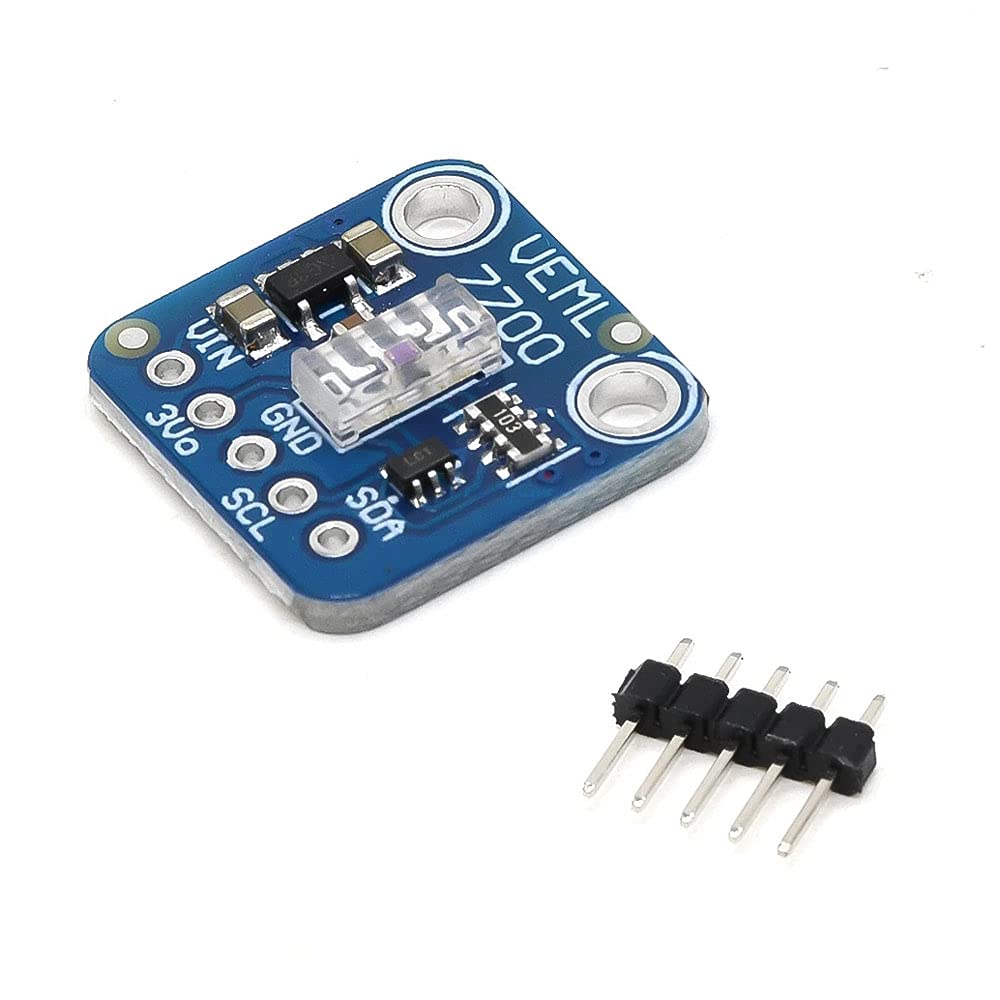
2.1-сүрөт: Бурчтуу view of the VEML7700 Ambient Light Sensor Module, showing the sensor chip and pin headers.
Негизги өзгөчөлүктөр төмөнкүлөрдү камтыйт:
- Module based on a VEML7700 sensor for ambient light measurement.
- Designed for use with Arduino, Raspberry Pi, or compatible microcontrollers.
- I2C bus interface for communication.

2.2-сүрөт: Жогорку view of the VEML7700 module, highlighting the VEML7700 chip and pin labels (VIN, GND, SDA, SCL, 3V0).

2.3-сүрөт: Төмөнкү view of the VEML7700 module, showing the I2C Lux Sensor label and Vin/logic voltage диапазону.
3. Орнотуу нускамалары
3.1 Soldering the Connector
The module typically requires soldering of the included 5-pin connector. Carefully solder the pins to the designated pads on the module. Ensure proper orientation and secure connections to prevent electrical shorts or intermittent contact.
3.2 Зымдарды туташтыруу
Connect the VEML7700 module to your microcontroller (e.g., Arduino, Raspberry Pi) using the I2C interface. The typical connections are:
- VIN: Connect to 3.3V or 5V DC power supply from your microcontroller.
- GND: Connect to the ground (GND) of your microcontroller.
- SDA: Connect to the I2C Data line of your microcontroller.
- SCL: Connect to the I2C Clock line of your microcontroller.
- 3V0: This is a 3.3V regulated output from the module (max 100mA), not typically used for primary power input.
3.3 Library Installation
To communicate with the VEML7700 sensor, you will need to install a compatible library for your chosen microcontroller platform:
- Arduino үчүн: Издөө 'VEML7700' in the Arduino IDE's Library Manager and install a suitable library (e.g., Adafruit VEML7700 Library).
- For Raspberry Pi (CircuitPython/Python): Install the CircuitPython VEML7700 library using pip:
pip3 install adafruit-circuitpython-veml7700.
4. Иштөө нускамалары
Once the module is wired and the necessary library is installed, you can begin reading ambient light data. The VEML7700 communicates via I2C, with a fixed address of 0x10.
4.1 Негизги операция
Refer to the documentation and example code provided with your chosen library for specific programming instructions. Generally, the process involves:
- I2C байланышын инициализациялоо.
- Initializing the VEML7700 sensor object.
- Reading the ambient light value (in lux) from the sensor.
- The sensor provides readings on a 16-bit scale, offering high resolution.
The sensor automatically handles gain and integration time settings to provide accurate lux readings across its wide dynamic range.
5. Техникалык шарттар
| Мүнөздүү | Нарк |
|---|---|
| Электр камсыздоо | 3.3V же 5V DC |
| Интерфейс | I2C |
| I2C дареги | 0x10 (not modifiable) |
| Өлчөө диапазону | 0 to 120,000 lux (on 16 bits) |
| Тактык | 0.0036 lux / count |
| Регулятордун чыгышы | 3.3V DC / 100 mA max |
| Өлчөмдөр | 17 x 17 x 4 мм |
| Платформанын шайкештиги | Arduino, Raspberry Pi (Linux) |
6. Кыйынчылыктарды
If you encounter issues with your VEML7700 module, consider the following:
- No Readings / I2C Error:
- Verify all wiring connections (VIN, GND, SDA, SCL) are correct and secure.
- электр менен жабдууну камсыз кылуу voltage 3.3V-5V диапазонунда.
- Check for proper soldering of the 5-pin connector.
- Confirm the I2C address (0x10) is correctly used in your code.
- Run an I2C scanner sketch/script on your microcontroller to detect if the sensor is visible on the bus.
- Туура эмес окуулар:
- Ensure the sensor is not obstructed or in direct, harsh light that might saturate it.
- Verify that the correct library for VEML7700 is installed and initialized.
- Check for any environmental factors affecting light measurement (e.g., flickering lights, reflections).
- Модуль күйбөйт:
- Double-check VIN and GND connections for correct polarity and voltage.
- Inspect for any physical damage to the module.
7. Техникалык тейлөө
The VEML7700 Ambient Light Sensor Module requires minimal maintenance. To ensure optimal performance and longevity:
- Модулду таза жана чаң менен таштандылардан таза кармаңыз. Тазалоо үчүн жумшак, кургак чүпүрөк колдонуңуз.
- Avoid exposing the module to extreme temperatures, high humidity, or corrosive environments.
- Do not apply excessive force or bend the PCB, as this can damage internal components.
- Ensure the sensor's light-sensitive area is unobstructed for accurate readings.
8. Кепилдик жана колдоо
Specific warranty information for this product is not provided in the available documentation. For technical support or inquiries regarding the Rakstore VEML7700 Ambient Light Sensor Module, please contact the manufacturer, Rakstore, through their official support channels or the retailer from whom the product was purchased.