
5Rcom MT2005
User Manual for 5Rcom Rolling TV Stand
Model: MT2005 | Brand: 5Rcom
Introduction
The 5Rcom Rolling TV Stand is designed to provide a versatile and stable solution for displaying your television. This mobile TV cart supports TVs from 23 to 65 inches, with a maximum load capacity of 88 lbs. It features height adjustment, tilt functionality, and 360° lockable wheels for easy mobility and secure positioning. The stand also includes integrated cable management and a low-profile X-shaped base for optimizing space.

Image: The 5Rcom Rolling TV Stand, featuring a television mounted on its adjustable pole and a stable X-shaped base with wheels.
Коопсуздук маалыматы
Чогултуудан жана колдонуудан мурун бардык көрсөтмөлөрдү кунт коюп окуп чыгыңыз. Бул көрсөтмөлөрдү аткарбоо мүлккө зыян келтирүүгө, олуттуу жаракат алууга же өлүмгө алып келиши мүмкүн. Эгерде кандайдыр бир суроолоруңуз болсо, кардарларды колдоо кызматына кайрылыңыз.
- 88 lbs (40 кг) максималдуу салмак сыйымдуулугунан ашпаңыз.
- Сыналгыңыздын VESA үлгүсү стенд менен шайкеш келишин текшериңиз (100x100 мм – 400x400 мм).
- Always ensure all screws and connections are securely tightened before use.
- Do not attempt to move the stand with a TV attached over uneven surfaces or obstacles.
- Кокусунан кыймылдап кетпеши үчүн, стенд каалаган абалда болгондо дөңгөлөктөрдү бекитиңиз.
- Keep children and pets away from the stand during assembly and adjustment.
- Use caution when adjusting height or tilt to avoid pinching or dropping the TV.
Пакеттин мазмуну
Чогултууну баштоодон мурун бардык компоненттердин бар экенин жана бузулбаганын текшериңиз. Эгерде кандайдыр бир тетиктер жок болсо же бузулган болсо, чогултууну улантпаңыз жана кардарларды колдоо кызматына кайрылыңыз.
- Негизги колдоо мамыча
- X-shaped Base
- Lockable Wheels (4x)
- Сыналгы орнотуу кронштейндери
- Accessory Shelf (optional)
- Roku/Apple TV Mount (optional)
- Hardware Kit (various screws, washers, spacers)
- Cable Management Clips/Straps
- Монтаждоо куралдары (мисалы, Аллен ачкычы)
Монтаждоо көрсөтмөлөрү
Follow these steps carefully to assemble your 5Rcom Rolling TV Stand. It is recommended to have two people for certain steps, especially when mounting the TV.
- Дөңгөлөктөрдү негизге бекитүү: Securely attach the four lockable wheels to the X-shaped base using the provided hardware. Ensure they are tightened to prevent wobbling.

Image: The 360° rotating lockable wheels, designed for silent and smooth movement without scratching floors.
- Негизги уюлду чогултуу: Connect the main support pole sections if they are separate. Attach the assembled pole to the center of the X-shaped base.
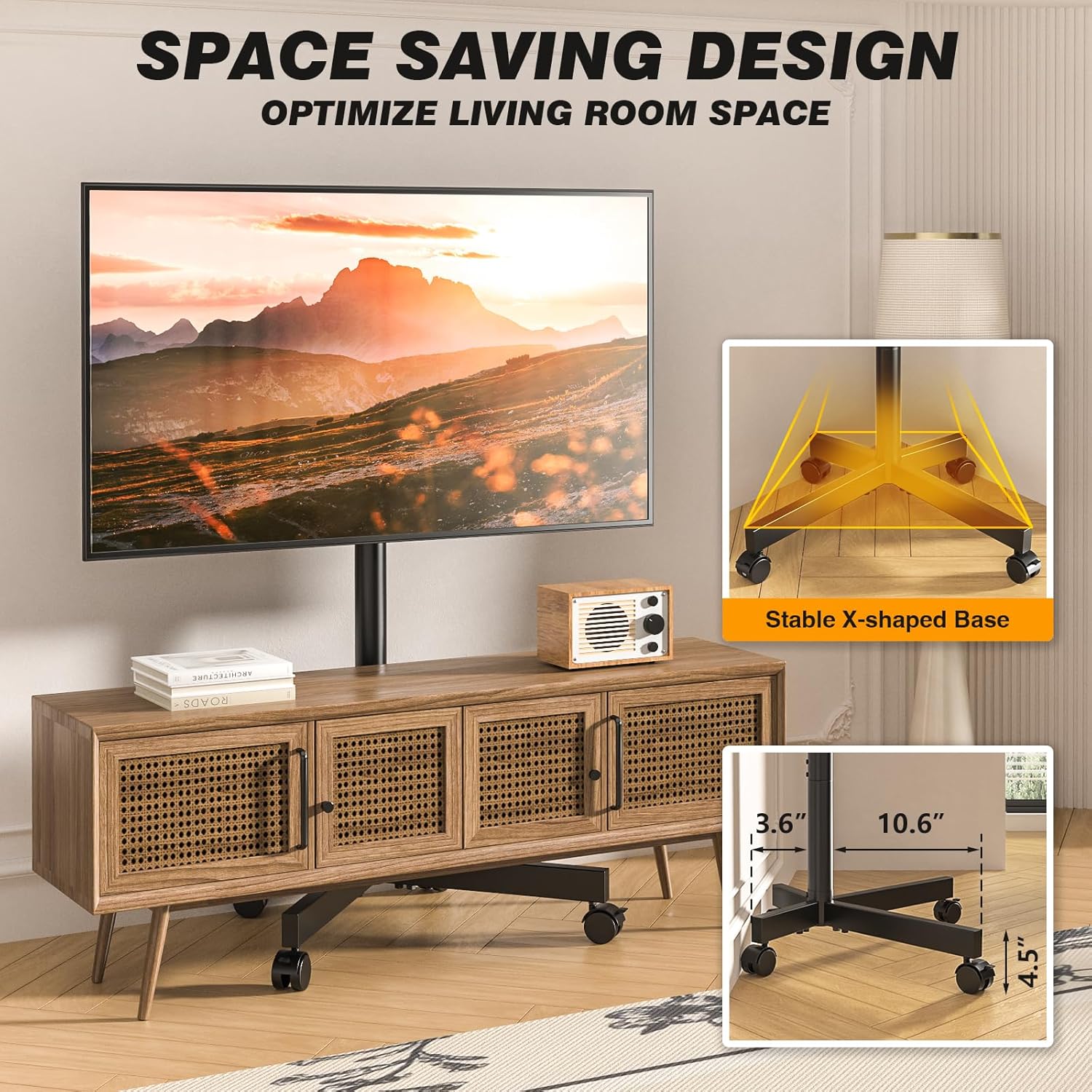
Image: The stable X-shaped base, illustrating its compact design suitable for various spaces.
- Install TV Mounting Brackets: Attach the vertical TV mounting brackets to the back of your television using the appropriate screws and spacers from the hardware kit. Refer to your TV's manual for VESA compatibility and screw length.
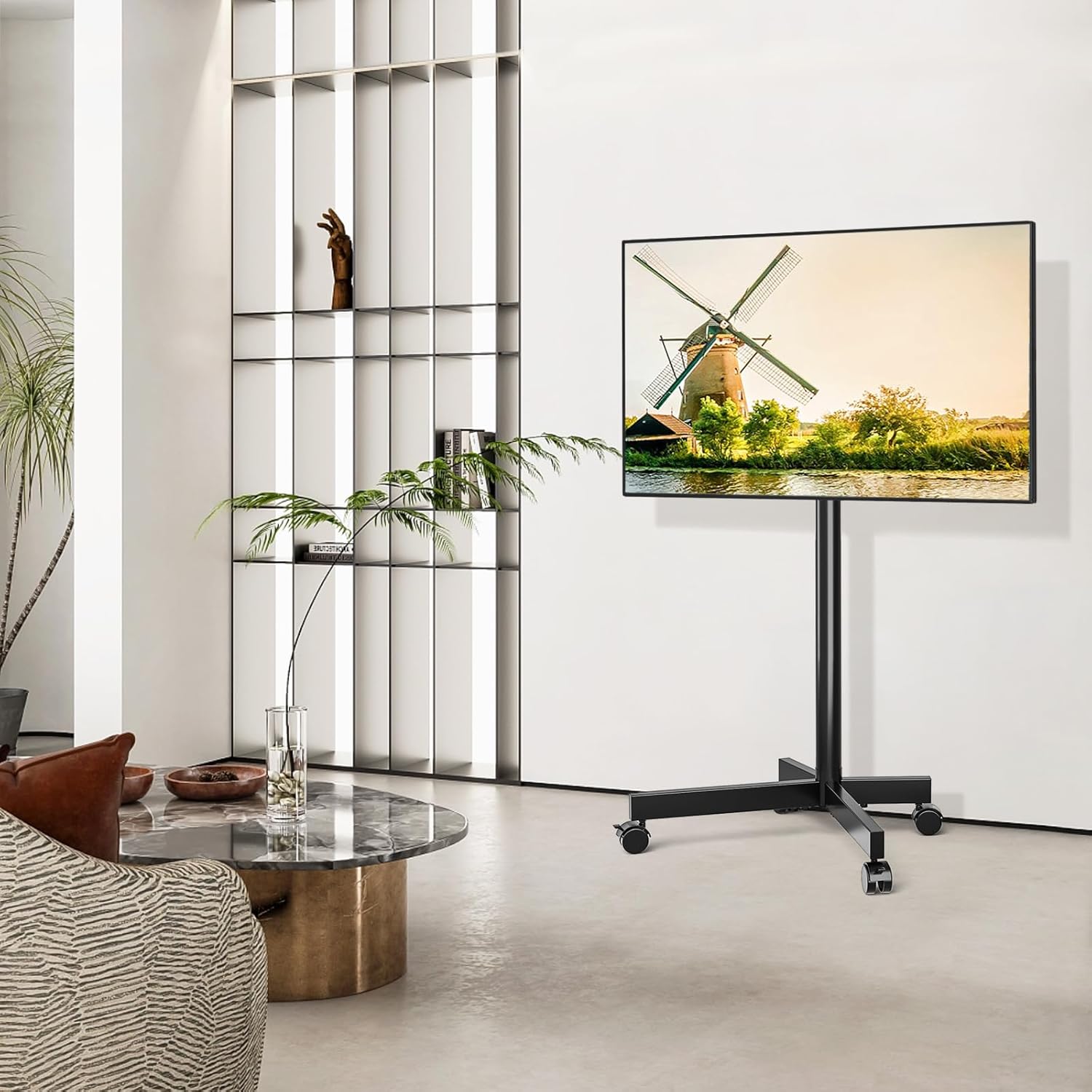
Image: VESA compatibility chart and included screw assortment for attaching TV mounting brackets.
- Телевизорду стендге орнотуу: Carefully lift the TV with the attached brackets and hook them onto the main support pole's mounting plate. Ensure the TV is centered and level. Secure the TV using the safety lock mechanism on the stand.
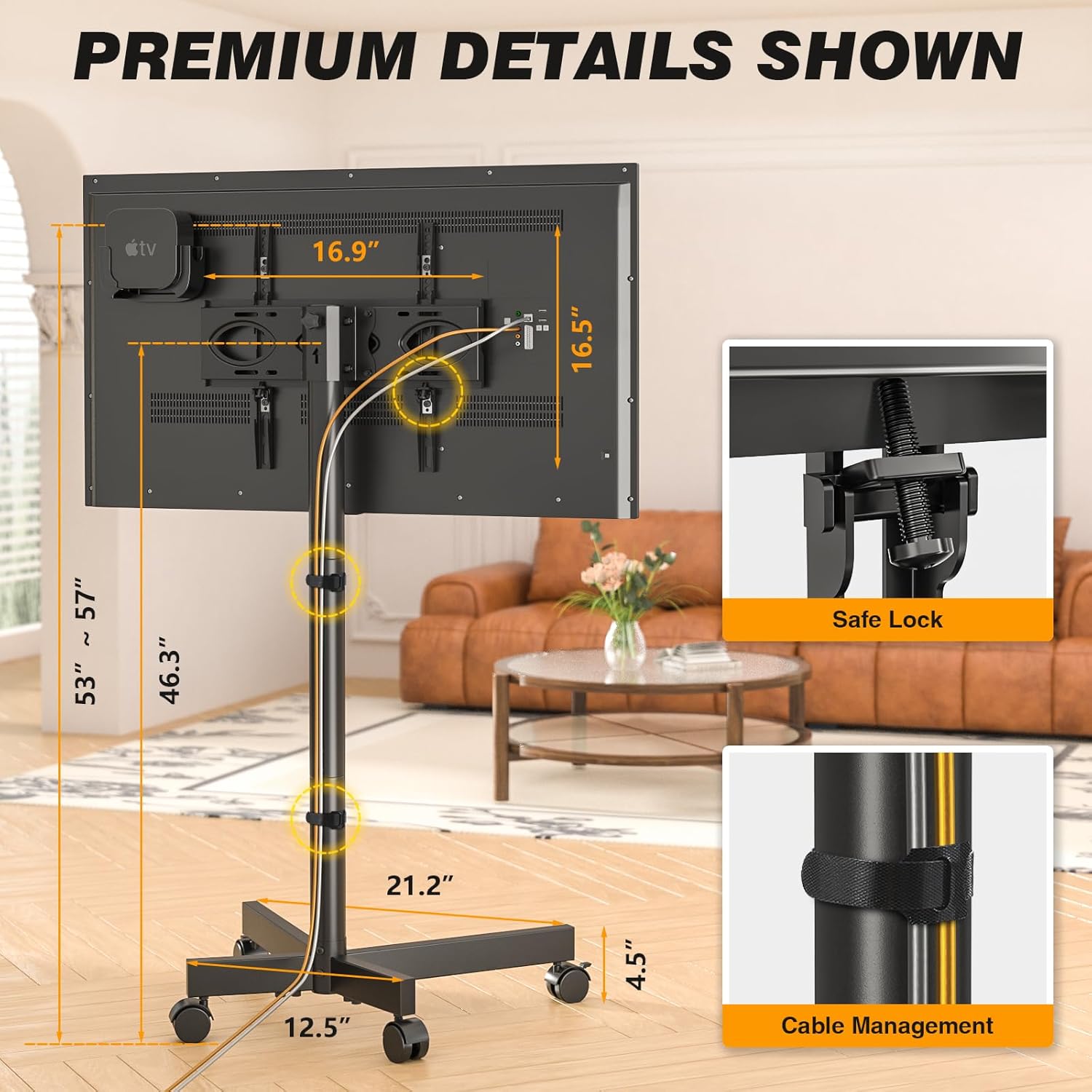
Image: Close-up of the safety lock feature and cable management solution on the TV stand.
- Attach Accessory Shelf and Roku/Apple TV Mount (Optional): If desired, attach the accessory shelf and the Roku/Apple TV mount to the main pole at your preferred height.

Image: The dedicated mount for Roku Ultra or Apple TV, designed to keep streaming devices neatly behind the television.
- Кабелдик башкаруу: Use the provided cable management clips or straps to neatly route and secure all cables along the main support pole.
Чогултуу жана өзгөчөлүк бүттүview Video
Video: An official demonstration of the 5Rcom Rolling TV Stand, showcasing its assembly process, adjustable features, and mobility.
Иштөө нускамалары
- Бийиктикти жөндөө: The TV stand offers 3 levels of height adjustment, ranging from 53 to 57 inches. To adjust, loosen the height adjustment screws on the main pole, slide the TV to the desired height, and re-tighten the screws securely.

Image: Visual representation of the TV stand's adjustable height and tilt features, allowing for optimal viewбурчтар.
- Tilting the TV: The TV mount allows for a tilt range of -2° to +5°. This feature helps reduce glare and optimize viewing angles. Loosen the tilt knobs on the side of the TV mounting plate, adjust the TV to the desired angle, and then firmly tighten the knobs.
- Стендди жылдыруу: To move the TV stand, unlock all four wheels by flipping their locking levers. Gently push or pull the stand to its new location. Once in position, lock all wheels to ensure stability. The silent, anti-scratch wheels are designed for smooth movement across various floor types.
Техникалык тейлөө
- Тазалоо: Стендди жумшак менен сүртүңүз, гamp кездеме. Финишке зыян келтирүүчү абразивдүү тазалагычтарды же эриткичтерди колдонуудан алыс болуңуз.
- Текшерүүлөр: Мезгил-мезгили менен бардык бурамалар менен байланыштарды текшерип туруңуз, алар бекем жана бекем бойдон калууда. Керек болсо кайра тартыңыз.
- Дөңгөлөккө кам көрүү: Keep the wheels free of debris (hair, dust, etc.) to ensure smooth rolling.
Проблемаларды чечүү
| Көйгөй | Мүмкүн себеп | Чечим |
|---|---|---|
| Турак солкулдап/туруктуу эмес. | Loose connections; uneven floor; TV too heavy or large. | Ensure all screws are tightened. Move to a level surface. Verify TV weight and size are within limits. |
| Дөңгөлөктөр тегиз жылбайт. | Wheels locked; debris in wheels. | Unlock all wheels. Clean any debris from the wheel casters. |
| Cannot adjust TV height or tilt. | Жөндөө баскычтары/бурамалары өтө катуу бекитилген. | Loosen the respective knobs/screws before attempting adjustment. Re-tighten after adjustment. |
| Телевизор розеткага туура келбейт. | Туура эмес VESA үлгүсү; сыналгы өтө чоң/оор. | Verify your TV's VESA pattern matches the stand's compatibility (100x100mm to 400x400mm). Check TV weight and size against specifications. |
Техникалык шарттар
- Модел: MT2005
- Бренд: 5Rcom
- Материал: Металл
- Түсү: Кара
- Элемент Салмагы: 15.38 фунт
- Продукциянын өлчөмдөрү: 21.2 x 16.1 x 56.6 дюйм
- Шайкеш сыналгы өлчөмдөрү: 23 - 65 дюйм
- Максималдуу жүктөө жөндөмдүүлүгү: 88 фунт (40 кг)
- VESA шайкештиги: 100x100ммден 400x400ммге чейин
- Бийиктигин тууралоо: 3 levels (approx. 53 to 57 inches)
- Ийилген бурч: -2°тан +5°ка чейин
- Кыймыл түрү: Tilt, Rolling
- Монтаж түрү: Floor Mount
- Келип чыккан өлкө: Кытай
Кепилдик жана колдоо
5Rcom products are manufactured with quality and performance in mind. For information regarding warranty coverage, product support, or to purchase replacement parts, please visit the official 5Rcom webсайтка же кардарларды тейлөө бөлүмүнө кайрылыңыз.
For further assistance, please refer to the contact information provided on the product packaging or the official 5Rcom brand store on Amazon:
Ask a question about this manual
Ask about setup, troubleshooting, compatibility, parts, safety, or missing instructions. Manuals+ will review the question and use this page’s manual context to help answer it.