
1. Киришүү
This document provides essential instructions for the setup and basic operation of your Easytry123 Replacement Remote Control. This remote is designed to function with various Yamaha Home Theater Systems, including models WY92530, BRX-750, WY92500, MCR-750, and BRX-610. Please note that as a replacement unit, some advanced or specific functions of your original remote may operate differently or not be supported.
For comprehensive details on your Yamaha Home Theater System's features, please refer to its original instruction manual.
2. Продукт бүтүп калдыview
The Easytry123 Replacement Remote Control is an infrared (IR) device designed for ease of use with compatible Yamaha Home Theater Systems. Its ergonomic design ensures comfortable handling.

2.1-сүрөт: Фронт view of the Easytry123 Replacement Remote Control, showing all buttons and their labels.

2.2-сүрөт: Бурчтуу view of the remote control, highlighting its ergonomic shape.
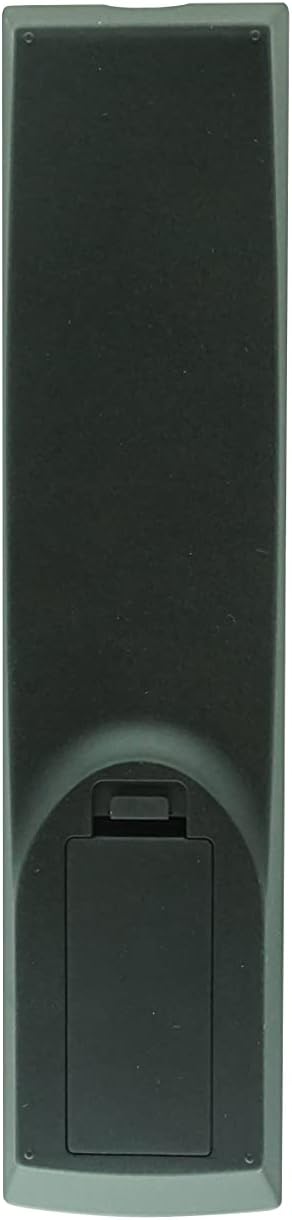
2.3-сүрөт: Артка view батарея бөлүмүнүн капкагын көрсөтүп, алыстан башкаруу пультунун
3. Орнотуу
3.1 Батареяны орнотуу
The remote control requires two (2) AA batteries (not included). Follow these steps to install them:
- Алыстан башкаруу пультунун арткы бетиндеги батарея бөлүмүн табыңыз (2.3-сүрөттү караңыз).
- Press down on the tab and slide the battery compartment cover downwards to open it.
- Эки (2) AA батарейкасын салып, оң (+) жана терс (-) терминалдары бөлүмдүн ичиндеги белгилер менен туура дал келгенин текшериңиз.
- Батарея бөлүкчөсүнүн капкагын бекем чыккыча ордуна жылдырыңыз.
Эскертүү: Ар дайым жаңы батарейкаларды колдонуңуз жана эки батарейканы бир убакта алмаштырыңыз. Эски жана жаңы батареяларды же батарейкалардын ар кандай түрлөрүн аралаштырбаңыз.
4. Иштөө нускамалары
This remote control operates using infrared (IR) signals. Ensure there is a clear line of sight between the remote's IR emitter and your Yamaha Home Theater System's IR receiver. Point the remote directly at the system when pressing buttons.
4.1 Негизги функциялар
- Кубат (кызыл баскыч): Системаны күйгүзөт же өчүрөт.
- Сан баскычтары (0-9): Used for direct input, such as selecting tracks or radio presets.
- Көлөмү (+/-): Аудио чыгаруу деңгээлин тууралайт.
- Үнсүз: Аудио чыгыштын үнүн басат.
- Input Selection (e.g., DISC, TV, AUX, TUNER, USB/NET): Керектүү аудио/видео киргизүү булагын тандайт.
4.2 Навигация жана менюну башкаруу
- Directional Pad (Up, Down, Left, Right) and ENTER: Used to navigate menus and confirm selections on your system's display.
- TOP MENU / POP-UP/MENU: Accesses the main menu or context-sensitive menus.
- КАЙТУУ: Мурунку экранга же менюга кайтып келет.
- ЭКРАНДА: Displays on-screen information or menus.
- ЖАЙГАШУУ: Accesses the system's setup menu.
- КӨРСӨТҮҮ: Changes the information displayed on the system's screen.
4.3 Playback and Media Control
- Playback Buttons (Play, Pause, Stop, Fast Forward, Rewind, Skip Forward, Skip Back): Медианы ойнотууну көзөмөлдөйт.
- АРАЛАШТЫРУУ: Кокус ойнотууну иштетет.
- КАЙТАЛОО: Учурдагы тректи же ойнотмо тизмесин кайталайт.
- A/B: Repeats a specific section of media.
- PIP (Сүрөт ичиндеги сүрөт): If supported by your system, controls the PIP function.
4.4 Advanced and System-Specific Functions
- ПРОГРАММА: Used for programming functions, such as radio presets.
- MARKER / DIGEST / ZOOM: Specific functions related to disc playback or display.
- SLEEP / TIMER: Sets sleep timers or other timed functions.
- АЙРАНА: Adjusts surround sound modes.
- ДИММЕР: Дисплей жарыктыгын тууралайт.
- АБАЛЫ: Displays system status information.
- SUBTITLE / AUDIO: Controls subtitle and audio track options during playback.
- Эстутум: Stores or recalls settings.
- iPod: Activates iPod control mode if your system has an iPod dock.
Маанилүү: Due to the nature of replacement remotes, some functions may not be identical to your original remote or may require specific system settings. Refer to your Yamaha system's manual for detailed function explanations.
5. Кыйынчылыктарды
| Көйгөй | Мүмкүн себеп | Чечим |
|---|---|---|
| Пульт жооп бербей жатат. |
|
|
| Some functions do not work as expected. |
|
|
6. Техникалык тейлөө
- Тазалоо: Пультту жумшак, кургак чүпүрөк менен сүртүңүз. Абразивдүү тазалагычтарды же эриткичтерди колдонбоңуз.
- Батареяга кам көрүү: Эгерде алыстан башкаруу пульту көпкө чейин колдонулбаса, агып кетүүнүн жана мүмкүн болгон зыяндын алдын алуу үчүн батарейкаларды алып салыңыз.
- Сактагыч: Пультту күн нурунан жана экстремалдык температурадан алыс, салкын, кургак жерде сактаңыз.
7. Техникалык шарттар
- Бренд: Easytry123
- Шайкеш түзмөктөр: Yamaha Home Theater Systems (Models: WY92530, BRX-750, WY92500, MCR-750, BRX-610)
- Байланыш технологиясы: Инфракызыл (IR)
- Контроллердин түрү: Control Button
- Өзгөчө өзгөчөлүгү: Эргономикалык дизайн
- Батареялар талап кылынат: 2 x AA (киргизилген эмес)
8. Кепилдик жана колдоо
As a third-party replacement remote control, specific warranty details are typically provided by the seller at the time of purchase. Please retain your purchase receipt for any warranty claims.
For technical support or inquiries regarding this Easytry123 replacement remote, please contact the seller directly through your purchase platform.