
UNITOPSCI A2878
UNITOPSCI A2878 Double Din Car Stereo User Manual
Модел: A2878
1. Киришүү
This manual provides instructions for the installation, operation, and maintenance of your UNITOPSCI A2878 Double Din Car Stereo. This unit features a 7-inch touchscreen, Apple CarPlay, Android Auto, Bluetooth connectivity, FM radio, support for a backup camera, mirror link functionality, and dual USB ports.
Продукттун туура иштешин камсыз кылуу жана зыян келтирбөө үчүн бул колдонмону колдонуудан мурун кылдат окуп чыгыңыз.
2. Пакеттин мазмуну
Төмөндө тизмеленген нерселердин баары пакетиңизге камтылганын текшериңиз:
- Негизги башкы блок
- Камера
- Тышкы микрофон
- Dual USB Adapter
- Электр кабели
- User Manual
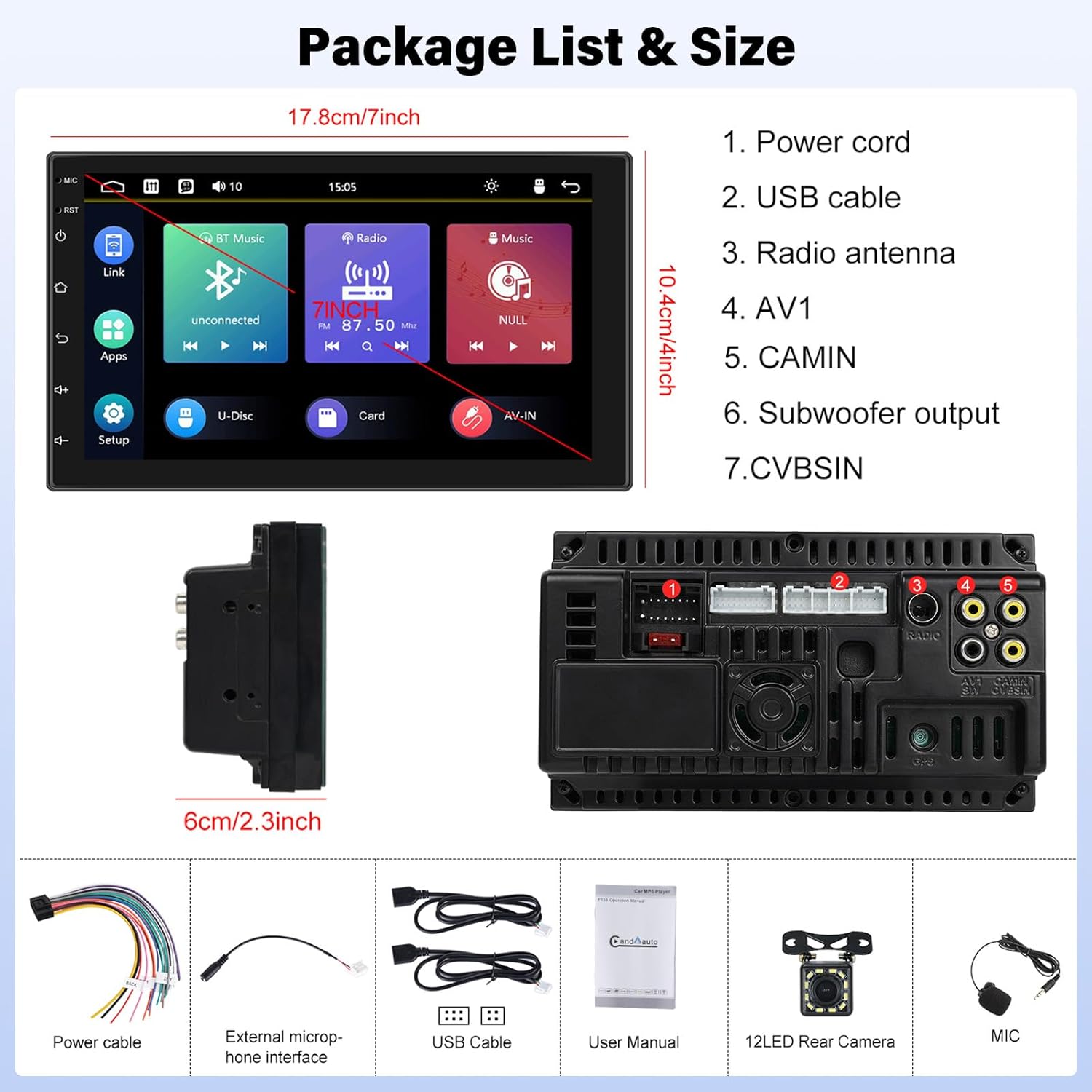
Image: Contents of the UNITOPSCI A2878 package, showing the main unit, wiring, and accessories.
3. Продукт бүтүп калдыview
The UNITOPSCI A2878 is a double din car stereo featuring a 7-inch high-definition touchscreen. The front panel includes essential controls and the display for various functions. The rear panel provides all necessary connection ports for power, speakers, USB devices, and external accessories like the backup camera.

Сүрөт: алдыңкы view of the UNITOPSCI A2878 car stereo with its 7-inch touchscreen interface.

Image: Rear panel connections of the UNITOPSCI A2878 head unit, indicating ports for power, USB, radio antenna, AV, camera, subwoofer, and CVBS.
4. Орнотуу жана орнотуу
Proper installation is crucial for the performance and safety of your car stereo. It is recommended that installation be performed by a qualified professional.
4.1 Зымдарды туташтыруу
Конкреттүү туташуулар үчүн аппаратыңыз менен берилген зымдар схемасын караңыз. Негизги байланыштарга төмөнкүлөр кирет:
- Электр кабели: Унаанын кубат булагына туташтырыңыз (туруктуу 12V, кошумча 12V жана жерге туташтыруу).
- USB кабелдери: Connect the provided USB cables for CarPlay/Android Auto and media playback.
- Радио антенна: Унааңыздын FM/AM антеннасын туташтырыңыз.
- CAMIN (Camera Input): Камдык камеранын видео сигналын туташтырыңыз.
- Сабвуфердин чыгышы: Тышкы сабвуферди туташтыруу үчүн.
- Тышкы микрофон: Чалуу сапатын жакшыртуу үчүн тышкы микрофонду туташтырыңыз.
4.2 Камдык камераны орнотуу
Install the backup camera at the rear of your vehicle. Connect its video output to the CAMIN port on the head unit and its power to the vehicle's reverse light circuit so it activates automatically when reversing.
5. Иштөө нускамалары
5.1 CarPlay жана Android Auto
Connect your smartphone to the stereo via a USB cable to activate Apple CarPlay or Android Auto. This allows access to your phone's navigation, music, calls, and other compatible apps directly on the stereo's screen, controlled by voice or touch.

Image: Wired connection setup for CarPlay and Android Auto.

Image: CarPlay and Android Auto interfaces displayed on the stereo screen.
5.2 Mirror Link
The mirror link function allows you to project your smartphone's screen (both iOS and Android) onto the stereo display via a USB cable. This enables viewing videos, navigation maps, and images from your phone on the larger screen.

Image: Mirror Link functionality with a smartphone connected to the stereo.
5.3 Bluetooth Hands-free & FM Radio
Bluetooth: Pair your smartphone with the stereo via Bluetooth for hands-free calling and wireless audio streaming. The built-in microphone facilitates clear communication. You can access your phone book and dial directly from the stereo.
FM радиосу: The unit includes an FM tuner with 18 preset stations. Tune into your favorite radio programs, music, and traffic updates.

Image: FM Radio interface and Bluetooth hands-free call screen.
5.4 Камдык камеранын киргизүүсү
When the vehicle is shifted into reverse, the stereo automatically displays the clear image from the connected backup camera, assisting with safe parking maneuvers.
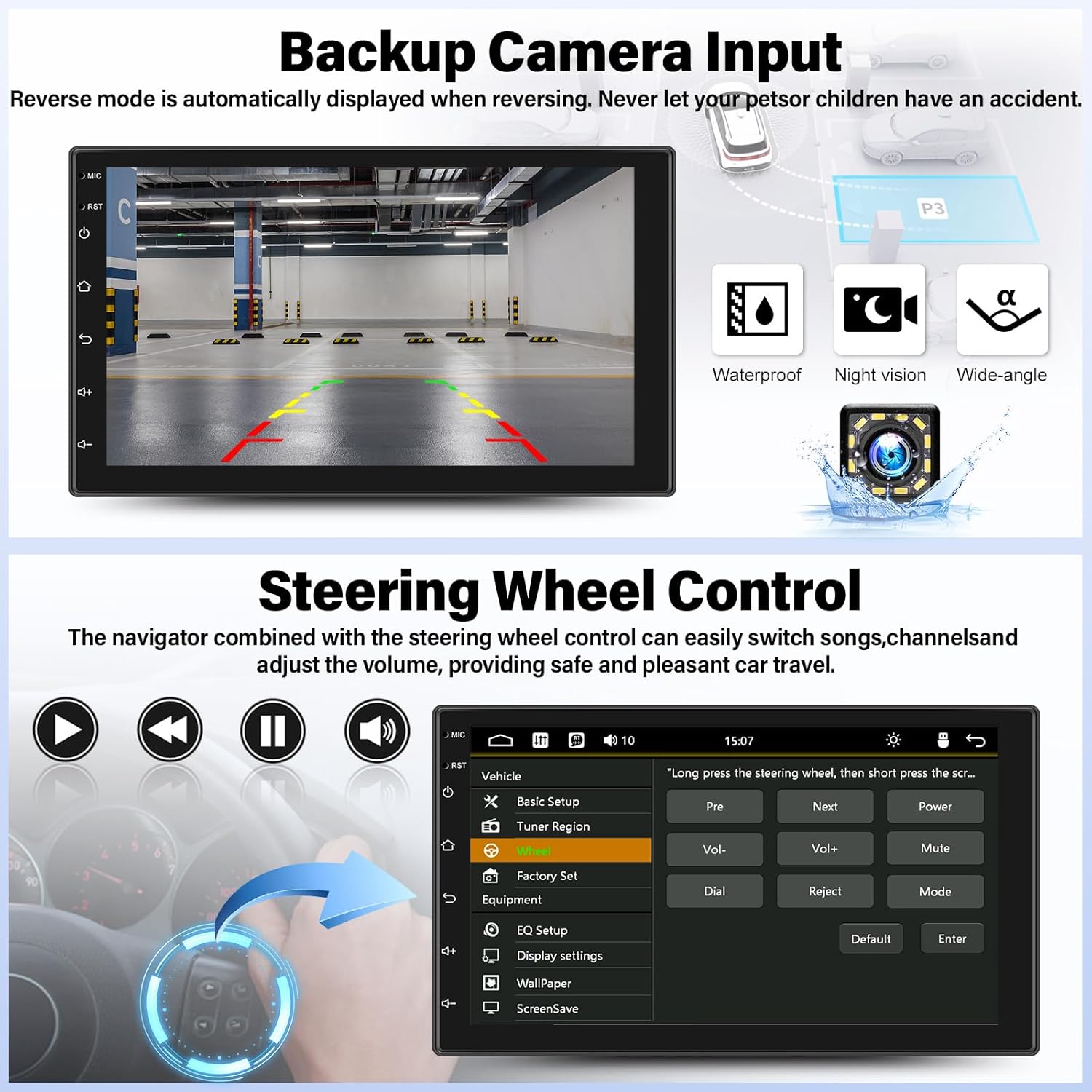
Image: Backup camera display on the stereo screen.
5.5 Рулду башкаруу (SWC)
The unit supports steering wheel control, allowing you to manage functions such as volume adjustment, track skipping, and mode switching directly from your vehicle's steering wheel buttons (if compatible and wired correctly). This enhances convenience and safety while driving.
5.6 USB ойнотуу жана заряддоо
The two USB adapter ports allow for media playback from a USB drive (audio/video files) and charging of compatible devices.

Image: USB media playback and charging capabilities.
5.7 Аудио эквалайзер (EQ)
Adjust the audio output using the built-in equalizer. You can select from various preset audio styles (e.g., Classic, Pop, Rock, Jazz) or customize settings to match your preferences and vehicle acoustics. The unit also supports subwoofer output for enhanced bass.

Image: Audio Equalizer interface for sound customization.
6. Техникалык тейлөө
Унаа стереоңуздун узак иштөөсүн жана оптималдуу иштешин камсыз кылуу үчүн, төмөнкү тейлөө көрсөтмөлөрүн аткарыңыз:
- Тазалоо: Сенсордук экранды жана блоктун сыртын тазалоо үчүн жумшак, кургак чүпүрөктү колдонуңуз. Абразивдүү тазалагычтардан же эриткичтерден качыңыз.
- Температура: Аппаратты экстремалдык температурага, түз күн нуруна узак убакытка же жогорку нымдуулукка дуушар кылуудан алыс болуңуз.
- Байланыштары: Мезгил-мезгили менен бардык зымдарды байланыштарды текшерип, алардын коопсуз экендигин текшерип туруңуз.
7. Кыйынчылыктарды
If you encounter issues with your UNITOPSCI A2878 car stereo, refer to the following common problems and solutions:
- Кубат жок: Check the power cable connections (constant 12V, accessory 12V, ground). Ensure the vehicle's fuse for the stereo is not blown.
- Үн жок: Verify speaker connections. Check volume levels and audio settings (EQ). Ensure the mute function is not activated.
- CarPlay/Android Auto туташпай жатат: Ensure your phone is connected via a compatible USB cable. Try a different USB port or cable. Check phone settings for CarPlay/Android Auto permissions.
- Bluetooth жупташтыруу маселелери: Ensure Bluetooth is enabled on both the stereo and your phone. Delete previous pairings and try pairing again.
- Камдык камера көрүнбөйт: Check the camera's power and video signal connections. Ensure the camera is properly installed and wired to the reverse light trigger.
- Сенсордук экран жооп бербейт: Try resetting the unit using the reset button (if available, typically a small pinhole).
Эгер көйгөйлөр чечилбесе, жардам алуу үчүн кардарларды колдоо кызматына кайрылыңыз.
8. Техникалык шарттар
| Өзгөчөлүк | Спецификация |
|---|---|
| Модель номери | A2878 |
| Дисплей өлчөмү | 7 дюйм |
| Display Resolution | 1024x600 |
| Продукциянын өлчөмдөрү | 7.01 x 1.77 x 4.02 дюйм |
| Элемент Салмагы | 2.4 фунт (1.09 килограмм) |
| Байланыш технологиясы | Bluetooth, USB, RCA |
| Controller Type | Android, iOS (via CarPlay/Android Auto) |
| Аудио чыгаруу режими | Стерео |
| Көлөмдүү үн каналынын конфигурациясы | 2.0 |
| Видеону коддоону колдоо | H.264, H.263 |
9. Кепилдик жана колдоо
UNITOPSCI provides comprehensive customer support for its products:
- Алмаштыруу: Available within 24 months of purchase.
- Техникалык колдоо: Өмүр бою сатуудан кийинки консультация жана техникалык колдоо.
- Кайтаруулар: 60 күндүк кайтаруу саясаты.
For any inquiries or support, please contact UNITOPSCI customer service at: UNITOPSCI@126.com