
Introduction
The SJCAM C100 is a compact and versatile action camera designed for capturing high-quality video and photos in various environments. Its small size, waterproof capabilities, and wireless connectivity make it suitable for sports, travel, and daily vlogging. This manual provides essential information for setting up, operating, and maintaining your C100 camera.

Image: The SJCAM C100 Action Camera, a compact device for capturing video and photos.
Жайгашуу
1. Micro SD картаны салуу
The SJCAM C100 requires a Micro SD card (not included) for storing recordings. Ensure the camera is powered off before inserting or removing the card.
- Камераңыздын капталынан Micro SD карта уячасын табыңыз.
- Микро SD картаны уячага акырын салыңыз, ал чыкылдагыча.
- Алып салуу үчүн, картаны ичкери карай чыгып кеткенче басыңыз.
Video: Demonstrates how to insert the Micro SD card into the SJCAM C100 camera.
2. Камераны заряддоо
The C100 camera has a built-in battery. Connect the camera to a power source using the provided USB cable. The camera can record while charging.
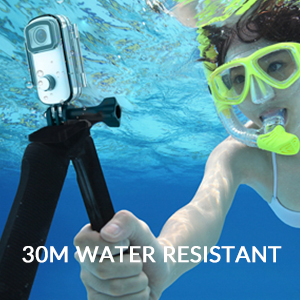
Image: The SJCAM C100 camera connected to a power bank, illustrating its ability to operate while charging. This extends recording time for longer sessions.
Камераны иштетүү
1. Күйгүзүү/өчүрүү
- To power on: Press and hold the main button for 5 seconds. The camera will vibrate once, and a blue light will illuminate, indicating it is on.
- To power off: Press and hold the main button for 2 seconds. The blue light will turn off.
2. Жазууну баштоо/токтот
- To start recording: With the camera powered on, click the main button once. The blue light will flash, indicating recording has started.
- To stop recording: Click the main button again. The blue light will stop flashing, and the recording will be saved.
3. Connecting to the Mobile App (SJCAM Zone)
The SJCAM C100 can be controlled and managed via the "SJCAM Zone" app on your smartphone (Android or iOS).
- Download the "SJCAM Zone" app from the App Store (iOS) or Android download link.
- On the camera, double-click the main button to activate Wi-Fi. A green light will flash.
- On your mobile phone, go to Wi-Fi settings and connect to the network named "C100+_XXXXXX" (where XXXXXX is a unique identifier). The default password is 12345678.
- Once connected, open the "SJCAM Zone" app and click "Connect Camera" to establish a connection.

Image: Instructions for connecting the SJCAM C100 to the SJCAM Zone mobile application, including QR codes for app download.
4. Advanced Functions via App
Through the SJCAM Zone app, you can access and adjust various settings and modes:
- Цикл жаздыруу: Эски азык-түлүктөрдү тынымсыз жазып, үстүнөн жазып туратtagд эстутум картасы толгондо.
- Slow-Motion Photography: Captures video at a higher frame rate for slow-motion playback.
- Айдоо режими: Automatically starts recording when the vehicle starts and stops when it turns off.
- Сүрөттү которуу: Adjusts image orientation.
- Убактылуу режим: Captures a sequence of images at set intervals to create a time-lapse video.
- Экспозицияны жөндөө: Controls the brightness of your recordings.
- Ак балансты жөндөө: Corrects color temperature for accurate color representation.

Сүрөт: мурункуample of a time-lapse video captured with an action camera, demonstrating the creative possibilities of this mode.
Негизги өзгөчөлүктөрү
- Суу өткөрбөйт дизайн: The C100 comes with an IPX65 waterproof case, allowing for underwater use up to 30 meters.
- EIS Anti-Shaking: Advanced Electronic Image Stabilization (EIS) helps produce stable and clear videos, even during fast movements.
- 115° кең бурчтуу объектив: Кеңири талааны камтыйт view, иммерсивдүү экшн сүрөттөрү үчүн идеалдуу.
- Magnetic Body: The camera body features integrated magnets, allowing for easy attachment to metallic surfaces without additional accessories.
- Wearable Accessories: Includes a back clip for attaching the camera to clothing or gear, enhancing portability and hands-free recording.
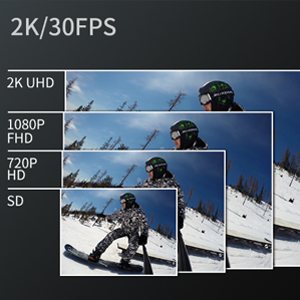
Image: The SJCAM C100 camera enclosed in its waterproof case, submerged in water, highlighting its water-resistant capability.
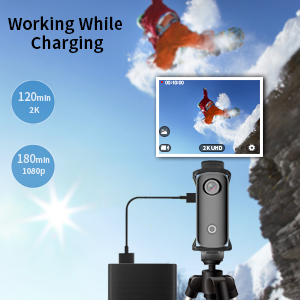
Image: A visual representation of the 115-degree wide-angle view captured by the SJCAM C100, showing a panoramic landscape.
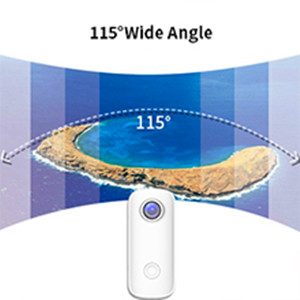
Image: The SJCAM C100 camera magnetically attached to a surface, demonstrating its versatile mounting options.

Image: A person wearing the SJCAM C100 camera attached to a backpack strap using the included wearable back clip.
Техникалык шарттар
| Бренд | SJCAM |
| Модель аты | C100 |
| Модель номери | C100+ |
| Натыйжалуу дагы эле чечим | 15 депутат |
| Видео тартуунун резолюциясы | 1080P (1920*1080) 30FPS |
| Сууга туруктуулук деңгээли | Суу өткөрбөйт (корпусу менен) |
| Image Stabilization | Санариптик (EIS) |
| Медиа түрү | Микро SD |
| Байланыш | WiFi |
| Батареянын орточо иштөө мөөнөтү | 2 hours (1080P recording) |
| Элемент Салмагы | 1.4 унция |
Техникалык тейлөө
- Тазалоо: Камера корпусун тазалоо үчүн жумшак, кургак чүпүрөктү колдонуңуз. Линза үчүн атайын линза тазалоочу чүпүрөктү жана эритмени колдонуңуз.
- Сактагыч: Камераны салкын, кургак жерде күндүн тике тийген нурунан жана экстремалдык температурадан алыс сактаңыз.
- Батареяга кам көрүү: For optimal battery life, avoid fully discharging the battery frequently. Charge the camera regularly, even if not in use, to prevent deep discharge.
- Суу өткөрбөй турган кап: After using the waterproof case in saltwater, rinse it with fresh water and allow it to air dry. Inspect the O-ring seal for any debris or damage before each use.
Проблемаларды чечүү
- Камера күйбөй жатат: Ensure the battery is charged. If the camera does not respond, connect it to a power source and try again. Verify a Micro SD card is inserted, as the camera may not operate without one.
- Recording stops randomly: This can often be caused by an incompatible or slow Micro SD card. Use a high-speed (U3 or higher) Micro SD card from a reputable brand. Format the card regularly.
- Wi-Fi туташуу көйгөйлөрү: Ensure the camera's Wi-Fi is enabled (green light flashing). Check that you are connecting to the correct Wi-Fi network name and entering the correct password (12345678). Restart both the camera and your mobile device if issues persist.
- Сүрөттүн турукташуусу начар: While the camera features EIS, extreme vibrations or rapid movements may still result in some blur. Ensure the camera is securely mounted.
Кепилдик жана колдоо
For warranty information and technical support, please refer to the official SJCAM webсайтка же сатуучуга кайрылыңыз. Кепилдик дооматтар үчүн сатып алганыңыздын далилин сактаңыз.