
T-Dagger Advance Force T-TGS005 Gaming Keyboard and Mouse Kit User Manual
Model: T-TGS005 | Brand: T-DAGGER
1. Продукт бүтүп калдыview
The T-Dagger Advance Force T-TGS005 is a comprehensive gaming kit designed to provide both performance and practicality. It includes a compact TKL mechanical keyboard with vibrant rainbow illumination and a high-performance gaming mouse with adjustable DPI settings.

Figure 1.1: T-Dagger Advance Force T-TGS005 Gaming Keyboard and Mouse Kit, showcasing эки компонент тең.
Негизги өзгөчөлүктөрү:
- Compact TKL (Tenkeyless) keyboard design.
- Rainbow illumination for the keyboard.
- Outemu Blue mechanical switches for tactile and audible feedback.
- High-performance gaming mouse with up to 7200 DPI.
- Durable ABS plastic construction for both devices.
2. Орнотуу колдонмосу
Follow these steps to set up your T-Dagger Advance Force T-TGS005 Gaming Kit:
- Комплектти таңгактан чыгаруу: Клавиатураны жана чычканды таңгагынан этияттык менен алып чыгыңыз.
- Баскычтопту туташтыруу: Locate the USB 2.0 cable attached to the keyboard. Insert the USB connector into an available USB port on your computer.
- Чычканды туташтыруу: Locate the USB 2.0 cable attached to the mouse. Insert the USB connector into another available USB port on your computer.
- Драйверди орнотуу: The T-Dagger Advance Force T-TGS005 kit is plug-and-play. Your operating system should automatically detect and install the necessary drivers. This process may take a few moments.
- Байланышты текшерүү: Once drivers are installed, the keyboard's rainbow illumination should activate, and the mouse's single-color illumination should light up. Test both devices to ensure they are functioning correctly.

2.1-сүрөт: жогорудан ылдыйга view of the keyboard and mouse, illustrating their layout and design.
3. Иштөө нускамалары
3.1 Клавиатуранын иштеши
The T-Dagger TKL keyboard features a compact design without a numeric keypad, optimizing desk space. It comes with Outemu Blue mechanical switches, providing a distinct tactile bump and audible click for each keypress.
- Rainbow Illumination: The keyboard features a fixed rainbow illumination pattern. There are no user-configurable RGB modes or colors.
- Арбактарга каршы: Equipped with N-Key Rollover (NKRO), allowing multiple keys to be pressed simultaneously without conflict, ensuring all commands are registered during intense gaming sessions.
- Жөнгө салынуучу бийиктик: Эргономикалык ыңгайлуулук үчүн баскычтоптун астыңкы жагында терүү бурчун өзгөртүү үчүн жөнгө салынуучу буттары бар.

Сүрөт 3.1: Жакын пландан view of the T-Dagger keyboard, highlighting the key layout and rainbow backlighting.
3.2 Чычкан менен иштөө
The T-Dagger gaming mouse is designed for high performance with an ambidextrous shape, though its side buttons are located only on the left side. It features single-color illumination.
- DPI жөндөө: The mouse supports multiple DPI levels: 1000, 1600, 2400, 3200, and 7200. Use the dedicated DPI button (usually located behind the scroll wheel) to cycle through these settings and adjust cursor sensitivity.
- Баскычтар: The mouse features 7 programmable buttons. Refer to any accompanying software (if available, not included in this kit's description) for advanced customization.
- Жарыктандыруу: The mouse features a single-color illumination that activates when connected. This illumination is not user-configurable.
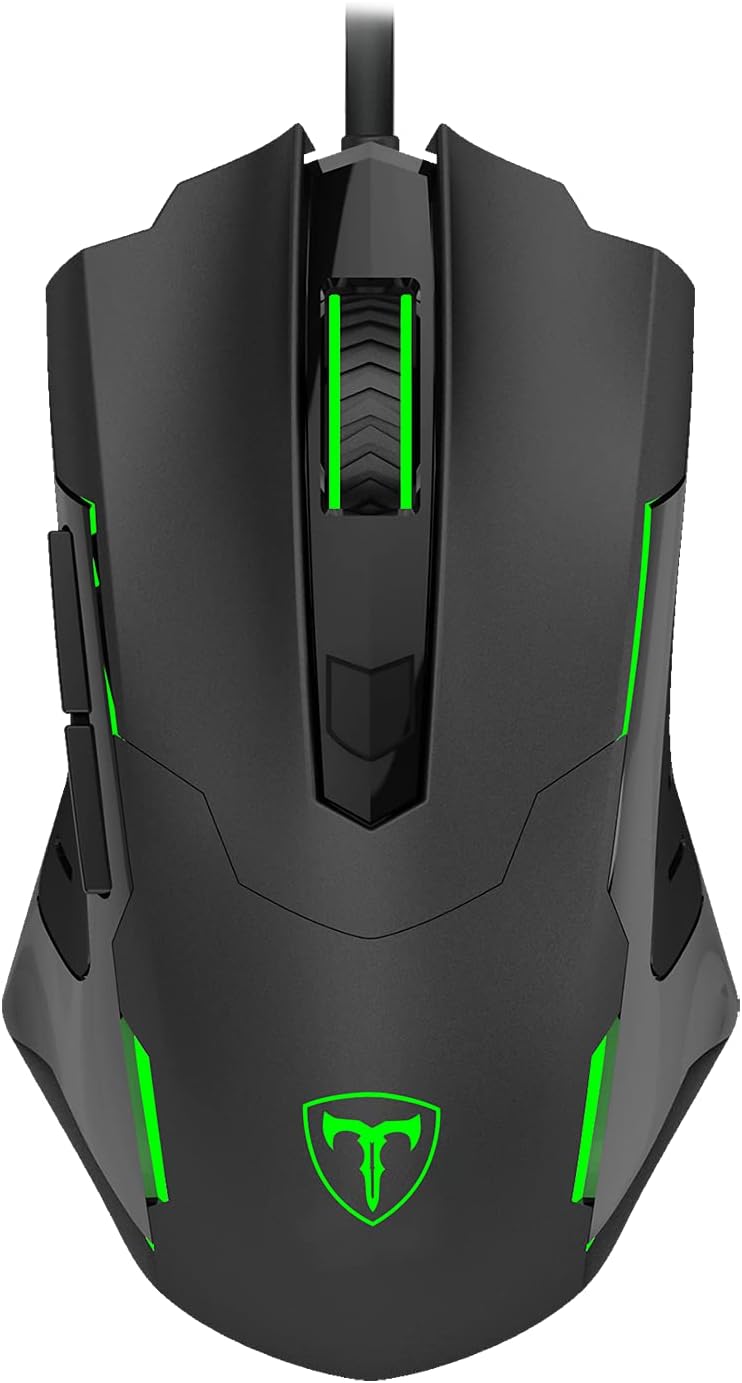
3.2-сүрөт: Жогорку view of the T-Dagger gaming mouse, showing its ergonomic shape and button layout.
4. Техникалык тейлөө
Proper maintenance ensures the longevity and optimal performance of your T-Dagger gaming kit.
- Баскычтопту тазалоо: Regularly use a soft, dry cloth to wipe down the keycaps and chassis. For deeper cleaning, use compressed air to remove dust and debris from between the keys. Avoid using harsh chemicals or abrasive materials.
- Чычканды тазалоо: Чычкандын бетин жумшак, бир аз г менен сүртүңүзamp cloth. Ensure no liquid enters the internal components. Clean the optical sensor area on the underside with a cotton swab if tracking issues occur.
- Кабельге кам көрүү: Avoid sharp bends or kinks in the USB cables. Do not pull the cables forcefully when disconnecting the devices; always grasp the USB connector.
- Сактагыч: Эгерде комплект көпкө колдонулбаса, аны салкын, кургак жерде, күндүн нуру түз тийген жерден жана өтө жогорку температурадан алыс сактаңыз.
5. Кыйынчылыктарды
If you encounter issues with your T-Dagger Advance Force T-TGS005 kit, refer to the following common troubleshooting steps:
- Түзмөк таанылган жок:
- USB кабелдери компьютердин USB портторуна бекем сайылганын текшериңиз.
- Түзмөктөрдү компьютериңиздеги ар кандай USB портторуна туташтырып көрүңүз.
- Компьютериңизди өчүрүп күйгүзүңүз.
- Check Device Manager (Windows) or System Information (macOS) to see if the devices are listed.
- Keyboard Illumination Not Working:
- Verify the keyboard is properly connected to a powered USB port.
- Ensure your computer's power settings are not disabling USB devices.
- Mouse Cursor Not Moving/Erratic:
- Чычкандын астындагы оптикалык сенсорду тазалаңыз.
- Чычканды ылайыктуу жерде колдонуп жатканыңызды текшериңиз (мисалы, чычкан аянтчасы, чагылдыруучу же тунук бет эмес).
- Чычкандагы DPI баскычын колдонуп, DPI жөндөөлөрүн тууралап көрүңүз.
- Ачкычтар жооп бербейт:
- Ensure the keyboard cable is firmly connected.
- Системага тиешелүү маселени болтурбоо үчүн баскычтопту башка компьютерде сынап көрүңүз.
- For individual keys, check for any physical obstructions or debris.
If these steps do not resolve the issue, please contact T-DAGGER customer support for further assistance.
6. Техникалык шарттар
Detailed technical specifications for the T-Dagger Advance Force T-TGS005 Gaming Kit:
6.1 Клавиатуранын мүнөздөмөлөрү
| Өзгөчөлүк | Деталь |
|---|---|
| Которгучтар | Outemu Blue Mechanical |
| Ишке киргизүү | Механикалык |
| Түс | Кара |
| Формат | TKL (Tenkeyless) |
| Дизайн | Floating Keys |
| Макет | ABNT2 |
| Байланыш | USB 2.0 |
| Жөнгө салынуучу бийиктик | Ооба |
| Иштин материалдары | ABS пластик |
| Жарыктандыруу | Радуга |
| Anti-Ghosting | N-Key Rollover (NKRO) |
| Кабелдин узундугу | 1.5 м |
| Алынуучу кабель | Ооба |
| Баскыч капкактары | Doubleshot ABS |
6.2 Чычкандын мүнөздөмөлөрү
| Өзгөчөлүк | Деталь |
|---|---|
| DPI орнотуулары | 1000 / 1600 / 2400 / 3200 / 7200 |
| Buttons | 7 |
| Форма | Ambidextrous (buttons on left side only) |
| Жарыктандыруу | Single Color |
| Байланыш | USB 2.0 |
| Кабелдин узундугу | 1.8 м |
7. Кепилдик жана колдоо
T-DAGGER products are manufactured to high quality standards. For information regarding warranty coverage, terms, and conditions, please refer to the warranty card included with your product or visit the official T-DAGGER webсайт.
For technical support, product inquiries, or assistance with troubleshooting beyond the scope of this manual, please contact T-DAGGER customer service through their official support channels. Contact information can typically be found on the product packaging or the manufacturer's webсайт.