
NEWTRY da53b7c9-dcb9-4cdf-bef2-cecdbb6ccfb6
NEWTRY OCA Vacuum Laminating Machine Instruction Manual
Model: da53b7c9-dcb9-4cdf-bef2-cecdbb6ccfb6
1. Продукт бүтүп калдыview
The NEWTRY OCA Vacuum Laminating Machine is designed for efficient and accurate defoaming and bubble removal during mobile phone, iPad, and LCD screen repair processes. This machine utilizes 360-degree stereoscopic cyclic debubbling to ensure thorough results. It is important to note that this machine requires an external air compressor for operation, which is not included.

1-сүрөт: алдыңкы жагы view of the NEWTRY OCA Vacuum Laminating Machine.
2. Коопсуздук маалыматы
Please read all safety instructions before operating the machine to prevent injury or damage. Keep this manual for future reference.
- Машина туруктуу, түз бетке коюлганын текшериңиз.
- Connect the machine to a grounded power outlet with the specified voltage (AC 110V).
- Машинаны ным колдор менен же дamp чөйрөлөр.
- The machine's door is constructed from high-density steel and features a reliable interlocking safety protection device. Do not attempt to open the door during operation.
- Кандайдыр бир тейлөө же тазалоо иштерин жүргүзүүдөн мурун ар дайым электр энергиясын өчүрүңүз.
- Балдарды жана уруксаты жок кызматкерлерди иштеп жаткан машинадан алыс кармаңыз.

Figure 2: High-density steel door for enhanced safety and durability.
3. Техникалык шарттар
| Параметр | Нарк |
|---|---|
| Электр камсыздоо | AC 110V |
| Күч | 50 Вт |
| Тышкы өлчөмдөрү (L x W x H) | 13.74" x 14.49" x 14.57" |
| Салмагы | 41.4 фунт |
| Internal Chamber Diameter | 8.27" |
| Internal Chamber Depth | 10.2" |
| Башкаруу ыкмасы | тийүү |
| Керектүү жабдуулар | External Air Compressor (not included) |

Figure 3: Machine dimensions for placement and setup.
4. Орнотуу нускамалары
Follow these steps to prepare your OCA Vacuum Laminating Machine for operation:
- Пакеттен чыгаруу: Carefully remove the machine from its packaging. Inspect for any signs of damage during transit.
- Жайгашкан жери: Place the machine on a sturdy, flat, and stable surface in a well-ventilated area. Ensure there is sufficient space around the machine for proper air circulation and operation.
- Кубат туташуу: Connect the power cord to the machine and then to a standard AC 110V grounded electrical outlet.
- Air Compressor Connection: This machine requires an external air compressor (not included). Connect your air compressor to the designated air inlet port on the machine. Ensure all connections are secure to prevent air leaks.
- Алгачкы текшерүү: Before first use, ensure the chamber is empty and clean.
5. Иштөө нускамалары
The machine is designed for ease of use with a digital display and timer for precise control.

Figure 4: Control panel with temperature, time, and pressure indicators.
- Күйгүзүү: Turn on the main power switch located on the control panel.
- Параметрлерди коюу: Use the 'TEMP SET' and 'TIME SET' controls to adjust the desired temperature and processing time. The digital display will show the current air pressure, temperature, and remaining time during operation.
- Load Screen: Open the machine door. Carefully place the mobile phone, iPad, or LCD screen requiring defoaming onto the practical defoaming board inside the chamber. Ensure the screen is positioned correctly for optimal debubbling.
- Жабуу: Securely close the machine door. The interlocking safety device will engage.
- Ишти баштоо: Press the 'START' button. The machine will begin the vacuum laminating and defoaming process. The 360-degree stereoscopic cyclic debubbling mechanism will activate.
- Автоматтык токтотуу: The machine will automatically stop once the set time has elapsed.
- Unload Screen: Once the process is complete and the pressure has normalized, open the door and carefully remove the processed screen.
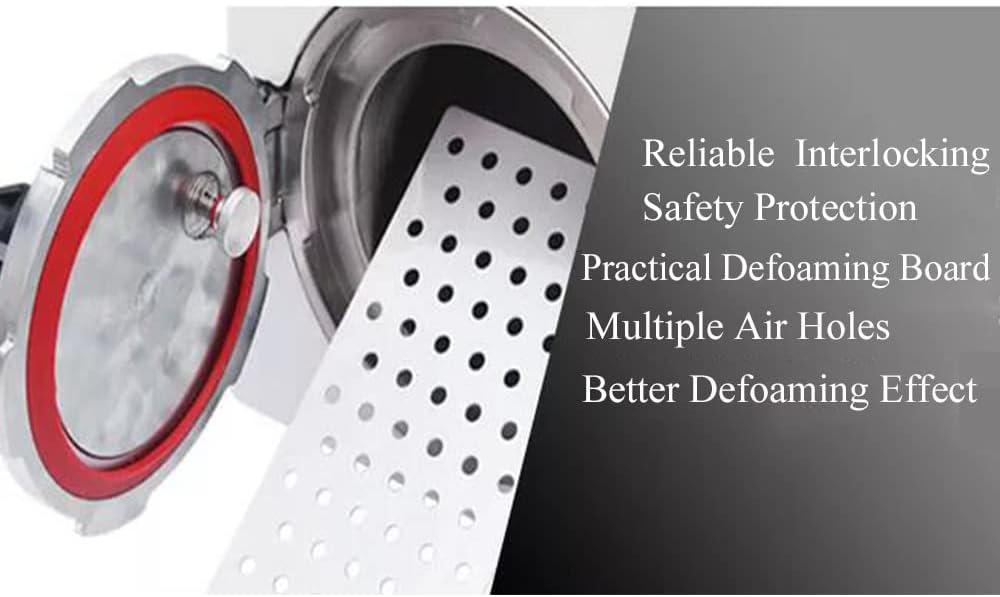
Figure 5: Interior chamber with practical defoaming board and multiple air holes for effective bubble removal.

Figure 6: Visual representation of the 360-degree cyclic debubbling process.
6. Техникалык тейлөө
Regular maintenance ensures the longevity and optimal performance of your machine.
- Тазалоо: After each use, wipe the interior and exterior surfaces with a soft, dry cloth. Ensure no debris or adhesive residue remains inside the chamber.
- Мөөрдү текшерүү: Periodically inspect the door seal for any signs of wear, cracks, or damage. A damaged seal can affect the vacuum integrity.
- Air Compressor Maintenance: Follow the maintenance guidelines for your external air compressor to ensure a consistent and clean air supply to the laminating machine.
- Сактагыч: When not in use for extended periods, store the machine in a clean, dry environment.
7. Кыйынчылыктарды
Бул бөлүм сиз кабылышы мүмкүн болгон жалпы көйгөйлөрдү карайт.
- Машина күйбөйт:
- Электр шнурунун машинага да, электр розеткасына да бекем сайылганын текшериңиз.
- Электр розеткасынын иштешин текшериңиз.
- Ensure the main power switch on the machine is in the 'ON' position.
- Insufficient Vacuum/Bubbles Remain:
- Ensure the machine door is fully closed and sealed.
- Check the connection to the external air compressor and ensure it is operating correctly and providing sufficient pressure.
- Inspect the door seal for any damage or debris that might prevent a proper seal.
- Verify that the set pressure and time parameters are appropriate for the material being processed.
- Температура маселелери:
- Ensure the temperature setting is correct.
- Allow sufficient time for the machine to reach the set temperature.
8. Кепилдик жана колдоо
For warranty information, please refer to the manufacturer's official warranty policy provided with your purchase or on the NEWTRY webсайт.
If you encounter any problems or require assistance with your NEWTRY OCA Vacuum Laminating Machine, please do not hesitate to contact NEWTRY customer service. We are committed to providing you with the best service.
Байланыш маалыматы: Refer to your purchase documentation or the official NEWTRY webакыркы байланыш маалыматы үчүн сайт.
Ask a question about this manual
Ask about setup, troubleshooting, compatibility, parts, safety, or missing instructions. Manuals+ will review the question and use this page’s manual context to help answer it.