
Introduction
The Eartec UL2S Ultralite Full Duplex Wireless Headset System provides hands-free, simultaneous two-way communication for two users. Operating on a 1.9 GHz frequency, this system is designed for clear voice communication in various environments, including video production, stage production, marine operations, and construction sites. This manual provides essential information for setting up, operating, and maintaining your Eartec UL2S system.
Кутуда эмне бар
Carefully unpack your Eartec UL2S Ultralite system and ensure all components are present:
- 1 x ULSM Single-Ear Main Headset
- 1 x ULSR Single-Ear Remote Headset
- 2 x Rechargeable Lithium Batteries
- 1 x Dual Bay Multi-port Charger
- 1 x Softside Case
- Solid Signal Cleaning Wipes

Image: The complete Eartec UL2S Ultralite system, including two single-ear headsets, batteries, charger, softside case, and cleaning wipes.
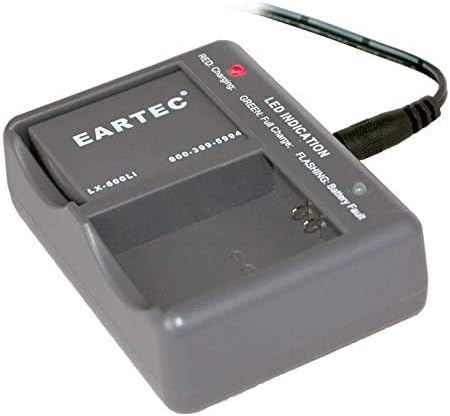
Image: Two rechargeable lithium polymer batteries, essential for powering the headsets.

Image: The dual-bay multi-port charger used to recharge the lithium batteries.

Image: The softside case designed for convenient storage and transport of the headset system.
Жайгашуу
1. Батареяны орнотуу жана заряддоо
- Insert the rechargeable lithium batteries into the designated battery compartments on each headset. Ensure correct polarity.
- Place the batteries into the dual-bay multi-port charger. Connect the charger to a power source. The LED indicator on the charger will show the charging status (e.g., red for charging, green for full charge).
- Allow batteries to fully charge before first use. A full charge provides up to 6 hours of talk time.
2. Күйгүзүү / Өчүрүү
- To power on, press and hold the power button on each headset until the indicator light illuminates.
- Өчүрүү үчүн, индикатор жарыгы өчмөйүнчө кубат баскычын кайра басып, кармап туруңуз.
3. Баштапкы жупташтыруу (зарыл болсо)
The UL2S system typically comes pre-paired. If re-pairing is required:
- Ensure both headsets are powered off.
- On the Main Headset (ULSM), press and hold the power button until the LED flashes rapidly.
- On the Remote Headset (ULSR), press and hold the power button until the LED flashes rapidly.
- The headsets will automatically connect. A solid LED light indicates a successful connection.
Video: An official product video demonstrating the features and setup of the Eartec UL2S Ultralite Wireless Headset system.
Иштөө нускамалары
1. Гарнитураны тагынуу
- Ыңгайлуу жана коопсуз кирүү үчүн баш боосун тууралаңыз.
- The microphone boom is pivoting, allowing the headset to be worn on either the left or right side, depending on user preference.
2. Микрофонду үнсүз кылуу функциясы
- To mute the microphone, pivot the microphone boom upwards. The microphone will automatically mute.
- To unmute, pivot the microphone boom downwards to the speaking position.
3. Үндү башкаруу
- Use the volume up (+) and volume down (-) buttons located on the earcup to adjust the listening volume.
4. Байланыш диапазону
- The system offers a wireless range of up to 1,000 feet in line-of-sight (LOS) conditions.
- Obstructions such as walls, buildings, and dense foliage can reduce the effective range. Maintain line of sight for optimal performance.
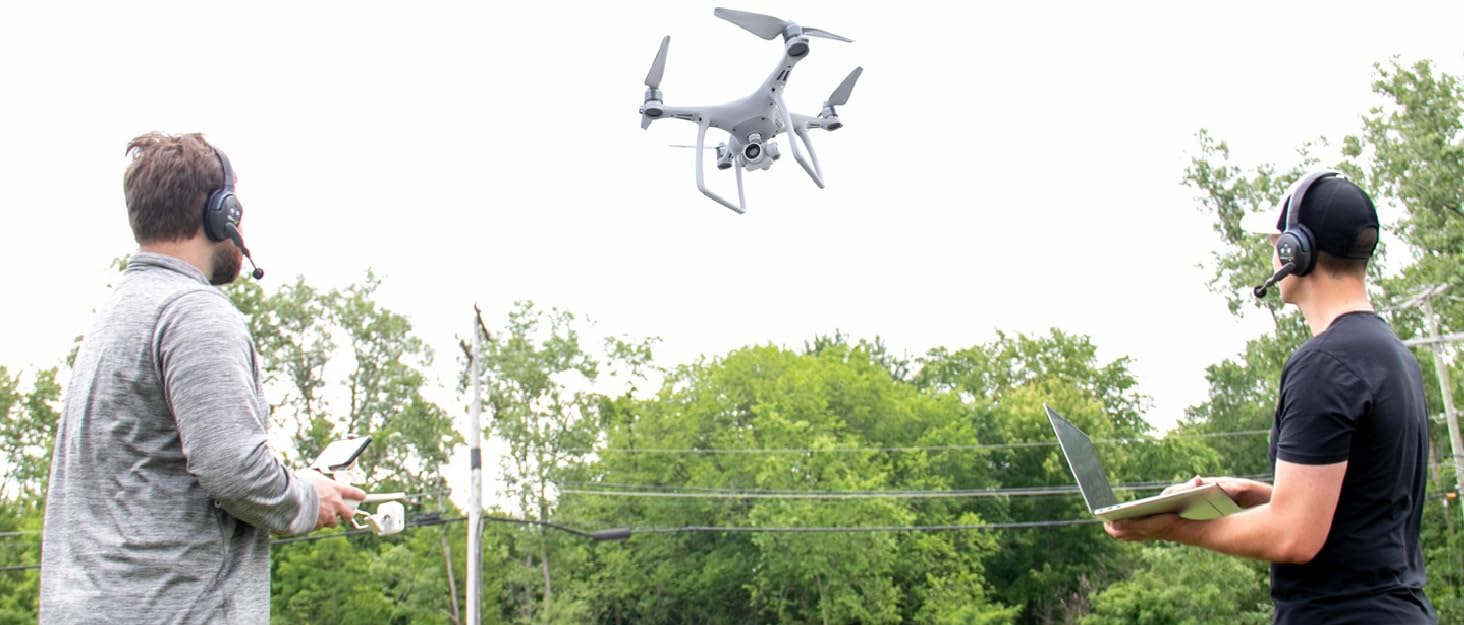
Image: Two individuals using Eartec UL2S headsets for clear communication while operating a drone, demonstrating the system's effective range and hands-free operation.
Өзгөчөлүктөрү
- Hands-Free Full Duplex Communication: Allows simultaneous two-way conversation for 2 users without pressing buttons.
- Ызы-чууну жок кылуучу микрофон: Ensures high-quality voice communication, even in high-noise environments.
- Auto-Mute Function: Microphone automatically mutes when pivoted upwards for convenience.
- Pivoting Microphone: Accommodates wearing the headset on either the left or right ear.
- Кеңейтилген зымсыз диапазон: Up to 1,000 ft Line of Sight (LOS) for reliable connectivity.
- Батареянын узак иштөө мөөнөтү: Up to 6 hours of continuous talk time on a single charge.
- 1.9 ГГц жыштыгы: Operates on a frequency designed to avoid interference with other devices.
Техникалык шарттар
| Өзгөчөлүк | Спецификация |
|---|---|
| Модель номери | UL2S |
| Продукциянын өлчөмдөрү | 16 x 9 x 11 дюйм |
| Элемент Салмагы | 2.9 фунт |
| Батареялар | 2 Литий Полимер батарейкалары талап кылынат (кошулган) |
| Каналдардын саны | 2 |
| Өзгөчөлүктөр | Микрофон камтылган, ызы-чууну жокко чыгаруу |
| Жыштык диапазону | 1.9 ГГц |
| Сүйлөшүү диапазону максималдуу | 1000 Feet (Line of Sight) |
| Сууга туруктуулук деңгээли | Сууга чыдамдуу эмес |
Техникалык тейлөө
1. Тазалоо
- Regularly clean the headsets, especially the ear cushions and microphone foam, using the provided Solid Signal Cleaning Wipes or a soft, damp кездеме.
- Катуу химиялык заттарды же абразивдүү тазалоочу каражаттарды колдонбоңуз.
Image: Solid Signal Cleaning Wipes, suitable for maintaining the hygiene and cleanliness of your headsets.
2. Батареяга кам көрүү
- Remove batteries from headsets when not in use for extended periods to prevent deep discharge.
- Батареяларды салкын, кургак жерде сактаңыз.
- Only use the provided charger for recharging.
3. Сактоо
- Store the headsets and accessories in the softside case to protect them from dust, moisture, and physical damage.
Проблемаларды чечүү
No Audio / Intermittent Connection
- Ensure both headsets are powered on and fully charged.
- Verify that the headsets are properly paired. If not, follow the initial pairing steps in the Setup section.
- Check for obstructions between the headsets that might be affecting the line of sight.
- Move closer to each other to rule out range issues.
Аудио сапаты начар / статикалык
- Ensure the microphone boom is correctly positioned and not muted (pivoted downwards).
- Check for sources of electromagnetic interference (e.g., other wireless devices, heavy machinery).
- Confirm that the microphone foam is clean and intact.
Кыска батареянын иштөө мөөнөтү
- Ар бир колдонуудан мурун батарейкалардын толук заряддалганын текшериңиз.
- Verify that the batteries are properly seated in the headsets and charger.
- Consider replacing old batteries if they no longer hold a charge effectively.
Кепилдик жана колдоо
For warranty information, technical support, or service inquiries, please refer to the documentation included with your product or visit the official Eartec webсайт. Кепилдик дооматтары үчүн сатып алуу дүмүрчөгүңүздү сактаңыз.