
1. Киришүү
Thank you for choosing the Andoer W200RGB LED Video Light. This manual provides detailed instructions for the proper setup, operation, and maintenance of your device. Please read this manual thoroughly before use to ensure optimal performance and longevity of the product. Keep this manual for future reference.
2. Продукт бүтүп калдыview
2.1 Пакеттин мазмуну
Пакетти ачкандан кийин, төмөндө көрсөтүлгөн нерселердин бардыгы бар экенин жана жакшы абалда экендигин текшериңиз:
- Andoer W200RGB LED Video Light
- USB Type-C кубаттоочу кабель
- Мини штатив
- Билек боо
- User Manual (English and Chinese)

Image: Contents of the Andoer W200RGB LED Video Light package, showing the light, USB cable, mini tripod, and wrist strap.
2.2 Негизги өзгөчөлүктөрү
- Компакт жана портативдик дизайн: Rod-shaped design, 20cm in length, lightweight for easy transport.
- Жогорку жарыктык: Equipped with 184 high-quality LED beads (69 white, 69 yellow, 46 RGB) with 7W output and CRI 95+.
- RGB Colored Light Mode: 360° adjustable HUE and 0%-100% adjustable brightness for diverse colorful lighting effects.
- CCT Cold & Warm Light Mode: Wide adjustable color temperature range from 2500K to 9000K.
- 20 Special Lighting Effects: Includes ambulance, fireworks, TV, candle, party, strobe, RGB strobe, red flash, green flash, blue flash, slow HSI, fast HSI, and more.
- Камтылган кайра заряддалуучу батарея: Integrated 3.7V 3000mAh lithium battery for extended working time, rechargeable via Type-C port.
- Магниттик арткы: Built-in magnets at both ends allow for easy attachment to magnetic surfaces.
2.3 Башкаруу жана дисплей
The Andoer W200RGB features intuitive controls and an LCD screen for easy operation.

Image: The control panel of the Andoer W200RGB LED Video Light, showing the power button, mode button, adjustment buttons, and LCD screen.
- Кубат баскычы: Press and hold to turn the light on or off. Short press to switch between modes.
- Режим баскычы (M): Short press to cycle through CCT, HSI (RGB), and Scene modes.
- Өйдө/Төмөн баскычтары (▲/▼): Adjust parameters such as brightness, color temperature, HUE, or saturation depending on the selected mode.
- LCD экран: Displays current settings including mode, brightness, color temperature, HUE, and battery level.
- Type-C заряддоо порту: Located at one end for charging the internal battery.
3. Орнотуу
3.1 Батареяны заряддоо
The Andoer W200RGB LED Video Light comes with a built-in rechargeable lithium battery. Before first use, it is recommended to fully charge the device.
- Connect the supplied USB Type-C cable to the charging port on the light.
- USB кабелинин экинчи учун стандарттуу USB кубат адаптерине (кошулмада жок) же компьютердин USB портуна туташтырыңыз.
- The LCD screen will indicate the charging status. A full charge typically takes a few hours.

Image: The Andoer W200RGB LED Video Light highlighting its internal 3.7V 3000mAh battery and Type-C charging capability.
3.2 Attaching the Mini Tripod
The included mini tripod can be attached to the 1/4-inch screw hole at the bottom of the light for stable placement.
- Locate the 1/4-inch screw hole on the bottom of the LED light.
- Screw the mini tripod securely into the screw hole.
- Adjust the tripod legs for desired height and stability.
4. Иштөө нускамалары
4.1 Күйгүзүү/өчүрүү
- To turn on the light, press and hold the Power button (labeled with a circle and vertical line) for a few seconds.
- To turn off the light, press and hold the Power button again for a few seconds.
4.2 Которуу режимдери
After powering on, short press the Mode button (M) to cycle through the available lighting modes:
- CCT Mode (Color Correlated Temperature): For adjusting white light from warm to cool.
- HSI режими (түс, каныккандык, интенсивдүүлүк): For adjusting RGB colored light.
- Сахна режими: For selecting special lighting effects.
4.3 CCT Mode Operation
In CCT mode, you can adjust the color temperature and brightness.
- Use the Up/Down buttons (▲/▼) to adjust the brightness from 0% to 100%.
- Short press the Power button to switch to color temperature adjustment. Use the Up/Down buttons (▲/▼) to adjust the color temperature from 2500K (warm) to 9000K (cool).

Image: Visual representation of brightness adjustments (0%, 50%, 100%) and color temperature settings (6000K, 5000K, 2800K) in CCT mode.
4.4 HSI Mode (RGB) Operation
In HSI mode, you can adjust the HUE (color), saturation, and brightness.
- Use the Up/Down buttons (▲/▼) to adjust the HUE (360° color spectrum).
- Short press the Power button to switch to saturation adjustment. Use the Up/Down buttons (▲/▼) to adjust saturation.
- Short press the Power button again to switch to brightness adjustment. Use the Up/Down buttons (▲/▼) to adjust brightness from 0% to 100%.
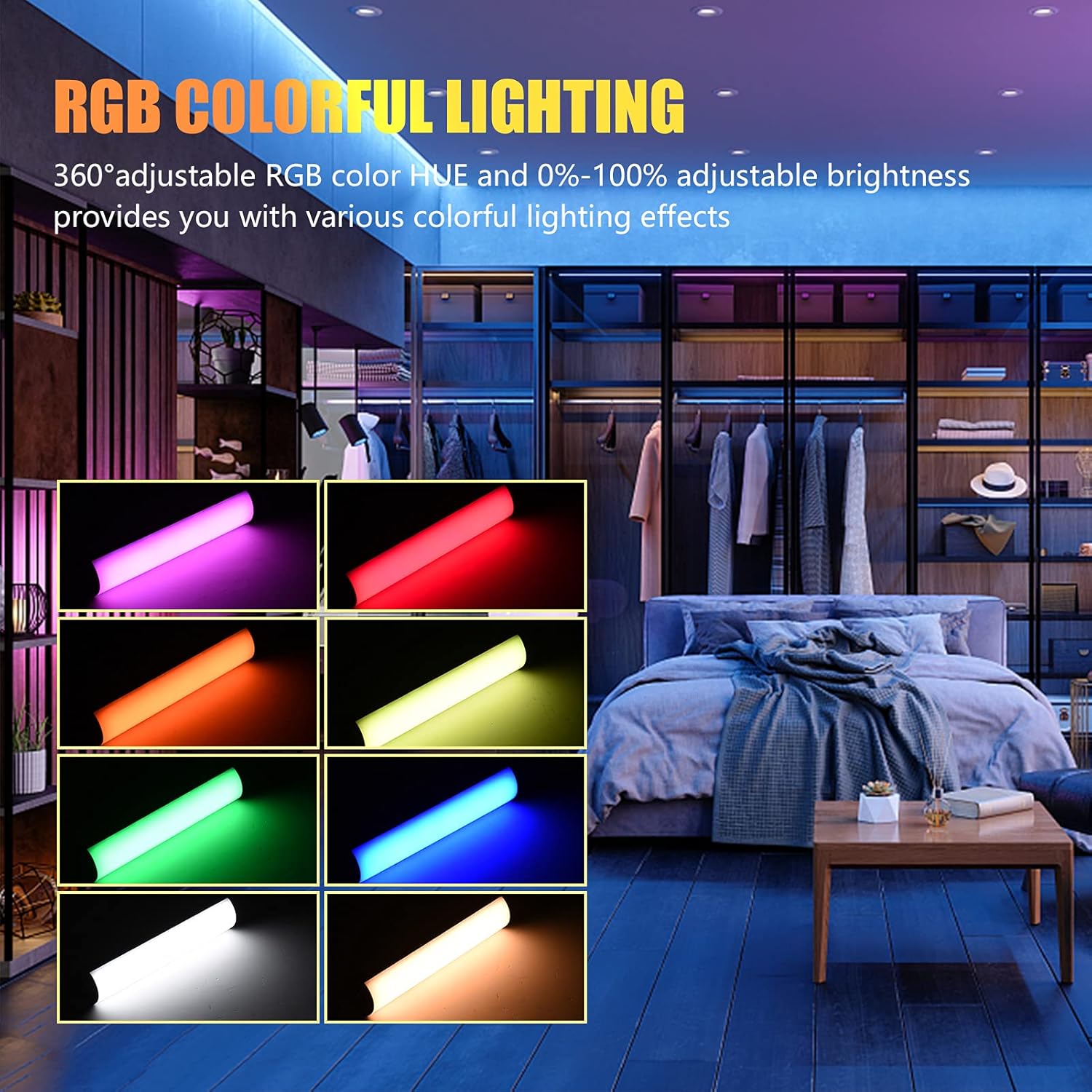
Image: The Andoer W200RGB LED Video Light demonstrating its RGB colorful lighting capabilities, showing different hues and brightness levels.

Image: Several Andoer W200RGB LED Video Lights illuminated in various solid RGB colors, showcasing the rod-shaped design.
4.5 Scene Mode Operation (Special Effects)
In Scene mode, you can select from 20 pre-programmed special lighting effects.
- Use the Up/Down buttons (▲/▼) to cycle through the 20 special effects.
- Some effects may have adjustable parameters (e.g., speed or intensity), which can be adjusted by short pressing the Power button and then using the Up/Down buttons.

Image: A visual guide to the 20 dynamic scene light effects, such as police car, ambulance, fireworks, TV, candle, party, strobe, and various color flashes.
4.6 Using the Magnetic Back
The Andoer W200RGB LED Video Light features built-in magnets at both ends, allowing it to be easily attached to metallic surfaces for flexible lighting setups.
- Simply place either end of the light onto a suitable magnetic surface.
- Ensure the surface is stable and can support the weight of the light.

Image: The Andoer W200RGB LED Video Light highlighting its magnetic ends, demonstrating how it can be attached to metal surfaces.
4.7 Практикалык колдонулуштар

Image: A comparison of scenes before and after using the Andoer W200RGB LED Video Light, illustrating its effectiveness in enhancing illumination for various activities.
5. Техникалык тейлөө
5.1 Тазалоо
- Тазалоодон мурун, түзмөктүн өчүрүлгөнүн жана ар кандай кубат булагынан ажыратылганын текшериңиз.
- Use a soft, dry cloth to wipe the surface of the light.
- өжөр кир үчүн, бир аз гampчүпүрөктү суу менен. Катуу химиялык заттарды, эриткичтерди же абразивдүү тазалагычтарды колдонуудан алыс болуңуз.
- Do not allow water or liquids to enter the device.
5.2 Сактоо
- Жарыкты күн тийбеген жана экстремалдык температурадан алыс салкын, кургак жерде сактаңыз.
- Эгер батареяны узак убакытка сактасаңыз, анын иштөө мөөнөтүн сактоо үчүн аны үч ай сайын болжол менен 50% га чейин кубаттап туруңуз.
5.3 Батареяга кам көрүү
- Батареяны бат-баттан толук кубаттап калуудан алыс болуңуз.
- Батареяны жогорку температурага калтырбаңыз же тешип албаңыз.
- If the battery shows signs of swelling or leakage, discontinue use immediately and dispose of it properly according to local regulations.
6. Кыйынчылыктарды
If you encounter any issues with your Andoer W200RGB LED Video Light, please refer to the following common problems and solutions:
- Жарык күйбөйт:
- Батарея заряддалганын текшериңиз. USB Type-C кабелин колдонуп, жарыкты кубат булагына туташтырыңыз.
- Бул жөн гана кыска басуу эмес экенине ынануу үчүн Кубат баскычын бир нече секунд басып, кармап туруңуз.
- Light flickers or output is unstable:
- Check the battery level; low battery can cause unstable performance. Recharge if necessary.
- Жарыктын өтө жогорку температурага дуушар болбогонун текшериңиз.
- Cannot change modes or adjust parameters:
- Ensure you are pressing the correct buttons (Mode button for mode changes, Power button to cycle through adjustable parameters within a mode, Up/Down buttons for value adjustment).
- Аппаратты өчүрүп кайра күйгүзүү менен кайра күйгүзүңүз.
- Батарея кубатталбай жатат:
- Verify the USB Type-C cable is securely connected to both the light and the power source.
- Бузулуу аксессуарларды болтурбоо үчүн башка USB кабелин же кубат адаптерин колдонуп көрүңүз.
- Кубат булагынын иштешин текшериңиз.
Бул чечимдерди колдонуп көргөндөн кийин көйгөй чечилбесе, кошумча жардам алуу үчүн кардарларды колдоо бөлүмүнө кайрылыңыз.
7. Техникалык шарттар
| Өзгөчөлүк | Спецификация |
|---|---|
| Бренд | Андоер |
| Модел | W200RGB |
| LED мончоктору | 69pcs White + 69pcs Yellow + 46pcs RGB |
| Түс температурасы | 2500K-9000K |
| CRI (түстүү көрсөтүү индекси) | 95+ |
| Максималдуу чыгаруу күчү | 7W |
| Жарык агымы | 800Lux / 0.3m |
| Beam Angle | 120° |
| Батарея түрү | Камтылган 3.7V 3000mAh литий батареясы |
| Заряддоо порту | USB Type-C |
| Элементтин өлчөмү | 20 x 4 x 3.5 см (7.9 x 1.6 x 1.4 дюйм) |
| Элемент Салмагы | 11.3 унция (болжол менен 320 г) |
| Tripod (folded length) | 7.5cm (use height 4.5cm) |
| Модель номери (ASIN) | QEX6686347803069PL (B09F8RLMSY) |
8. Коопсуздук маалыматы
Эскертүү:
If you find the product damaged, deformed, or exhibiting abnormal performance, please stop using it immediately and contact us.
Always handle the device with care. Do not disassemble or modify the product. Keep out of reach of children.
9. Кепилдик жана колдоо
Andoer products are designed for reliability and performance. This product is covered by a standard manufacturer's warranty against defects in materials and workmanship. For specific warranty terms and conditions, please refer to the documentation provided at the time of purchase or contact your retailer.
For technical support, troubleshooting assistance, or warranty claims, please contact Andoer customer service through the retailer's platform or the official Andoer webсайт. Колдоо кызматына кайрылганда, өнүмүңүздүн үлгүсү жана сатып алуу маалыматы даяр болсун.
зыярат кылыңыз Andoer Store on Amazon көбүрөөк маалымат жана продуктулар үчүн.