
1. Киришүү
Verizon 4G LTE Тармак Экстендери (SLS-BU102 модели) имараттардын ичинде 4G LTE уюлдук сигналынын камтуусун жакшыртуу үчүн иштелип чыккан. Бул ишкана деңгээлиндеги кичинекей уюлдук түзмөк Verizon компаниясынын негизги тармагына коопсуз туннель түзүү үчүн учурдагы интернет байланышыңызга туташып, күчтүү LTE сигналын жаратат. Ал бир нече колдонуучулар үчүн имараттын ичиндеги камтууну камсыз кылат, сырткы сигналдар алсыз болушу мүмкүн болгон жерлерде үзгүлтүксүз уюлдук байланышты камсыз кылат.
Бул колдонмодо Тармак кеңейткичиңизди орнотуу, иштетүү жана техникалык тейлөө боюнча кеңири көрсөтмөлөр берилген.
2. Пакеттин мазмуну
Төмөндө тизмеленген нерселердин баары пакетиңизге камтылганын текшериңиз:
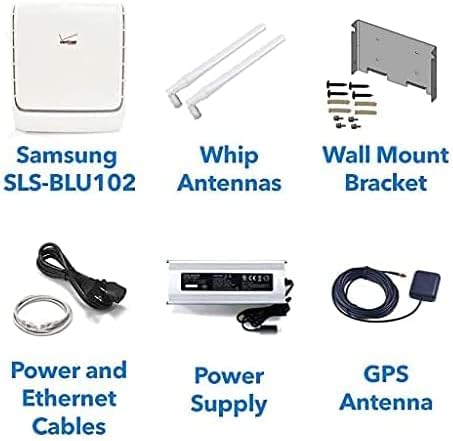
Сүрөт 2.1: Network Extender блогун, антенналарды, дубалга орноткучту, кабелдерди, электр менен камсыздоону жана GPS антеннасын камтыган таңгактын ичиндегилер.
- Verizon 4G LTE тармак кеңейтүүчү түзүлүшү (SLS-BU102)
- Камчы антенналары (2 даана)
- Дубалга орнотуу кронштейн
- Электр кабели
- Ethernet кабели
- Электр менен жабдуу бирдиги
- GPS антеннасы
- Көрсөтмө (бул документ)
3. Продукт бүтүп калдыview
Verizon 4G LTE Network Extender – бул ар кандай чөйрөлөргө оңой интеграциялоо үчүн иштелип чыккан компакттуу түзмөк. Ал сигналды берүү жана кабыл алуу үчүн эки багыттуу камчы антеннасына жана иштөө абалын көрсөтүү үчүн көп түстүү LED индикаторуна ээ.

Сүрөт 3.1: Алдыңкы view Verizon 4G LTE Network Extenderдин тиркелген камчы антенналары менен.
3.1 Негизги компоненттер
- Негизги блок: Иштетүүчү негизги түзмөк жана amp4G LTE сигналын күчөтөт.
- Камчы антенналары: Оптималдуу сигналды камтуу үчүн 360 градуска айланган эки тышкы антенна.
- LED көрсөткүчү: Түзмөктөгү бир көп түстүү LED анын туташуу абалын көрсөтөт.
- Порттор: Кубат, Ethernet жана GPS антенна туташуусу үчүн портторду камтыйт.
4. Орнотуу жана орнотуу
Network Extender жөнөкөй "plug-and-play" орнотуу үчүн иштелип чыккан. Түзмөгүңүздү орнотуу үчүн төмөнкү кадамдарды аткарыңыз:
4.1 Жайгаштыруу маселелери
- Түзмөктү каалаган камтуу аймагынын борбордук бөлүгүнө коюңуз.
- Розеткага жана активдүү интернет байланышына (роутер/модем) жакын жерде болушун камсыз кылыңыз.
- GPS сигналын оптималдуу алуу үчүн, GPS антеннасын терезенин жанына же ачык асман астында жайгашкан жерге коюңуз. view.
4.2 Туташуу кадамдары
- Антенналарды тиркөө: Эки камчы антеннасын Network Extenderдеги белгиленген портторго бурап бекитиңиз. Эң жакшы камтуу үчүн алардын багытын тууралаңыз.
- GPS антеннасын туташтыруу: GPS антеннасынын кабелин Network Extenderдеги GPS портуна туташтырыңыз. GPS антеннасын 4.1-пунктта сүрөттөлгөндөй жайгаштырыңыз.
- Интернетке туташуу: Берилген Ethernet кабелин колдонуп, Network Extenderдин LAN портун интернет роутериңиздеги же модемиңиздеги жеткиликтүү LAN портуна туташтырыңыз.
- Туташуу кубаты: Кубат булагын Network Extenderдин кубат киргизүүсүнө сайыңыз, андан кийин кубат кабелин розеткага сайыңыз.
- Күйгүзүү: Түзмөк автоматтык түрдө күйүп, ишке киргизүү ырааттуулугун баштайт. Абалын билүү үчүн LED индикаторуна көңүл буруңуз.

Сүрөт 4.1: Арткы view орнотуу чекиттерин жана болжолдуу өлчөмдөрүн (дюйм жана миллиметр менен) көрсөткөн Network Extenderдин.
4.3 Дубалга орнотуу (кошумча)
Тармак кеңейткичин дубалга берилген кронштейнди колдонуп орнотууга болот. Анкердик болттун тешик өлчөмдөрү жана жайгашуусу үчүн 4.1-сүрөттү караңыз. Орнотуучу бет түзмөктүн салмагын (болжол менен 10 фунт) көтөрө ала тургандай кылып бекитиңиз.
5. Иштөө нускамалары
Ийгиликтүү орнотулгандан кийин, Network Extender автоматтык түрдө жакшыртылган 4G LTE камтуусун камсыздай баштайт. Ал сиздин интернет байланышыңыз аркылуу Verizon тармагына коопсуз туташуу түзүү менен иштейт.
5.1 Камтуу жана сыйымдуулук
- Бир блок 75 000 чарчы футка чейинки аянтты камсыз кылат.
- Бир эле учурда 42ге чейин активдүү колдонуучуларды колдойт.
- Ар бир түзмөктө 200гө чейин бош турган колдонуучуларды колдойт.
- 150 000 чарчы футка чейинки чоңураак "супер-клетка" камтуу аймагын түзүү үчүн бир нече түзмөктөрдү жайгаштырууга болот.
5.2 Автоматтык түрдө өткөрүп берүү
Колдонуучулар имаратка киргенде, алардын түзмөктөрү автоматтык түрдө тышкы уюлдук тармактан Network Extenderдин камтуу аймагына "өтүп", үзгүлтүксүз жана күчтүү сигналды камсыздайт.
5.3 Жергиликтүү башкаруу интерфейси
Тармак кеңейткичи камтылган тармакты колдойт web сервер, IP жөндөөлөрүн ыңгайлаштырууга жана туташкан түзмөктөрдү көзөмөлдөөгө мүмкүндүк берет. Бул интерфейс учурда туташкан колдонуучуларды жана 24 сааттык мезгил ичиндеги тарыхый кубаттуулукту пайдаланууну көрсөтө алат.
6. Техникалык тейлөө
Verizon 4G LTE Network Extender минималдуу тейлөөнү талап кылат. Түзмөктү таза, кургак чөйрөдө кармаңыз жана желдетүүнүн туура болушун камсыз кылыңыз. Желдетүүчү торчолорду жаппаңыз. Түзмөктү өзүңүз ачууга же оңдоого аракет кылбаңыз, анткени бул кепилдикти жокко чыгарат.
- Кабелдик байланыштарды дайыма текшерип туруңуз, алар коопсуз.
- Аппаратты мезгил-мезгили менен жумшак, кургак чүпүрөк менен сүртүп туруңуз.
- Түзмөктүн өтө жогорку температурага же түз күн нуруна дуушар болбогонун текшериңиз.
7. Кыйынчылыктарды
Бул бөлүмдө кеңири таралган көйгөйлөр жана алардын чечимдери каралат.
7.1 LED индикаторунун абалы
Network Extender анын иштөө абалын көрсөткөн бир түстүү LED менен жабдылган. LEDдин белгилүү бир түстөрү жана үлгүлөрү жөнүндө толук маалымат алуу үчүн Verizon компаниясынын расмий документтерин же жергиликтүү администрациянын интерфейсин караңыз.
- Сигнал жок / Алсыз сигнал: Бардык кабелдер (Ethernet, кубат, GPS) бекем туташтырылганын текшериңиз. Интернет байланышыңыз активдүү экенин текшериңиз. Ачык асман үчүн GPS антеннасынын жайгашкан жерин текшериңиз view.
- Түзмөк күйбөй жатат: Электр кабелинин туташуусун жана дубалдагы розетканы текшериңиз. Башка розетканы колдонуп көрүңүз.
- Үзгүлтүктүү кызмат: Интернет байланышыңыздын туруктуулугун текшериңиз. Network Extender тосулуп калбаганын же тоскоолдук булактарына жакын коюлбаганын текшериңиз.
Эгерде көйгөйлөр чечилбесе, техникалык колдоо кызматына кайрылыңыз.
8. Техникалык шарттар
| Өзгөчөлүк | Деталь |
|---|---|
| Модел | SLS-BU102 |
| Камтуу аймагы (бир түзмөк) | 75,000 кв. |
| Камтуу аймагы (Бир нече түзмөктөр) | 150 000 чарчы футка чейин (супер-клетка) |
| Активдүү колдонуучунун сыйымдуулугу | Бир убакта 42 колдонуучуга чейин |
| Бош турган колдонуучунун сыйымдуулугу | 200гө чейин бош турган колдонуучулар |
| Зымсыз байланыш стандарты | 4G LTE, 802.11ac (эгер тиешелүү болсо, ички Wi-Fi роутеринин функциялары үчүн) |
| MIMO колдоо | 2x2 MIMO |
| Байланыш | Ethernet (Verizon тармагына IPsec туннели) |
| Энергияны керектөө | Төмөн энергия керектөө дизайн |
| Өлчөмдөрү (болжолдуу) | 10.60 x 8.98 x 2.95 дюйм (269.3 x 228.2 x 75 мм) |
| Элемент Салмагы | 10 фунт |
| Шайкеш түзмөктөр | Смартфон, планшет, ноутбук, Wi-Fi аркылуу иштеген түзмөктөр |
9. Кепилдик жана колдоо
Бул продукт Amazon Renewed буюму катары сунушталат. Кепилдиктин чоо-жайын билүү үчүн, сатып алуу учурунда Amazon Renewed программасынын шарттарын жана эрежелерин караңыз. Активдештирүү, орнотуу жана сиз туш болушу мүмкүн болгон ар кандай колдонуу көйгөйлөрү боюнча техникалык колдоо жеткиликтүү.
Техникалык жардам алуу үчүн Verizon кардарларды колдоо кызматына же Amazon Renewed колдоо каналына кайрылыңыз.