
1. Киришүү
This manual provides detailed instructions for the setup, operation, maintenance, and troubleshooting of your uRage Exodus 700 Semi-Mechanical Gaming Keyboard. Please read this manual thoroughly before using the product to ensure optimal performance and longevity.
2. Пакеттин мазмуну
Пакетте бардык буюмдар бар экенин текшериңиз:
- uRage Exodus 700 Semi-Mechanical Gaming Keyboard
- Колдонуучунун колдонмосу (бул документ)
- Кепилдик картасы
3. Орнотуу
3.1 Баскычтопту туташтыруу
The uRage Exodus 700 keyboard connects via a wired USB-A connection. Follow these steps to connect your keyboard:
- Компьютериңиздеги жеткиликтүү USB-A портун табыңыз.
- Plug the USB-A connector of the keyboard cable into the USB-A port on your computer.
- The operating system (Windows 11/10/8/7) will automatically detect and install the necessary drivers.
3.2 Программалык камсыздоону орнотуу (кошумча)
For advanced customization, including macro programming and lighting effects, dedicated gaming software is available. Refer to the official uRage website for the latest software download and installation instructions.

Image 1: uRage Exodus 700 Semi-Mechanical Gaming Keyboard connected and ready for use.
4. Баскычтопту иштетүү
4.1 Негизги өзгөчөлүктөрү
- Semi-Mechanical Keys: Provides a tactile typing experience with fast response times (1 ms) and a key travel of 2.5 mm.
- Арбактарга каршы: Ensures that multiple key presses are registered simultaneously, crucial for gaming. Up to 24 keys can be registered at once.
- RGB жарыктандыруу: Customizable backlighting with various effects and colors.
- WIN Lock-Function: Disables the Windows key to prevent accidental interruptions during gameplay.
- Интегралдык билек эс алуу: Designed for enhanced comfort during extended use.
4.2 RGB жарыкты башкаруу
The keyboard features integrated RGB lighting. Specific key combinations (often involving the 'Fn' key) or the dedicated gaming software can be used to:
- Turn the lighting on or off.
- Cycle through different lighting modes and effects.
- Жарыктуулук деңгээлин тууралаңыз.
Refer to the keyboard's function key legends for specific lighting control shortcuts.

Image 2: Keyboard in use, demonstrating RGB lighting.
4.3 Macro and Multimedia Functions
The keyboard includes 4 dedicated macro buttons (G1-G4) and additional multimedia functions. These can be programmed and controlled:
- Макро программалоо: Use the dedicated gaming software to record and assign complex key sequences to the macro buttons.
- Мультимедиа башкаруу элементтери: Access functions like volume control, play/pause, and track skipping via function key combinations.
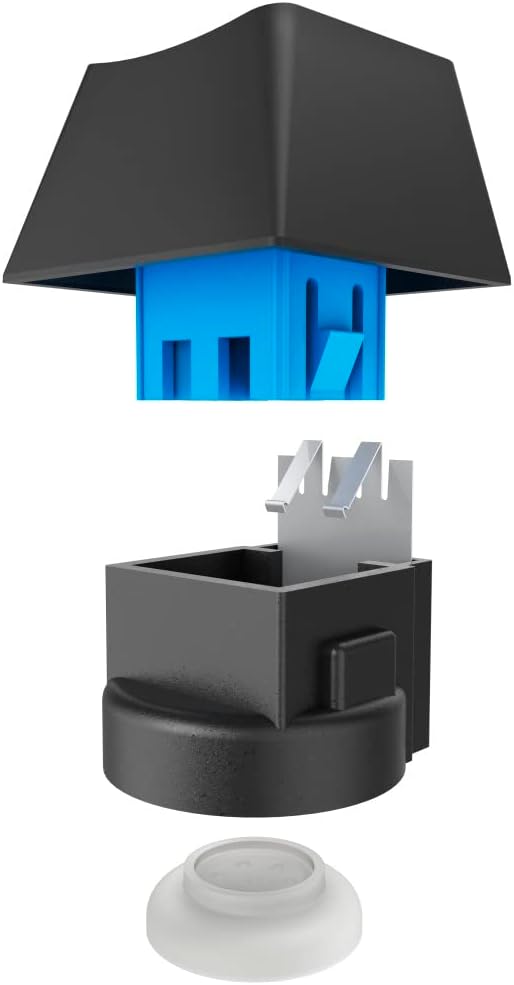
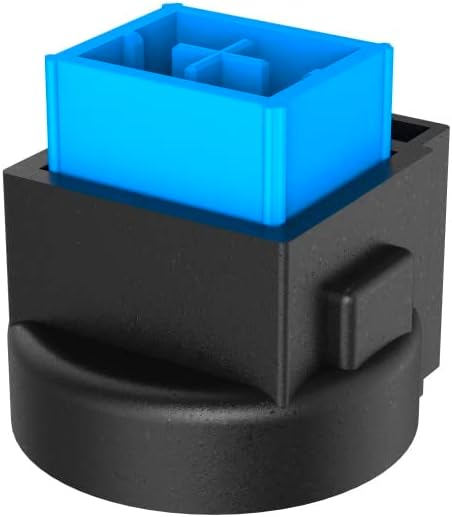
Image 3: Exploded and assembled views of the semi-mechanical key structure.
5. Техникалык тейлөө
Туура тейлөө клавиатураңыздын узак иштөөсүн жана иштешин камсыз кылат.
5.1 Тазалоо
- Тазалоодон мурун клавиатураны компьютерден ажыратыңыз.
- Баскычтоптун бетин сүртүү үчүн жумшак, кургак чүпүрөктү колдонуңуз.
- Ачкычтардын ортосундагы чаң жана таштанды үчүн кысылган абаны колдонуңуз.
- Катуу химиялык заттарды, абразивдүү тазалагычтарды же ашыкча нымдуулукту колдонуудан алыс болуңуз.
5.2 Сактоо
Колдонбогондо, клавиатураны таза, кургак чөйрөдө күн нурунан жана өтө температурадан алыс сактаңыз.
6. Кыйынчылыктарды
If you encounter issues with your uRage Exodus 700 keyboard, refer to the following common solutions:
- Баскычтоп жооп бербей жатат:
- USB кабели клавиатурага жана компьютерге бекем сайылганын текшериңиз.
- Баскычтопту башка USB портуна сайып көрүңүз.
- Компьютериңизди өчүрүп күйгүзүңүз.
- Катталбай жаткан ачкычтар:
- Баскычтоптун капкактарынын астында кандайдыр бир физикалык тоскоолдуктар бар-жогун текшериңиз.
- Ensure the keyboard drivers are correctly installed (check Device Manager on Windows).
- RGB жарыктандыруу иштебейт:
- Verify that the lighting is not turned off via keyboard shortcuts.
- Check the gaming software settings if installed.
- Макро функциялары иштебей жатат:
- Ensure the gaming software is running and macros are correctly configured.
- Update the gaming software to the latest version.
If problems persist, contact uRage customer support for further assistance.
7. Техникалык шарттар
| Өзгөчөлүк | Спецификация |
|---|---|
| Модель аты | Чыгуу 700 |
| Модель номери | ham_n8_U8186011 |
| Баскычтоптун жайгашуусу | QWERTY (англисче) |
| Негизги технология | Semi-Mechanical |
| Ачкычтардын саны | 114 |
| Rollover Buttons | 24ге чейин |
| Жооп убактысы | 1 мс |
| Key Lifetime | 10 Million Attacks |
| Work Travel | 2.5 мм |
| Байланыш | Зымдуу USB-A |
| Жарыктандыруу | RGB Түстөр |
| Шайкеш OS | Windows 11/10/8/7 |
| Number of Macro Buttons | 4 |
| Түс | Кара |
| Материал | Пластик |
| Кабелдин узундугу | 180 см |
| Өлчөмдөрү (W x Y x D) | 47 см х 3.5 см х 19 см |
| Салмагы | 885 г |
8. Кепилдик жана колдоо
8.1 Өндүрүүчүнүн Кепилдиги
The uRage Exodus 700 Semi-Mechanical Gaming Keyboard comes with a 5 жылдык өндүрүүчү кепилдик. Кепилдик дооматтары үчүн сатып алганыңыздын далилин сактап коюңуз. Кепилдик нормалдуу колдонуудагы материалдардагы жана жасалгадагы кемчиликтерди камтыйт.
8.2 Кардарларды колдоо
For technical support, warranty claims, or further inquiries, please visit the official uRage website or contact their customer service department. Contact information can typically be found on the warranty card included in your package or on the brand's official webсайт.