
Introduction
The Keychron K1 SE is an 87-key ultra-slim wireless mechanical keyboard designed for enhanced productivity and a superior tactile typing experience. It features RGB LED backlighting, hot-swappable low-profile Gateron mechanical switches, and broad compatibility with Mac and Windows operating systems. This manual provides detailed instructions for setting up, operating, maintaining, and troubleshooting your Keychron K1 SE keyboard.

Бүттүview of the Keychron K1 SE keyboard highlighting its key features: wireless/wired connectivity, 87 keys, hot-swappable low-profile Gateron switches, Mac & Windows compatibility, and RGB backlighting.
Жайгашуу
Пакеттин мазмуну
- Keychron K1 SE Keyboard
- Баскыч капкагын тарткыч
- USB-C - USB-A кабели
- Extra Keycaps for Mac and Windows operating systems
Баштапкы туташуу
The Keychron K1 SE supports both wireless (Bluetooth) and wired (USB-C) connections.
Зымдуу туташуу
- Locate the toggle switch on the side of the keyboard labeled "Bluetooth OFF Cable".
- Slide the switch to the "Cable" position.
- Берилген USB-C кабелин клавиатурага, ал эми USB-A учун компьютериңизге туташтырыңыз.
- Клавиатура системаңыз тарабынан автоматтык түрдө таанылат.
Зымсыз (Bluetooth) туташуу
- Locate the toggle switch on the side of the keyboard labeled "Bluetooth OFF Cable".
- Slide the switch to the "Bluetooth" position.
- Компьютериңизде же түзмөгүңүздө Bluetooth иштетип, жаңы түзмөктөрдү издеңиз.
- The keyboard will appear as "Keychron K1 SE". Select it to pair.
- Эгер суралса, экранда көрсөтүлгөн жупташтыруу кодун клавиатура аркылуу киргизип, Enter баскычын басыңыз.
- The K1 SE can connect to up to 3 devices simultaneously. To switch between paired devices, press fn+1, fn+2, же fn+3.

The side of the Keychron K1 SE keyboard features two toggle switches: one for selecting between Wireless (Bluetooth) and Wired (USB-C) modes, and another for switching between Mac/iOS and Windows/Android layouts.

The Keychron K1 SE can connect to up to three devices, including desktops, tablets, and smartphones, and is compatible with both Mac and Windows operating systems.
Operating System Layout Switch
The keyboard includes a dedicated switch to optimize its layout for either Mac/iOS or Windows/Android operating systems. Use the toggle switch labeled "Win/Android Mac/iOS" on the side of the keyboard to select the appropriate layout. Extra keycaps for both Windows and Mac are included in the box for customization.
Баскычтоптун бийиктигин тууралоо
The K1 SE features two levels of adjustable rubber feet, allowing you to set the keyboard at a comfortable typing angle (6° or 9°). Extend or retract the feet as desired.

The Keychron K1 SE is engineered with two adjustable feet levels, providing ergonomic typing support at angles of 6 or 9 degrees.
Иштөө нускамалары
Мультимедиа жана Функция баскычтары
The K1 SE provides access to essential multimedia and function keys through combinations with the Fn key. Refer to the keycap legends for specific functions (e.g., brightness, media control, volume).
RGB LED Backlight Control
The keyboard features a charming RGB backlight with various patterns and intensity levels.
- To cycle through different RGB lighting effects, press the лампочканын ачкычы (usually located near F12).
- To adjust backlight brightness, press Fn + F5 (төмөндөө) же Fn + F6 (көбөйтүү).

The Keychron K1 SE features vibrant RGB LED backlighting, offering a range of colors and effects to personalize your typing experience.
Батареянын абалы
To check the current battery charge level, press Fn+B. The backlight will briefly indicate the battery status.
Bluetooth Power Saving
By default, the keyboard may enter a power-saving mode after a period of inactivity. If you experience a delay in wake-up time, you can disable Bluetooth power saving by pressing and holding Fn + S + O 4 секундга.
Техникалык тейлөө
Баскычтопту тазалоо
Клавиатураңызды тазалоо үчүн, баскычтоптун капкактарын жана корпусун жумшак, нымдуу чүпүрөк менен акырын сүртүңүзamp cloth. For deeper cleaning, you may remove the keycaps using the provided keycap puller. Avoid using harsh chemicals or abrasive materials.
Ысык алмаштыруучу которгучтар
The Keychron K1 SE features hot-swappable switches, allowing you to easily change switches without soldering. This is useful for customizing your typing feel or replacing a faulty switch.
- Ensure the keyboard is disconnected or powered off.
- Каалаган баскычтоптун капкагын этияттык менен алып салуу үчүн берилген баскычтоптун капкагын тартуучу каражатты колдонуңуз.
- Use a switch puller (not included, but often comes with switch sets) to gently pull the switch straight up from the keyboard plate.
- Жаңы которгучтун төөнөгүчтөрүн платадагы тешиктер менен тегиздеп, чыкылдаган үн чыкканга чейин бекем басыңыз.
- Баскыч капкагын алмаштырыңыз.

Keychron K1 SE ысык алмаштырылуучу төмөнкү прогрессивдүү функцияга ээfile Gateron mechanical switches, allowing for easy removal and replacement of individual switches without soldering.
Проблемаларды чечүү
Байланыш маселелери
- Баскычтоп Bluetooth аркылуу туташпай жатат: Ensure the keyboard's toggle switch is set to "Bluetooth". Check if Bluetooth is enabled on your device. Try re-pairing the keyboard. Ensure no other devices are interfering with the Bluetooth signal.
- Lag or disconnections in Bluetooth mode: Try disabling Bluetooth power saving (Fn + S + O for 4 seconds). Ensure the keyboard is within range of your device.
- Зымдуу байланыш иштебей жатат: Ensure the keyboard's toggle switch is set to "Cable". Try a different USB-C cable or USB port on your computer.
Кубат жана кубаттоо
- Keyboard not turning on: Ensure the battery is charged. Connect the keyboard via USB-C cable to charge it.
- Батарея кубатталбай жатат: Try a different USB-C cable and power source. Ensure the cable is securely connected.
Негизги Функционалдык
- Ачкычтар жооп бербейт: Check if the keyboard is properly connected (wired or Bluetooth). If it's a specific key, consider hot-swapping the switch for a new one.
- Incorrect key output (Mac/Windows): Ensure the operating system toggle switch on the side of the keyboard is set to the correct position for your system.
Техникалык шарттар
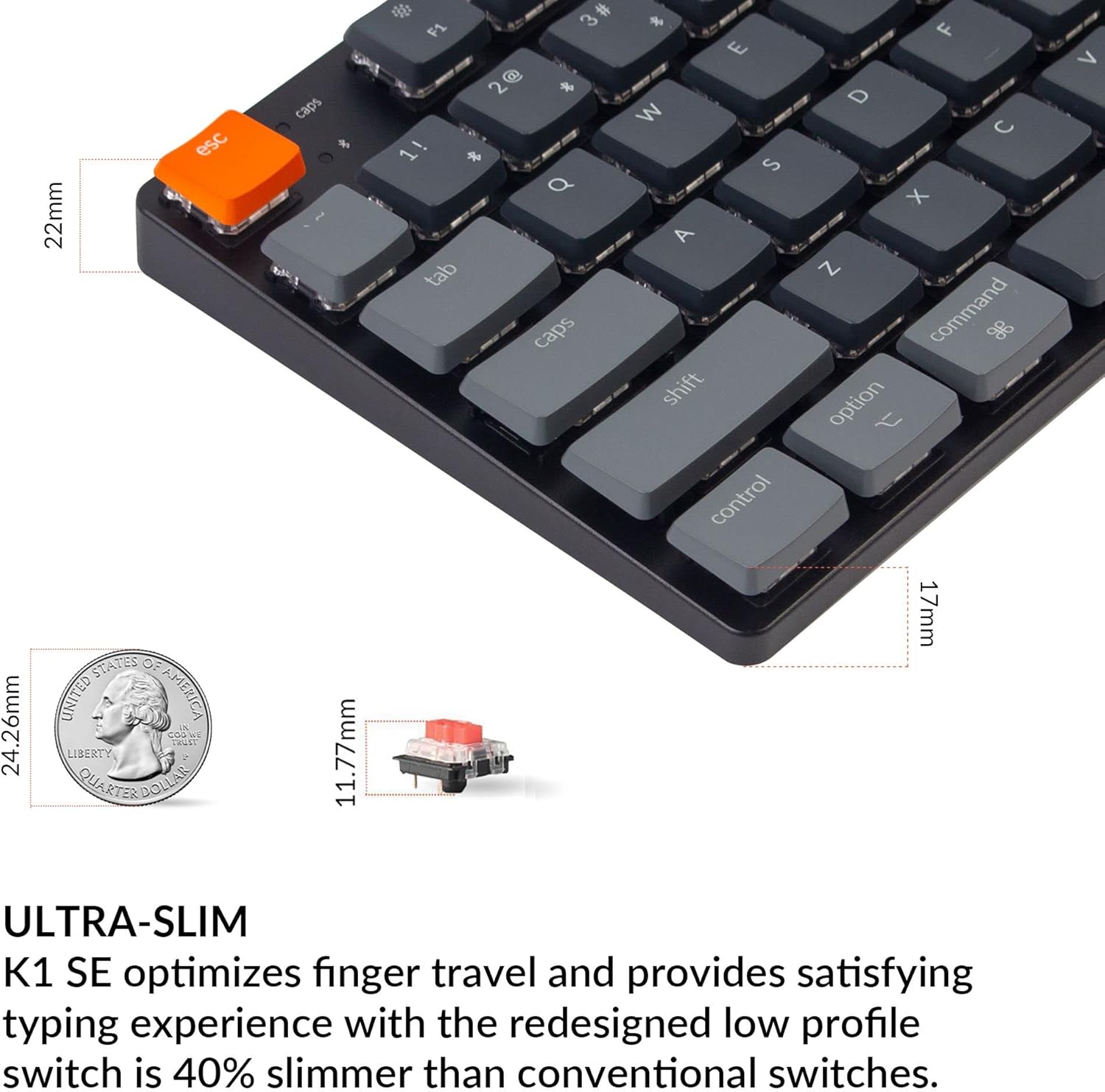
The Keychron K1 SE features an ultra-slim design, optimizing finger travel and providing a satisfying typing experience with its low-profile Gateron mechanical switches, which are 40% slimmer than conventional switches.
| Өзгөчөлүк | Деталь |
|---|---|
| Модел | K1SE-H1 |
| Ачкычтар | 87 (TKL Layout) |
| Которуу түрү | Low-Profile Gateron Mechanical Red Switch |
| Actuation Force (Red Switch) | 50±15гф |
| Pre-travel (Red Switch) | 1.5±0.5мм |
| Total Travel (Red Switch) | 2.5±0.25мм |
| Switch Behavior (Red Switch) | Сызыктуу |
| Sound Level (Red Switch) | Тынч |
| Байланыш | Bluetooth 5.1, USB-C зымдуу |
| Арткы жарык | RGB LED |
| Батарея | 1 Литий-ион (кошулган) |
| Өлчөмдөрү (L x W x Y) | 14.45 x 6.22 x 1.57 дюйм |
| Элемент Салмагы | 2.03 фунт |
| Шайкештик | Mac, Windows, iOS, Android, Chromebook, Linux, Gaming Consoles |