
Introduction
Thank you for choosing the SOMIC MS300 Over-Ear Wireless Bluetooth Headphones. This manual provides essential information for setting up, operating, and maintaining your headphones to ensure optimal performance and longevity. Please read this manual thoroughly before using the product.
Пакеттин мазмуну
- SOMIC MS300 Over-Ear Wireless Bluetooth Headphones
- USB заряддоо кабели
- 3.5 мм аудио кабель
- Колдонуучунун Колдонмосу (бул документ)
Продукт бүттүview
Familiarize yourself with the various components and controls of your SOMIC MS300 headphones.
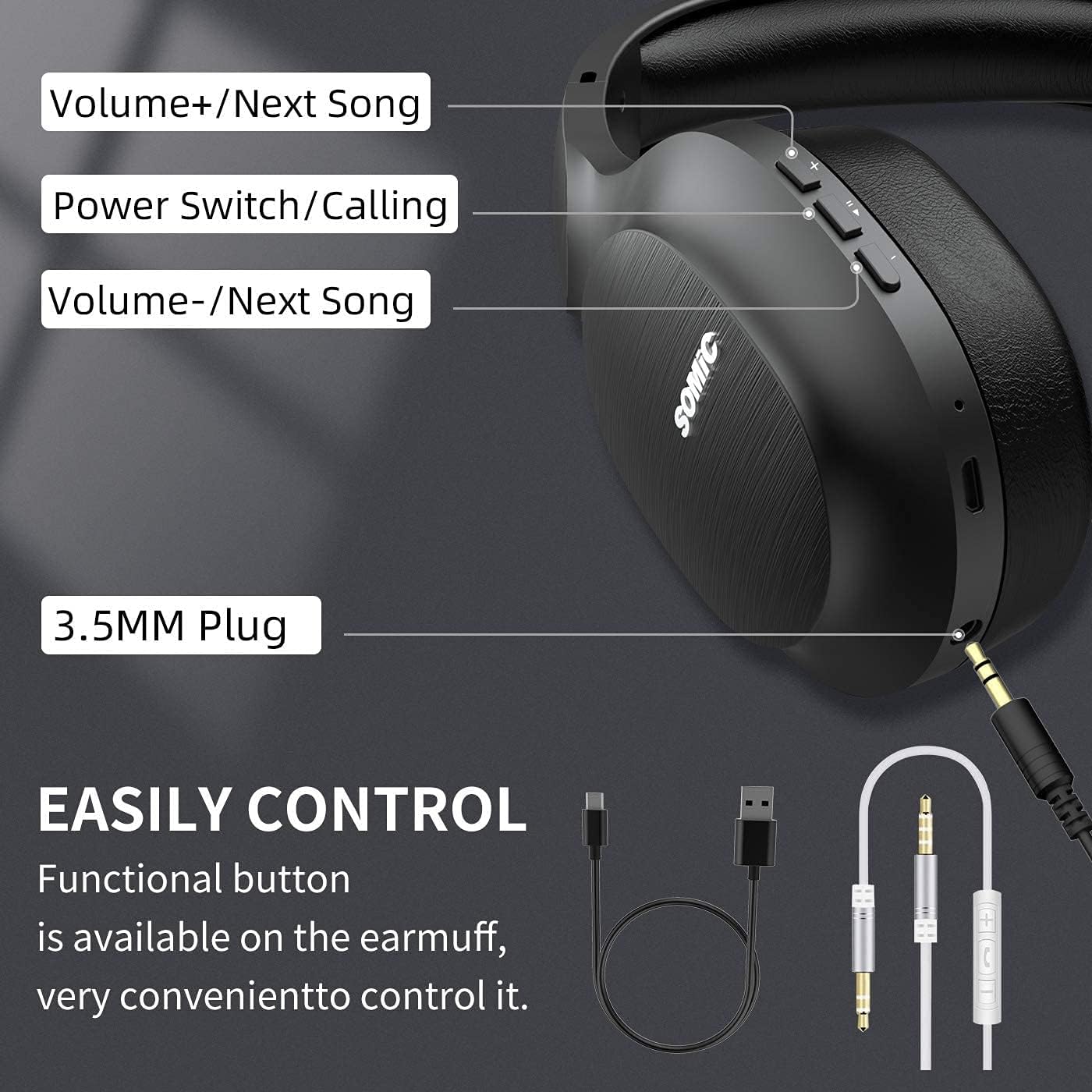
Сүрөт: Бүттүview of the SOMIC MS300 headphone controls, including volume buttons, power switch, and 3.5mm audio jack.
Башкаруу каражаттары жана порттор
- Көлөм + / Кийинки ыр: Press briefly to increase volume, press and hold to skip to the next song.
- Power Switch / Calling: Press and hold to power on/off. Briefly press to play/pause music. During a call, press to answer/end a call.
- Көлөмү - / Мурунку ыр: Press briefly to decrease volume, press and hold to go to the previous song.
- 3.5 мм аудио уячасы: Зымдуу туташуу үчүн комплекттеги 3.5 мм аудио кабелин колдонуңуз.
- USB кубаттоо порту: For charging the headphones using the included USB cable.
- Микрофон: Үнсүз чалуу үчүн орнотулган.
Жайгашуу
Наушниктерди заряддоо

Сүрөт: The SOMIC MS300 headphones illustrating the fast charging capability: 5 minutes of charge provides 2 hours of playback.
- Connect the small end of the USB charging cable to the USB charging port on the headphones.
- USB кубаттоо кабелинин чоңураак учунун USB кубат адаптерине (кошумча эмес) же компьютердин USB портуна туташтырыңыз.
- LED индикатору кубаттоо абалын көрсөтөт (мисалы, кубаттоо үчүн кызыл, толук заряддалган үчүн көк).
- A full charge takes approximately 2-3 hours. For quick use, a 5-minute charge provides up to 2 hours of playtime.

Сүрөт: The SOMIC MS300 headphones highlighting their strong endurance with up to 72 hours of playtime on a single charge.
Күйгүзүү/өчүрүү
- Күйгүзүү үчүн: Press and hold the Power Switch button for approximately 3 seconds until the LED indicator flashes blue.
- Өчүрүү үчүн: Press and hold the Power Switch button for approximately 3 seconds until the LED indicator turns off.
Bluetooth Жупташтыруу
- Наушниктердин өчүрүлгөнүн текшериңиз.
- Кубат баскычын LED индикатору кезектешип кызыл жана көк түстө күйүп-өчкөнгө чейин 5-7 секунд басып туруңуз, бул жупташтыруу режимин көрсөтөт.
- Түзмөгүңүздө (смартфон, планшет, компьютер) Bluetooth иштетип, жеткиликтүү түзмөктөрдү издеңиз.
- Select "SOMIC MS300" from the list of devices.
- Туташтырылгандан кийин, LED индикатору акырындык менен көк болуп жанат.
Зымдуу туташуу (3.5 мм аудио кабель)

Сүрөт: The SOMIC MS300 headphones demonstrating their versatility with both wireless Bluetooth connectivity and a wired option via a 3.5mm audio cable.
The SOMIC MS300 headphones can also be used with a wired connection, even if the battery is depleted.
- Connect one end of the 3.5mm audio cable to the 3.5mm audio jack on the headphones.
- 3.5 мм аудио кабелдин экинчи учун түзмөгүңүздүн аудио чыгаруу портуна туташтырыңыз.
- The headphones will automatically switch to wired mode. Bluetooth functionality will be disabled.
Иштөө нускамалары
Музыканы ойнотуу
- Ойнотуу/тындыруу: Briefly press the Power Switch button.
- Көлөмү: Briefly press the Volume + button.
- Үнүн азайтуу: Briefly press the Volume - button.
- Кийинки трек: Көлөмү + баскычын басып, кармап туруңуз.
- Мурунку трек: Үн көлөмү - баскычын басып, кармап туруңуз.
Телефон чалуулар
- Чалууга жооп берүү/аяктоо: Briefly press the Power Switch button.
- Чакырууну четке кагуу: Press and hold the Power Switch button for 2 seconds.
- Акыркы номерди кайра терүү: Double-press the Power Switch button.
Кош түзмөк байланышы
The SOMIC MS300 headphones support connecting to two Bluetooth devices simultaneously.
- Connect the headphones to the first device as described in the "Bluetooth Pairing" section.
- Биринчи түзмөктө Bluetooth'ду өчүрүңүз. Кулакчындар жупташтыруу режимине кайра кирет.
- Кулакчындарды экинчи түзмөккө туташтырыңыз.
- Re-enable Bluetooth on the first device. The headphones should automatically reconnect to both devices.
- Аудио медиа файлдарды активдүү ойнотуп жаткан же чалуу кабыл алып жаткан түзмөктөн ойнотулат.
Noise Cancellation (CVC 8.0)

Сүрөт: A person wearing SOMIC MS300 headphones in a public setting, demonstrating the effectiveness of CVC Noise Cancelling Technology in reducing ambient noise.
The SOMIC MS300 headphones feature CVC 8.0 noise cancelling technology, which helps reduce ambient noise during calls for clearer communication. This feature is automatically active when using the built-in microphone.
Техникалык тейлөө
Тазалоо
- Наушниктерди жумшак, кургак, түксүз чүпүрөк менен сүртүңүз.
- Абразивдүү тазалагычтарды, эриткичтерди же спрей тазалагычтарды колдонбоңуз.
- Ар кандай тешиктерге ным кирүүдөн сактаңыз.
Сактагыч
- Наушниктерди салкын, кургак жерде, экстремалдык температурадан жана тике күн нурунан алыс сактаңыз.
- Узак мөөнөткө колдонулбаганда, батареянын иштөө мөөнөтүн сактоо үчүн наушниктерди жок дегенде үч айда бир жолу заряддаңыз.
Батареяга кам көрүү
- Do not attempt to replace the battery yourself. Contact customer support for battery-related issues.
- Батареяны бат-баттан толук кубаттап коюудан качыңыз, анткени бул анын жалпы иштөө мөөнөтүн кыскартат.
Проблемаларды чечүү
| Көйгөй | Мүмкүн чечим |
|---|---|
| Кулакчындар күйбөйт. | Кулакчындар заряддалганын текшериңиз. USB кабелин колдонуп, кубат булагына туташтырыңыз. |
| Түзмөк менен жупташтыруу мүмкүн эмес. | Ensure headphones are in pairing mode (LED flashing red and blue). Turn off and on Bluetooth on your device. Move headphones closer to the device. |
| Үн жок же үнү төмөн. | Check volume levels on both headphones and the connected device. Ensure headphones are properly paired or the 3.5mm cable is fully inserted. |
| Үн сапаты начар. | Move closer to the connected device to avoid interference. Ensure there are no obstacles between the headphones and the device. |
| Микрофон иштебей жатат. | Ensure the headphones are connected via Bluetooth. Check microphone settings on your device. |
Техникалык шарттар

Сүрөт: А жарылды view of the 40mm dynamic driver and the Qualcomm QCC Bluetooth 5.0 chip, highlighting the audio technology within the SOMIC MS300 headphones.
| Өзгөчөлүк | Деталь |
|---|---|
| Модел | MS300 |
| Бренд | SOMIC |
| Байланыш | Wireless (Bluetooth 5.0), Wired (3.5mm Audio Jack) |
| Bluetooth чип | Qualcomm QCC Bluetooth 5.0 |
| Айдоочунун өлчөмү | 40мм динамикалык айдоочулар |
| Noise Control | CVC 8.0 ызы-чууну жокко чыгаруу |
| Батарея сыйымдуулугу | 1000mAh |
| Оюн убактысы | 72 саатка чейин |
| Тез заряддоо | 2 саат ойноо үчүн 5 мүнөт кубаттоо |
| Наушниктердин материалы | Memory Foam Protein |
| Салмагы | 208г |
| Түс | Кара |
| Суу каршылык | Сууга чыдамдуу эмес |
Кепилдик жана колдоо
Кепилдик маалымат
SOMIC products are designed and manufactured to the highest quality standards. This product is covered by a limited warranty from the date of purchase. Please refer to the warranty card included in your package for specific terms and conditions. Keep your proof of purchase for warranty claims.
Кардарларды колдоо
If you encounter any issues or have questions regarding your SOMIC MS300 headphones, please contact our customer support team. Contact details can typically be found on the warranty card or the official SOMIC website. Please have your model number (MS300) and purchase information ready when contacting support.