
1. Киришүү
This manual provides detailed instructions for the installation, operation, and maintenance of your Swann SWNHD-900BE-US 4K Bullet Security Camera. This camera is designed for both indoor and outdoor surveillance, offering 4K Ultra HD video resolution, Power over Ethernet (PoE) connectivity, and advanced security features.
The SWNHD-900BE-US camera integrates with Swann NVR systems to provide comprehensive security monitoring. It features color night vision, heat and motion detection, flashing LED lights, and advanced analytics for enhanced detection capabilities.
2. Продукт бүтүп калдыview
The Swann SWNHD-900BE-US is a robust 4K bullet-style security camera equipped with several key features:
- 4K Ultra HD видео: Provides 8MP resolution, offering significantly clearer images than 1080P systems.
- Ethernet аркылуу күч (PoE): Simplifies installation by delivering power and video through a single Cat5e Ethernet cable.
- Түнкү көрүнүш: Utilizes LED lights to provide full-color video footage up to 115ft (35m) in low-light conditions.
- Heat and Motion Detection: Triggers recording and alerts based on thermal and movement changes.
- Flashing Red & Blue Lights and Siren: Deters intruders with visible and audible warnings.
- Өркүндөтүлгөн аналитика: Includes Human and Vehicle Detection, Face Recognition, Object Removal, Sound Detection, Perimeter Intrusion, Line Crossing, and People Counting.
- Аба ырайына чыдамдуу дизайн: Built to withstand various outdoor elements.
- Акылдуу эскертүүлөр: Sends notifications to your smartphone via the Swann Security App.
Image: The Swann 4K NVR Security Camera highlighting its advanced analytics capabilities including Heat Mapping, Face Recognition, Perimeter Intrusion, Line Crossing, Sound Detection, Object Removal, People Counter, and Durable Metal Construction.

Сүрөт: алдыңкы view of the Swann bullet security camera with its red and blue flashing LED lights activated, indicating an alert or deterrent function.

Сүрөт: алдыңкы view of the Swann bullet security camera with its white spotlight illuminated, providing enhanced visibility in dark conditions or acting as a deterrent.
3. Орнотуу
3.1 Пакеттин мазмуну
Орнотууну баштоодон мурун, бардык компоненттер бар экенин текшериңиз:
- NHD-900BE SwannForce Bullet Camera
- Ethernet Cable (60ft/18m)
- Винттерди жана сайгычтарды орнотуу
- Иштөө нускамалары (бул колдонмо)
- Уурулукка каршы стикерлер
3.2 Камераны орнотуу
The camera is designed for surface, ceiling, or wall mounting. Choose a location that provides the desired viewing angle and is within reach of the Ethernet cable connection to your NVR.
- Позициялоо: Hold the camera in the desired mounting location and mark the screw holes. Ensure the camera's field of view covers the area you wish to monitor.
- Бургулоо: Drill pilot holes at the marked positions. If mounting on a masonry surface, insert the provided wall plugs.
- Камсыздоо: Attach the camera base to the surface using the mounting screws. Adjust the camera's angle for optimal coverage.

Image: A Swann bullet security camera mounted on an exterior wall, demonstrating its placement for monitoring an entrance. The image also shows examples of face recognition data displayed on a screen.
3.3 Connecting the Camera (PoE)
The SWNHD-900BE-US camera uses Power over Ethernet (PoE) for both power and data transmission.
- Ethernet кабелин туташтыруу: Plug one end of the provided Ethernet cable into the camera's RJ45 port.
- Connect to NVR: Plug the other end of the Ethernet cable into an available PoE port on your Swann NVR (Network Video Recorder).
- Күйгүзүү: Ensure your NVR is powered on. The camera will receive power directly from the NVR via the Ethernet cable and automatically begin initialization.
3.4 Initial Configuration (Swann Security App)
For full functionality and remote access, download and configure the Swann Security App.
- жүктөп алыңыз Swann Security App App Store'дон (iOS) же Google Play Store'дон (Android).
- Follow the in-app instructions to add your NVR system and connected cameras. This typically involves scanning a QR code on your NVR.
- Кошулгандан кийин, сиз төмөнкүлөрдү жасай аласыз view жаша фооtage, configure settings, and receive alerts directly on your smartphone.

Image: A woman using the Swann Security App on her smartphone, demonstrating the app's interface for multi-camera live streaming, alerts, and footage ойнотуу.
4. Камераны иштетүү
4.1 Live View жана Жаздыруу
Түз эфирдеги видео берүүлөргө жана жаздырылган тамак-ашка кирүүtage through your connected NVR or the Swann Security App.
- NVR монитору: Connect a monitor to your NVR to view туташкан бардык камералардан түз эфирде көрсөтүлөт.
- Swann Security App: Open the app on your smartphone or tablet to view live streams, playback recordings, and manage camera settings remotely.
4.2 Акылдуу аныктоо жана эскертүүлөр
The camera's advanced analytics provide intelligent detection capabilities:
- Адамды жана унааны аныктоо: The camera can differentiate between human and vehicle movement, reducing false alarms from other sources.
- Жүздү таануу: Identifies and logs known faces, allowing for customized alerts or actions.
- Perimeter Intrusion & Line Crossing: Define specific zones or lines, and receive alerts when they are breached.
- Үн аныктоо: Triggers alerts based on unusual sounds detected by the camera's microphone.
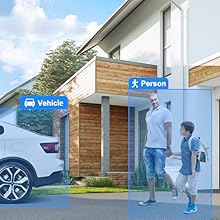
Image: A security camera view highlighting the detection of a person and a vehicle, demonstrating the camera's intelligent object recognition capabilities.
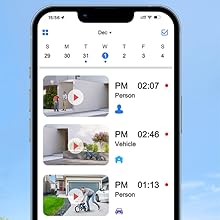
Image: A smartphone screen displaying the Swann Security App's event timeline, showing recorded events categorized by person and vehicle detection with timestamps.
4.3 Night Vision and Deterrent Features
- Түнкү көрүнүш: The camera automatically switches to color night vision in low light, providing more detailed and identifiable footage than traditional black and white infrared.
- Flashing Lights & Siren: These features can be configured to activate automatically upon detection of suspicious activity or manually via the app, serving as a powerful visual and audible deterrent.
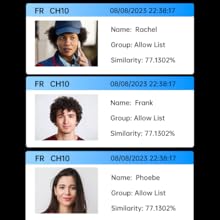
Image: A split image comparing traditional black and white night vision on the left with the camera's full-color night vision on the right, showcasing the enhanced detail and color retention in low-light conditions.
5. Техникалык тейлөө
Үзгүлтүксүз техникалык тейлөө камераңыздын оптималдуу иштешин жана узак мөөнөттүү иштешин камсыз кылат.
- Линзаны тазалоо: Мезгил-мезгили менен камеранын линзасын жумшак, гamp cloth to remove dust, dirt, or water spots that may affect image clarity. Avoid abrasive cleaners.
- Кабелдик текшерүү: Check the Ethernet cable for any signs of wear, damage, or loose connections, especially if installed outdoors.
- Программалык камсыздоонун жаңыртуулары: Regularly check for and install firmware updates for your NVR and cameras through the Swann Security App or Swann's official webсайт. Жаңыртуулар көбүнчө иштин натыйжалуулугун жакшыртууларды жана коопсуздукту жакшыртууларды камтыйт.
- Экологиялык текшерүүлөр: Ensure the camera's mounting remains secure and that no obstructions (e.g., growing foliage) are blocking its field of view.
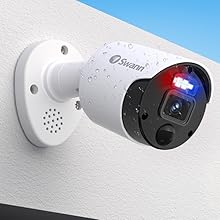
Image: A Swann bullet security camera mounted outdoors on a wall, with water droplets visible on its casing, illustrating its weatherproof design.
6. Кыйынчылыктарды
If you encounter issues with your Swann SWNHD-900BE-US camera, refer to the following common troubleshooting steps:
- Видео/Оффлайн камера жок:
- Check the Ethernet cable connection at both the camera and the NVR. Ensure it is securely plugged in.
- NVR күйгүзүлгөнүн жана туура иштеп жатканын текшериңиз.
- Try connecting the camera to a different PoE port on the NVR to rule out a faulty port.
- NVRди кайра иштетиңиз.
- Сүрөттүн сапаты начар:
- Камера линзасын жумшак чүпүрөк менен кылдаттык менен тазалаңыз.
- Камеранын талаасында эч кандай тоскоолдуктар жок экенин текшериңиз view (e.g., spiderwebs, dirt).
- Check the camera's resolution settings in the NVR or Swann Security App to ensure it is set to 4K (8MP).
- Жалган ойготкучтар:
- Adjust the sensitivity settings for motion and heat detection in the NVR or app.
- Configure detection zones to exclude areas with frequent, non-threatening movement (e.g., swaying trees, busy roads).
- Ensure the camera is not pointing directly at reflective surfaces or areas with rapid light changes.
- Түнкү көрүү маселелери:
- Ensure the camera's LED lights are not obstructed.
- Check for strong light sources near the camera that might interfere with its night vision sensors.
For further assistance, refer to the support section on the Swann webсайтка же кардарларды тейлөөгө кайрылыңыз.
7. Техникалык шарттар
| Өзгөчөлүк | Спецификация |
|---|---|
| Бренд | Swann |
| Модель номери | SWNHD-900BE-US |
| Байланыш технологиясы | Wired (Power over Ethernet) |
| Видео тартуунун резолюциясы | 4K (8 МП) |
| Өзгөчөлүктөр | Motion Sensor, Color Night Vision, Flashing LED Lights, Siren, Advanced Analytics (Human/Vehicle Detection, Face Recognition, etc.) |
| Сунушталган Колдонуулар | Сырткы байкоо |
| Power Source | Ethernet аркылуу кубат |
| Элементтин өлчөмдөрү (L x W x Y) | 2.56 x 2.56 x 7.8 дюйм |
| Элемент Салмагы | 1.85 фунт |
| Viewбурч | 90 градус |
| Операциялык системанын шайкештиги | Android, iOS (via Swann Security App) |
| Камтылган компоненттер | NHD-900BE SwannForce Bullet Camera, Ethernet Cable, Mounting Screws & Plugs, Operating Instructions, Theft Deterrent Stickers |
8. Кепилдик жана колдоо
8.1 Кепилдик маалыматы
The Swann SWNHD-900BE-US camera comes with a 1 жылдык Чектелген Кепилдик сатып алынган күндөн тартып. Бул кепилдик өндүрүштүк кемчиликтерди камтыйт жана өнүмдүн кадимки колдонууда максатка ылайыктуу иштешин камсыздайт. Кепилдик дооматтары үчүн сатып алгандыгыңызды тастыктаган документти сактап коюңуз.
For detailed warranty terms and conditions, please visit the official Swann webсайт.
8.2 Кардарларды колдоо
If you experience any challenges with your product, require technical assistance, or have questions regarding its operation, please contact Swann customer service. Support resources, including FAQs and troubleshooting guides, are also available on the official Swann webсайт:
- Swann колдоо кызматы Webсайт: www.swann.com/us/support
- Байланыш маалыматы: Refer to the Swann website for the most current contact details (phone, email, live chat).