
1. Киришүү
The Cuifati RX888 MKII is a Software Defined Radio (SDR) receiver module designed for exploring a wide range of radio frequencies. This device allows users to tune into various radio signals, from amateur radio to shortwave broadcasts, utilizing its advanced features and robust construction. This manual provides essential information for the proper setup, operation, maintenance, and troubleshooting of your RX888 MKII module.
2. Коопсуздук маалыматы
To ensure safe and optimal operation of your RX888 MKII module, please observe the following precautions:
- Аппаратты ашыкча жүктөбөңүз.
- Avoid using the device under excessive pressure.
- Ensure the device is not subjected to overcurrent conditions.
- Always connect the device to a compatible power source and host computer.
3. Продукт бүтүп калдыview
The RX888 MKII is a 16-bit Software Defined Radio with a direct sampling receiver architecture. It features an aluminum alloy casing for durability and enhanced heat dissipation.

Сүрөт 3.1: Алдыңкы view of the Cuifati RX888 MKII SDR Receiver Module, showcasing its compact design and heat sinks.
Негизги өзгөчөлүктөрү:
- Кең жыштык диапазону: Operates from 1kHz to 64Mhz, with a high-frequency range extending from 64Mhz to 1700Mhz.
- Enhanced LPF: Utilizes an enhanced 64M LPF (Low Pass Filter) for improved image suppression.
- Adjustable VGA: Features a Variable Gain Amplifier (VGA) with an adjustment range of -10dB to +33dB, replacing the fixed low noise amplifier of previous models.
- Туруктуу курулуш: Encased in an aluminum alloy, coated with anti-corrosion paint for extended service life.
- Ар тараптуу колдонмо: Suitable for scientific research, amateur radio, and other specialized applications.

Figure 3.2: The RX888 MKII highlighting the VGA adjustment capability, which offers a gain range of -10dB to +33dB.
4. Орнотуу
Setting up your RX888 MKII module involves connecting it to a host computer and installing the necessary software.
4.1 Системалык талаптар
- USB порт: A USB 3.0 port is recommended for optimal performance and data transfer rates.
- Компьютер: A fast computer is advisable to handle the processing demands of software-defined radio applications.
- Операция системасы: Compatible with various operating systems, typically Windows, Linux, and macOS (driver availability may vary).
4.2 Аппараттык туташуу
- Антеннаны туташтыруу: Attach your desired antenna to the appropriate antenna port(s) on the RX888 MKII. The module typically features two antenna ports, labeled 'H' and 'V' for horizontal and vertical polarization, or for different frequency ranges.
- USB кабелин туташтыруу: Connect the provided USB cable from the RX888 MKII's USB 3.0 port to a USB 3.0 port on your computer.
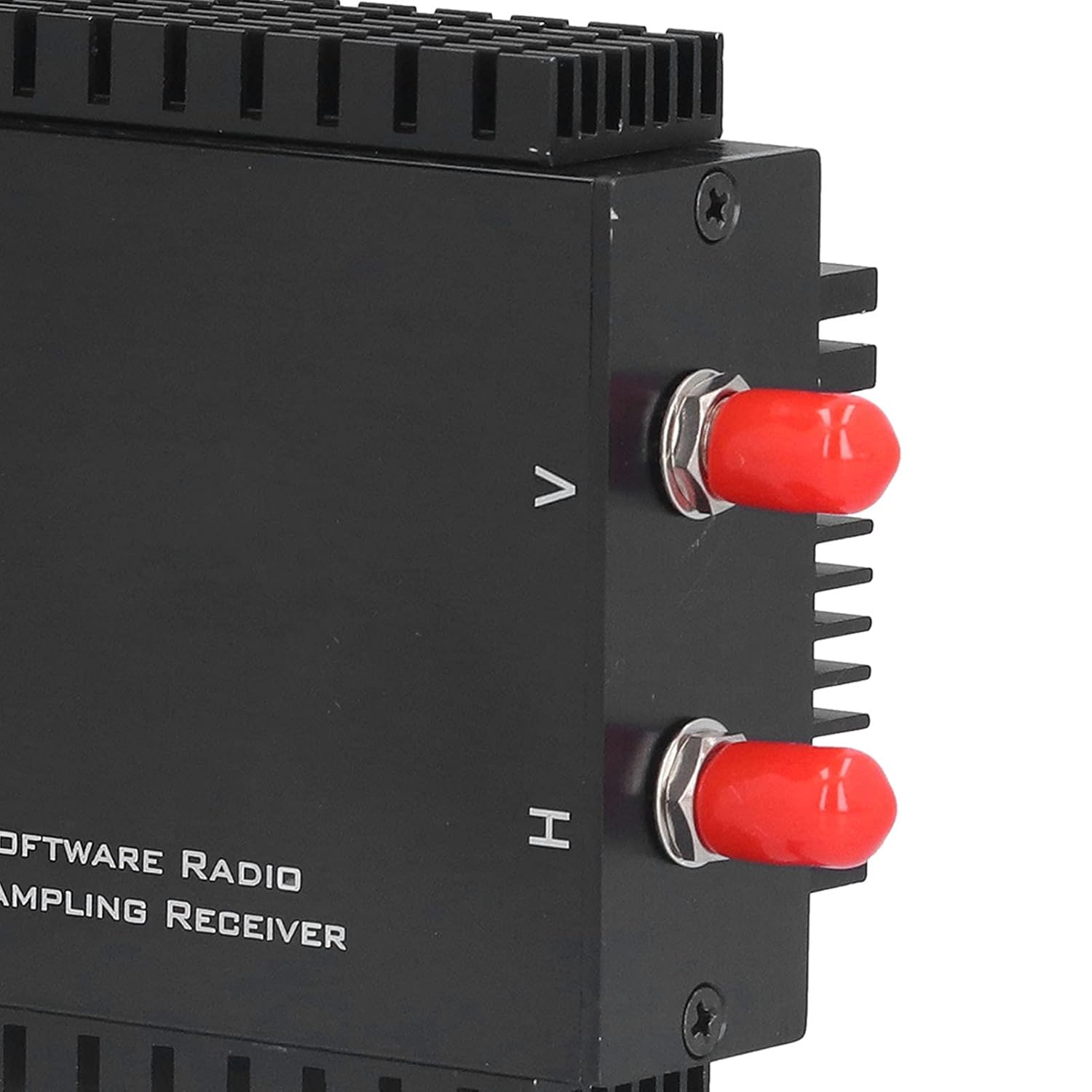
Сүрөт 4.1: Жакын пландан view of the antenna input ports, typically labeled H and V.

Figure 4.2: The USB 3.0 port on the side of the RX888 MKII module for data and power connection.
4.3 Программалык камсыздоону орнотуу
The RX888 MKII requires specific drivers and SDR software to function. Refer to the manufacturer's website or included documentation for the latest driver downloads and recommended SDR applications (e.g., SDR Console, SDR#). Follow the provided instructions for driver installation. It is crucial to ensure drivers are correctly installed for the device to be recognized by your computer.
5. Иштөө нускамалары
Once the hardware is connected and software is installed, you can begin operating your RX888 MKII.
- Launch SDR Software: Open your preferred SDR application (e.g., SDR Console).
- Түзмөктү тандоо: Within the software, select the RX888 MKII as your input device.
- Орнотууларды конфигурациялоо: Adjust settings such as sample rate, gain (VGA), and filter bandwidth according to your reception needs. The VGA offers a range of -10dB to +33dB for optimizing signal reception.
- Tune to Frequency: Enter the desired frequency to begin listening.
- Monitor Spectrum: Utilize the spectrum analyzer and waterfall display within the SDR software to visualize radio signals.
6. Техникалык тейлөө
Proper maintenance ensures the longevity and performance of your RX888 MKII module.
- Тазалоо: Use a soft, dry cloth to clean the exterior of the module. Avoid liquid cleaners or abrasive materials.
- Сактагыч: Аппаратты колдонбогондо түз күн тийбеген жана өтө температурадан алыс салкын, кургак жерде сактаңыз.
- Микропрограмма/Программа жаңыртуулары: Дайыма өндүрүүчүнүн текшерүү website for any firmware or driver updates to ensure optimal performance and compatibility.
- Кабелдик башкаруу: Ensure USB and antenna cables are not kinked or strained to prevent damage.
7. Кыйынчылыктарды
If you encounter issues with your RX888 MKII, refer to the following troubleshooting steps:
- Түзмөк таанылган жок:
- Ensure the USB cable is securely connected to both the module and a USB 3.0 port on your computer.
- Try plugging and unplugging the device multiple times.
- Verify that the correct drivers are installed. Check Device Manager (Windows) or equivalent for driver status.
- Test with a different USB port or computer if possible.
- Poor Reception/No Signal:
- Check antenna connections and ensure the antenna is appropriate for the frequency range you are trying to receive.
- Adjust the VGA gain settings within your SDR software.
- Ensure no local interference sources are affecting reception.
- Verify the frequency entered in the SDR software is correct.
- Software Crashes/Instability:
- Ensure your SDR software is up to date.
- Verify that your computer meets the recommended system requirements, especially regarding processor speed and RAM.
- Reinstall drivers and SDR software if necessary.
8. Техникалык шарттар
| Өзгөчөлүк | Деталь |
|---|---|
| Модел | RX888 MKII |
| Материал | Алюминий эритмеси |
| Жыштык диапазону | 1kHz - 64Mhz |
| High Frequency Range | 64M - 1700Mhz |
| ATT Adjustment Range | -32 дБдан 0 дБга чейин |
| VGA Adjustment Range | -10 дБдан +33 дБга чейин |
| Пакеттин өлчөмдөрү | 7.68 x 4.29 x 2.72 дюйм |
| Салмагы | 10.58 унция |
| Каналдардын саны | 2 |
9. Пакеттин мазмуну
The standard package for the Cuifati RX888 MKII Software Defined Radio Receiver Module includes:
- 1 x Cuifati RX888 MKII Software Defined Radio Receiver Module
- 1 x Connection Line (USB cable)
- 1 х Колдонуучунун колдонмосу (бул документ)
10. Кепилдик жана колдоо
Кепилдик жөнүндө маалымат алуу, техникалык колдоо же тейлөө боюнча суроолор боюнча сатуучуга же өндүрүүчүгө түздөн-түз кайрылыңыз. Кепилдик боюнча дооматтар үчүн сатып алуунун далили катары сатып алуу дүмүрчөгүңүздү сактап коюңуз.