
Dascert Q38[NEW]
Dascert Q38 Wireless Bluetooth Earbuds User Manual
Model: Q38[NEW]
1. Киришүү
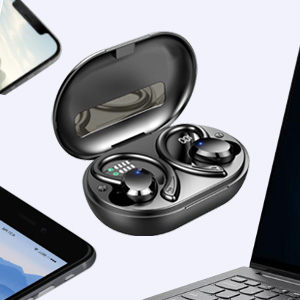
Thank you for choosing the Dascert Q38 Wireless Bluetooth Earbuds. These earbuds are designed to provide a comfortable and immersive audio experience, perfect for sports and daily use. Featuring Bluetooth 5.1 technology, IP7 waterproofing, and a long-lasting battery, the Q38 earbuds offer stable connectivity and high-fidelity stereo sound.
Продукттун туура иштешин камсыз кылуу жана анын иштөө мөөнөтүн максималдуу узартуу үчүн аны колдонуудан мурун бул колдонмону кылдаттык менен окуп чыгыңыз.
2. Пакеттин мазмуну
Пакетте бардык буюмдар бар экенин текшериңиз:
- Dascert Q38 Wireless Earbuds (Left and Right)
- Заряддоо кутусу
- USB-C заряддоо кабели
- User Manual
- Earhooks (pre-installed or included separately)
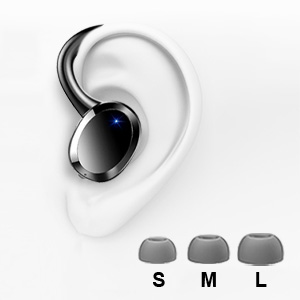
- Кулакчындардын ар кандай өлчөмдөгү учтары (S, M, L)

3. Продукт бүтүп калдыview
The Dascert Q38 earbuds are designed for comfort and performance, especially during physical activity. Key features include secure earhooks, IP7 waterproofing, and intuitive touch controls.
3.1 Кулакчындын компоненттери

- Кулак илгич: Provides a secure and comfortable fit, ideal for sports.
- Сенсордук башкаруу аймагы: Ойнотуу, чалуулар жана үн жардамчысын башкаруу үчүн.
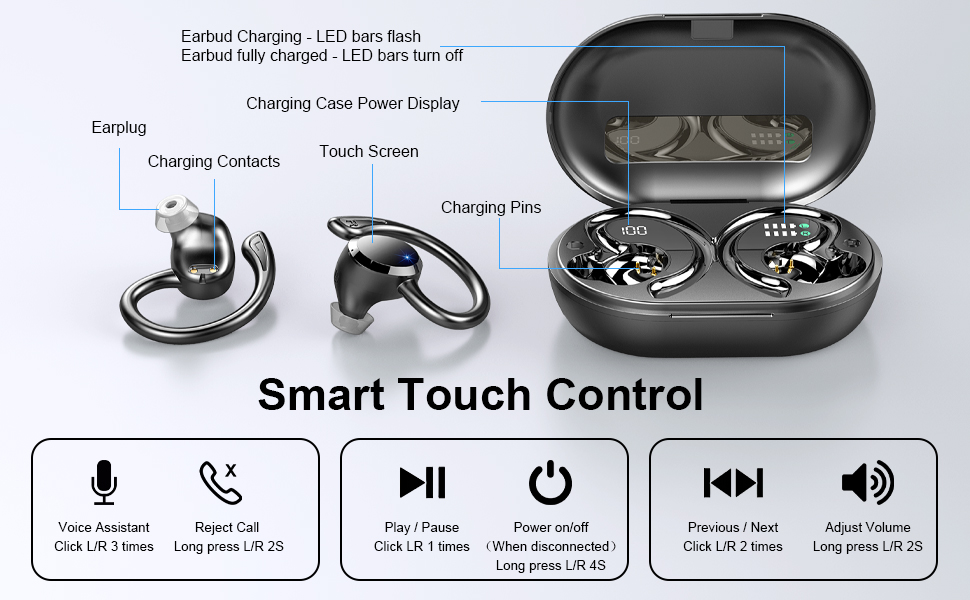
- LED көрсөткүчү: Shows charging status and connection status.
- Заряддоо байланыштары: Кубат алуу үчүн заряддоо кутучасына туташат.
- Микрофон: Чалуулар жана үн буйруктары үчүн.
3.2 Кубаттоочу кутучанын компоненттери
- Digital LED дисплей: Кубаттоочу кутучанын батареянын пайызын көрсөтөтtage (1%-100%).
- Earbud Charging Indicators: LED bars for Left (L) and Right (R) earbuds, flashing when charging and turning off when fully charged.
- USB-C заряддоо порту: For fast charging the case.

4. Орнотуу
4.1 Баштапкы төлөм
Биринчи колдонуудан мурун, кулакчындарды жана заряддоо кутучасын толук заряддаңыз.
- Кулакчындардын экөөнү тең зарядкага салыңыз.
- USB-C заряддоо кабелин корпустагы заряддоо портуна туташтырыңыз жана экинчи учун USB кубат адаптерине (кошумча эмес) же компьютердин USB портуна сайыңыз.
- The LED display on the case will show the battery percentage, and the earbud indicators will flash during charging.
- Charging takes approximately 1 hour for earbuds and 1.5 hours for the case.

4.2 Pairing with a Device (One-Step Pairing)
Ыңгайлуулук үчүн кулакчындар бир баскычтуу жупташтыруу функциясына ээ.
- Заряддоо кутучасын ачыңыз. Кулакчындар автоматтык түрдө күйүп, жупташтыруу режимине өтөт.
- Смартфонуңузда же Bluetooth иштетилген түзмөгүңүздө Bluetooth жөндөөлөрүнө өтүңүз.
- Издөө Жеткиликтүү түзмөктөрдүн тизмесинен "Q38" тандап, туташуу үчүн аны тандаңыз.
- Туташкандан кийин, үн билдирүүсү ийгиликтүү жупташтырууну ырастайт.

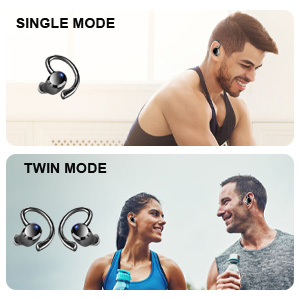
You can use either earbud independently (single mode) or both together (twin mode).
4.3 Туура кулак капкактарын тандоо
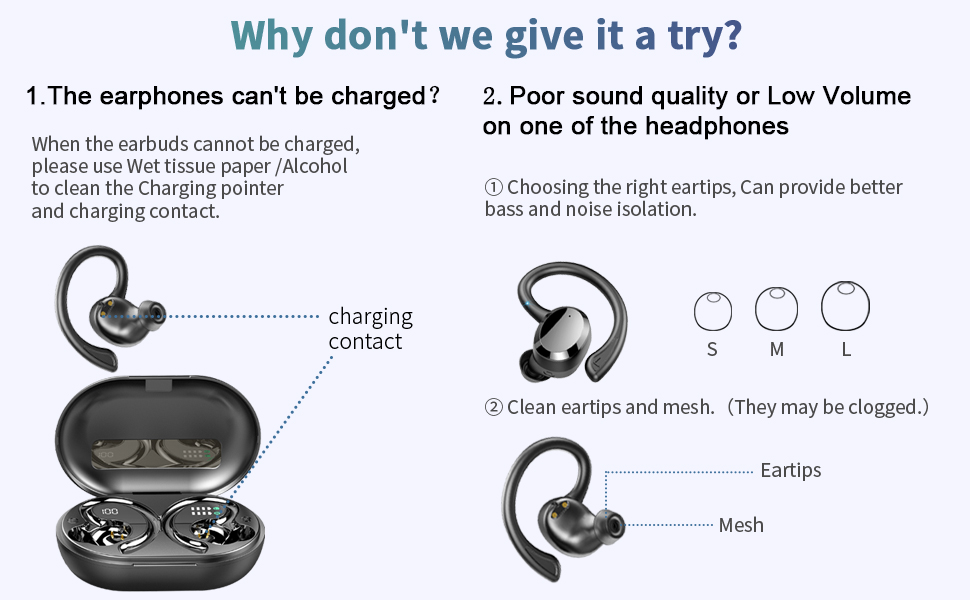
Selecting the correct eartip size is crucial for optimal sound quality and comfort. A proper seal enhances bass and noise isolation.
- Try each size (S, M, L) to find the one that fits snugly and comfortably in your ear canal.
- The earbud should feel secure and create a good seal without causing discomfort.
5. Иштөө нускамалары
5.1 Күйгүзүү/өчүрүү
- Күйгүзүү: Open the charging case, or long press the touch control area on either earbud for 4 seconds if disconnected.
- Өчүрүү: Place the earbuds back into the charging case and close the lid. Alternatively, long press the touch control area on either earbud for 4 seconds if disconnected.
5.2 Сенсордук башкаруу
The Dascert Q38 earbuds feature multi-function touch panels for easy control.
| Функция | Акция |
|---|---|
| Ойнотуу/Тыныгуу | Click L or R once |
| Кийинки ыр | Click R twice |
| Мурунку ыр | Click L twice |
| Үндү көтөрүү | R баскычын 2 секунда узакка басыңыз |
| Үндү төмөндөтүү | Long press L for 2 seconds |
| Чалууга жооп берүү/түп коюу | Click L or R once |
| Чакырууну четке кагуу | Long press L or R for 2 seconds |
| Үн жардамчысын иштетүү (Siri/Google Жардамчы) | Click L or R three times |
5.3 Кулакчындарды тагынуу
The ergonomic design with earhooks ensures a secure and comfortable fit.
- Сол (L) жана Оң (R) кулакчындарды аныктаңыз.
- Наушникти кулак каналыңызга акырын киргизиңиз.
- Adjust the earhook over your ear until it feels secure and comfortable.

6. Техникалык тейлөө жана кам көрүү
- Тазалоо: Regularly clean the earbuds, especially the eartips and charging contacts, with a soft, dry cloth. For stubborn dirt, a slightly damp cloth or alcohol wipe can be used, ensuring no liquid enters the earbud openings.
- Сактагыч: Колдонулбаганда, кулакчындарды коргоо жана кубаттоо үчүн кубаттоочу кутучага сактаңыз.
- Суу каршылык: The earbuds are IP7 waterproof, meaning they can withstand sweat, rain, and splashes. However, they are not designed for swimming or submersion for extended periods. Ensure earbuds are dry before placing them back in the charging case.
- Ашыкча температурадан сактаныңыз: Do not expose the earbuds or charging case to extreme heat or cold, as this can damage the battery and internal components.

7. Кыйынчылыктарды
If you encounter issues with your Dascert Q38 earbuds, please refer to the following common problems and solutions:
| Көйгөй | Чечим |
|---|---|
| Кулакчындар заряддалбай жатат |
|
| Үн сапаты начар же үнү төмөн |
|
| Кулакчындар жупташтырылбай же туташпай жатат |
|
| Бир гана кулакчын иштейт |
|
8. Техникалык шарттар
| Өзгөчөлүк | Деталь |
|---|---|
| Модель аты | Q38[NEW] |
| Байланыш технологиясы | Зымсыз (Bluetooth 5.1) |
| Сууга туруктуулук деңгээли | IP7 суу өткөрбөйт |
| Ойнотуу убактысы (наушник) | 5-6 саат (бир заряд) |
| Жалпы ойноо убактысы (заряддоо кутусу менен) | 48 саатка чейин |
| Заряддоо убактысы (наушник) | Болжол менен 1 саат |
| Заряддоо убактысы (капка) | Болжол менен 1.5 саат |
| Заряддоо порту | USB-C |
| Башкаруу түрү | Сенсордук башкаруу, Үн менен башкаруу |
| Кулак жайгаштыруу | Кулактагы кулак илгичтери менен |
| Noise Control | Активдүү ызы-чууну жокко чыгаруу |
| Жыштык диапазону | 20 Гц - 20 000 Гц |
| Элемент Салмагы | 2.54 унция |
| Продукциянын өлчөмдөрү | 3.64 x 2.47 x 1.12 дюйм |
9. Кепилдик жана колдоо
Dascert products come with a standard manufacturer's warranty. For detailed warranty information, please refer to the warranty card included in your package or visit the official Dascert webсайт.
If you require technical support or have any questions regarding your Dascert Q38 Wireless Bluetooth Earbuds, please contact our customer service team:
- Электрондук почта: каралган эмес
- Телефон: каралган эмес
- Онлайн колдоо: зыярат кылыңыз Dascert Store on Amazon Көп берилүүчү суроолор жана кошумча ресурстар үчүн.
Please have your model number (Q38[NEW]) and purchase date ready when contacting support.
10. Коопсуздук маалыматы
- Do not disassemble or attempt to repair the earbuds or charging case.
- Балдардан жана үй жаныбарларынан алыс кармаңыз.
- Укуунун бузулушуна жол бербөө үчүн жогорку үн деңгээлинин узакка созулушунан качыңыз.
- Кулакчындарды айланадагы үндөрдү уга албаганыңыз кооптуу болушу мүмкүн болгон учурларда (мисалы, унаа айдоо, велосипед тебүү, жол тыгынында жөө басуу) колдонбоңуз.
- Продукцияны жергиликтүү эрежелерге ылайык таштаңыз.
Ask a question about this manual
Ask about setup, troubleshooting, compatibility, parts, safety, or missing instructions. Manuals+ will review the question and use this page’s manual context to help answer it.