
Introduction
Thank you for choosing the Audizio SB85 Soundbar with Subwoofer. This manual provides essential information for the safe and correct operation of your new audio system. Please read it thoroughly before use and retain it for future reference. The SB85 is designed to enhance your television's audio, providing a rich, immersive sound experience for movies, games, and music, complete with a dedicated subwoofer for powerful bass.
Коопсуздук нускамалары
- Аппаратты иштетүүдөн мурун бардык нускамаларды кылдат окуп чыгыңыз.
- Keep the unit away from water, moisture, and heat sources.
- Эч кандай желдетүүчү тешиктерди жаап албаңыз.
- Өндүрүүчү белгилеген тиркемелерди/аксессуарларды гана колдонуңуз.
- Чагылган бороондо же узак убакыт бою колдонбогондо аппаратты розеткадан ажыратыңыз.
- Бардык тейлөөлөрдү квалификациялуу тейлөө кызматкерлерине тапшырыңыз.
- Do not expose the battery (if applicable) to excessive heat such as sunshine, fire, or the like.
Пакеттин мазмуну
Бардык буюмдар кутуда бар экенин текшериңиз:
- Audizio SB85 Soundbar
- Зымдуу сабвуфер
- Алыстан башкаруу
- Оптикалык кабель (Toslink)
- AUX кабели
- Кубаттуу адаптер
- User Manual
Продукт бүттүview
The Audizio SB85 system consists of a soundbar and a separate wired subwoofer, designed to deliver a powerful and clear audio experience.
Soundbar өзгөчөлүктөрү
- Integrated 150W speaker system with 4 speakers (2x 2cm range, 2x 2cm tweeter).
- Front LED display for status indication.
- Control buttons on the side panel.
- Multiple input options: HDMI (ARC), USB, Line In (AUX), Coaxial, Optical.
- Зымсыз аудио агым үчүн Bluetooth 5.0.

Image: Close-up of the Audizio SB85 Soundbar's control panel and its remote control, highlighting Bluetooth 5.0 and ease of use.

Сүрөт: Ички view of the Audizio SB85 Soundbar's full-range speaker, emphasizing its 150W speaker system for an immersive audio experience.
Сабвуфердин өзгөчөлүктөрү
- 5.25-inch wired subwoofer for enhanced bass response.

Image: Close-up of the Audizio SB85 wired subwoofer, designed to amplify bass frequencies.
Жайгашуу
1. Жайгаштыруу
Place the soundbar centrally below your television. The subwoofer can be placed on the floor near the soundbar, ideally in a corner for optimal bass reflection, but ensure it is not obstructed.

Image: Audizio SB85 Soundbar and Subwoofer setup in a living room, demonstrating room-filling sound and clean design.

Image: Audizio SB85 Soundbar placed below a television, illustrating its universal compatibility with any TV.
2. Кубатка туташуу
Connect the power adapter to the DC IN port on the soundbar and then plug it into a wall outlet (230 Vac/50 Hz).
3. Сабвуферди туташтыруу
Connect the wired subwoofer to the dedicated subwoofer output port on the soundbar.
4. Аудио булактарына туташуу
The SB85 offers several connection options:
- HDMI (ARC): For the best audio quality and control, connect an HDMI cable from the HDMI (ARC) port on the soundbar to the HDMI ARC port on your TV. This allows the TV to send audio to the soundbar and often enables TV remote control of the soundbar's volume.
- Оптикалык (Toslink): Connect the included optical cable from the OPTICAL port on the soundbar to the Optical Digital Audio Out port on your TV or other audio source.
- Катар киргизүү (AUX): Use the included AUX cable to connect the LINE IN port on the soundbar to the headphone jack or audio output of your device (e.g., smartphone, MP3 player).
- Коаксиалдуу: Connect a coaxial cable (not included) from the COAXIAL port on the soundbar to the Coaxial Digital Audio Out port on your TV or other audio source.
- USB: Insert a USB flash drive into the USB port for MP3 playback.
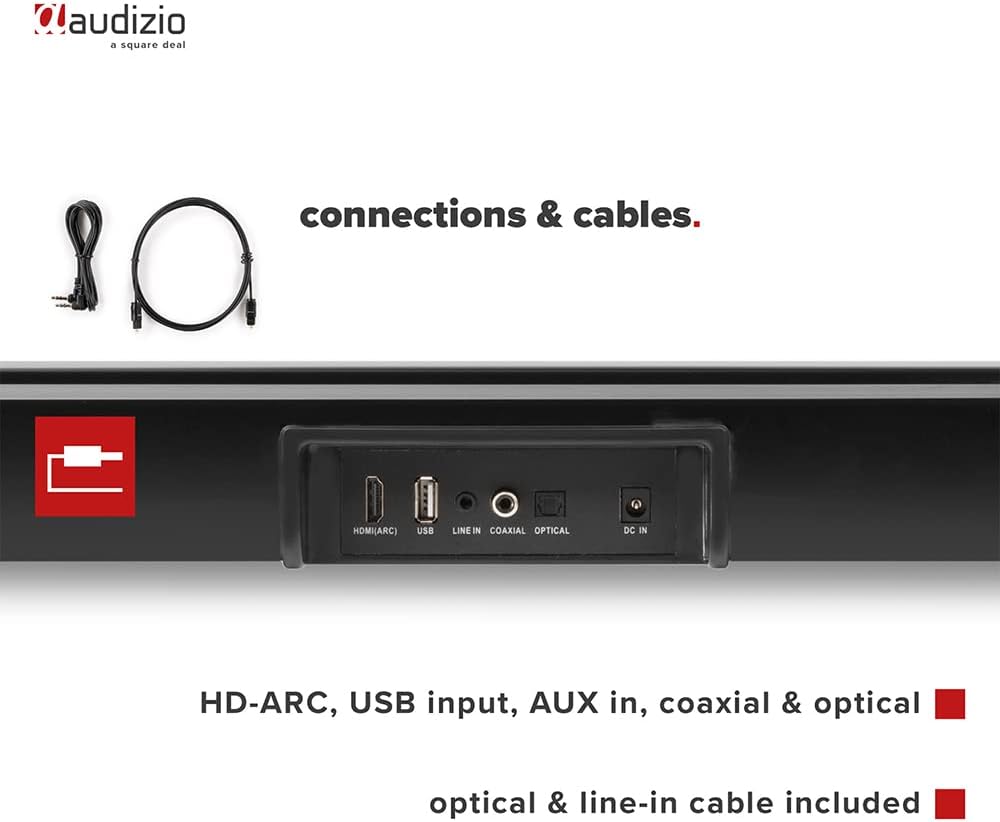
Сүрөт: Арткы view of the Audizio SB85 Soundbar showing various connection ports: HDMI (ARC), USB, Line In, Coaxial, and Optical. Includes optical and line-in cables.
Иштөө нускамалары
1. Күйгүзүү/өчүрүү
Түзмөктү күйгүзүү же өчүрүү үчүн саундбардагы же пульттагы Кубат баскычын басыңыз.
2. Киргизүү булагын тандоо
Press the 'MODE' button on the soundbar or the remote control repeatedly to cycle through the available input sources: HDMI (ARC), Optical, Coaxial, AUX, USB, and Bluetooth. The selected input will be shown on the front LED display.
3. Үндү башкаруу
Use the 'VOL+' and 'VOL-' buttons on the soundbar or the remote control to adjust the volume. The 'MUTE' button on the remote control will temporarily silence the audio.
4. Bluetooth Жупташтыруу
- Switch the soundbar to Bluetooth mode using the 'MODE' button. The LED display will show 'BT'.
- Смартфонуңузда же планшетиңизде Bluetooth'ду иштетиңиз жана жеткиликтүү түзмөктөрдү издеңиз.
- Select 'Audizio SB85' from the list of devices.
- Once paired, the soundbar will indicate a successful connection, and you can stream audio wirelessly.
5. USB ойнотуу
MP3 аудиосу бар USB флэш-дискти салыңыз files into the USB port. The soundbar will automatically switch to USB mode and begin playing the music. Use the remote control to navigate tracks (play/pause, next/previous).
6. Алыстан башкаруу функциялары
The remote control provides full functionality for the soundbar, including power, mode selection, volume, mute, and playback controls for USB and Bluetooth modes.
Техникалык тейлөө
Тазалоо
Wipe the soundbar and subwoofer surfaces with a soft, dry cloth. Do not use abrasive cleaners, waxes, or solvents as they may damage the finish. Ensure the device is unplugged before cleaning.
Сактагыч
Эгерде түзмөктү узак убакытка сактап жатсаңыз, аны розеткадан сууруп, салкын, кургак жерде, күн нуру түз тийбеген жана өтө жогорку температурадан алыс сактаңыз.
Проблемаларды чечүү
| Көйгөй | Мүмкүн себеп | Чечим |
|---|---|---|
| Күч жок | Электр кабели туташкан эмес; розетка туура эмес | Электр кабелинин туташуусун текшерүү; Башка розеткадан аракет кылып көрүңүз. |
| Үн жок | Incorrect input selected; Volume too low; Mute activated; Cable connection loose | Туура киргизүү булагын тандаңыз; Үндү катуулатыңыз; Үнсүз режимди өчүрүңүз; Бардык аудио кабелдердин туташууларын текшериңиз. |
| Bluetooth туташпай жатат | Soundbar not in Bluetooth mode; Device too far; Device already connected to another unit | Switch soundbar to BT mode; Move device closer; Disconnect from other devices and try again. |
| Пульт иштебей жатат | Батареялар түгөнгөн; Пульт менен үн панелинин ортосундагы тоскоолдук | Батареяларды алмаштыруу; Бардык тоскоолдуктарды алып салыңыз. |
Техникалык шарттар
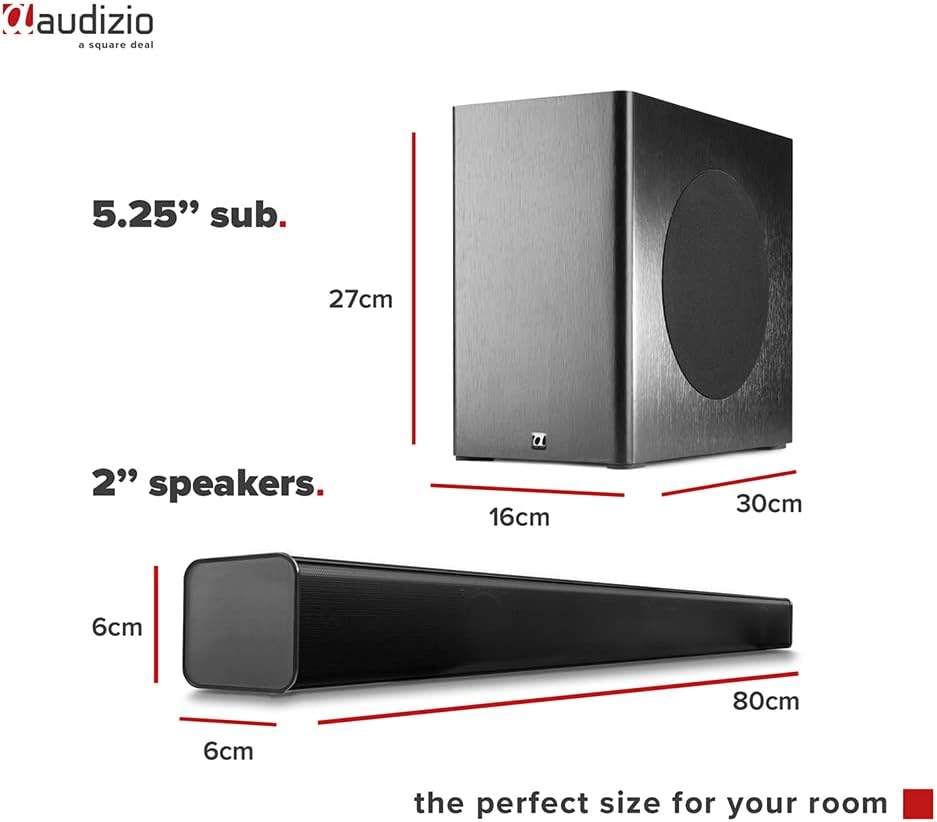
Image: Diagram showing the dimensions of the Audizio SB85 Soundbar and its subwoofer.
- Чыгуу кубаттуулугу: 150 Вт (макс.)
- Динамиктин конфигурациясы: 4 speakers (2x 2cm range, 2x 2cm tweeter)
- Сабвуфердин өлчөмү: 5.25 дюйм
- Жыштык диапазону: 50 Гц - 20 000 Гц
- Макс SPL: 125 дБ
- Байланыш: Bluetooth 5.0, HDMI (ARC), USB, Line In (AUX), Coaxial, Optical
- Аудио чыгаруу режими: Стерео
- Шайкеш түзмөктөр: MP3 Player, Smartphone, TV
- Кубат булагы: 230 Vac/50 Hz (via electric cable)
- Саундбардын өлчөмдөрү (узундугу x туурасы x бийиктиги): 80 x 6 x 6 см
- Сабвуфердин өлчөмдөрү (узундугу x туурасы x бийиктиги): 16 x 30 x 27 см
- Жалпы Салмагы: 3.9 кг
- Модель номери: 100.292
Кепилдик жана колдоо
Кепилдик маалыматы же техникалык колдоо үчүн, сатып алуу учурунда берилген документтерди караңыз же сатуучуга кайрылыңыз. Ар кандай кепилдик дооматтары үчүн сатып алганыңыздын далилин сактаңыз.