
ENGINDOT ENGiNDOT
ENGINDOT Bill Counter User Manual
Model: ENGiNDOT
1. Киришүү
This manual provides detailed instructions for the safe and efficient operation of your ENGINDOT Bill Counter. Please read this manual thoroughly before using the device to ensure proper functionality and to prevent damage. This bill counter is designed for accurate counting and counterfeit detection of banknotes.

Сүрөт 1.1: Алдыңкы view of the ENGINDOT Bill Counter, showcasing анын компакттуу дизайны жана колдонуучу интерфейси.
2. Кутуда эмне бар
Таңгактан чыгаргандан кийин, төмөнкү нерселердин бардыгы камтылганын текшериңиз:
- ENGINDOT Bill Counter Unit
- Колдонуучунун Колдонмосу (бул документ)
- Электр кабели
- Тышкы дисплей
- Тазалоочу щетка
- Алмаштыруучу кур
- Money Bands
- Counterfeit Detection Pen
Video 2.1: An unboxing video demonstrating the contents included with the ENGINDOT Bill Counter.
3. Продукт бүтүп калдыview
Familiarize yourself with the main components of the bill counter:
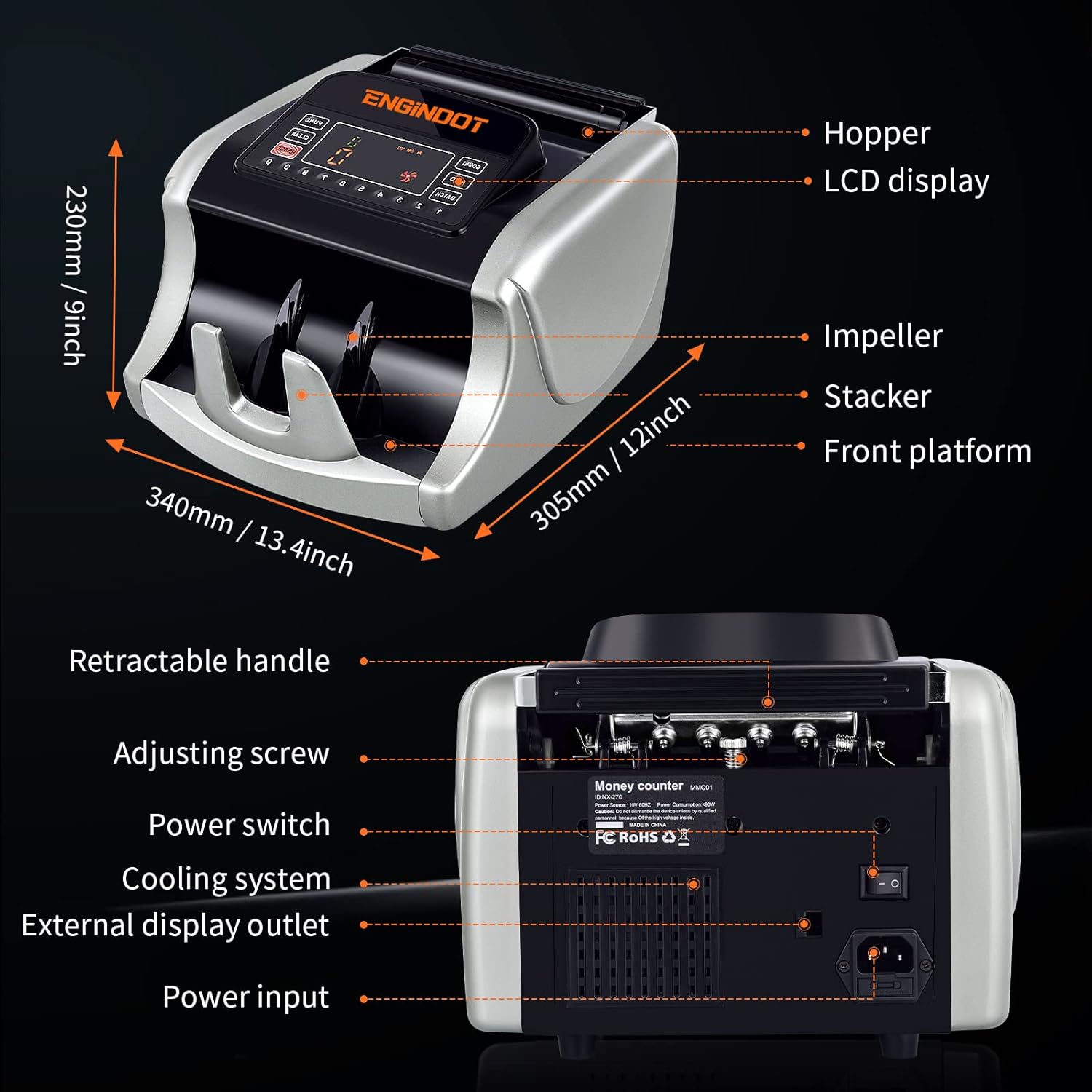
Figure 3.1: Diagram illustrating the key components of the bill counter, including the hopper, LCD display, impeller, stacker, and front platform, along with overall dimensions.
3.1 Негизги өзгөчөлүктөрү
- Жогорку ылдамдыктагы эсептөө: Processes up to 1000 notes per minute.
- Чоң сыйымдуулугу: 200-bill stacker and hopper capacity.
- Жасалма акчаны аныктоо: Equipped with UV, MG, IR, DBL, HLF, CHN, and DD image detection.
- Колдонуучуга ыңгайлуу дисплей: Large LED display for clear readings.
- Портативдик дизайн: Features a retractable handle for easy transport.
- Туруктуу курулуш: Built with robust metal components.

Figure 3.2: Visual representation of the bill counter's core benefits, including fast counting speed, time-saving capabilities, counterfeit detection, quiet operation, and portability.
4. Орнотуу
Follow these steps to set up your ENGINDOT Bill Counter:
- Агрегатты таңгактан чыгаруу: Carefully remove the bill counter and all accessories from the packaging.
- Туруктуу бетке кой: Position the bill counter on a flat, stable, and dry surface.
- Туташуу кубаты: Insert the power cord into the power input port on the back of the machine and plug the other end into a suitable power outlet.
- Тышкы дисплейди туташтыруу (милдеттүү эмес): If desired, connect the external display to the external display outlet on the back of the unit.
- Күйгүзүү: Flip the power switch located on the back of the machine to the 'ON' position. The machine will perform a self-test.
Figure 4.1: The bill counter positioned on a surface, ready for initial setup and connection.
5. Иштөө режимдери
The ENGINDOT Bill Counter offers multiple operating modes to suit various counting needs:
- Саноо режими: Simply counts the number of bills inserted.
- Кошуу режими: Accumulates the count of multiple batches of bills.
- Баштапкы абалга келтирүү: Clears the current count.
- Авто режим: Automatically starts counting when bills are placed in the hopper.
- Пакет режими: Counts bills into preset batches (e.g., 100 bills per batch).
- Тазалоо режими: Resets the display to zero.
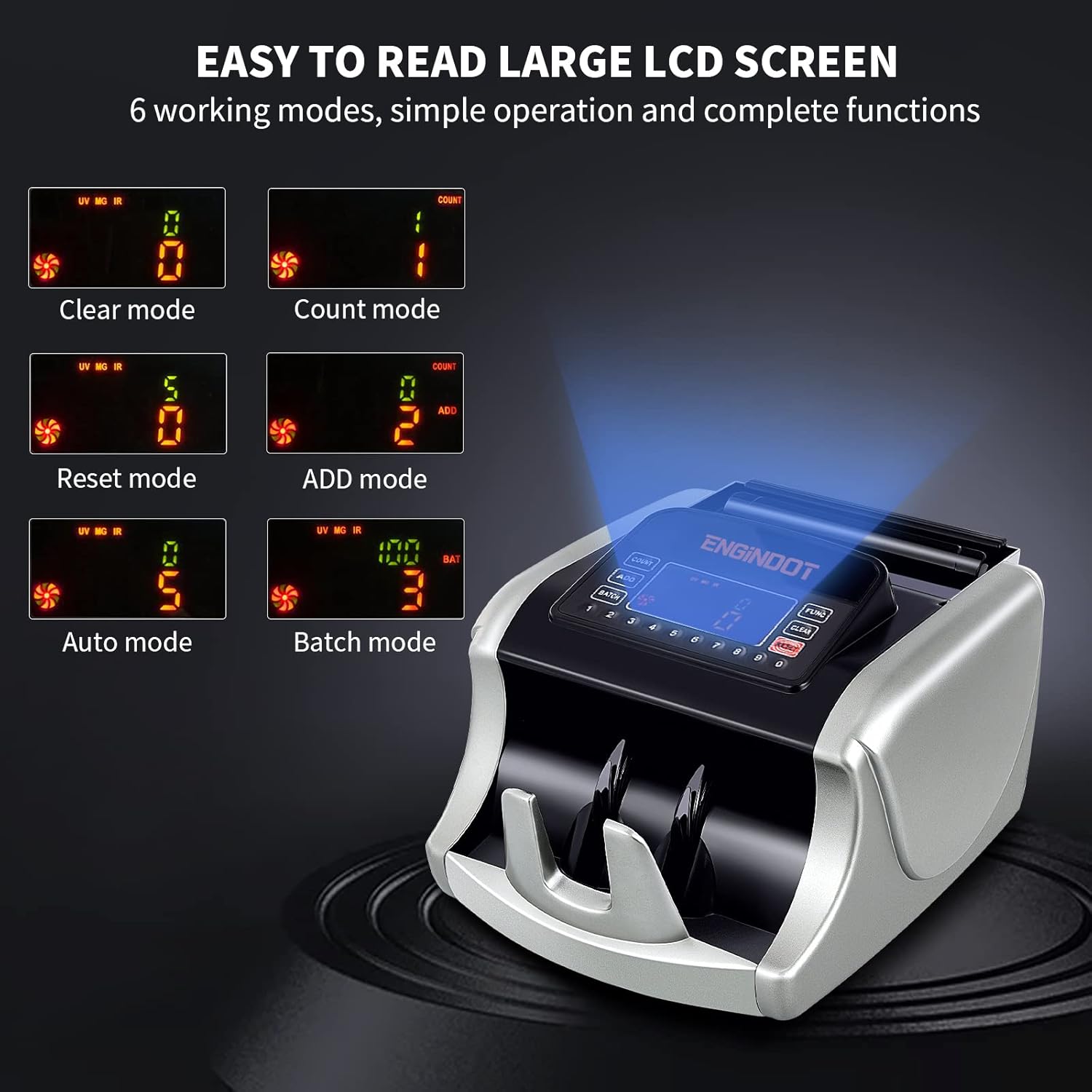
Figure 5.1: The large LCD screen of the bill counter displaying the six available working modes, indicating simple operation and comprehensive functions.

Figure 5.2: A visual guide to the six optional operating modes, emphasizing stable and smooth banknote counting performance.
5.1 Эсептерди жүктөө
Ensure bills are neatly stacked and free from tears or folds. Place the stack of bills into the hopper. The machine will automatically begin counting in Auto Mode, or you can press the 'COUNT' button to start in other modes.

Figure 5.3: The bill counter in action, illustrating its high-speed capability of 1000 notes per minute and its 200-bill stacker and hopper capacity for efficient and accurate counting.

Figure 5.4: An illustration showing the correct orientation for inserting bills into the hopper to prevent jams and ensure accurate counting.
6. Жасалма буюмдарды аныктоо
The ENGINDOT Bill Counter employs multiple professional detection methods to identify counterfeit, ripped, or damaged bills:
- UV (Ultraviolet) Security Thread Detection: Checks for UV features embedded in banknotes.
- MG (Magnetic) Ink Verification: Detects magnetic properties in the ink.
- IR (Infrared) Sensor: Verifies infrared patterns on bills.
- DBL (Double-Note Detection): Identifies instances where two bills are counted as one.
- HLF (Half-Note Detection): Detects torn or half bills.
- CHN (Chain-Note Detection): Identifies bills that are stuck together end-to-end.
- DD (өлчөмдүү аныктоо): Checks for discrepancies in bill dimensions.

6.1-сүрөт: Көрүү бүттүview of the various counterfeit detection technologies integrated into the bill counter, ensuring precise and complete verification of banknotes.
7. Техникалык тейлөө
Regular maintenance ensures the longevity and optimal performance of your bill counter:
- Тазалоо: Use the provided cleaning brush to regularly remove dust and debris from the bill path, sensors, and internal components. Ensure the machine is powered off and unplugged before cleaning.
- Сенсор тазалоо: Gently wipe the sensors with a soft, lint-free cloth.
- Белди алмаштыруу: If the bill feeding mechanism shows signs of wear or slippage, replace the belt using the provided replacement and following instructions in the detailed PDF manual.

Figure 7.1: The cleaning brush and replacement belt included with the bill counter, facilitating easy maintenance and ensuring prolonged operational efficiency.
8. Кыйынчылыктарды
The bill counter features an error self-check system. If an error occurs, an error code will be displayed on the screen. Refer to the table below for common error codes and their solutions:
| Ката коду | Description | Чечим |
|---|---|---|
| EE1 | Ультрафиолет нуру аркылуу жасалмалуулук аныкталган | Remove the suspected bill and re-count. |
| EE2 | М.Г. тарабынан жасалма акча аныкталган | Remove the suspected bill and re-count. |
| EE4 | Broken bill detected & Counting sensors don't work or are dirty | Clean the sensors and ensure bills are in good condition. |
| EE5 | Эки мыйзам долбоору бир болуп эсептелет | Adjust the bill stack, ensure bills are not stuck together. |
| EE6 | The magnetic stripe of the bills on different sites are detected | Check bill quality and sensor cleanliness. |
| EE8 | Bills width size is smaller than 30 mm | Ensure correct bill size is used. |
| EE9 | Bills width size is longer than 85mm | Ensure correct bill size is used. |
| EEA | Чынжыр ноталары аныкталды | Separate chained bills and re-feed. |

Figure 8.1: The bill counter's display showing an error code, accompanied by a list of common error messages and their corresponding causes for easy troubleshooting.
9. Техникалык шарттар
| Өзгөчөлүк | Деталь |
|---|---|
| Бренд | ENGINDOT |
| Модель номери | ENGINDOT |
| Түс | Silver |
| Элемент Салмагы | 13.37 фунт |
| Продукциянын өлчөмдөрү | 13.4 x 12 x 9 дюйм |
| Жасалма акчаны аныктоо | UV, MG, IR, DBL, HLF, CHN, DD |
| Дата биринчи жеткиликтүү | 22-сентябрь, 2021-жыл |
10. Кепилдик жана колдоо
For detailed warranty information and customer support, please refer to the full User Manual PDF available for download or contact ENGINDOT customer service. Keep your purchase receipt as proof of purchase for warranty claims.
You can access the comprehensive User Manual (PDF) бул жерде.
Ask a question about this manual
Ask about setup, troubleshooting, compatibility, parts, safety, or missing instructions. Manuals+ will review the question and use this page’s manual context to help answer it.