
1. Киришүү
Thank you for choosing the BOROFONE BR15 Portable Bluetooth Speaker. This manual provides essential information for setting up, operating, and maintaining your speaker. Please read it carefully before use to ensure optimal performance and longevity of your device. The BR15 is a versatile portable speaker designed for various audio playback needs, featuring Bluetooth connectivity, FM radio, and support for TF cards and USB drives.
2. Продукт бүтүп калдыview
The BOROFONE BR15 is a compact and robust portable Bluetooth speaker. It features a camouflage green design and is built for on-the-go use.
Негизги өзгөчөлүктөрү:
- Bluetooth 5.0: Туруктуу жана натыйжалуу зымсыз байланыш үчүн.
- Батарея сыйымдуулугу: 1200mAh, providing approximately 2.5 hours of music playback or talk time.
- Чыгуу күчү: 5W x 2, delivering clear audio.
- Сууга чыдамдуу: Designed to withstand splashes.
- Бир нече ойнотуу режимдери: Supports Bluetooth, FM radio, TF card, and USB disk playback.
- TWS Функциясы: Allows connection of two BR15 speakers for stereo sound.
Динамик компоненттери:
Familiarize yourself with the speaker's physical components and controls.
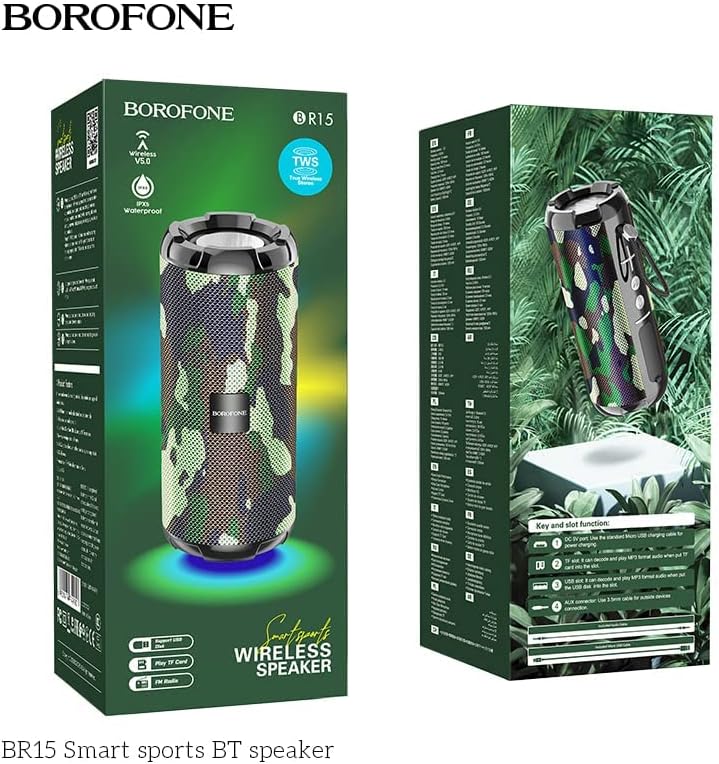
Image: The BOROFONE BR15 speaker packaging, illustrating the various buttons and ports for user reference.
The packaging image above highlights the 'Key and slot function' area, which typically includes:
- Кубат баскычы: Динамикти күйгүзүү же өчүрүү үчүн.
- Режим баскычы (M): To switch between Bluetooth, FM radio, TF card, and USB disk modes.
- Үндү катуулатуу/Кийинки трек баскычы (+): Кийинки трекке кыска басыңыз, үнүн жогорулатуу үчүн узакка басыңыз.
- Үндү азайтуу/Мурунку трек баскычы (-): Мурунку трек үчүн кыска басыңыз, үнүн азайтуу үчүн көпкө басыңыз.
- Ойнотуу/тындыруу баскычы: To play or pause audio, answer/end calls.
- Заряддоо порту: Динамикти кубаттоо үчүн USB порту.
- TF карта уячасы: MicroSD картадан түз музыка ойнотуу үчүн.
- USB порт: USB флешкасынан түз музыка ойнотуу үчүн.
- AUX-кирүү порту: 3.5 мм аудио кабели аркылуу тышкы аудио түзмөктөрдү туташтыруу үчүн.
3. Орнотуу
3.1 Динамикти заряддоо
- Берилген USB заряддоо кабелин динамиктин заряддоо портуна туташтырыңыз.
- Кабелдин экинчи учун USB кубат адаптерине (кошумча эмес) же компьютердин USB портуна туташтырыңыз.
- Кубаттоо учурунда кубаттоо индикатору, адатта, кызыл түстө күйөт.
- Charging takes approximately 2 hours. The indicator light will turn off or change color (e.g., blue) when fully charged.
3.2 Күйгүзүү/өчүрүү
- Күйгүзүү үчүн: Press and hold the Power button for a few seconds until you hear an audible prompt or see an indicator light.
- Өчүрүү үчүн: Үн чыккан үн чыкканга чейин же индикатордун жарыгы өчкөнгө чейин Кубат баскычын кайра бир нече секунд басып туруңуз.
4. Иштөө нускамалары
4.1 Bluetooth жупташтыруу
- Ensure the speaker is powered on and in Bluetooth mode (indicated by a flashing blue LED and an audible prompt). If not, press the 'M' (Mode) button to switch to Bluetooth mode.
- Смартфонуңузда же планшетиңизде Bluetooth'ду иштетиңиз жана жеткиликтүү түзмөктөрдү издеңиз.
- Select "BOROFONE BR15" from the list of devices.
- Once paired, the speaker will emit an audible confirmation, and the blue LED will stop flashing and remain solid.
- Эми сиз түзмөгүңүздөн аудиону динамик аркылуу ойной аласыз.
4.2 Playing Music from TF Card/USB Disk
- Insert a TF card (MicroSD) or USB flash drive with MP3 audio files into the respective slot on the speaker.
- The speaker will automatically detect the storage device and switch to the corresponding playback mode. If not, press the 'M' (Mode) button to cycle through modes until you reach TF card or USB disk mode.
- Use the Play/Pause, Next Track (+), and Previous Track (-) buttons to control playback.
4.3 FM радио режими
- Press the 'M' (Mode) button repeatedly until you hear the FM radio prompt.
- Жеткиликтүү станцияларды автоматтык түрдө сканерлөө жана сактоо үчүн, "Ойнотуу/Тынытуу" баскычын басып, кармап туруңуз. Динамик станцияларды автоматтык түрдө сканерлейт жана сактайт.
- Use the Next Track (+) and Previous Track (-) buttons to switch between saved stations.
4.4 TWS (чыныгы зымсыз стерео) функциясы
The TWS function allows you to connect two BOROFONE BR15 speakers together for a true stereo sound experience.
- Ensure both BR15 speakers are powered off.
- Power on both speakers. They should both be in Bluetooth pairing mode.
- On one of the speakers, double-press the Play/Pause button. The speaker will attempt to connect to the other BR15 speaker.
- Once successfully paired, you will hear an audible confirmation. The main speaker's LED will flash, and the secondary speaker's LED will be solid.
- Now, connect your smartphone or tablet to the main speaker via Bluetooth as described in section 4.1.
- Аудио эми эки динамиктен тең стерео режиминде ойнотулат.
4.5 Үндү башкаруу
- Көлөмүн жогорулатуу: '+' баскычын көпкө басыңыз.
- Көлөмдү азайтуу: '-' баскычын көпкө басыңыз.
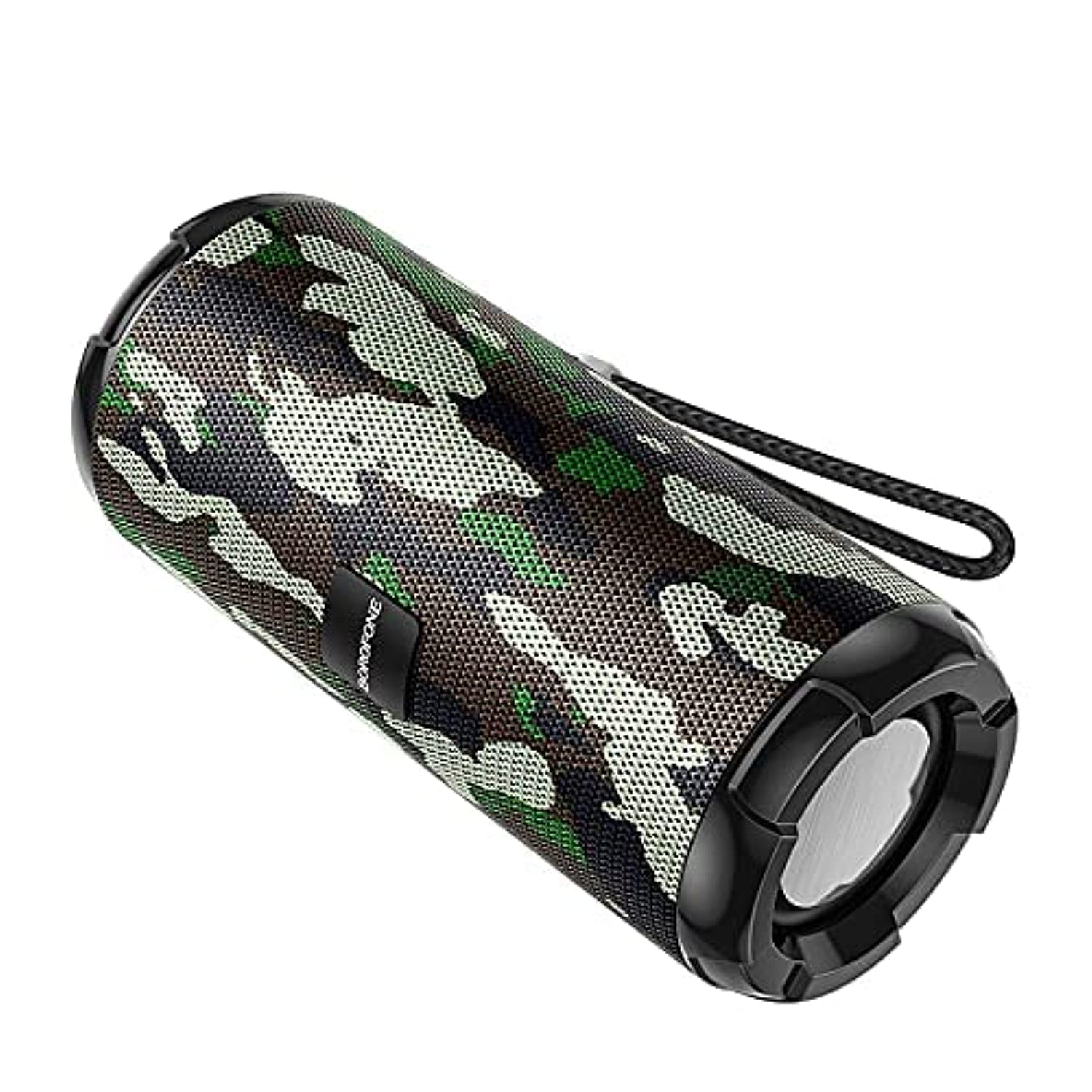
Image: The BOROFONE BR15 Portable Bluetooth Speaker, showcasing its camouflage green finish and cylindrical design.
5. Техникалык тейлөө
5.1 Тазалоо
- Тазалоодон мурун ар дайым динамикти өчүрүңүз.
- Динамиктин сыртын сүртүү үчүн жумшак, кургак, мамыксыз чүпүрөктү колдонуңуз.
- Абразивдүү тазалоочу каражаттарды, спиртти, бензолду же башка химиялык эриткичтерди колдонбоңуз, анткени алар бетине же ички компоненттерине зыян келтириши мүмкүн.
5.2 Сактоо
- Динамикти түз күн нурунан жана өтө температурадан алыс салкын, кургак жерде сактаңыз.
- Узак мөөнөткө сактасаңыз, батарейканын ден соолугун сактоо үчүн бир нече ай сайын батареяны болжол менен 50% га чейин заряддаңыз.
5.3 Батареяга кам көрүү
- Батареяны бат-баттан толук кубаттап калуудан алыс болуңуз.
- Динамикке 60°C (140°F) жогору же -10°C (14°F) төмөн температурага дуушар кылбаңыз.
- Берилген заряддоо кабелин же тастыкталган эквивалентти гана колдонуңуз.
6. Кыйынчылыктарды
| Көйгөй | Мүмкүн себеп | Чечим |
|---|---|---|
| Динамик күйбөйт. | Батарея аз. | Динамикти кеминде 30 мүнөткө заряддаңыз. |
| Bluetooth аркылуу жупташтыруу мүмкүн эмес. | Speaker not in pairing mode; Bluetooth disabled on device; speaker too far. | Ensure speaker is in Bluetooth mode (flashing LED). Enable Bluetooth on your device. Move speaker closer to your device (within 10 meters). |
| Үн жок. | Үнү өтө төмөн; туура эмес режим; түзмөк ойнотулбай жатат. | Increase speaker and device volume. Check if the speaker is in the correct mode (Bluetooth, TF, USB, FM). Ensure audio is playing on your connected device. |
| FM радиосун кабыл алуу начар. | Алсыз сигнал. | Move the speaker to an open area or closer to a window. |
| TWS жупташтыруу ишке ашпай калды. | Speakers too far apart; one speaker already paired. | Ensure both speakers are close to each other. Disconnect any existing Bluetooth connections from both speakers before attempting TWS pairing. |
7. Техникалык шарттар
| Өзгөчөлүк | Спецификация |
|---|---|
| Модель аты | BR15 |
| Bluetooth версиясы | 5.0 |
| Чип | Джерри |
| Батарея сыйымдуулугу | 1200mAh |
| Заряддоо убактысы | Болжол менен 2 саат |
| Музыка/Сүйлөшүү убактысы | Болжол менен 2.5 саат |
| Динамик бирдиги | 45mm х 2 |
| Чыгуу күчү | 5W х 2 |
| Өлчөмдөрү (L x W x Y) | 162мм x 70мм x 70мм (6.38 x 2.76 x 2.76 дюйм) |
| Салмагы | Белгиленген эмес |
| Материал | Пластик |
| Түс | Camouflage Green |
| Суу каршылык | Ооба |
| Байланыш | Bluetooth, TF Card, USB Disk, FM Radio, AUX-in, TWS |
| Шайкеш түзмөктөр | Смартфон, Планшет |

Image: The BOROFONE BR15 Portable Bluetooth Speaker positioned outdoors, highlighting its portability and design.
8. Кепилдик жана колдоо
BOROFONE products are designed and manufactured to the highest quality standards. For information regarding warranty coverage, please refer to the warranty card included with your purchase or visit the official BOROFONE website. If you encounter any issues or require technical assistance, please contact BOROFONE customer support through their official channels.
No official product videos were provided for this model.