
1. Киришүү
Сатып алганыңыз үчүн рахматasing the VILINICE BL89 Native 1080P Projector. This manual provides essential information for the safe and efficient operation of your projector. Please read it thoroughly before use and retain it for future reference.
The VILINICE BL89 projector delivers a native 1920x1080P resolution, 9000 Lux brightness, and an 8000:1 contrast ratio, designed for a high-quality viewing experience. It features a long-lasting LED lamp and versatile connectivity options.

Image: The VILINICE BL89 Native 1080P Projector set up for a home theater experience, including a 100-inch screen.
2. Коопсуздук маалыматы
To ensure safe operation and prolong the life of your projector, please observe the following precautions:
- Вентиляция тешиктерин жаппаңыз. Ашыкча ысып кетүүнүн алдын алуу үчүн проектордун айланасында адекваттуу аба агымын камсыз кылыңыз.
- l болгондо проектордун объективине тике карабаamp күйүк. Жарык жарык көзгө зыян келтириши мүмкүн.
- Keep the projector away from water or any liquids. Do not operate in damp чөйрөлөр.
- Проектор кулап калбашы үчүн аны туруктуу, түз жерге коюңуз.
- Проектор менен келген кубат адаптерин гана колдонуңуз.
- Unplug the projector during lightning storms or when unused for extended periods.
- Проекторду өз алдынча оңдоого аракет кылбаңыз. Бардык тейлөө иштерин квалификациялуу адистерге тапшырыңыз.
- This projector is less harmful to children's eyesight than television due to diffuse reflection imaging, but direct viewing of the lens should still be avoided.
3. Пакеттин мазмуну
Таңгактан чыгарганда бардык буюмдардын бар экенин текшериңиз:
- VILINICE BL89 Projector
- Электр кабели
- Алыстан башкаруу
- HDMI кабели
- AV Cable
- User Manual
- 100 дюймдук проектор экраны
4. Продукт бүтүп калдыview
Familiarize yourself with the various parts and connections of your VILINICE BL89 projector.
Фронт View

Сүрөт: алдыңкы view of the VILINICE BL89 projector, highlighting the projection lens.
Арткы жана каптал Views (Порттор жана башкаруу элементтери)

Сүрөт: Арткы жана каптал view of the VILINICE BL89 projector, illustrating the power input, HDMI ports, USB ports, VGA port, AV port, and control panel.
- Объектив: Сүрөттү экранга проекциялайт.
- Фокус шакеги: Сүрөттүн тунуктугун тууралайт.
- Негизги ташты оңдоо: Трапеция сымал сүрөттүн бурмаланышын оңдойт.
- Башкаруу панели: Power, menu, source, navigation buttons.
- HDMI порттору (x2): Connect to HDMI-enabled devices (laptops, TV sticks, game consoles).
- USB порттору (x2): Медиа ойнотуу үчүн USB дисктерди туташтырыңыз.
- VGA порту: Connect to computers with VGA output.
- AV порт: Эски түзмөктөргө AV кабели аркылуу туташыңыз.
- Аудио чыгыш (AUX): Тышкы динамиктерди же гарнитураны туташтырыңыз.
- Кубат киргизүү: Электр кабелин туташтырыңыз.
5. Орнотуу
5.1 Проекторду жайгаштыруу
Choose a suitable location for your projector. The optimal projection distance ranges from 1.2 meters (approximately 5 feet) to 5 meters (approximately 30 feet), yielding screen sizes from 44 inches to 300 inches. For the included 100-inch screen, position the projector at an appropriate distance to fill the screen.

Image: A family enjoying a movie projected onto a 100-inch screen, demonstrating typical projector placement.
5.2 Кубат туташтыруу
- Электр кабелин проектордун кубат киргизүү портуна туташтырыңыз.
- Электр кабелинин экинчи учун розеткага сайыңыз.
- Аны күйгүзүү үчүн проектордун же пульттун кубат баскычын басыңыз.
5.3 Киргизүү түзүлүштөрүн туташтыруу
The VILINICE BL89 projector supports various input sources:
- HDMI: Connect TV sticks (e.g., Amazon Fire Stick, Roku), laptops, game consoles (Playstation, Xbox), or Blu-ray players using an HDMI cable.
- USB: Insert a USB flash drive into a USB port for direct media playback.
- VGA: Эски компьютерлерди же ноутбуктарды VGA кабели аркылуу туташтырыңыз.
- OF: Connect legacy devices like DVD players using the provided AV cable.
- Смартфондор/Планшеттер: Connect via HDMI adapter (not included) or screen mirroring devices (e.g., Chromecast).
Image: Visual representation of compatible devices and their connection types for the VILINICE BL89 projector.
6. Иштөө нускамалары
6.1 Күйгүзүү/өчүрүү
Проектордун же пульттун кубат баскычын басып, блокту күйгүзүңүз же өчүрүңүз.
6.2 Сүрөттүн фокусун жана негизги көрүнүшүн тууралоо
After powering on, adjust the image for clarity and correct shape:
- Фокус: Сүрөт так жана даана көрүнгөнгө чейин линзага жакын фокустук шакекчени айландырыңыз.
- Негизги ташты оңдоо: If the image appears trapezoidal (wider at the top or bottom), use the manual keystone correction dial (±15°) to adjust the image to a rectangular shape.
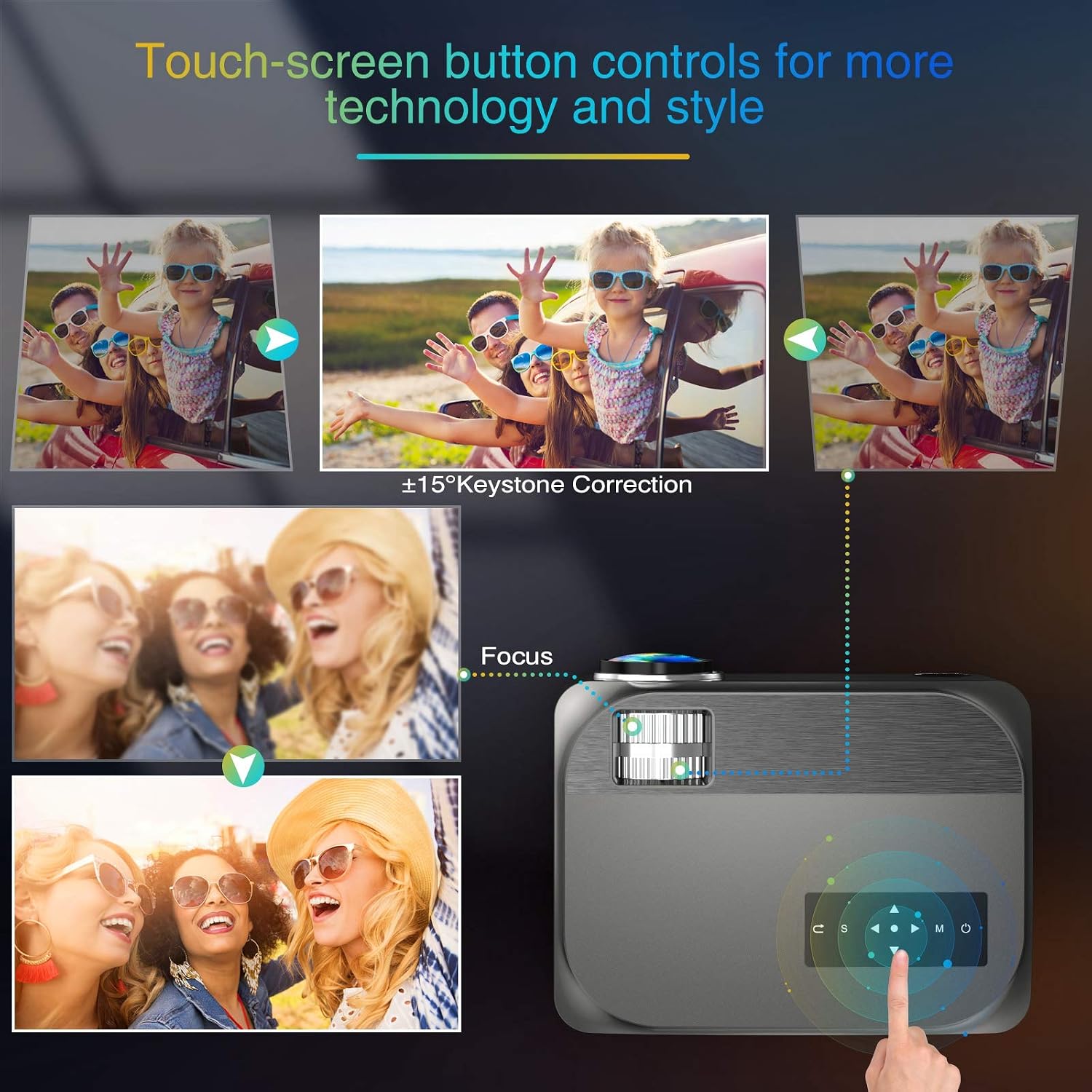
Image: Visual guide for adjusting keystone correction and focus on the VILINICE BL89 projector.
6.3 Чоңойтуу функциясы
The projector features a -25% zoom function, allowing you to reduce the image size without moving the projector. This is particularly useful for ceiling-mounted installations. Use the remote control to access and adjust the zoom setting.

Image: Illustration of the projector's zoom function, showing how the image size can be reduced from 100% to 75%.
6.4 Киргизүү булагын тандоо
Press the 'Source' button on the projector or remote control to cycle through available input sources (HDMI1, HDMI2, USB1, USB2, VGA, AV). Select the input corresponding to your connected device.
6.5 Аудио чыгаруу
The projector has built-in 10W HiFi stereo speakers. For an enhanced audio experience, you can connect external speakers or headphones to the 3.5mm audio out (AUX) port.

Сүрөт: үстүнкү view showing the VILINICE BL89 projector in use, emphasizing its integrated Hi-Fi stereo sound system.
6.6 Стриминг кызматтары
Due to app copyright restrictions, direct streaming of services like Netflix, Prime Video, or Hulu is not supported via the projector's internal system. To watch content from these platforms, connect an external device such as a laptop, Amazon Fire TV Stick, Roku, or Chromecast via an HDMI port.
7. Техникалык тейлөө
7.1 Линзаны тазалоо
Проектордун линзасын акырын сүртүү үчүн оптикалык линзалар үчүн атайын иштелип чыккан жумшак, мамыксыз чүпүрөктү колдонуңуз. Абразивдүү тазалоочу каражаттарды же линзаны чийип салышы мүмкүн болгон ашыкча күч колдонуудан алыс болуңуз.
7.2 Проектордун корпусун тазалоо
Wipe the exterior of the projector with a soft, dry cloth. Do not use liquid or aerosol cleaners.
7.3 Вентиляция
Regularly check that the ventilation openings are clear of dust and debris to ensure proper airflow and prevent overheating. The projector's ECO-mode helps extend the lamp жашоо.
7.4 Лamp Жашоо
LED lamp in your VILINICE BL89 projector has an estimated operating life of up to 100,000 hours, significantly reducing the need for lamp алмаштыруу.
8. Кыйынчылыктарды
Проекторуңузда көйгөйлөргө туш болсоңуз, төмөнкү жалпы көйгөйлөрдү жана чечимдерди караңыз:
| Көйгөй | Мүмкүн себеп | Чечим |
|---|---|---|
| Сүрөт жок же бүдөмүк сүрөт | Focus not adjusted; Keystone not adjusted; Lens cap on; Incorrect input source. | Adjust the focus ring; Adjust keystone correction; Remove lens cap; Select correct input source. |
| Үн жок | Volume too low; Mute enabled; External audio device not connected or configured correctly; Source device volume low. | Increase projector volume; Disable mute; Check external audio connections; Increase volume on source device. |
| Пульт иштебей жатат | Batteries dead or incorrectly inserted; Obstruction between remote and projector; Remote out of range. | Replace batteries; Remove obstructions; Ensure remote is within range and pointed at the IR receiver. |
| Проектор ысып, өчүп калат | Ventilation blocked; Operating in high ambient temperature. | Ensure ventilation openings are clear; Operate in a well-ventilated area. |
| Сүрөт бурмаланган же түсү өзгөргөн | Faulty cable connection; Source device issue; Projector settings. | Check and re-secure all cable connections; Test with a different source device; Reset projector display settings. |
9. Техникалык шарттар
| Өзгөчөлүк | Деталь |
|---|---|
| Бренд | VILINICE |
| Модель номери | BL89 |
| Native Resolution | 1920 x 1080P Full HD |
| Жарыктык | 9000 Lux |
| Контраст катышы | 8000:1 |
| Дисплей түрү | LCD |
| Жарык булагы иштөө мөөнөтү | 100,000 саат |
| Keystone Correction | Кол менен ±15° |
| Zoom функциясы | -25% |
| Проекциянын өлчөмү | 44" - 300" |
| Ыргытуу Дистанция | 1.2 - 5 Meters (5 - 30 ft) |
| Камтылган динамиктер | 10W HiFi Stereo Sound |
| Байланыш технологиясы | HDMI, USB, VGA, AV, AUX |
| Шайкеш түзмөктөр | TV Box, Amazon Fire Stick TV, Chromecast, Laptop, Speakers, Playstation, Xbox, DVD player, Card reader, USB stick, Media players, iPad, iPhone, Android smartphone |
| Башкаруу ыкмасы | Remote Control, App (if applicable) |
| Түс | Боз |
| Ватtage | 130 Ватт-саат |
10. Кепилдик жана колдоо
10.1 Кепилдик маалыматы
The VILINICE BL89 Projector comes with a 2-year warranty. Additionally, upon product registration, you may receive an extended 3-month return period and a 24-month promise.
10.2 Техникалык колдоо
VILINICE offers lifetime technical support for this product. If you have any questions, require assistance, or encounter issues not covered in this manual, please contact VILINICE customer service. Refer to the product packaging or the official VILINICE website for contact details (e.g., email address or support portal).