
1. Киришүү
The eero Max 7 mesh WiFi system is designed to provide high-speed, reliable internet connectivity throughout your home or office. Utilizing advanced Wi-Fi 7 technology, it supports internet plans up to 10 Gbps, offers extensive coverage, and can connect hundreds of devices simultaneously. This manual will guide you through the setup, operation, maintenance, and troubleshooting of your eero Max 7 system.

Сүрөт 1.1: Алдыңкы жана арткы view of the eero Max 7 mesh WiFi system, showcasing its sleek design and port configuration.
2. Орнотуу колдонмосу
Setting up your eero Max 7 system is a straightforward process primarily managed through the eero mobile application. Ensure you have a compatible iOS or Android device and an active internet service.
2.1 Кутуда эмне бар
- eero Max 7 router(s)
- 45W USB-C power adapter(s)
- CAT6a Ethernet cable(s)
2.2 Initial Installation Steps
- Download the eero App: Издөө 'eero' in your device's app store and download the official eero application.
- Connect Your First eero:
- Unplug your modem (if applicable).
- Connect one of your eero Max 7 units to your modem using the provided Ethernet cable. Use one of the 10 GbE ports for the primary internet connection.
- Plug in the eero Max 7 power adapter and connect it to a power outlet.
- Plug your modem back in.
- Колдонмодогу нускамаларды аткарыңыз: Open the eero app and follow the on-screen prompts to create your eero account, set up your first eero, and add additional eero units to expand your mesh network. The app will guide you through optimal placement for maximum coverage.
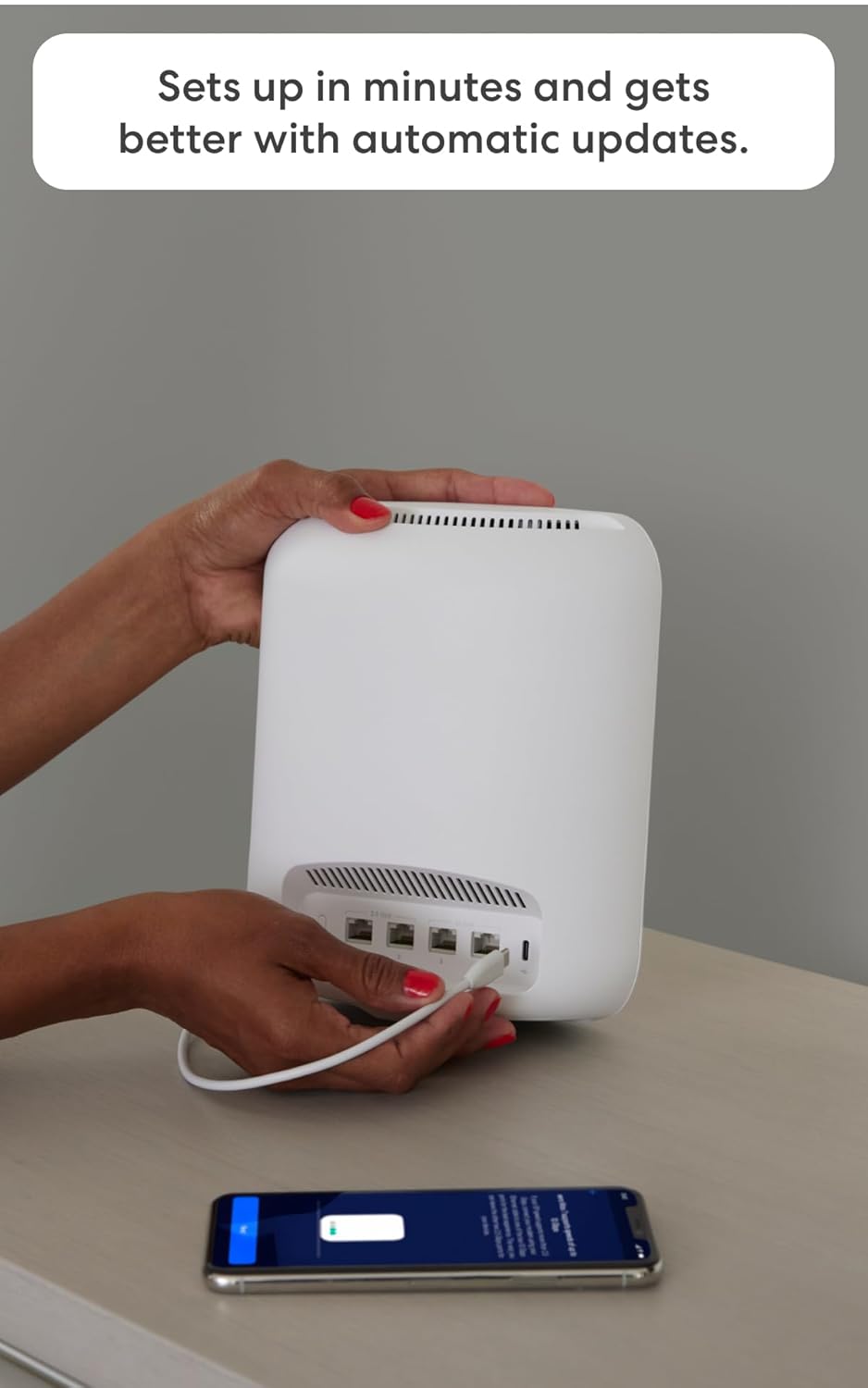
Image 2.1: A user connecting an Ethernet cable to the eero Max 7, with the eero app visible on a smartphone, illustrating the setup process.

Сүрөт 2.2: Детальдуу view of the eero Max 7's connectivity options, featuring two 2.5 GbE ports and two 10 GbE ports for versatile wired connections.
3. Operating Your eero Max 7 System
The eero app serves as your central control panel for managing your mesh WiFi network.
3.1 Тармакты башкаруу
- Куралдар тактасы: View your network status, connected devices, and internet speed.
- Конок мүмкүнчүлүгү: Easily create a separate guest network with a unique password for visitors.
- Түзмөктү башкаруу: Pause internet access for specific devices or profiles, manage bandwidth, and prioritize devices for critical tasks like gaming or streaming.
- Өркүндөтүлгөн орнотуулар: Access advanced network configurations such as port forwarding, DNS settings, and IP reservations.
3.2 Smart Home Hub Functionality
The eero Max 7 acts as a smart home hub, allowing you to connect and control various smart devices directly from your network.
- Тема: Supports Thread devices for a more robust and responsive smart home network.
- Hayalin Diğer Adı: Functions as a Matter controller, enabling seamless integration with Matter-certified devices.
- Зигби: Operates as a Zigbee controller, allowing you to connect compatible Zigbee devices.
- Alexa менен иштейт: Integrate with Alexa devices to manage network access and other functions using voice commands.

Image 3.1: The eero Max 7 supporting high-performance applications like gaming, demonstrating its capability for demanding network activities.

Image 3.2: The eero Max 7 seamlessly integrated into a modern living space, providing Wi-Fi 7 connectivity for entertainment and smart home devices.
4. Техникалык тейлөө
The eero Max 7 system is designed for minimal maintenance, with several features ensuring optimal performance without constant user intervention.
4.1 Программалык камсыздоону автоматтык түрдө жаңыртуу
eero devices automatically receive software updates to improve performance, add new features, and enhance security. Ensure your eero devices remain connected to the internet to receive these updates.
4.2 Жалпы кам көрүү
- Keep your eero devices in well-ventilated areas to prevent overheating.
- Avoid placing eero devices near large metal objects, thick walls, or other electronics that may cause interference.
- Clean the exterior of your eero devices with a soft, dry cloth as needed. Do not use liquid cleaners.
5. Кыйынчылыктарды
If you encounter issues with your eero Max 7 system, try the following troubleshooting steps before contacting support.
5.1 Жалпы маселелер жана чечимдер
- Интернет байланышы жок:
- Модемиңиз туура иштеп жатканын текшериңиз.
- Ensure all Ethernet cables are securely connected to your eero and modem.
- Restart your modem and then your eero devices by unplugging them for 30 seconds and plugging them back in.
- Жай ылдамдыктар:
- Run a speed test through the eero app to verify your internet speed.
- Ensure your eero devices are optimally placed and not too far apart.
- Check for any devices consuming excessive bandwidth and consider pausing them temporarily.
- Түзмөк туташпай жатат:
- Ensure the device's Wi-Fi is enabled and it is within range of an eero unit.
- Көйгөйлүү түзмөктү өчүрүп-күйгүзүңүз.
- Verify that the Wi-Fi password entered is correct.
5.2 eero App Diagnostics
The eero app provides diagnostic tools and network insights that can help identify and resolve issues. Check the app for alerts or recommendations.
6. Техникалык шарттар
Detailed technical specifications for the eero Max 7 mesh WiFi system:
| Өзгөчөлүк | Деталь |
|---|---|
| Wifi standards | Wi-Fi 7 (IEEE802.11a/b/g/n/ac/ax/be) |
| Number of radios | 3; tri-band |
| Колдоого алынган каналдар | 2.4 GHz: 1-13; 5 GHz: 36-64, 100-144, 149-165; 6 GHz: 1-233 |
| MIMO | 2x2/4x4/4x4 MU/SU-MIMO |
| мейкиндик агымдары | 10 |
| Каналдын туурасы | 20, 40, 80, 160, 240, 320 МГц |
| Тармактын коопсуздугу жана кызматтары | WPA2-PSK, WPA3-Personal transition mode |
| Other Wi-Fi features | WMM, Tx Beamforming, OFDMA |
| BE rating | BE20800 |
| Канал тандоо | Автоматтык түрдө канал тандоо |
| Топ руль | Ооба |
| Device/profile тыныгуу | Ооба |
| Easy password sharing for guest and home network | Ооба |
| Акылдуу үй хабы | Ооба |
| Жип | Ооба |
| Bluetooth | Bluetooth аз энергия 5.0 |
| Zigbee | Yes (as a controller only) |
| Alexa менен иштейт | Yes: With eero Max 7 and an Alexa device (not included), you can easily manage wifi access for family profiles. |
| Материя | Yes (controller only) |
| Антенна | 2.4 GHz: 2x2, 5 GHz: 4x4, 6 GHz: 4x4 |
| Жыштык тилкелери | ISM (2.4-2.484 GHz), UNII 1: 5.15 - 5.25 GHz, UNII 2A: 5.25 - 5.35 GHz, UNII 2C: 5.47 - 5.725 GHz, UNII 3: 5.725 - 5.850 GHz, UNII 5: 5.925 - 6.425 GHz, UNII 6: 6.425 - 6.525 GHz, UNII 7: 6.525 - 6.875 GHz, UNII 8: 6.875 - 7.125 GHz |
| Types of modulation | OFDM |
| Ethernet | Two auto-sensing 10 GbE ports and two auto-sensing 2.5 GbE ports for WAN and/or LAN connectivity |
| Процессор | Quad-core A73 processor |
| Эс | 2 ГБ RAM |
| Сактагыч | 4 ГБ флеш сактагыч |
| Өлчөмү | 7.24 x 8.73 x 3.54 дюйм (183.90 x 221.89 x 89.90 мм) |
| Иштөө температурасы | 32°F–104°F (0°C–40°C) |
| Электрдик талап | 100-240В AC, 50/60 Hz |
| AC менен камсыздоо | 45W external USB-PD |
| OS support for eero app | iOS/Android колдонмосу |
| Орнотуу үчүн талап кылынат | Supported iOS or Android device and internet service (with cable, DSL, or fiber ONT modem, if required). |
7. Кепилдик жана колдоо
eero provides comprehensive support and warranty coverage for your Max 7 mesh WiFi system.
7.1 Кепилдик маалыматы
The eero Max 7 comes with a 3 жылдык чектелген кепилдик. For detailed warranty information, privacy policy, terms of service, and trial/subscription terms, please visit eero.com/legal.
7.2 Кардарларды колдоо
If you require assistance with setup, troubleshooting, or any other issues, the eero support team is available to help.
- Электрондук почта колдоо: support@eero.com
- Телефондук колдоо: +1-877-659-2347